
我的树莓派 Raspberry Pi Zero 2W 折腾笔记,记录一些遇到的问题和解决办法
0x00 前言说明
最近买了一块Raspberry Pi Zero 2W来玩,目的是想搭建一台远程运行的个人服务器,上面放个博客、点个灯啥的。于是就有了这篇文章。
树莓派官网地址:https://www.raspberrypi.com/
0x01 SSH连接
首先一开始买到手之后我是很懵的,于是在google上找到了以下几篇文章帮助了我很多。
- https://www.freesion.com/article/3840979679/
- https://www.cnblogs.com/liaouser/p/15844159.html
- https://www.freebuf.com/geek/209255.html
- https://shumeipai.nxez.com/2018/02/20/raspberry-pi-zero-usb-ethernet-gadget-tutorial.html?variant=zh-cn
- https://www.youtube.com/watch?v=sUU-ch8LEcE&ab_channel=ITCommander
看了那个youtube上面的视频后,发现其实买之前是可以叫淘宝客服帮忙焊接gpio引脚的。然后发现我身边有一个电烙铁,于是打算试一下(从来焊接过),结局如下
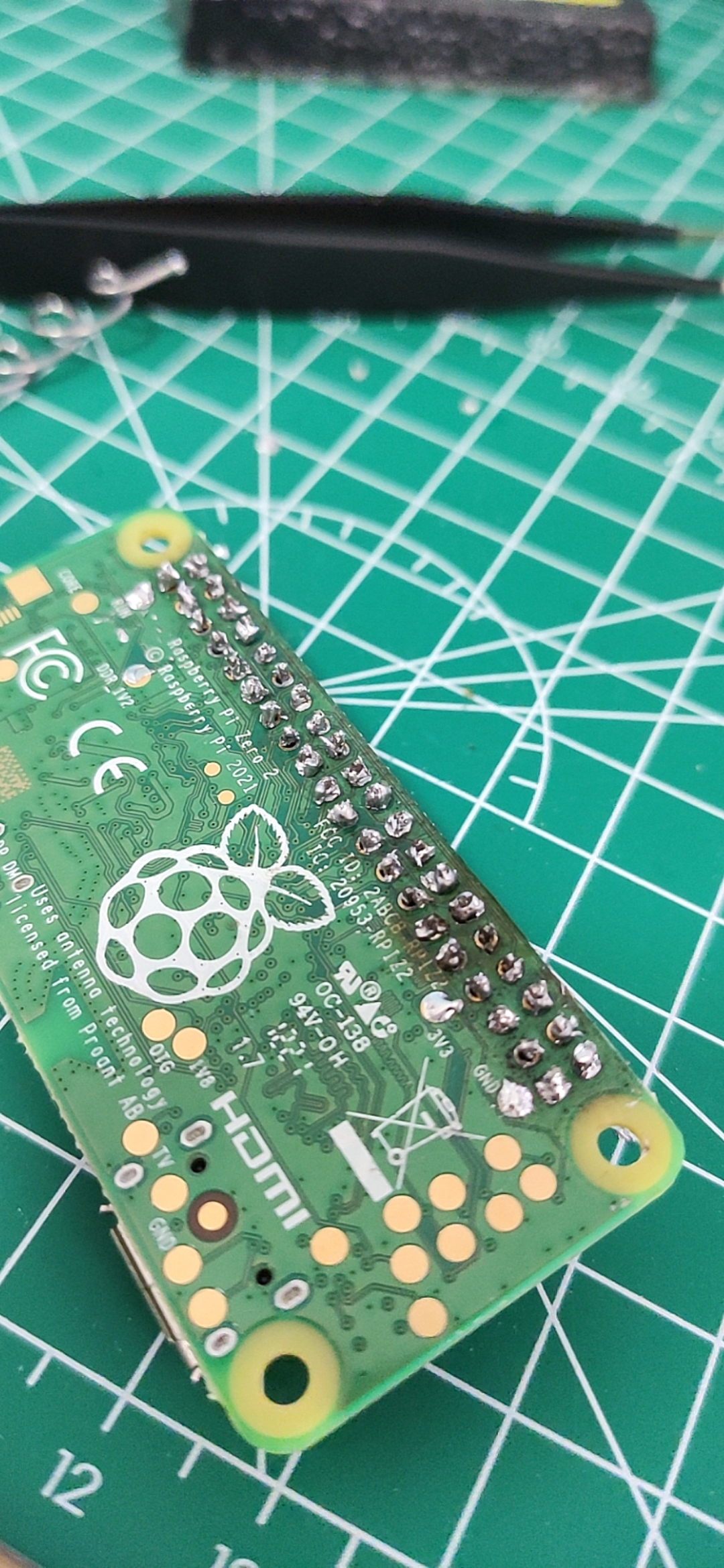
还好,没有坏掉!哈哈,这就是不看教程就直接动手的后果,望大家引以为戒!那么,跟着上面的教程写入操作系统到sd卡之后就是安装驱动和ssh连接树莓派了,连接的时候遇到了一个问题就是pi@raspberrypi.local's password,ssh登录不上去,看了下官方发现:
There are also mechanisms to preconfigure an image without using Imager. To set up a user on first boot and bypass the wizard completely, create a file called userconf or userconf.txt in the boot partition of the SD card; this is the part of the SD card which can be seen when it is mounted in a Windows or MacOS computer.

This file should contain a single line of text, consisting of username:encrypted- password – so your desired username, followed immediately by a colon, followed immediately by an encrypted representation of the password you want to use.

To generate the encrypted password, the easiest way is to use OpenSSL on a Raspberry Pi that is already running – open a terminal window and enter

echo 'mypassword' | openssl passwd -6 -stdin

This will produce what looks like a string of random characters, which is actually an encrypted version of the supplied password.
https://www.raspberrypi.com/news/raspberry-pi-bullseye-update-april-2022/
简单来说就是树莓派为了安全起见不在使用默认密码,所以需要在启动前在boot目录下创建一个userconf.txt,格式如下:
username:encrypted-password
其中encrypted-password可以用echo 'mypassword' | openssl passwd -6 -stdin这条命令生成,贴一下我生成的配置:
pi:$6$T12E4motTbeG7HXC$0vvzm.7sNj9bsEzVL2JT4P9OYXpvsk3lwqK6CzTVyyLrRdUA.fZVWrfzqmU./mmuU1O/i3xSueXPX4ieBjrCM/
也就是用户名为pi,密码为raspberry。重新写入sd卡之后,再次连接一波!
λ ssh pi@raspberrypi.local -p 22

Warning: Permanently added the ECDSA host key for IP address '169.254.155.237' to the list of known hosts.

pi@raspberrypi.local's password:

Linux raspberrypi 5.15.32-v8+ #1538 SMP PREEMPT Thu Mar 31 19:40:39 BST 2022 aarch64

The programs included with the Debian GNU/Linux system are free software;

the exact distribution terms for each program are described in the

individual files in /usr/share/doc/*/copyright.

Debian GNU/Linux comes with ABSOLUTELY NO WARRANTY, to the extent

permitted by applicable law.

Last login: Mon Apr  4 15:41:56 2022

SSH is enabled and the default password for the 'pi' user has not been changed.

This is a security risk - please login as the 'pi' user and type 'passwd' to set a new password.

Wi-Fi is currently blocked by rfkill.

Use raspi-config to set the country before use.

pi@raspberrypi:~ $
成功了!!!!!!!!!!!!!!!哇,成就感满满的!
0x02 配置网络
输入sudo raspi-config,选择国家—> “System Options”—>选第一个 —> 输入WiFi名称密码—> 重启sudo reboot
pi@raspberrypi:~ $ ifconfig

lo: flags=73<UP,LOOPBACK,RUNNING>  mtu 65536

        inet 127.0.0.1  netmask 255.0.0.0

        inet6 ::1  prefixlen 128  scopeid 0x10<host>

        loop  txqueuelen 1000  (Local Loopback)

        RX packets 10  bytes 1600 (1.5 KiB)

        RX errors 0  dropped 0  overruns 0  frame 0

        TX packets 10  bytes 1600 (1.5 KiB)

        TX errors 0  dropped 0 overruns 0  carrier 0  collisions 0

usb0: flags=4163<UP,BROADCAST,RUNNING,MULTICAST>  mtu 1500

        inet 169.254.174.149  netmask 255.255.0.0  broadcast 169.254.255.255

        inet6 fe80::74a7:e6a5:d1b2:66e  prefixlen 64  scopeid 0x20<link>

        ether 62:ae:a7:2d:b5:2f  txqueuelen 1000  (Ethernet)

        RX packets 187  bytes 19160 (18.7 KiB)

        RX errors 0  dropped 0  overruns 0  frame 0

        TX packets 30  bytes 5905 (5.7 KiB)

        TX errors 0  dropped 0 overruns 0  carrier 0  collisions 0

wlan0: flags=4163<UP,BROADCAST,RUNNING,MULTICAST>  mtu 1500

        inet 192.168.1.4  netmask 255.255.255.0  broadcast 192.168.1.255

        inet6 240e:379:1a87:b500:fc16:62d:3ce4:de2b  prefixlen 64  scopeid 0x0<global>

        inet6 fe80::4ee:25c1:2732:51c0  prefixlen 64  scopeid 0x20<link>

        ether e4:5f:01:4b:3a:e4  txqueuelen 1000  (Ethernet)

        RX packets 157  bytes 24008 (23.4 KiB)

        RX errors 0  dropped 0  overruns 0  frame 0

        TX packets 87  bytes 14755 (14.4 KiB)

        TX errors 0  dropped 0 overruns 0  carrier 0  collisions 0

pi@raspberrypi:~ $ ping www.baidu.com

PING www.a.shifen.com (14.215.177.39) 56(84) bytes of data.

64 bytes from 14.215.177.39 (14.215.177.39): icmp_seq=1 ttl=55 time=19.8 ms

64 bytes from 14.215.177.39 (14.215.177.39): icmp_seq=2 ttl=55 time=23.1 ms

64 bytes from 14.215.177.39 (14.215.177.39): icmp_seq=3 ttl=55 time=22.9 ms

64 bytes from 14.215.177.39 (14.215.177.39): icmp_seq=4 ttl=55 time=22.9 ms

64 bytes from 14.215.177.39 (14.215.177.39): icmp_seq=5 ttl=55 time=22.8 ms

64 bytes from 14.215.177.39 (14.215.177.39): icmp_seq=6 ttl=55 time=24.1 ms

^C

--- www.a.shifen.com ping statistics ---

6 packets transmitted, 6 received, 0% packet loss, time 5007ms

rtt min/avg/max/mdev = 19.849/22.594/24.104/1.306 ms

pi@raspberrypi:~ $
连接网络成功!哦耶!
0x03 文本结语
那么先到这里,后续出一个电灯的文章!!!
我的树莓派 Raspberry Pi Zero 2W 折腾笔记,记录一些遇到的问题和解决办法的更多相关文章
- 树莓派(raspberry pi)学习4: 更改键盘布局(转)
树莓派(raspberry pi)用了几次后,发现键盘老是按错,一些字符打不出来或打错 这个问题,折腾我半天.还是把心得分享一下吧 上网查,发现是键盘布局不对,树莓派(raspberry pi)是英国 ...
- 树莓派(raspberry pi)更改键盘布局
http://blog.csdn.net/c80486/article/details/8460271 树莓派(raspberry pi)用了几次后,发现键盘老是按错,一些字符打不出来或打错 这个问题 ...
- 树莓派(Raspberry Pi)搭建简单的lamp服务
树莓派(Raspberry Pi)搭建简单的lamp服务: 1. LAMP 的安装 sudo apt-get install apache2 mysql-server mysql-client php ...
- 外网登录访问树莓派 Raspberry Pi
外网登录访问树莓派 Raspberry Pi 本地的树莓派 Raspberry Pi,只能在局域网内访问,怎样从公网也能登录访问树莓派 Raspberry Pi? 本文将介绍具体的实现步骤. 1. 准 ...
- 树莓派(Raspberry Pi)使用Shell编写的极简Service
树莓派(Raspberry Pi)运行的系统是基于Debian的,不仅可以运行Shell,还支持systemd和docker,可以编写一个简单的服务,让其在启动时运行,执行一些自动化的操作.这里在Ra ...
- 树莓派raspberry pi配置
(1)国际化语言 树莓派初装系统之后,首次启动会出现“raspi-config”工具,如下图:(若不是初次启动,在命令模式下,请输入 sudo raspi-config 命令,即可调出此界面.若在图形 ...
- 树莓派(raspberry pi)学习11: 将树莓派变成一个Web服务器(转)
将树莓派变成一个Web服务器,通过访问网页,就可以控制树莓派,比如:查看摄像头\开灯等等. 一想到Linux Web服务器,我们首先想到的是,Apache + MySql + Php. 树莓派可以安装 ...
- 做一个树莓派Raspberry Pi拍立得
用树莓派Raspberry Pi打造一台拍立得,作法如下: 材料:树莓派+数字相机模块+热敏打印机 因为打印机所需电流较高,所以电源供应器的规格需要5V 3A以上. 再找一个稳定的电源以及够大的外壳装 ...
- VLOG丨树莓派Raspberry Pi 3安装PLEX并挂载USB硬盘打造最牛的微型家庭影音服务器2018
视频介绍 树莓派3安装目前最流行的PLEX服务器,实现既能最大限度降低功耗,也能随时随地观看分享影片. 一.在树莓派下安装PLEX媒体服务器 1.在终端,将你的树莓派更新至最新 sudo apt up ...
随机推荐
- 百度Paddle速查_CPU和GPU的mnist预测训练_模型导出_模型导入再预测_导出onnx并预测
需要做点什么 方便广大烟酒生研究生.人工智障炼丹师算法工程师快速使用百度PaddelPaddle,所以特写此文章,默认使用者已有基本的深度学习概念.数据集概念. 系统环境 python 3.7.4 p ...
- Hibernate学习一:Hebinate入门以及一些小问题
1:Hebinate框架的简述: Hebinate框架主要用用在javaee开发中的dao层设计,实现对数据库的crud等操作, Hibernate的底层通过jdbc实现,通过对jdbc的封装,实现对 ...
- Mysql之锁(二)
1.查看锁 SELECT * FROM INFORMATION_SCHEMA.INNODB_TRX; -- 记录当前运行的事务 SELECT * FROM INFORMATION_SCHEMA.INN ...
- jvm-learning-类加载子系统
类加载子系统的作用 类加载器ClassLoader角色 类的加载过程(广义加载) 加载 加载.class文件的方式 连接Linker 初始化 注意:如果类种没有变量赋值动作和静态代码块的语句是不 ...
- Error 和 Exception 有什么区别?
Error 表示系统级的错误和程序不必处理的异常,是恢复不是不可能但很困难的情 况下的一种严重问题:比如内存溢出,不可能指望程序能处理这样的情况: Exception 表示需要捕捉或者需要程序进行处理 ...
- Zookeeper 下 Server 工作状态 ?
服务器具有四种状态,分别是 LOOKING.FOLLOWING.LEADING.OBSERVING. 1.LOOKING:寻找 Leader 状态.当服务器处于该状态时,它会认为当前集群中 没有 Le ...
- java-反射-注解-json-xml
反射: 框架设计的灵魂 框架:半成品软件.可以再框架的基础上进行软件开发,简化代码 定义:将类的各个组成部分封装为其他对象,这就是反射机制 好处: 可以再程序运行过程中,操作这些对象 可以解耦,提高程 ...
- spring 支持哪些 ORM 框架?
Hibernate iBatis JPA JDO· OJB
- Java中final的使用
原文链接https://www.cnblogs.com/dolphin0520/p/10651845.html 作者Matrix海 子 本文为笔记 0. 概述 final和static一样都是修饰词, ...
- Servlet的url-pattern配置
url匹配规则 1)精确配置 精确匹配是指<servlet-mapping>中配置的值必须与请求中的url完全精确匹配. <servlet-mapping> <servl ...