
基于vlc sdk的二次开发--环境搭建、编译
前言
关于 搭建、编译VLC,不同的平台有不同的方法,可以参考wiki。
其中在windows下编译VLC有两种方式,MSYS+MinGW和CygWin。通过测试,最后决定采用MSYS+MinGW搭建VLC编译环境(多次测试, 通过且不需要额外的修改)。
详细步骤请参考 wiki
注:文本编辑建议使用notepad2替代windows原有的notepad,并在保存文件前选择“文件->行末符号->Unix(换行)”
搭建过程所需要的资料我没上传, 给个快照, 照着下载就是了。
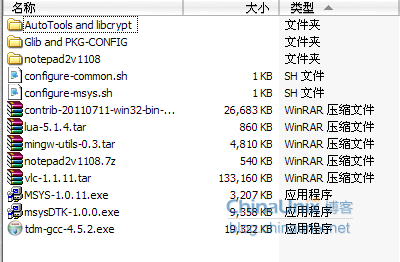
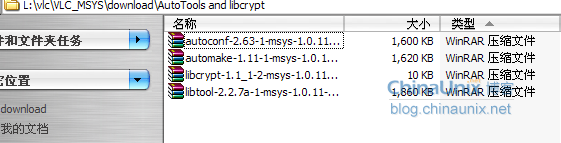
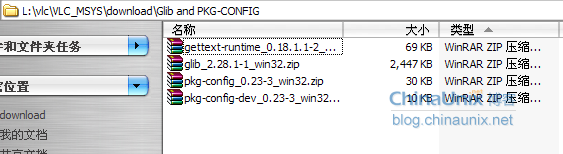
VLC环境搭建
- MinGW Setup
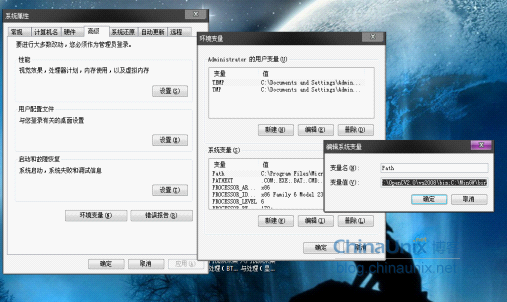
运行tdm-gcc-4.5.2.exe, 然后Select "Create",install to C:\MinGW(默认是C:\ MinGW32, 记得改成C:\ MinGW),keep default settings,afterwards check that C:\MinGW\bin is added to windows PATH (参考下图 添加到末尾, 用分号分隔)
解压mingw-utils-0.3.tar, Extract contents to c:\MinGW - MSys Setup,运行MSYS-1.0.11.exe,然后:Go through the wizard and install to to default C:\Msys\1.0(默认是C:\msys\1.0, 记得改成C:\Msys\1.0)
In the command window that opens, answer questions as follows:
Accept Post Install: [y]
MinGW Installed? : [y]
path to MinGW: [c:/MinGW]
接着安装MSys Developer Toolkit,运行msysDTK-1.0.0.exe,然后Go through the wizard, keeping default values. (默认是C:\msys\1.0, 记得改成C:\Msys\1.0) - 将AutoTools and libcrypt,文件夹和Glib and PKG-CONFIG文件夹下面的所有包解压到C:\Msys\1.0,添加set PKG_CONFIG_PATH=/win32/lib/pkgconfig到C:\MSys\1.0\msys.bat第一行。
- Fix libtool search dirs
Open C:\MSys\1.0\bin\libtool and change line 9926 by appending ' /mingw/lib' to the end of 'compiler_lib_search_dirs'. The line should then read : (注: 一定要用notepad2编辑文本,并保存为unix格式)
compiler_lib_search_dirs="/usr/lib /usr/lib /bin/../lib/gcc-lib/i686-pc-msys/2.95.3-1 /bin/../lib/gcc-lib /usr/lib/gcc-lib/i686-pc-msys/2.95.3-1 /bin/../lib/gcc-lib/i686-pc-msys/2.95.3-1/../../../../i686-pc-msys/lib /usr/lib/gcc-lib/i686-pc-msys/2.95.3-1/../../../../i686-pc-msys/lib /mingw/lib"
- 安装lua
Download the lua tools package from http://www.lua.org/ftp/lua-5.1.4.tar.gz
Uncompress it in your home folder (C:\MSys\1.0\home\Administrator)
run C:\MSys\1.0\msys.bat
type the following commands:
cd /home/ Administrator /lua-5.1.4

make mingw
This should produce lua.exe, luac.exe and lua51.dll in the src directory. Put these in your /bin with the commands:
cd src

cp *.exe /bin

cp *.dll /bin

cd ..
- 安装第三方库(已提供最新版contrib-20110711-win32-bin-gcc-4.4.4-runtime-3.17-only.tar.bz2), 解压, 将usr目录下面的win32文件夹拷贝到C:\Msys\1.0下
VLC编译
- 解压vlc-1.1.11.tar
- extract it to C:\MSys\1.0\home\ Administrator ,rename the vlc-1.1.11 dir to vlc
- 编辑configure-msys.sh文件,添加--disable-upnp,类似于下图:
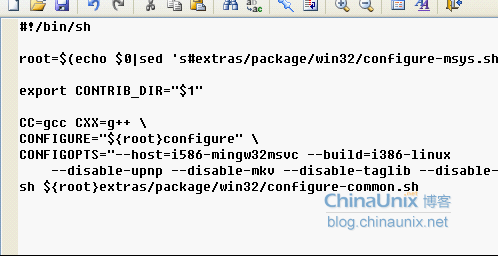
然后拷贝configure-msys.sh和configure-common.sh文件到C:\Msys\1.0\home\Administrator\vlc\extras\package\win32下。 - Create a new file containing the single line:echoAdministrator
and save it as C:\MSys\1.0\bin\whoami (without any extension)
Modify configure.ac so that it doesn't call 'hostname -f' as follows:
open C:\MSys\1.0\home\Administrator\vlc\configure.ac
goto search button:
change it as follows:
old: AC_DEFINE_UNQUOTED(VLC_COMPILE_HOST, "hostname -f 2> /dev/null || hostname", [host which ran configure])
new: AC_DEFINE_UNQUOTED(VLC_COMPILE_HOST, "hostname", [host which ran configure]) - Build VLC
The build is made exclusively from the command line, so if you closed the prompt at the LUA step, re-execute C:\MSy\1.0\msys.bat, then type the commands as mentioned Bootstrap
cd vlccp -v /win32/share/aclocal/* m4/cp -v /share/aclocal/* m4/PATH=/win32/bin:$PATH ./bootstrap

Configure

sh extras/package/win32/configure-msys.sh

Make (compile)
PATH=/usr/win32/bin:$PATH make -j4 (如果是四核的电脑, 否则相应修改)
make成功后如果想要生成sdk等文件夹, 可以输入下面命令Create self-contained packages
Once the compilation is done, build self-contained VLC packages with one of the following "make" commands:
make package-win32-base
(This will create a subdirectory named vlc-x.x.x with all the binaries "stripped" without any debugging symbols).
完!
2012年5月
基于vlc sdk的二次开发--环境搭建、编译的更多相关文章
- 基于全志H3芯片的ARM开发环境搭建
基于全志H3芯片的ARM开发环境搭建 最近买了个友善之臂的NanoPi M1板子,又在网上申请了个NanoPi NEO板子,这两个都是基于全志H3芯片的Crotex-A7四核ARM开发板,两个板子可以 ...
- C# NX二次开发环境搭建
在网上看到一篇C#二次开发环境搭建的文章:NX二次开发-使用NXOPEN C#手工搭建开发环境配置 ,写得非常好.我按照文章操作,过程中遇到几个问题,把问题分享给大家,希望对各位有帮助. 注意三点: ...
- Flutter入门教程(二)开发环境搭建
学习Flutter,首先需要搭建好Flutter的开发环境,下面我将一步步带领大家搭建开发环境并且成功运行flutter项目. Flutter环境配置主要有这几点: 系统配置要求 Java环境 Flu ...
- 在windows环境下基于sublime text3的node.js开发环境搭建
首先安装sublime text3,百度一堆,自己找吧.理论上sublime text2应该也可以.我只能说一句:这个软件实在是太强悍了. 跨平台,丰富的插件体系,加上插件基本上就是一个强悍的ide了 ...
- Zephyr学习(二)开发环境搭建
一.概述 Zephyr支持在Windows.Linux和MacOS环境下开发,这里只介绍如何在Windows下搭建zephyr的开发环境. 二.步骤 2.1安装msys2 msys2是一个Linux模 ...
- 【Python】Java程序员学习Python(二)— 开发环境搭建
巧妇难为无米之炊,我最爱的还是鸡蛋羹,因为我和鸡蛋羹有段不能说的秘密. 不管学啥,都要有环境,对于程序员来说搭建个开发环境应该不是什么难题.按顺序一步步来就可以,我也只是记录我的安装过程,你也可以滴. ...
- nutch二次开发环境搭建
开发环境: ubuntu14.04 + jdk1.7 + eclispe +nutch1.7 1:解压下好nutch1.7 src 源码(wget http://archive.apache.org/ ...
- Java(二)——开发环境搭建 安装JDK和配置环境变量
1.安装JDK 下载地址 http://www.oracle.com/technetwork/java/javase/downloads/jdk8-downloads-2133151.html 下载 ...
- Revit二次开发环境配置(Revit 2020 +Visual Studio 2019)
Revit二次开发环境搭建(Revit 2019+Visual Studio 2017)准备内容 Revit 2019开发环境的搭建,需要安装的内容如下: Revit 2019(主要的开发环境) Vi ...
随机推荐
- HTML5 本地存储Web Storage简单了解
HTML5本地存储规范,定义了两个重要的API :Web Storage 和 本地数据库Web SQL Database. 本地存储Web Storage 实际上是HTML4的cookie存储机 ...
- Python网络编程(基础总结、 入门经典)
Linux下文件类型: bcd -lsp b(块.设备文件) c(字符设备文件) d(目录) -(普通文件) ...
- CodeForces-1132F Clear the String
题目链接 https://vjudge.net/problem/CodeForces-1132F 题面 Description You are given a string \(s\) of leng ...
- HDU 4468 Spy(KMP+贪心)(2012 Asia Chengdu Regional Contest)
Description “Be subtle! Be subtle! And use your spies for every kind of business. ”― Sun Tzu“A spy w ...
- DFS——CodeForces740DAlyona and a tree
一.题目回顾 题目链接:Alyona and a tree Examples Input 52 5 1 4 61 71 13 53 6 Output 1 0 1 0 0 Input 59 7 8 ...
- Week1 Team Homework #1 from Z.XML-总结学长经验教训
谭传奇学长: 我们的弯路可能是,一开始没有从最基础的部分开始迭代开发,一开始就想的太远了一些,每一步开的有点太大了,所以可能有些东西最后就连不上,也没有能够按时完成.如果可以先做出一个能用的版本,然后 ...
- UnrealEngine4入门(一) 新建一个c++项目
epic games宣布ue4免费使用(游戏发布之后,每个季度大于3000美元则收取收益的5%)之后,吸引了大批看好VR和AR前景的游戏开发者.不过国内(中文)ue4教程和资料太少,而且一大部分资料都 ...
- PTA实验报告 数组
(第二张代码均为英红的代码) 题目1:题目名称:数组元素循环右移问题 1. 本题PTA提交列表 2. 设计思路(包括流程图) 将数组内每个位置移动,第2个放第一个,第三个放第二个,以此类推.使用两个循 ...
- css如何选择相同class下的第一个class元素和最后一个元素?
如图,如果像选择类名为 class="exerciseInfo" 中的第一个和最后一个div,做法如下: 选择第一个类名: .exerciseInfo: nth-of-type ...
- Nginx学习笔记之应用篇
Nginx服务器的安装请参考Nginx学习笔记之安装篇 关于Nginx配置文档的API在这里就不一一列出,现在我们来配置第一个Nginx架构实现负载均衡的网站. 1.打开IIS,配置如下站点 重复上述 ...