
windows安装rabbitmq
- 官网下载windows安装版本:http://www.rabbitmq.com/install-windows.html ,安装文件rabbitmq-server-3.6.5.exe
- 前提:安装erlang;官网下载:http://www.erlang.org/downloads,安装文件:OTP 19.1 Windows 64-bit Binary File(101629312)
- erlang安装步骤如下:
1.双击运行安装即可(在安装目录选择时注意可输入自己容易记并好区别的,eg:D:\work\emm_windows\erlang)

2.配置环境变量(如果不在系统自带命令提示符下运行,这步可跳过):

在系统变量的PATH后面添加上erl.exe的所在目录即可(eg:D:\work\emm_windows\erlang\bin\werl.exe)
3.在命令提示符下输入”erl”可得如下结果: C:\Users\adapp>erl Eshell V5.10.3 (abort with ^G) 1> 表示安装成功,或者直接点击安装成功后的”Erlang”图标后提示: Erlang R16B02 (erts-5.10.3) [64-bit] [smp:4:4] [async-threads:10] Eshell V5.10.3 (abort with ^G) 1> 亦表示安装成功. - 运行rabbitmq安装包。
- 安装成功后,激活插件
D:\work\emm_windows\RabbitMQ Server\rabbitmq_server-3.6.\sbin>rabbitmq-plugins.bat enable rabbitmq_management
The following plugins have been enabled:
mochiweb
webmachine
rabbitmq_web_dispatch
amqp_client
rabbitmq_management_agent
rabbitmq_management Applying plugin configuration to rabbit@PC-HONGCHQ... started plugins. D:\work\emm_windows\RabbitMQ Server\rabbitmq_server-3.6.\sbin>rabbitmq-plugins.bat enable rabbitmq_mqtt
The following plugins have been enabled:
rabbitmq_mqtt Applying plugin configuration to rabbit@PC-HONGCHQ... started plugin. D:\work\emm_windows\RabbitMQ Server\rabbitmq_server-3.6.\sbin>rabbitmq-plugins.bat enable rabbitmq_tracing
The following plugins have been enabled:
rabbitmq_tracing Applying plugin configuration to rabbit@PC-HONGCHQ... started plugin. - 创建用户,密码,绑定权限
D:\work\emm_windows\RabbitMQ Server\rabbitmq_server-3.6.5\sbin>rabbitmqctl.bat add_user emm 123456

Creating user "emm" ...

D:\work\emm_windows\RabbitMQ Server\rabbitmq_server-3.6.5\sbin>rabbitmqctl.bat set_user_tags emm administrator

Setting tags for user "emm" to [administrator] ...

D:\work\emm_windows\RabbitMQ Server\rabbitmq_server-3.6.5\sbin>rabbitmqctl.bat set_permissions -p / emm ".*" ".*" ".*"

Setting permissions for user "emm" in vhost "/" ...

D:\work\emm_windows\RabbitMQ Server\rabbitmq_server-3.6.5\sbin>rabbitmqctl.bat list_users

Listing users ...

guest   [administrator]

emm [administrator] - 使用浏览器打开
http://localhost:15672访问Rabbit Mq的管理控制台,使用刚才创建的账号登陆系统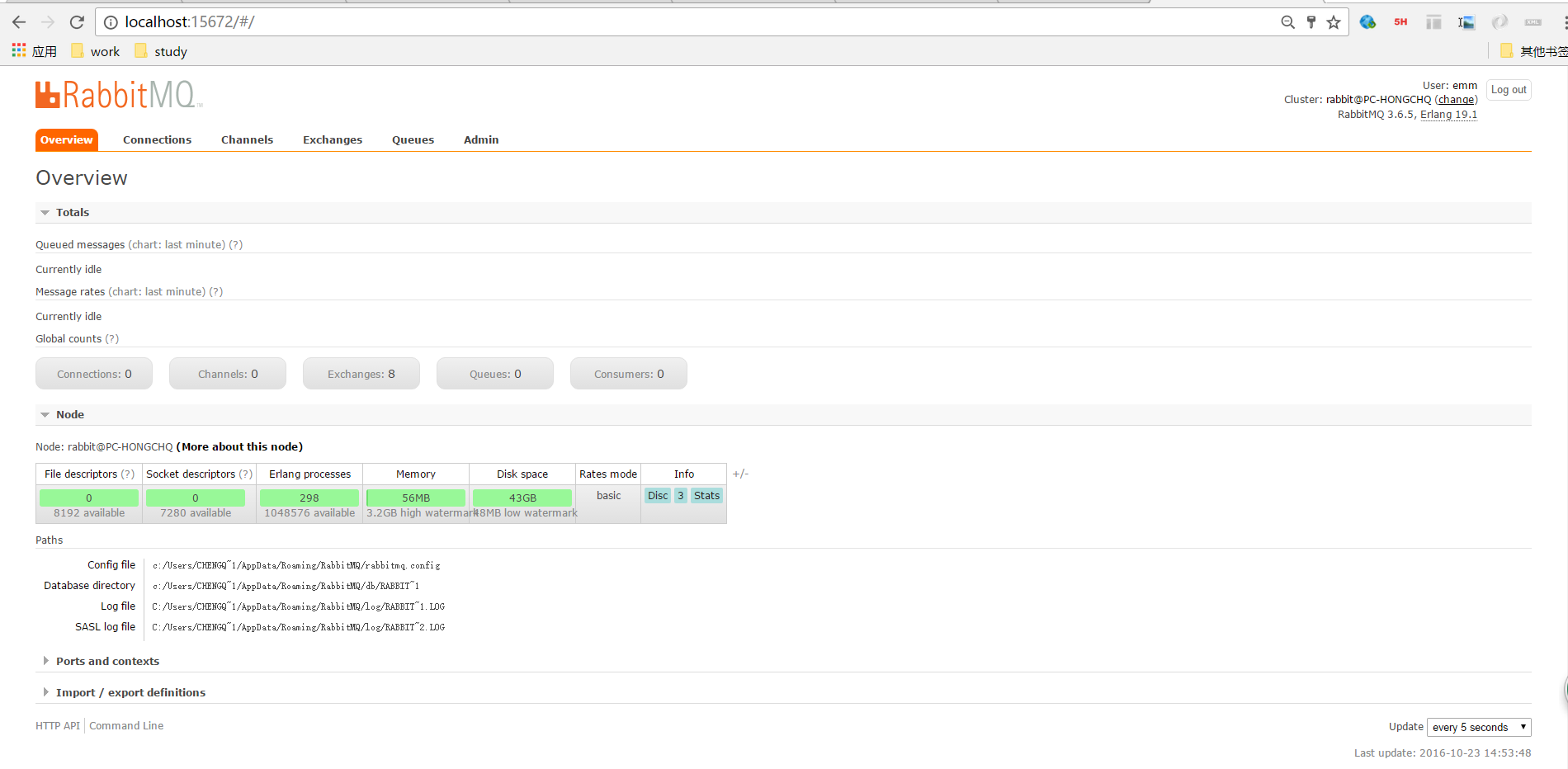
- 启停操作可在start menu菜单中进行。
- 附官网说明:
Install the Server

Firstly, download and run the Erlang Windows Binary File. It takes around 5 minutes.

Then just run the installer, rabbitmq-server-3.6.5.exe. It takes around 2 minutes, and will set RabbitMQ up and running as a service, with a default configuration.

Run RabbitMQ Service

Customise RabbitMQ Environment Variables

The service will run fine using its default settings. You may want to customise the RabbitMQ environment or edit configuration.

Run RabbitMQ

The RabbitMQ service starts automatically. You can stop/reinstall/start the RabbitMQ service from the Start Menu.

Manage the Service

You can find links to RabbitMQ directories in the Start Menu.

There is also a link to a command prompt window that will start in the sbin dir, in the Start Menu. This is the most convenient way to run the various command line tools.

Port Access

Firewalls and other security tools may prevent RabbitMQ from binding to a port. When that happens, RabbitMQ will fail to start. Make sure the following ports can be opened:

4369 (epmd), 25672 (Erlang distribution)

5672, 5671 (AMQP 0-9-1 without and with TLS)

15672 (if management plugin is enabled)

61613, 61614 (if STOMP is enabled)

1883, 8883 (if MQTT is enabled)

It is possible to configure RabbitMQ to use different ports.

Default user access

The broker creates a user guest with password guest. Unconfigured clients will in general use these credentials. By default, these credentials can only be used when connecting to the broker as localhost so you will need to take action before connecting from any other machine.

See the documentation on access control for information on how to create more users, delete the guest user, or allow remote access to the guest user.

Managing the Broker

To stop the broker or check its status, use rabbitmqctl.bat in sbin (as an administrator).

Stopping the Broker

Use rabbitmqctl stop.

Checking the Broker Status

Use rabbitmqctl status. All rabbitmqctl commands will report the node absence if no broker is running (i.e. nodedown).

More info on rabbitmqctl

Logging

Output from the server is sent to a RABBITMQ_NODENAME.log file in the RABBITMQ_LOG_BASE directory. Additional log data is written to RABBITMQ_NODENAME-sasl.log.

The broker always appends to the log files, so a complete log history is retained.

You can rotate logs using rabbitmqctl rotate_logs.

Troubleshooting When Running as a Service

In the event that the Erlang VM crashes whilst RabbitMQ is running as a service, rather than writing the crash dump to the current directory (which doesn't make sense for a service) it is written to an erl_crash.dump file in the base directory of the RabbitMQ server (set by the RABBITMQ_BASE environment variable, defaulting to %APPDATA%\%RABBITMQ_SERVICENAME% - typically %APPDATA%\RabbitMQ otherwise).

Windows-specific Issues

We aim to make RabbitMQ a first-class citizen on Windows. However, sometimes there are circumstances beyond our control. Please consult the Windows-specific Issues page.

Getting Help

If you have questions or need help, feel free to ask on RabbitMQ mailing list.
windows安装rabbitmq的更多相关文章
- windows安装rabbitMQ服务
简介: RabbitMQ是流行的开源消息队列系统,用erlang语言开发.RabbitMQ是AMQP(高级消息队列协议)的标准实现. windows安装rabbitMQ服务步骤: 首先需要安装 Erl ...
- windows 安装 RabbitMQ 并添加用户 – 畅玩Coding
原文:windows 安装 RabbitMQ 并添加用户 – 畅玩Coding 1.RabbitMQ 使用 Eralng,所以需要先安装 Eralng 下载: http://www.erlang.or ...
- CentOS8/Windows 安装RabbitMQ
Centos8安装rabbitmq 1.安装erlang(rabbitmq是用erlang语言开发的,erlang版本需要22.x以上) yum install erlang 2.下载rabbitmq ...
- Windows安装RabbitMQ集群的几个注意点
记录一下RabbitMQ在windows平台下安装的几个注意点- -,好记性不如烂笔头 安装过程与Linux安装一致,教程参照官网集群配置:此处只列举出几个注意点: 1. erlang的版本需要一致, ...
- Windows 安装Rabbitmq
Rabbitmq是基于erlang开发的消息队列,客户端支持主流的开发语言(java.C#.Python等). 环境:windows server 2012(x64) 1.下载安装 http://ww ...
- Windows安装RabbitMQ并设置数据存储目录
一.安装Elang 下载otp_win64_xx.x.exe,当前使用otp_win64_21.3.exe版本,按步骤完成安装. 下载地址:http://www.erlang.org/download ...
- windows安装rabbitmq踩坑实录
最近学习springcloud消息总线需要用到rabbitmq,然后安装的时候踩了一些坑,记录如下: 首先安装rabbitmq之前需要先安装erlang,因为rabbitmq服务端使用erlang写的 ...
- Windows 安装RabbitMQ后,启动服务就自动停止
在做SpringCloud消息总线的时候,需要用到RabbitMQ,于是在windows上下载安装了一个,erlang的安装包不是官网下载的,而是朋友分享给我的,没注意它的版本(9.3). 安装完成后 ...
- Windows 安装 RabbitMQ
RabbitMQ概述 RabbitMQ是流行的开源消息队列系统,是AMQP(Advanced Message Queuing Protocol高级消息队列协议)的标准实现,用erlang语言开发.Ra ...
随机推荐
- SSH整合
首先,SSH不是一个框架,而是多个框架(struts+spring+hibernate)的集成,是目前较流行的一种Web应用程序开源集成框架,用于构建灵活.易于扩展的多层Web应用程序. 集成SSH框 ...
- Dijkstra算法(三)之 Java详解
http://www.cnblogs.com/skywang12345/p/3711516.html
- HTML 学习笔记 JavaScript(call方法详解)
http://www.cnblogs.com/f-dream/p/4950918.html
- [LeetCode] Minimum Moves to Equal Array Elements 最少移动次数使数组元素相等
Given a non-empty integer array of size n, find the minimum number of moves required to make all arr ...
- 5G承载为什么需要三层到边缘
- ajax 多级联动 下拉框 Demo
写了ajax实现级联下拉框,考虑常用,并且级联个数随不同业务个数不同,于是就整理了一下,实现了 ajax + N级联动 下拉框的效果 效果图 HTML 代码 <h2> 省级联动</h ...
- 关于iOS特定设别推送(特定用户推送)【原】
在这里,我就不哆嗦如何制作推送证书之类的了,网上一搜一大堆. 我们现在很多开发者的推送,就是集成第三方的推送SDK,然后通过第三方的推送平台帮我们进行推送.其实,这种推送(如JPush),一般只能广播 ...
- django 进阶篇
models(模型) 创建数据库,设计表结构和字段 使用 MySQLdb 来连接数据库,并编写数据访问层代码 业务逻辑层去调用数据访问层执行数据库操作 import MySQLdb def GetLi ...
- iOS中获取当前时间,设定时间,并算出差值
NSDate *date = [NSDate date];//获取当前时间 NSTimeZone *zone = [NSTimeZone systemTimeZone];//修改时区 NSIntege ...
- Oracle中已有数据的字段类型修改
创建测试表 create table t_person( id varchar2(200) primary key, name varchar2(200), address varchar2(200) ...