
9.2.3 hadoop reduce端连接-分区分组聚合
1.1.1 reduce端连接-分区分组聚合
reduce端连接则是利用了reduce的分区功能将stationid相同的分到同一个分区,在利用reduce的分组聚合功能,将同一个stationid的气象站数据和温度记录数据分为一组,reduce函数读取分组后的第一个记录(就是气象站的名称)与其他记录组合后输出,实现连接。例如连接下面气象站数据集和温度记录数据集。先用几条数据做分析说明,实际肯定不只这点数据。
气象站数据集,气象站id和名称数据表
StationId StationName
1~hangzhou
2~shanghai
3~beijing
温度记录数据集
StationId TimeStamp Temperature
3~20200216~6
3~20200215~2
3~20200217~8
1~20200211~9
1~20200210~8
2~20200214~3
2~20200215~4
目标:是将上面两个数据集进行连接,将气象站名称按照气象站id加入气象站温度记录中最输出结果:
1~hangzhou ~20200211~9
1~hangzhou ~20200210~8
2~shanghai ~20200214~3
2~shanghai ~20200215~4
3~beijing ~20200216~6
3~beijing ~20200215~2
3~beijing ~20200217~8
详细步骤如下
(1) 两个maper读取两个数据集的数据输出到同一个文件
因为是不同的数据格式,所以需要创建两个不同maper分别读取,输出到同一个文件中,所以要用MultipleInputs设置两个文件路径,设置两个mapper。
(2) 创建一个组合键<stationed,mark>用于map输出结果排序。
组合键使得map输出按照stationid升序排列,stationid相同的按照第二字段升序排列。mark只有两个值,气象站中读取的数据,mark为0,温度记录数据集中读取的数据mark为1。这样就能保证stationid相同的记录中第一条就是气象站名称,其余的是温度记录数据。组合键TextPair定义如下
package Temperature;

import org.apache.hadoop.io.Text;

import org.apache.hadoop.io.WritableComparable;

import java.io.DataInput;

import java.io.DataOutput;

import java.io.IOException;

public class TextPair implements WritableComparable<TextPair> {

    private Text first;

    private Text second;

    public TextPair() {

        set(new Text(),new Text());

    }

    public TextPair(String first, String second) {

        set(new Text(first),new Text(second));

    }

    public TextPair(Text first, Text second) {

        set(first, second);

    }

    public void set(Text first, Text second) {

        this.first = first;

        this.second = second;

    }

    public Text getFirst() {

        return first;

    }

    public Text getSecond() {

        return second;

    }

    @Override

    public void write(DataOutput out)throws IOException {

        first.write(out);

        second.write(out);

    }

    @Override

    public void readFields(DataInput in)throws IOException {

        first.readFields(in);

        second.readFields(in);

    }

    @Override

    public int hashCode() {

        return first.hashCode() *163+ second.hashCode();

    }

    @Override

    public boolean equals(Object o) {

        if(o instanceof TextPair) {

            TextPair tp = (TextPair) o;

            return first.equals(tp.first) && second.equals(tp.second);

        }

        return false;

    }

    @Override

    public String toString() {

        return first +"\t"+ second;

    }

    public int compareTo(TextPair tp) {

        int cmp = first.compareTo(tp.first);

        if(cmp !=0) {

            return cmp;

        }

        return second.compareTo(tp.second);

    }

}
定义maper输出的结果如下,前面是组合键,后面是值。
<1,0> hangzhou
<1,1> 20200211~9
<1,1> 20200210~8
<2,0> shanghai
<2,1> 20200214~3
<2,1> 20200215~4
<3,0> beijing
<3,1> 20200216~6
<3,1> 20200215~2
<3,1> 20200217~8
(3)map结果传入reduce按stationid分区再分组聚合
map输出结果会按照组合键第一个字段stationid升序排列,相同stationid的记录按照第二个字段升序排列,气象站数据和记录数据混合再一起,shulfe过程中,map将数据传给reduce,会经过partition分区,相同stationid的数据会被分到同一个reduce,一个reduce中stationid相同的数据会被分为一组。假设采用两个reduce任务,分区按照stationid%2,则分区后的结果为
分区1
<1,0> hangzhou
<1,1> 20200211~9
<1,1> 20200210~8
<3,0> beijing
<3,1> 20200216~6
<3,1> 20200215~2
<3,1> 20200217~8
分区2
<2,0> shanghai
<2,1> 20200214~3
<2,1> 20200215~4
(4)分区之后再将每个分区的数据按照stationid分组聚合
分区1
分组1
<1,0> <Hangzhou, 20200211~9, 20200210~8>
分组2
<3,0> <Beijing, 20200216~6, 20200215~2, 20200217~8>
分区2
<2,0> <shanghai, 20200214~3, 20200215~4>
(5)将分组聚合后的数据传入reduce函数,将车站加入到后面的温度记录输出。
因为数据是经过mark升序排列的,所以每组中第一个数据就是气象站的名称数据,剩下的是改气象的温度记录数据,mark字段的作用就是为了保证气象站数据在第一条。所以读取每组中第一个value,既是气象站名称。与其他value组合输出,即实现了数据集的连接。
1~hangzhou ~20200211~9
1~hangzhou ~20200210~8
2~shanghai ~20200214~3
2~shanghai ~20200215~4
3~beijing ~20200216~6
3~beijing ~20200215~2
3~beijing ~20200217~8
(6)详细的代码实例
package Temperature;

import org.apache.hadoop.conf.Configured;

import org.apache.hadoop.fs.FileUtil;

import org.apache.hadoop.fs.Path;

import org.apache.hadoop.io.*;

import org.apache.hadoop.mapreduce.*;

import org.apache.hadoop.mapreduce.lib.input.FileInputFormat;

import org.apache.hadoop.mapreduce.lib.input.FileSplit;

import org.apache.hadoop.mapreduce.lib.input.MultipleInputs;

import org.apache.hadoop.mapreduce.lib.input.TextInputFormat;

import org.apache.hadoop.mapreduce.lib.output.FileOutputFormat;

import org.apache.hadoop.util.Tool;

import org.apache.hadoop.util.ToolRunner;

import java.io.File;

import java.io.IOException;

import java.lang.reflect.Method;

import java.util.Iterator;

public class ReduceJoinRecordWithStationId extends Configured implements Tool {

    //气象站名称数据集map处理类

   public static class StationMapper extends Mapper<LongWritable,Text,TextPair,Text>{

        @Override

       protected void setup(Context context) throws IOException,

                InterruptedException {

            InputSplit split = context.getInputSplit();

            Class<? extends InputSplit> splitClass = split.getClass();

            FileSplit fileSplit = null;

            if (splitClass.equals(FileSplit.class)) {

                fileSplit = (FileSplit) split;

            } else if (splitClass.getName().equals(

                    "org.apache.hadoop.mapreduce.lib.input.TaggedInputSplit")) {

                // begin reflection hackery...

                try {

                    Method getInputSplitMethod = splitClass

                            .getDeclaredMethod("getInputSplit");

                    getInputSplitMethod.setAccessible(true);

                    fileSplit = (FileSplit) getInputSplitMethod.invoke(split);

                } catch (Exception e) {

                    // wrap and re-throw error

                }

                // end reflection hackery

            }

        }

        protected void map(LongWritable key, Text value, Context context) throws IOException, InterruptedException {

           //1~hangzhou

           String[] values=value.toString().split("~");

           if (values.length!=2)

           {

               return;

           }

           //组合键第一字段为stationid,第二字段为默认0,表示车站名字数据

           context.write(new TextPair(new Text(values[0]),new Text("0")),new Text(values[1]));

       }

   }

   //温度记录数据集处理mapper类

   public static class TemperatureRecordMapper extends Mapper<LongWritable,Text,TextPair,Text>{

        @Override

       protected void setup(Context context) throws IOException,InterruptedException {

           InputSplit split = context.getInputSplit();

           Class<? extends InputSplit> splitClass = split.getClass();

           FileSplit fileSplit = null;

           if (splitClass.equals(FileSplit.class)) {

               fileSplit = (FileSplit) split;

           } else if (splitClass.getName().equals(

                   "org.apache.hadoop.mapreduce.lib.input.TaggedInputSplit")) {

               // begin reflection hackery...

               try {

                   Method getInputSplitMethod = splitClass

                           .getDeclaredMethod("getInputSplit");

                   getInputSplitMethod.setAccessible(true);

                   fileSplit = (FileSplit) getInputSplitMethod.invoke(split);

               } catch (Exception e) {

                   // wrap and re-throw error

               }

               // end reflection hackery

           }

       }

       protected void map(LongWritable key, Text value, Context context) throws IOException, InterruptedException {

           String[] values=value.toString().split("~");

           if (values.length!=3)

           {

               return;

           }

           //组合键第一字段为stationid,第二字段为默认1,表示温度记录数据

           //3~20200216~6

           String outputValue=values[1]+"~"+values[2];

           context.write(new TextPair(new Text(values[0]),new Text("1")),new Text(outputValue));

       }

   }

   //按照statitionid分区的partioner类

    public static class FirstPartitioner extends Partitioner<TextPair,Text>{

       public int getPartition(TextPair textPair, Text text, int i) {

           //按照第一字段stationid取余reduce任务数,得到分区id

           return Integer.parseInt(textPair.getFirst().toString())%i;

       }

   }

   //分组比较类

   public static class GroupingComparator extends WritableComparator

   {

       //这里一定要加,否则会报NULLException

       public GroupingComparator()

       {

           super(TextPair.class,true);

       }

       public int compare(WritableComparable a, WritableComparable b) {

           TextPair pairA=(TextPair)a;

           TextPair pairB=(TextPair)b;

           //stationid相同,返回值为0的分为一组

           return pairA.getFirst().compareTo(pairB.getFirst());

       }

   }

   //reudce将按键分组的后数据,去values中第一个数据(气象站名称),聚合values后面的温度记录输出到文件

    public static class JoinReducer extends Reducer<TextPair,Text,Text,Text>

    {

        @Override

        protected void reduce(TextPair key, Iterable<Text> values, Context context) throws IOException, InterruptedException {

            Iterator it =values.iterator();

            String stationName=it.next().toString();

            while (it.hasNext())

            {

                String outputValue="~"+stationName+"~"+it.next().toString();

                context.write(key.getFirst(),new Text(outputValue));

            }

        }

    }

    public int run(String[] args) throws IOException, ClassNotFoundException, InterruptedException {

       if (args.length!=3)

       {

           return -1;

       }

        Job job=new Job(getConf(),"joinStationTemperatueRecord");

       if (job==null)

       {

           return -1;

       }

       String strClassName=this.getClass().getName();

       job.setJarByClass(this.getClass());

      //设置两个输入路径,一个输出路径

       Path StationPath=new Path(args[0]);

       Path TemperatureRecordPath= new Path(args[1]);

       Path outputPath=new Path(args[2]);

       MultipleInputs.addInputPath(job,StationPath, TextInputFormat.class,StationMapper.class);

       MultipleInputs.addInputPath(job,TemperatureRecordPath,TextInputFormat.class,TemperatureRecordMapper.class);

       FileOutputFormat.setOutputPath(job,outputPath);

       //设置分区类、分组类、reduce类

       job.setPartitionerClass(FirstPartitioner.class);

       job.setGroupingComparatorClass(GroupingComparator.class);

       job.setReducerClass(JoinReducer.class);

       job.setNumReduceTasks(2);

        //下面的三行不能加,否则会报java.lang.Exception: java.lang.ClassCastException: org.apache.hadoop.mapreduce.lib.input.FileSplit cannot be cast to org.apache.hadoop.mapreduce.lib.input.TaggedInputSplit

      // job.setInputFormatClass(TextInputFormat.class);

      // FileInputFormat.addInputPath(job,StationPath);

      // FileInputFormat.addInputPath(job,TemperatureRecordPath);

       //设置输出类型

       job.setOutputKeyClass(Text.class);

       job.setOutputValueClass(Text.class);

       job.setMapOutputKeyClass(TextPair.class);

       job.setMapOutputValueClass(Text.class);

        //删除结果目录,重新生成

        FileUtil.fullyDelete(new File(args[2]));

       return job.waitForCompletion(true)? 0:1;

    }

    public static void main(String[] args) throws Exception

    {

        //三个参数,参数1:气象站数据集路径,参数2:温度记录数据集路径,参数3:输出路径

       int exitCode= ToolRunner.run(new ReduceJoinRecordWithStationId(),args);

       System.exit(exitCode);

    }

}
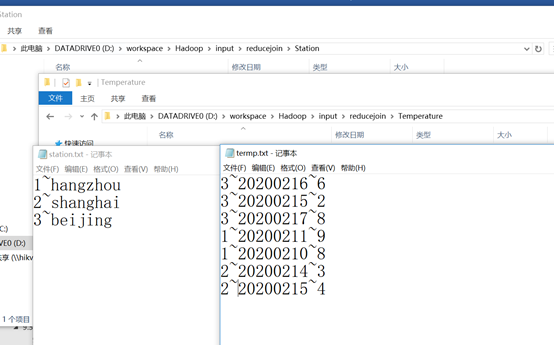
程序编好之后,创建输入文件夹如下图所示,输入气象站数据和温度数据保存。
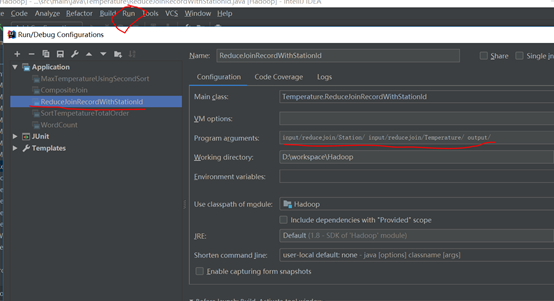
在ieda的run-edit Configuration输入两个输入路径和一个输出路径
运行main函数就可以输出如下结果,两个reduce输出两个文件

自己开发了一个股票智能分析软件,功能很强大,需要的点击下面的链接获取:
https://www.cnblogs.com/bclshuai/p/11380657.html
9.2.3 hadoop reduce端连接-分区分组聚合的更多相关文章
- Oracle函数over(),rank()over()作用及用法--分区(分组)求和& 不连续/连续排名
(1) 函数: over()的作用及用法: -- 分区(分组)求和. RANK ( ) OVER ( [query_partition_clause] order_by_clause )D ...
- Oracle分析函数及常用函数: over(),rank()over()作用及用法--分区(分组)求和& 不连续/连续排名
(1) 函数: over()的作用及用法: -- 分区(分组)求和. sum() over( partition by column1 order by column2 )主要用来对某个字 ...
- Atitit 数据存储的分组聚合 groupby的实现attilax总结
Atitit 数据存储的分组聚合 groupby的实现attilax总结 1. 聚合操作1 1.1. a.标量聚合 流聚合1 1.2. b.哈希聚合2 1.3. 所有的最优计划的选择都是基于现有统计 ...
- ORACLE字符串分组聚合函数(字符串连接聚合函数)
ORACLE字符串连接分组串聚函数 wmsys.wm_concat SQL代码: select grp, wmsys.wm_concat(str) grp, 'a1' str from dual un ...
- SSRS 系列 - 使用带参数的 MDX 查询实现一个分组聚合功能的报表
SSRS 系列 - 使用带参数的 MDX 查询实现一个分组聚合功能的报表 SSRS 系列 - 使用带参数的 MDX 查询实现一个分组聚合功能的报表 2013-10-09 23:09 by BI Wor ...
- MySQL最常用分组聚合函数
一.聚合函数(aggregation function)---也就是组函数 在一个行的集合(一组行)上进行操作,对每个组给一个结果. 常用的组函数: AVG([distinct] expr) 求平均值 ...
- solrcloud jsonfacet分组聚合 unique计数不准确
jsonfacet分组聚合查询 unique.hll函数问题: 对不同的值进行估算,并非准确的值, 优点:节省内存消耗,用分组算法对不同的值count进行估算 缺点:无法准确统计count(disti ...
- 微软BI 之SSRS 系列 - 使用带参数的 MDX 查询实现一个分组聚合功能的报表
基于数据仓库上的 SSRS 报表展示,一般可以直接通过 SQL 查询,存储过程,视图或者表等多种方式将数据加载并呈现在报表中.但是如果是基于 Cube 多维数据集的数据查询,就不能再使用 SQL 的语 ...
- 微软BI 之SSRS 系列 - 报表中分组聚合中处理不规则层次结构的技巧(没有子元素的时候不展开, 删除+符号)
分组聚合的展开和收起效果在SSRS Report中非常常用,并且有时还要处理一些比较特别的情况.比如分组合并时有的层次结构是不规则的,有的组有两层,遇到这种情况应该如何处理? 注意到下面的这个需求 ...
随机推荐
- 01-Spring的概述
Spring概述 ①Spring是一个开源框架 ②Spring为简化企业级开发而生,使用Spring开发可以将Bean对象,Dao组件对象,Service组件对象等交给Spring容器来管理,这样使得 ...
- vue基础笔记
目录 Vue 渐进式 JavaScript 框架 一.走进Vue 二.Vue实例 三.生命周期钩子 四.Vue指令 五.组件 六.Vue-CLI 项目搭建 Vue 渐进式 JavaScript 框架 ...
- tensorflow之tensorboard
参考https://www.cnblogs.com/felixwang2/p/9184344.html 边学习,边练习 # https://www.cnblogs.com/felixwang2/p/9 ...
- JenKins docker 集群
//tag 桉树有时间来搞 **阿斯蒂 啊 阿斯蒂
- 2 数据结构的性能分析 timeit
# python数据结构的性能分析 https://www.cnblogs.com/bobo-zhang/p/10521769.html from timeit import Timer #计算运行平 ...
- mcast_set_loop函数
#include <errno.h> #include <sys/socket.h> #include <net/if.h> #include <netine ...
- C语言:有序递增链表的插入问题。
//已建立一个带头节点的单向链表,链表中的各结点按结点数据域中的数据递增有序连接.fun函数:把形参x的值放入一个新结点并插入链表中,使插入的各个数据域的数据仍保持递增有序. #include < ...
- 大端(bigend)与小端(littleend)
大端:是指数据的低位保存在内存的高地址中,而数据的高位,保存在内存的低地址中: 小端:是指数据的高位保存在内存的高地址中,而数据的高 ...
- python 切片技巧
说明: 字符串[开始索引:结束索引:步长] 开始索引:从指定位置开始截取: 结束索引:从指定位置结束截取,但不包含该位置的字符. 步长:不指定时步长为1: 1)当步长为正数时候,那么切片是从左到右进行 ...
- 解决el-input 触发不了键盘事件
<el-input v-model="form.loginName" placeholder="账号" @keyup.enter="doLogi ...