
进度2_家庭记账本App
今天在昨天的基础上,相继完成了三个页面的布局和显示情况:
新增加的xml文件如下:
activity_add.xml:
<?xml version="1.0" encoding="utf-8"?>

<LinearLayout xmlns:android="http://schemas.android.com/apk/res/android"

    xmlns:app="http://schemas.android.com/apk/res-auto"

    xmlns:tools="http://schemas.android.com/tools"

    android:layout_width="match_parent"

    android:layout_height="match_parent"

    android:orientation="vertical"

    android:gravity="center">

  <EditText

      android:id="@+id/et_cost_title"

      android:layout_width="match_parent"

      android:layout_height="wrap_content"

      android:layout_margin="4dp"

      android:hint="花费名称"/>

    <EditText

        android:id="@+id/et_cost_money"

        android:layout_width="match_parent"

        android:layout_height="wrap_content"

        android:layout_margin="4dp"

        android:hint="花费金额"/>

    <DatePicker

        android:id="@+id/dp_cost_date"

        android:layout_width="wrap_content"

        android:layout_height="wrap_content"

        android:layout_margin="4dp"

        android:datePickerMode="spinner"

        android:calendarViewShown="false"/>

    <LinearLayout

        android:id="@+id/btn"

        android:layout_width="match_parent"

        android:layout_height="wrap_content"

        android:layout_marginTop="20dp"

        android:layout_gravity="center"

        android:orientation="horizontal">

        <Button

            android:id="@+id/btn_return"

            android:layout_width="wrap_content"

            android:layout_height="wrap_content"

            android:text="返回"

            android:background="#87CEFA"

            android:layout_marginLeft="90dp"

            />

        <Button

            android:id="@+id/btn_go"

            android:layout_width="wrap_content"

            android:layout_height="wrap_content"

            android:text="确认"

            android:background="#87CEFA"

            android:layout_marginLeft="50dp" />

    </LinearLayout>

    </LinearLayout>
activity_look.xml:
<?xml version="1.0" encoding="utf-8"?>

<RelativeLayout xmlns:android="http://schemas.android.com/apk/res/android"

    xmlns:app="http://schemas.android.com/apk/res-auto"

    xmlns:tools="http://schemas.android.com/tools"

    android:layout_width="match_parent"

    android:layout_height="80dp"

    android:orientation="vertical">

    <TextView

        android:id="@+id/tv_title"

        android:layout_width="150dp"

        android:layout_height="80dp"

        android:layout_marginLeft="10dp"

        android:layout_alignParentLeft="true"

        android:gravity="center"

        android:singleLine="true"

        android:textSize="30sp"

        android:ellipsize="marquee"

        android:text="花费名称"/>

    <TextView

        android:id="@+id/tv_data"

        android:layout_width="wrap_content"

        android:layout_height="80dp"

        android:gravity="center"

        android:textSize="20sp"

        android:layout_marginLeft="15dp"

        android:layout_toRightOf="@id/tv_title"

        android:text="花费日期"/>

    <TextView

        android:id="@+id/tv_cost"

        android:layout_width="wrap_content"

        android:layout_height="80dp"

        android:gravity="center"

        android:layout_alignParentRight="true"

        android:layout_marginRight="20dp"

        android:text="00.00"

        android:textSize="25sp"/>

</RelativeLayout>
activity_setting.xml:
<?xml version="1.0" encoding="utf-8"?>

<LinearLayout xmlns:android="http://schemas.android.com/apk/res/android"

    android:orientation="vertical"

    android:layout_width="match_parent"

    android:layout_height="match_parent">

    <TextView

        android:id="@+id/usname"

        android:layout_marginTop="100dp"

        android:layout_width="wrap_content"

        android:layout_height="wrap_content"

        android:padding="10dp"

        android:text="账户名:"

        android:textColor="#000"

        android:textSize="20dp" />

    <EditText

        android:id="@+id/usname_"

        android:layout_alignBottom="@+id/reg_number1"

        android:layout_toRightOf="@+id/reg_number1"

        android:layout_width="match_parent"

        android:layout_height="wrap_content"

        android:hint="请输入账户名"

        android:padding="10dp" />

    <TextView

        android:layout_marginTop="60dp"

        android:id="@+id/reg_number1"

        android:layout_width="wrap_content"

        android:layout_height="wrap_content"

        android:padding="20dp"

        android:text="密码:"

        android:textColor="#000"

        android:textSize="20dp" />

    <EditText

        android:layout_alignBottom="@+id/reg_number1"

        android:layout_toRightOf="@+id/reg_number1"

        android:id="@+id/reg_username"

        android:layout_width="match_parent"

        android:layout_height="wrap_content"

        android:hint="请输入密码:"

        android:padding="10dp" />

    <LinearLayout

        android:id="@+id/btn_setting_"

        android:layout_width="match_parent"

        android:layout_height="wrap_content"

        android:layout_marginTop="50dp"

        android:layout_gravity="center"

        android:orientation="horizontal">

        <Button

            android:id="@+id/btn_return"

            android:layout_width="wrap_content"

            android:layout_height="wrap_content"

            android:text="更改密码"

            android:background="#87CEFA"

            android:layout_marginLeft="90dp"

            />

        <Button

            android:id="@+id/btn_go"

            android:layout_width="wrap_content"

            android:layout_height="wrap_content"

            android:text="退出登录"

            android:background="#87CEFA"

            android:layout_marginLeft="50dp" />

    </LinearLayout>

</LinearLayout>
运行结果:
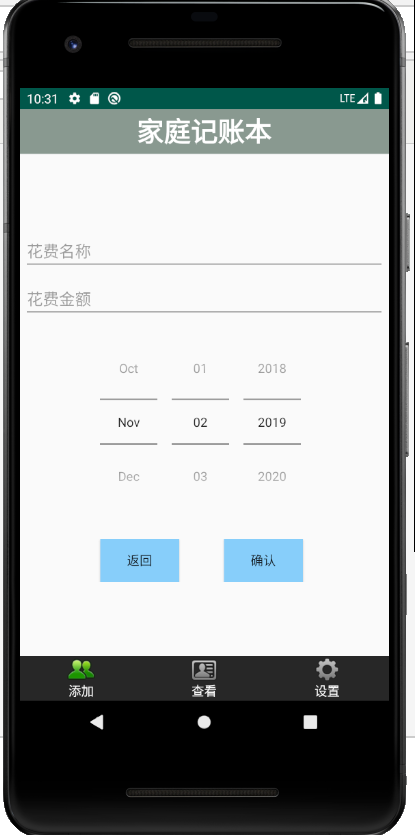
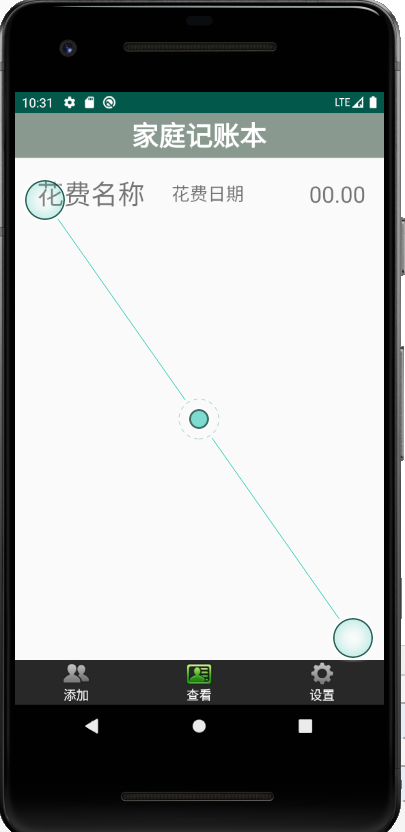
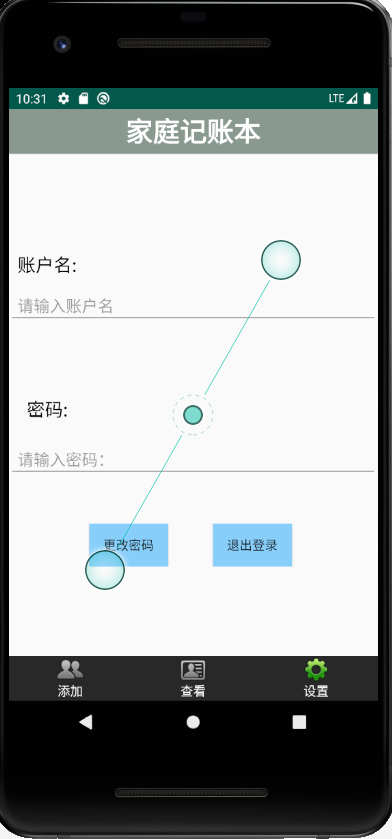
进度2_家庭记账本App的更多相关文章
- 进度1_家庭记账本App
今天完成了昨天的初步构想,详细介绍见上一篇博客,具体项目结构和案例如下: MainActivity.java: package com.example.familybooks; import andr ...
- 进度4_家庭记账本App
在上一个博客中,我学习了用Fragment进行数据的传值,但是出现了好多问题,我通过百度查阅资料发现fregment在进行数值传输的时候有的语法不能使用,并且不方便的进行数据库的使用,所以我在原来的家 ...
- 进度5_家庭记账本App_数据库的添加和查看
今天继续在昨天的基础上完成了家庭记账单的在数据库中的添加和查看功能 在之前的基础上舍弃了Fragment,重新在百度上找到了学习资料,并且自我完成了实践 首先在之前的基础上创建CostListAdap ...
- 家庭记账本app进度之android中AlertDialog的相关应用以及对日期时间的相关操作(应用alertdialog使用的谈话框)
对于AlertDialog的相关知识: 1.创建构造器AlertDialog.Builder的对象: 2.通过构造器对象调用setTitle.setMessage.setIcon等方法构造对话框 ...
- 家庭记账本app进度之对于登录和注册两个界面点击按钮的相互跳转
这次主要完成了两个两个android页面之间的跳转.从登录页面点击注册就会跳转到注册页面.在注册页面点击返回登录,这样就可以返回到登录界面.主要是这样的操作.其中遇到了一个困难主要是当点击按钮的时候, ...
- 家庭记账本app进度之下拉框和数字转轮的相关应用
这次主要是悬系的下拉框Spinner和数字转轮NumberPicker的使用.先分析相关的用到的知识点. 在Android中,用string-array是一种简单的提取XML资源文件数据的方法. 例子 ...
- 家庭记账本app进度之复选框以及相应滚动条的应用
这次主要是对于android中复选框的相应的操作.以及其中可能应用到的滚动条的相关应用.每一个复选框按钮都要有一个checkBox与之相对应. 推荐使用XML配置,基本语法如下:<CheckBo ...
- 家庭记账本app进度之关于单选按钮的相关操作(添加点击按钮事件以及点击单选更改事件)
这次主要是通过代码实现了android中的相关单选按钮的相关操作,之后再最下面有一个按钮,当点击这个按钮的时候,会获取当上面的相关信息,之后再下方会进行相应的文字显示,获取的信息不同显示的信息也不会一 ...
- 家庭记账本app进度之关于tap的相关操作1
今天还主要学习关于怎样制作微信的先关的tap. 今天的主要成果是已经了解了相关的技术,以及相关的思路.代码经过一个下午的编写,基本接近尾声. 更详细的实验代码,以及相关的知识点将在明天完善后进行发表. ...
随机推荐
- 安装ruby的一些坑
之前一直下载不下来.是因为需要翻墙.
- Linux-hosts
Linux-hosts hosts文件 /etc/hosts OS hosts (path) 使其生效,命令行执行 Windows (C:\Windows\System32\drivers\etc\h ...
- 清北学堂模拟赛2 T2 ball
题目大意: 多组数据,每组给定n,m,表示将n个小球放进m个箱子,每个小球均有两个箱子(可能相同)可放,求所有小球均放好的方案mod998244353的总数. 思路: 算是我和题解思路肥肠相近的一道题 ...
- Flask—核心对象app初步理解
前言 flask的核心对象是Flask,它定义了flask框架对于http请求的整个处理逻辑.随着服务器被启动,app被创建并初始化,那么具体的过程是这样的呢? flask的核心程序就两个: 1.we ...
- Run K8s / 安装指南
Windows 下载 kubectl 官方文档下载对应操作系统的 Kubectl 下载 minikube 如图将下载的文件放在一起,如图: 配置环境变量,如图: 配置Hype-V或者安装Vir ...
- Java If ... Else
章节 Java 基础 Java 简介 Java 环境搭建 Java 基本语法 Java 注释 Java 变量 Java 数据类型 Java 字符串 Java 类型转换 Java 运算符 Java 字符 ...
- zTree第二次
需要注意的是:动态生成的树节点数据不是在后面拼接的,而是直接在done里面 <!DOCTYPE HTML> <HTML> <HEAD> <TITLE> ...
- 活动目录对象属性批量修改工具------ADModify
最近下载了一个可以修改活动目录用户.组.联系人等活动目录对象属性的工具,试用了一下,发现还是蛮好用的,并且还可以修改对象的扩展属性,如:在活动目录中安装了Exchange 2003,Exchange ...
- c++输出哈夫曼编码
#include<iostream> #include<string> using namespace std; struct huffTree { int parent; i ...
- 采用idea创建springboot mybatis web工程
idea是一款强大的利器,最近公司换成采用springboot在eclipse上开发,因为idea的强大,故而,学习一下该利器,搭建springboot的web工程,在下面练习使用. 一.创建spri ...