
SuperSocket Code解析
SuperSocket1.6Code解析
Normal Socket
System.Net.Sockets.dll程序集中使用socket类:
服务器:
- 创建socket:
_socket = new Socket(AddressFamily.InterNetwork, SocketType.Stream, ProtocolType.Tcp); - 创建IP:
IPAddress _ip = IPAddress.Parse(ip);_endPoint = new IPEndPoint(_ip, port); - 绑定IP地址:
_socket.Bind(_endPoint);//绑定端口 - 服务开启监听:
_socket.Listen(BACKLOG);//开启监听,backlog是监听的最大数列 - 开启监听线程:创建新的监听线程,在监听线程中while调用
Socket acceptSocket = _socket.Accept();- 一旦acceptSocket 不为空,说明有客户端连接成功,保存客户端socket,并查看该socket的isConnected属性是否连接
socket.RemoteEndPoint.ToString(); - 一旦连接创建接收线程,并启动线程,在该线程中创建while
while (sInfo.isConnected){sInfo.socket.BeginReceive(sInfo.buffer, 0, sInfo.buffer.Length, SocketFlags.None, ReceiveCallBack, sInfo.socket.RemoteEndPoint);}来接收客户端传来的消息。
- 一旦acceptSocket 不为空,说明有客户端连接成功,保存客户端socket,并查看该socket的isConnected属性是否连接
- BeginReceive()有一个回调函数ReceiveCallBack()通过读取byte[]buffer
- 向客户端发送信息
socket.Send(Encoding.ASCII.GetBytes(text));
receivebuffer默认值8192
SocketAsyncEventArgs
异步套接字操作
- 创建IPEndPoint
- 创建socket
ListenerSocket = new Socket(AddressFamily.InterNetwork, SocketType.Stream, ProtocolType.Tcp); - 绑定IP地址
ListenerSocket.Bind(e); - 开始监听
ListenerSocket.Listen(10); - 创建异步套接字,并绑定异步完成事件
Args = new SocketAsyncEventArgs();Args.Completed += new EventHandler<SocketAsyncEventArgs>(ProcessAccept); - 调用socket的AcceptAsync(Args)方法
ListenerSocket.AcceptAsync(Args); - 在异步套接字完成事件的回调函数中,创建新的异步套接字用于接收客户端传入消息的异步操作。
var args = new SocketAsyncEventArgs();args.Completed += new EventHandler<SocketAsyncEventArgs>(OnIOCompleted);args.AcceptSocket = s;s.ReceiveAsync(args)s.ReceiveAsync(args),s接收的socket的,新建一个异步套接字,并传入ReceiveAsync()方法。 switch (e.LastOperation)case SocketAsyncOperation.Receive:
Socket.AcceptAsync(SocketAsyncEventArgs) 方法
返回:如果 I/O 操作挂起,则为 true。 操作完成时,将引发 Completed 参数的 e 事件。
如果 I/O 操作同步完成,则为 false。 将不会引发 Completed 参数的 e 事件,并且可能在方法调用返回后立即检查作为参数传递的 e 对象以检索操作的结果。
SuperSocket Architecture
SuperSocket 层次示意图

- Reusable IO Buffer Pool:BufferManager类
SuperSocket 对象模型图示意图

SuperSocket 请求处理模型示意图

SuperSocket 隔离模型示意图

Config
Command Filters
Log/LogFactory
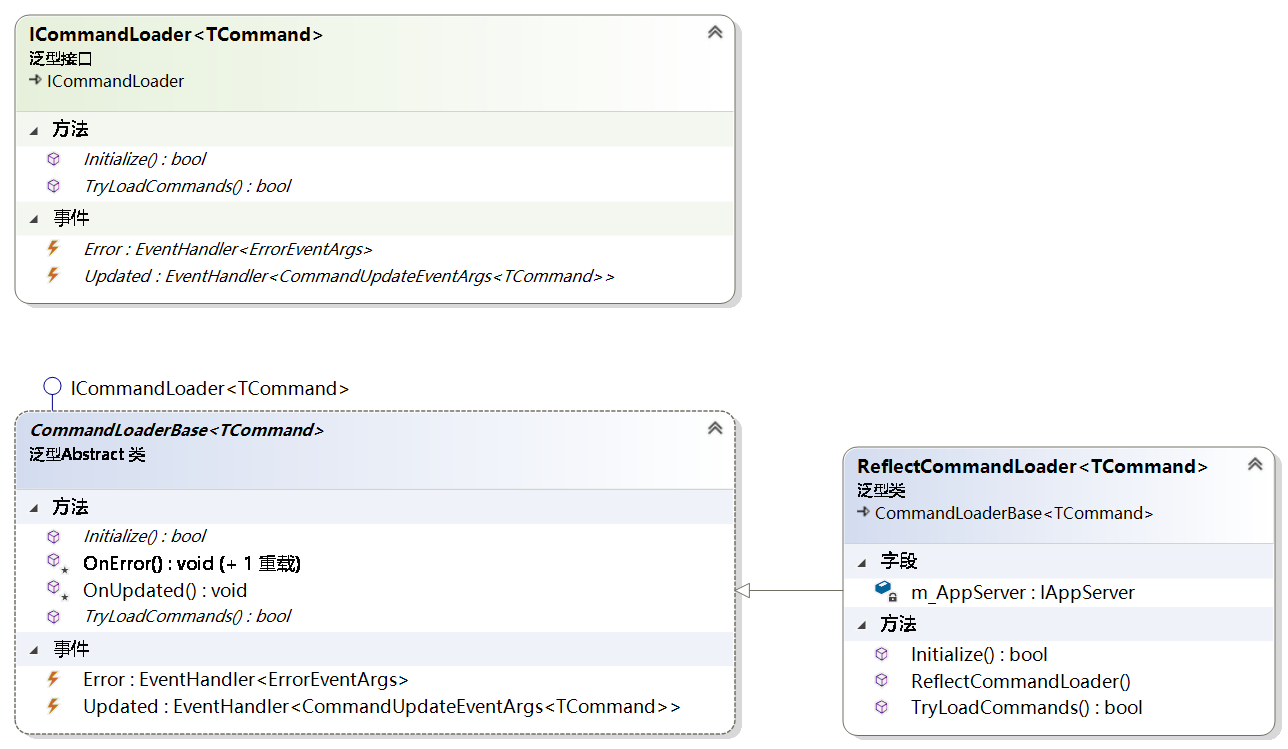
Command Loaders
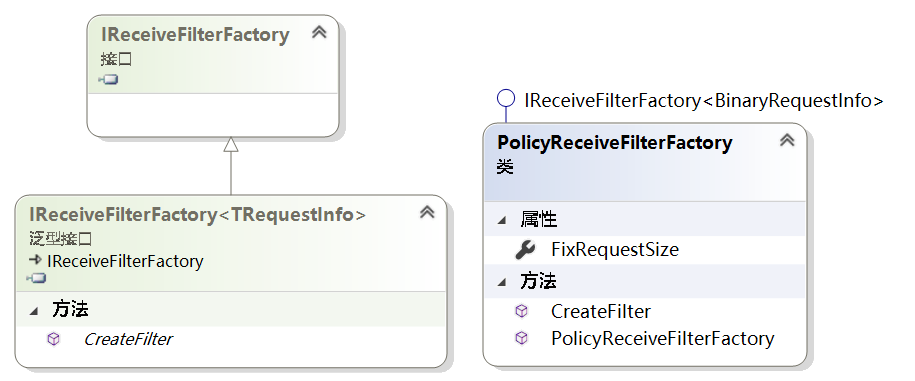
ReceiveFilterFactory
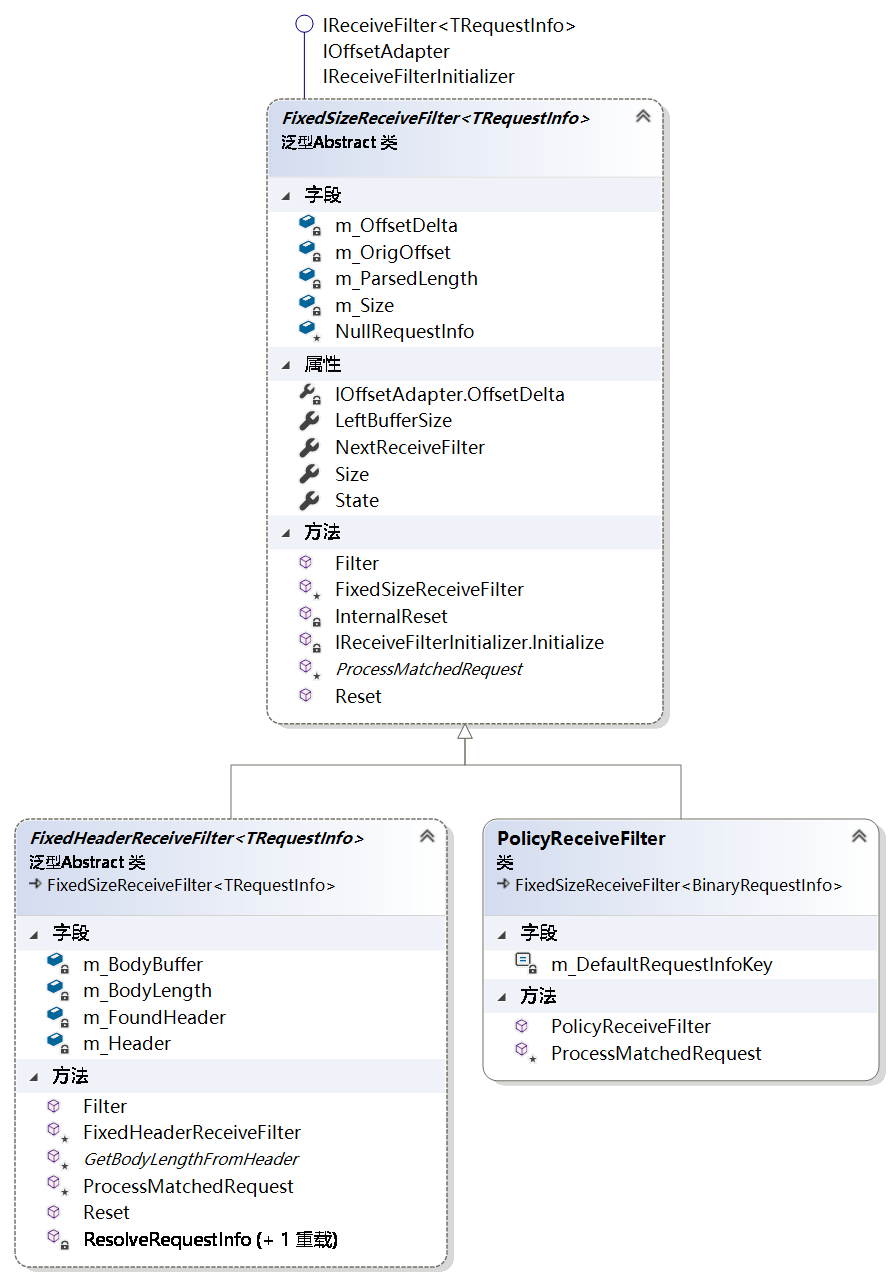
ReceiveFilter
Connection Filters

SocketBase.dll
ISessionBase

AppSession
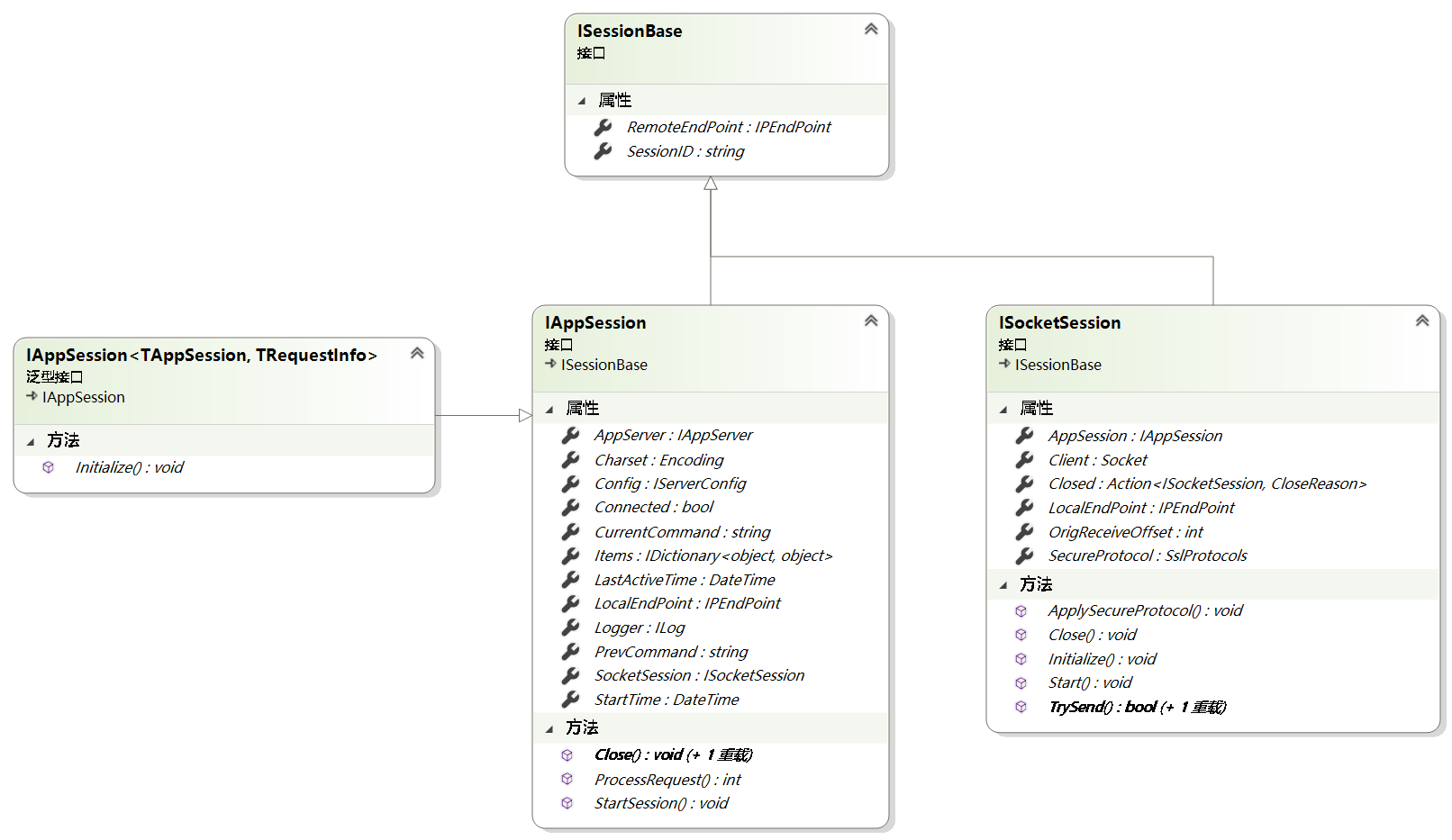

对AppServer和SocketSession的包装
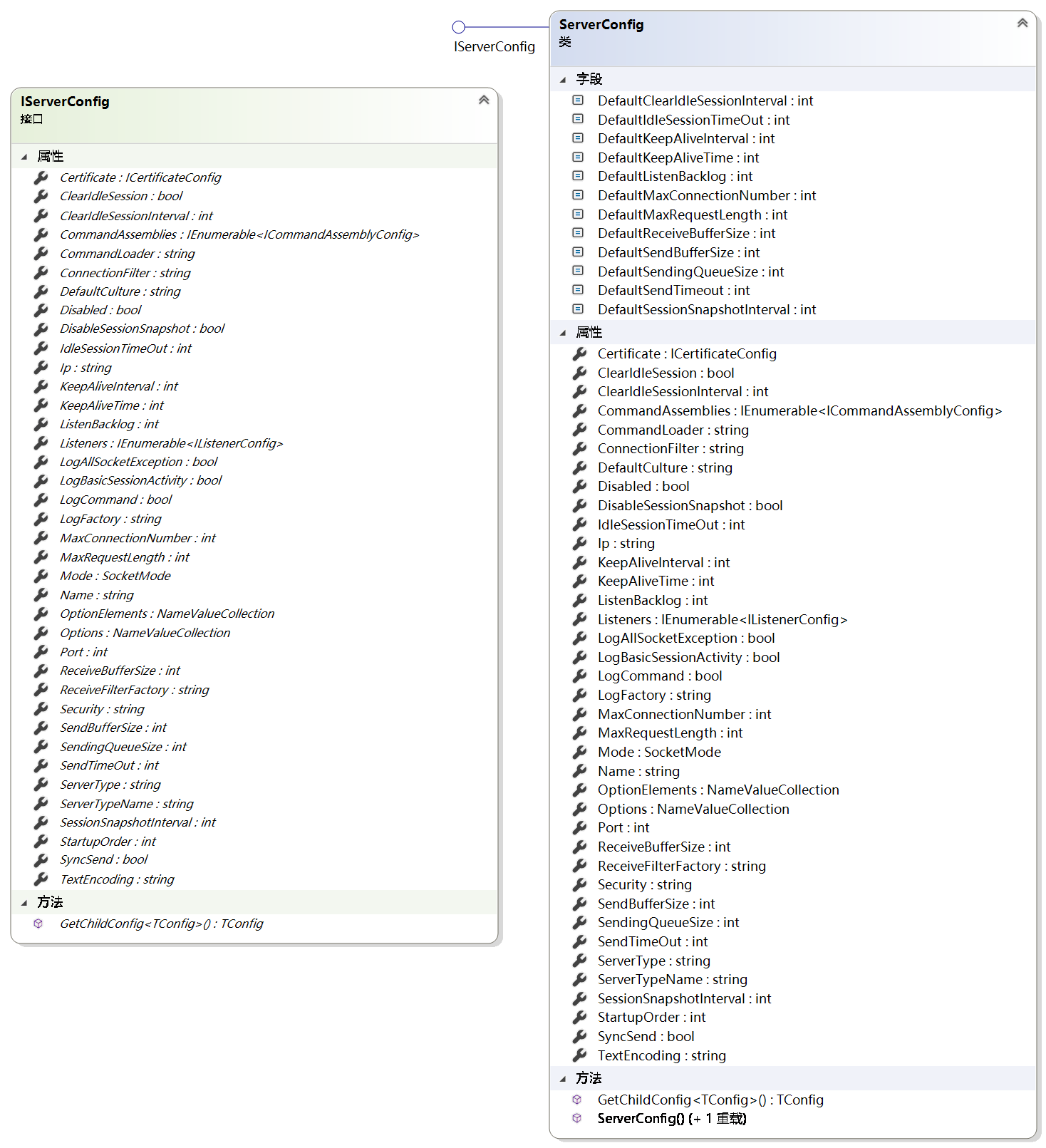
ServerConfig
服务参数配置,在serverbase基类SetUp中创建
/// <summary>
/// Setups with the specified ip and port.
/// </summary>
/// <param name="ip">The ip.</param>
/// <param name="port">The port.</param>
/// <param name="socketServerFactory">The socket server factory.</param>
/// <param name="receiveFilterFactory">The Receive filter factory.</param>
/// <param name="logFactory">The log factory.</param>
/// <param name="connectionFilters">The connection filters.</param>
/// <param name="commandLoaders">The command loaders.</param>
/// <returns>return setup result</returns>
public bool Setup(string ip, int port, ISocketServerFactory socketServerFactory = null, IReceiveFilterFactory<TRequestInfo> receiveFilterFactory = null, ILogFactory logFactory = null, IEnumerable<IConnectionFilter> connectionFilters = null, IEnumerable<ICommandLoader<ICommand<TAppSession, TRequestInfo>>> commandLoaders = null)
{
    return Setup(new ServerConfig
                    {
                        Ip = ip,
                        Port = port
                    },
                    socketServerFactory,
                    receiveFilterFactory,
                    logFactory,
                    connectionFilters,
                    commandLoaders);
}
RootConfig

- MaxWorkingThreads:最大工作线程数量
- MaxCompletionPortThreads:线程池中异步 I/O 线程的最大数目。
- PerformanceDataCollectInterval:性能数据收集间隔
RequestInfo
类图
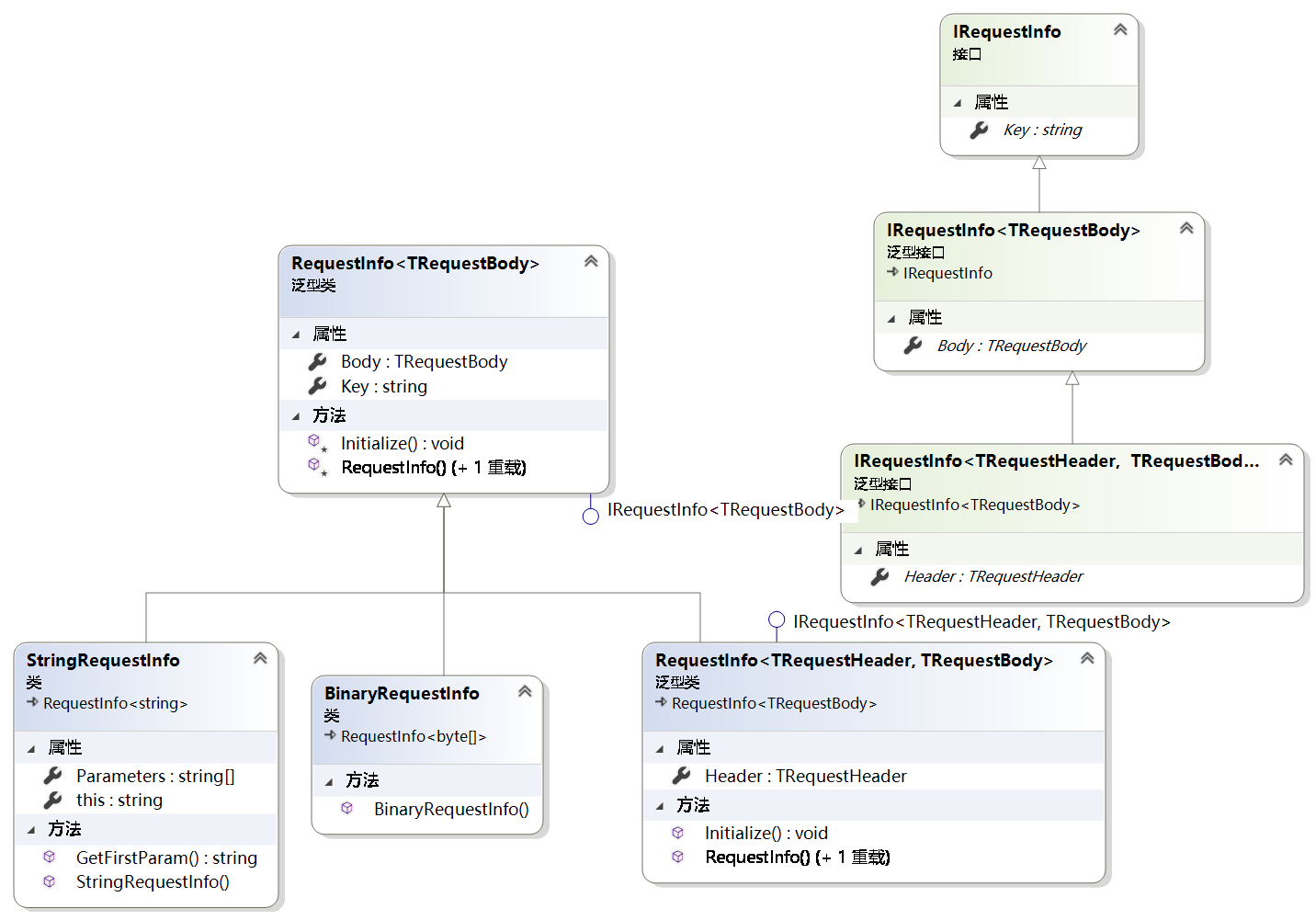
- 基类是RequestInfo,提供了两个方法Key和Body,Body是模板,由子类确定具体类型
- StringRequestInfo,在父类基础上提供了一个参数,String[] Parameters
- RequestInfo<TRequestHeader, TRequestBody>:提供了请求头和请求体类型的模板。
- 三个接口,key属性,body属性,heater属性
ListenerInfo

监听节点
ListenerConfig

ReflectCommandLoader

- ReflectCommandLoader:通过TryLoadCommands方法反射出程序集中的所有命令
/// <summary>
/// Tries to load commands.
/// </summary>
/// <param name="commands">The commands.</param>
/// <returns></returns>
public override bool TryLoadCommands(out IEnumerable<TCommand> commands)
{
    commands = null;
    var commandAssemblies = new List<Assembly>();
    if (m_AppServer.GetType().Assembly != this.GetType().Assembly)
        commandAssemblies.Add(m_AppServer.GetType().Assembly);
    string commandAssembly = m_AppServer.Config.Options.GetValue("commandAssembly");
    if (!string.IsNullOrEmpty(commandAssembly))
    {
        OnError("The configuration attribute 'commandAssembly' is not in used, please try to use the child node 'commandAssemblies' instead!");
        return false;
    }
    if (m_AppServer.Config.CommandAssemblies != null && m_AppServer.Config.CommandAssemblies.Any())
    {
        try
        {
            var definedAssemblies = AssemblyUtil.GetAssembliesFromStrings(m_AppServer.Config.CommandAssemblies.Select(a => a.Assembly).ToArray());

            if (definedAssemblies.Any())
                commandAssemblies.AddRange(definedAssemblies);
        }
        catch (Exception e)
        {
            OnError(new Exception("Failed to load defined command assemblies!", e));
            return false;
        }
    }
    if (!commandAssemblies.Any())
    {
        commandAssemblies.Add(Assembly.GetEntryAssembly());
    }
    var outputCommands = new List<TCommand>();
    foreach (var assembly in commandAssemblies)
    {
        try
        {
            outputCommands.AddRange(assembly.GetImplementedObjectsByInterface<TCommand>());
        }
        catch (Exception exc)
        {
            OnError(new Exception(string.Format("Failed to get commands from the assembly {0}!", assembly.FullName), exc));
            return false;
        }
    }
    commands = outputCommands;
    return true;
}
}
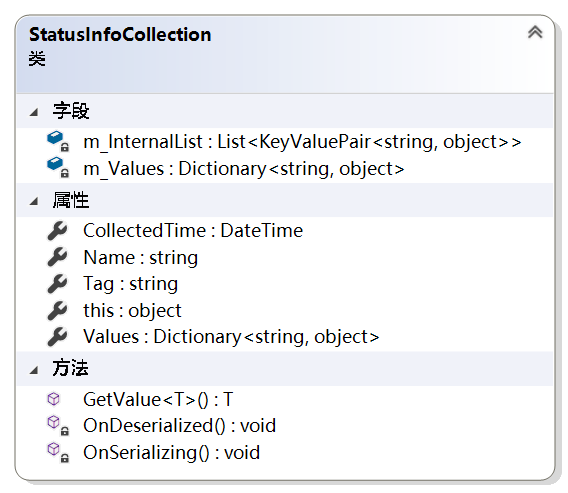
StatusInfoCollection
AppServerBase
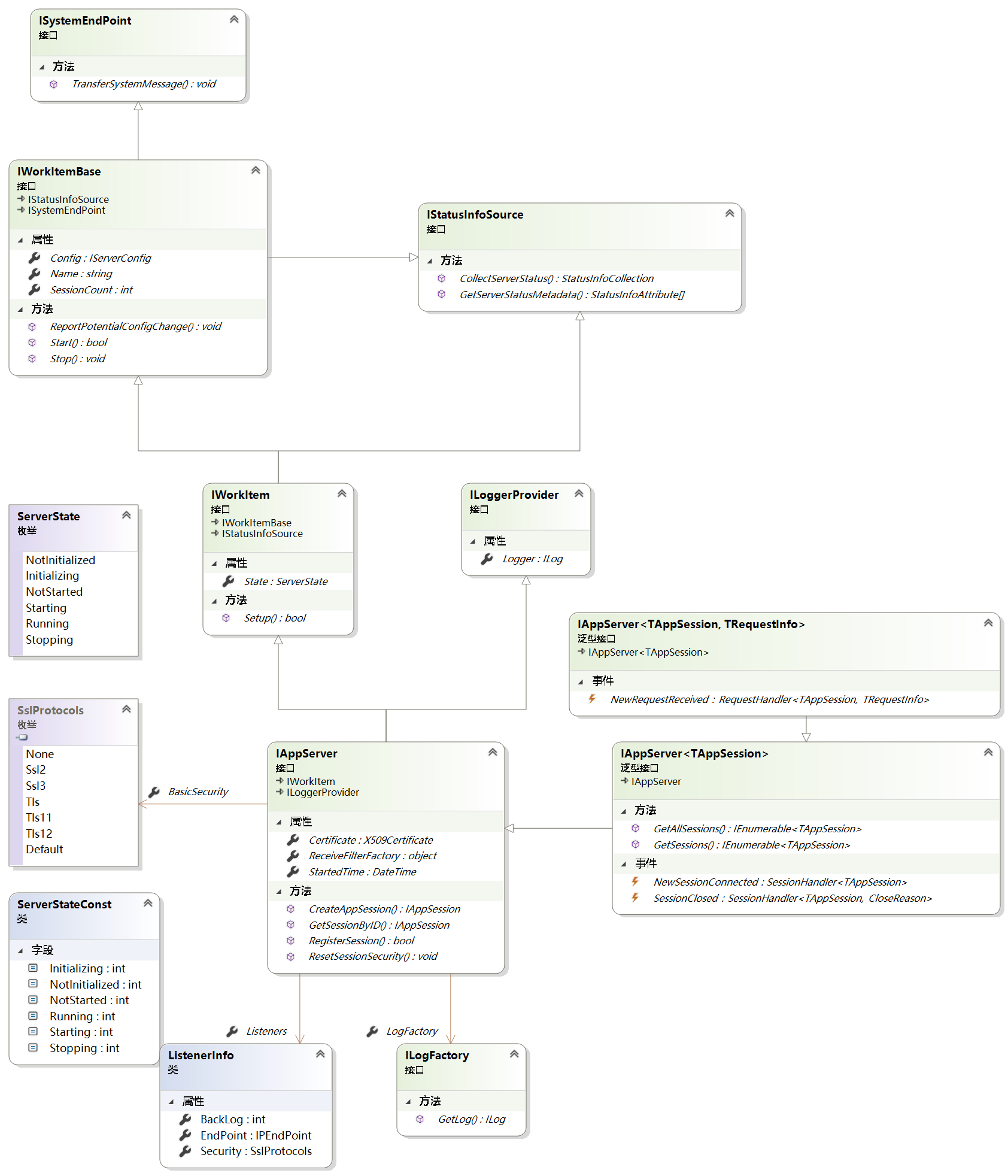

AppSeverBase<TAppSession,TRequestInfo>
m_CommandContainer:命令容器
m_CommandLoaders
m_ConnectionFilters
m_GlobalCommandFilters
m_Listeners
m_SocketServerFactory:在SetupBas
Facility.dll
PolicyReceiveFilterFactory
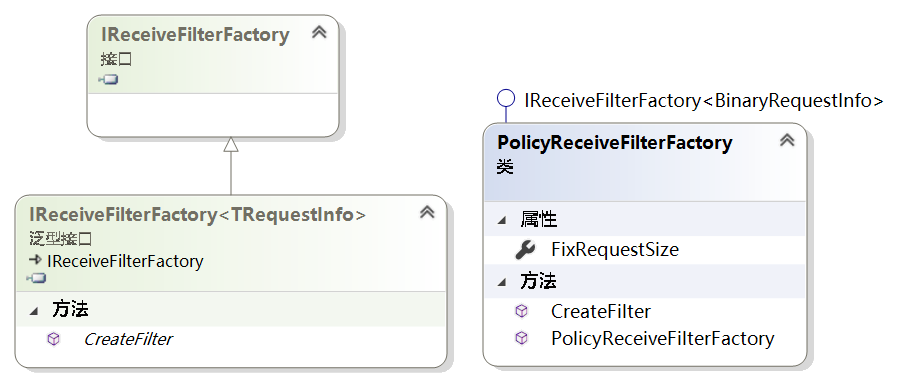
PolicyRecieveFilter

Protocol
ReceiveFilterBase
类图

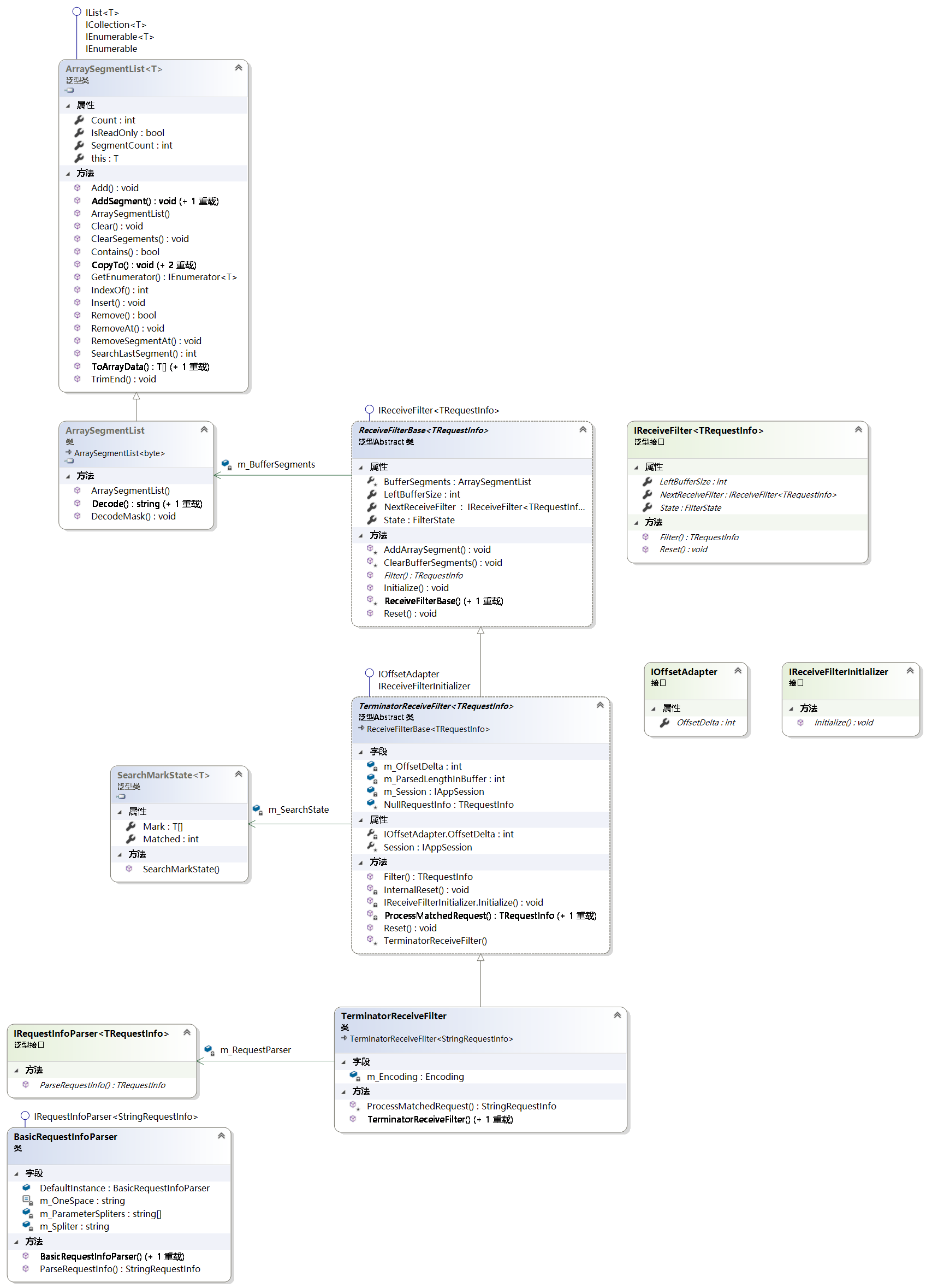

- 在SuperSocket.SocketBase.Protocol程序集中
- IReceiveFilter<TRequestInfo>接口,接收解析接口
- Filter方法,解析会话请求的信息,参数包括,读取缓冲,偏移量,长度,是否copy,没有被解析的长度
- LeftBufferSize属性:空余的缓冲区长度
- NextReceiveFilter属性,下一个接收解析器
- Reset方法,恢复初始化
- State:解析器状态,正常和错误状态
- ArraySegmentEx<T>数段类
- T为数组模板
- Array数组,count:数量,Offset偏移量,From从,To到
- ArraySegmentList<T>数段列表
- 实现了一个数组段列表
- m_PrevSegment:当前的数段
- m_PrevSegmentIndex,数段所在的index
- ReceiveFilterBase<TRequestInfo>
- BufferSegments属性
SocketEngine.dll
PerformanceMonitor

SocketSession

在初始化里对AppSession产生依赖,同时维护Socket和SmartPool(SendingQueue[]),因为维护着socket所以发送接收数据都是通过这个类。
- 设置状态:AddStateFlag()TryAddStateFlag()RemoveStateFlag(),AddStateFlag:自旋设置m_State状态,线程安全的
- m_Client:Socket
- SessionID:new guid
- LocalEndPoint:本地Id端
- RemoteEndPoint:远程终结点
- m_SendingQueuePool:实际是SmartPool类的实例,该实例维护者sendingQueue数组
- m_SendingQueue:从SmarlPool中获取一个SendingQueue实例。
方法
Initialize()方法:
- 初始化m_SendingQueuePool和m_SendingQueue
TrySend()方法:参数:IList<ArraySegment<byte>> segments:将segments压入sendingqueue队列并调用StartSend最终是调用SendAsync或SendSync,这个是由子类实现。
AsyncSocketSession
在子类中维护SocketAsyncEventArgs
- SocketAsyncProxy:维护着SocketAsyncEventArgs
- m_SocketEventArgSend:发送的SocketAsyncEventArgs实例
在初始化中如果同步发送就使用m_SocketEventArgSend,并OnSendingCompleted方法绑定其Completed事件
在SendAsync()方法中将SendingQueue实例给m_SocketEventArgSend的UserToken属性,并调用m_SocketEventArgSend的SetBuffer和SendAsync方法,发送失败也调用OnSendingCompleted
SocketAsyncProxy中的Completed事件中调用ProcessReceive方法,再调用this.AppSession.ProcessRequest(e.Buffer, e.Offset, e.BytesTransferred, true);方法
AsyncStreamSocketSession
SocketFactory

/// <summary>
/// Creates the socket server.
/// </summary>
/// <typeparam name="TRequestInfo">The type of the request info.</typeparam>
/// <param name="appServer">The app server.</param>
/// <param name="listeners">The listeners.</param>
/// <param name="config">The config.</param>
/// <returns></returns>
public ISocketServer CreateSocketServer<TRequestInfo>(IAppServer appServer, ListenerInfo[] listeners, IServerConfig config)
    where TRequestInfo : IRequestInfo
{
    if (appServer == null)
        throw new ArgumentNullException("appServer");
    if (listeners == null)
        throw new ArgumentNullException("listeners");
    if (config == null)
        throw new ArgumentNullException("config");
    switch(config.Mode)
    {
        case(SocketMode.Tcp):
            return new AsyncSocketServer(appServer, listeners);
        case(SocketMode.Udp):
            return new UdpSocketServer<TRequestInfo>(appServer, listeners);
        default:
            throw new NotSupportedException("Unsupported SocketMode:" + config.Mode);
    }
}
SocketServers

AsyncSocketServer
- 缓存管理器m_BufferManager
- 线程安全的SocketAsyncEventArgsProxy栈
构造函数,父类
public TcpSocketServerBase(IAppServer appServer, ListenerInfo[] listeners)
    : base(appServer, listeners)
{
    var config = appServer.Config;

    uint dummy = 0;
    m_KeepAliveOptionValues = new byte[Marshal.SizeOf(dummy) * 3];
    m_KeepAliveOptionOutValues = new byte[m_KeepAliveOptionValues.Length];
    //whether enable KeepAlive
    BitConverter.GetBytes((uint)1).CopyTo(m_KeepAliveOptionValues, 0);
    //how long will start first keep alive
    BitConverter.GetBytes((uint)(config.KeepAliveTime * 1000)).CopyTo(m_KeepAliveOptionValues, Marshal.SizeOf(dummy));
    //keep alive interval
    BitConverter.GetBytes((uint)(config.KeepAliveInterval * 1000)).CopyTo(m_KeepAliveOptionValues, Marshal.SizeOf(dummy) * 2);

    m_SendTimeOut = config.SendTimeOut;
    m_ReceiveBufferSize = config.ReceiveBufferSize;
    m_SendBufferSize = config.SendBufferSize;
}
public override bool Start()
{
try
{
int bufferSize = AppServer.Config.ReceiveBufferSize;
if (bufferSize <= 0)
bufferSize = 1024 * 4;
m_BufferManager = new BufferManager(bufferSize * AppServer.Config.MaxConnectionNumber, bufferSize);
try
{
m_BufferManager.InitBuffer();
}
catch (Exception e)
{
AppServer.Logger.Error("Failed to allocate buffer for async socket communication, may because there is no enough memory, please decrease maxConnectionNumber in configuration!", e);
return false;
}
// preallocate pool of SocketAsyncEventArgs objects
SocketAsyncEventArgs socketEventArg;
var socketArgsProxyList = new List<SocketAsyncEventArgsProxy>(AppServer.Config.MaxConnectionNumber);
for (int i = 0; i < AppServer.Config.MaxConnectionNumber; i++)
{
//Pre-allocate a set of reusable SocketAsyncEventArgs
socketEventArg = new SocketAsyncEventArgs();
m_BufferManager.SetBuffer(socketEventArg);
socketArgsProxyList.Add(new SocketAsyncEventArgsProxy(socketEventArg));
}
m_ReadWritePool = new ConcurrentStack<SocketAsyncEventArgsProxy>(socketArgsProxyList);
if (!base.Start())
return false;
IsRunning = true;
return true;
}
catch (Exception e)
{
AppServer.Logger.Error(e);
return false;
}
}SocketAsyncEventArgsProxy
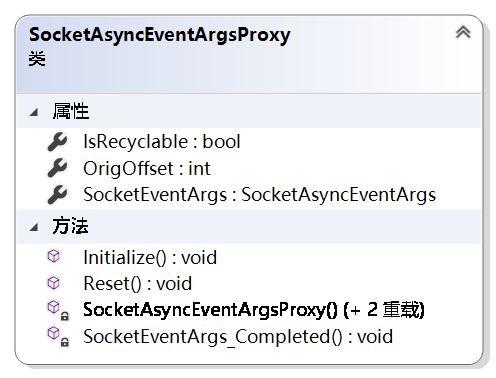
SocketAsyncEventArgs的代理
维护着一个SocketAsyncEventArgs对象,并订阅了该对象的Completed事件(异步完成事件)
IsRecyclable:是否可以循环使用
OrigOffset:原始偏移量
每当异步完成的时候调用SocketAsyncEventArgs实例中的UserToken属性,该属性实际上保存着SocketSession实例,并调用SocketSession的ProcessReceive()和AsyncRun()方法;socketSession.AsyncRun(() => socketSession.ProcessReceive(e));
UserToken属性是在SocketAsyncEventArgsProxy的初始化方法中定义的
public void Initialize(IAsyncSocketSession socketSession)
{
    SocketEventArgs.UserToken = socketSession;
}
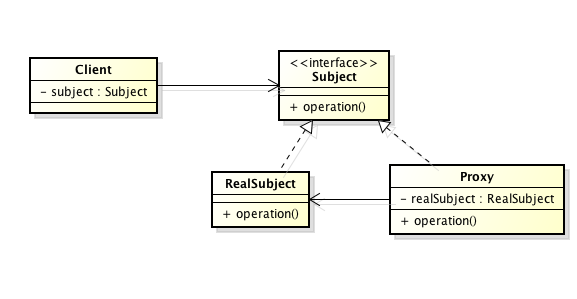
代理模式
BootstrapFactory

DefaultBootStrap

引导配置文件并通过配置实例化各个server和factory,在CreateWorkItemInstance方法通过Activator.CreateInstance(serviceType)实例化
ConfigurationWatcher

SocketListenerBase
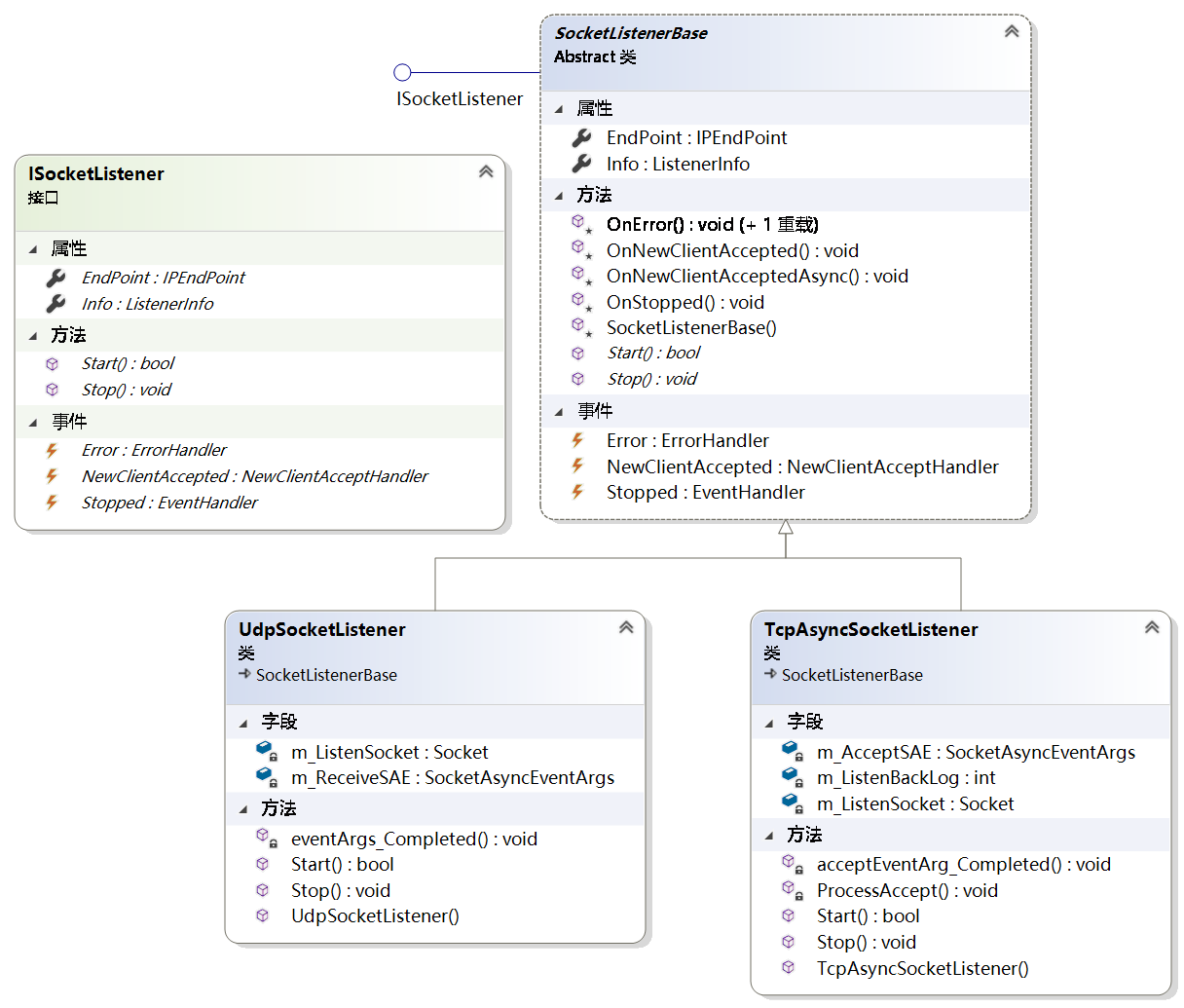
TcpAsyncSocketListener
监听类,由三个事件:监听错误,监听停止,新的客户端连接
m_ListrnSocket:监听Socket
WorkItemFactoryInfoLoader

配置文件载入 LoadResult,载入配置的connectionFilter,logfactory,commandloaderfactory,将appserver转化成IworkItem接口,
Common.dll
BufferManager
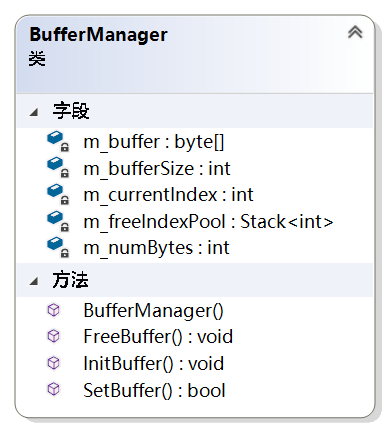
此类创建一个大缓冲区,该缓冲区可以分配给每个套接字I / O操作使用,并分配给SocketAsyncEventArgs对象。 这使得bufffer可以轻松地重用,并且可以防止堆内存碎片化。
BufferManager类上公开的操作不是线程安全的。我觉得这个类不需要线程安全,因为每个socket获得数据基本不会并发执行。
- m_buffer:所有的字节缓存
- m_bufferSize:单个片段的缓存大小
- m_currentIndex:当前字节在总缓存中的索引
- m_freeIndexPool:空闲索引池
- m_numBytes:缓存片段的数目
主要提供两个方法:一个是SetBuffer和FreeBuffer
SetBuffer:
- 检查空闲索引栈中是否有值,有值就直接使用空闲索引栈中的值,并将其值从栈中推出,
- 如果没有空闲栈的值就先检查剩余的缓存是否有一个片段大小,有的化就设置并改变m_currentIndex索引,没有返回false
FreeBuffer:
- 将当前索引添加到空闲索引栈中,并释放SocketAsyncEventArgs中用的缓存片段。
ArraySegmentList
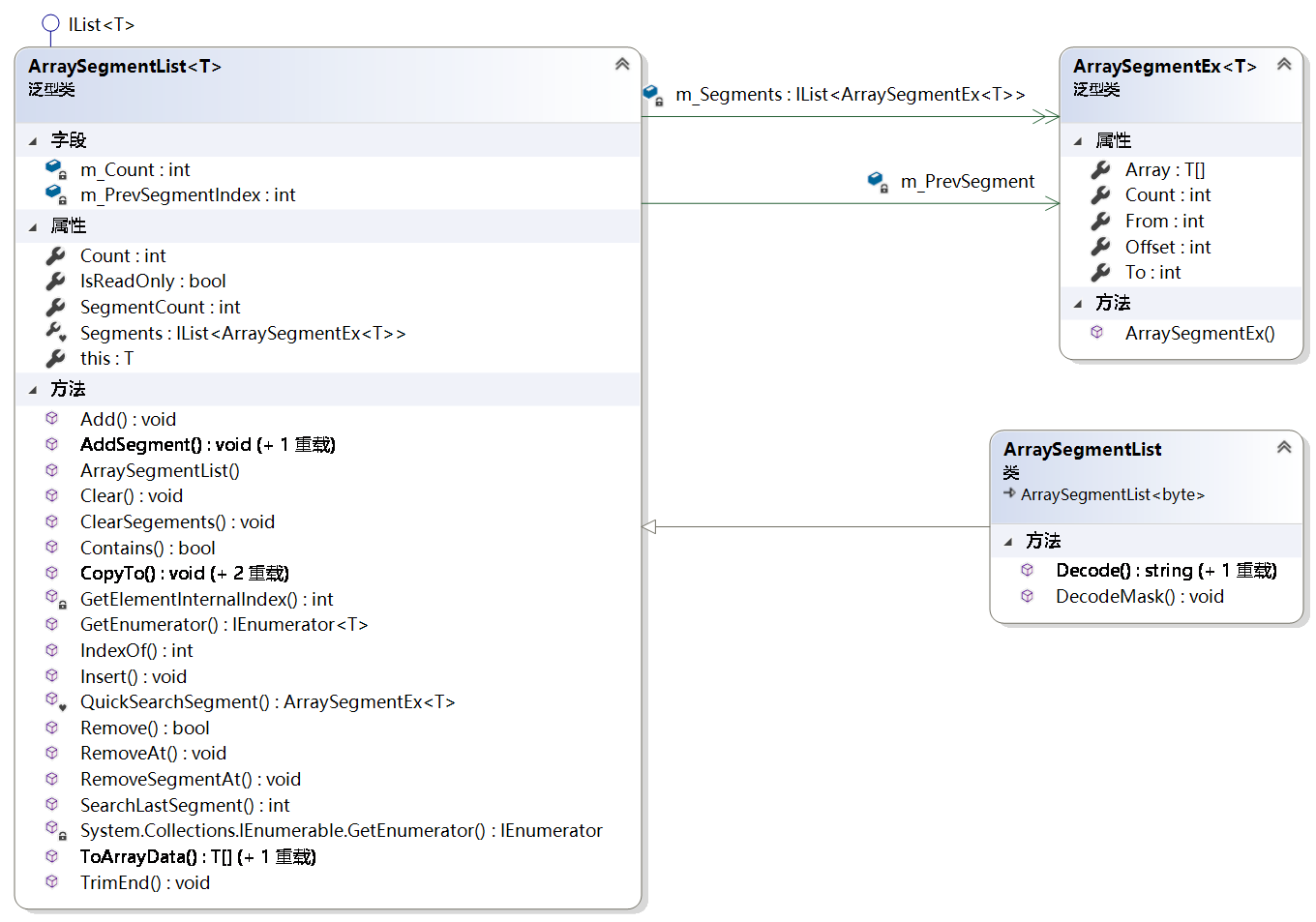
方法:
IndexOf:T在所有缓存中的索引
ArraySegmentEx
- 数组,是保存着所有缓存,T[]
- 偏移,该片段在缓存中的位置
- 数量,该片段的长度
SendingQueue
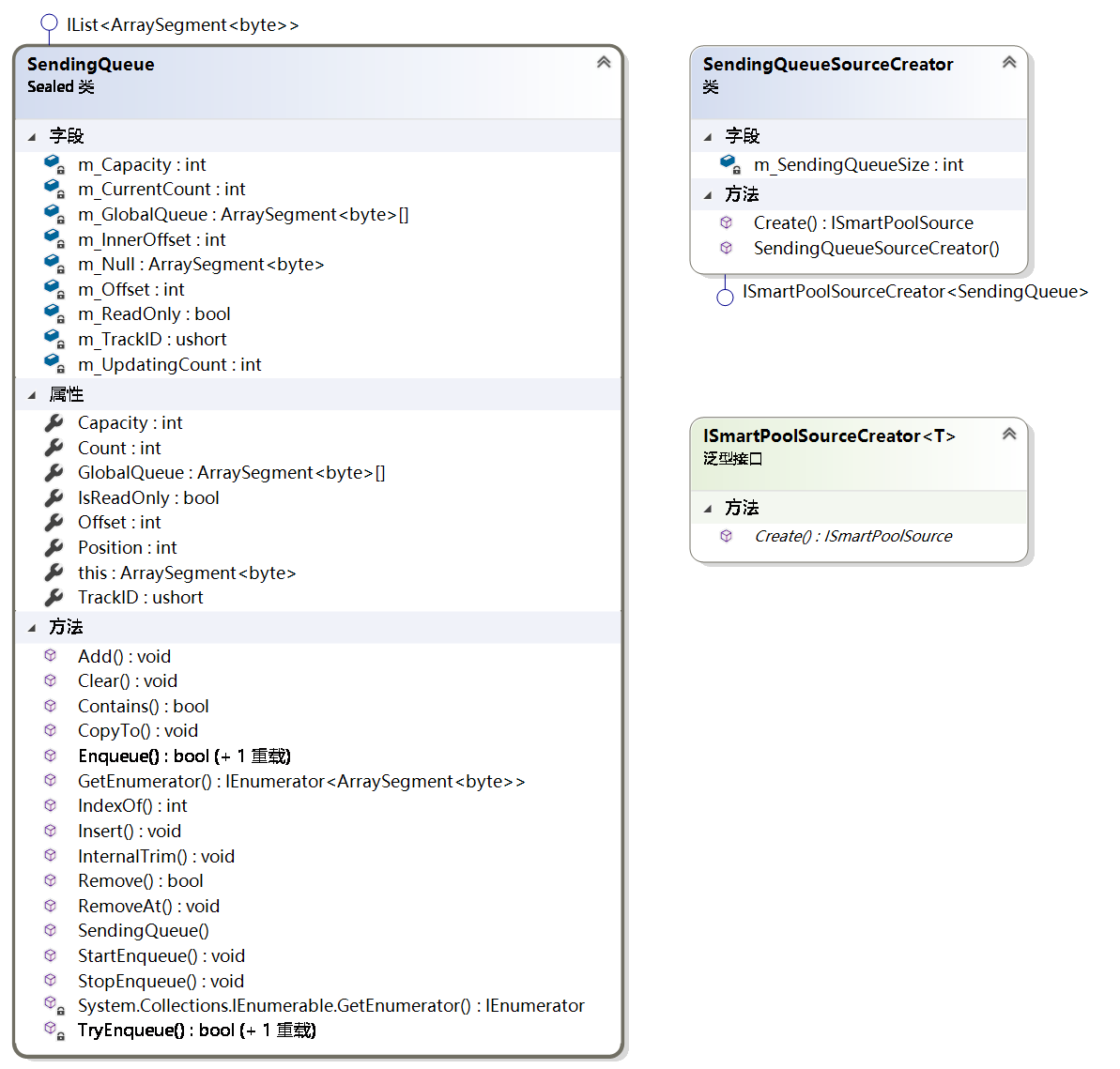
维护ArraySegment<byte>[] globalQueue, globalQueue中包含着所有所有缓存
入栈,出战,开始入栈,开始出栈。
所有的发送队列内存片组成一个大的arraysegment,由SendingQueueSourceCreator创建,并由SmartPool维护
SendingQueueSourceCreator
实际就是SmartPoolSourceCreator,发送队列创建者,默认有5个发送队列,其实每个连接一个发送队列,这边的所有sendingQueue组数是由SmartPool维护的
m_SendingQueueSize:发送队列大小,默认为5
/// <summary>
/// Creates the specified size.
/// </summary>
/// <param name="size">The size.</param>
/// <param name="poolItems">The pool items.</param>
/// <returns></returns>
public ISmartPoolSource Create(int size, out SendingQueue[] poolItems)
{
    var source = new ArraySegment<byte>[size * m_SendingQueueSize];//256*5
    poolItems = new SendingQueue[size];//size=256
    for (var i = 0; i < size; i++)
    {
        poolItems[i] = new SendingQueue(source, i * m_SendingQueueSize, m_SendingQueueSize);//SendingQueue中的source是所有的队列缓存,发送队列偏移量和发送队列容量
    }
    return new SmartPoolSource(source, size);
}
SmartPool

其中维护了一个T(实际是SendingQueue)线程安全栈(m_GlobalStack)。由此看出SmartPool就是SendingQueue的池
m_MinPoolSize:Math.Max(config.MaxConnectionNumber / 6, 256)
m_MaxPoolSize:Math.Max(config.MaxConnectionNumber * 2, 256)
m_SourceCreator:new SendingQueueSourceCreator(config.SendingQueueSize)
m_ItemsSource:保存着SmartPoolSource[]对象,该对象实际上是所有的sendingqueue缓存。
m_GlobalStack:保存着单个SendingQueuep对象的数组
Initialize():初始化函数,初始化上面的变量
SmartPoolSource
维护所有的发送队列缓存,并保存sendingQueue的个数
Source:是object类型,实际上是ArraySegment<byte>[],实际上是所有的sendingqueue的缓存,大小为size*sendingqueuesize=256*5,
Count:为默认值5
Other.dll
SocketAsyncEventArgs 类
表示异步套接字操作。
设置IP和Port调用流程
- 创建ServerConfig实例,RootConfig实例
- 设置m_State状态,线程安全的,通过Interlocked.CompareExchange方法设置
- 在setbasic中设置RootConfig,m_Name,Config,设置currentculture,设置线程池参数,设置m_socketfactory,设置textencoding,
- 设置logfactory
- 在setMedium中设置ReceiveFilterFactory,m_ConnectionFilters,m_CommandLoaders(add ReflectCommandLoader)
- 在SetupAdvanced中设置BaseSecurity和Certificate,设置listners(ListenerInfo) 设置CommandFilterAttribute,遍历m_CommandLoaders,订阅Error,Updated事件,调用Initialize方法,通过TryLoadCommands方法获取命令集合commands,遍历命令集合添加命令到discoveredCommands集合中
- 遍历discoveredCommands集合,将其添加到命令容器 m_CommandContainer中,使用Interlocked.Exchange方法保证线程安全
- 在SetupFinal中设置ReceiveFilterFactory=new CommandLineReceiveFilterFactory(TextEncoding),设置m_ServerStatus,通过socketfactory获得serverfactory。
start调用流程
- 调用SuperSocket.SocketBase.AppServer中start()方法,调用基类AppServerBase的start()方法,该方法中调用socketserver的start方法
- 在socketserver的start方法中设置BufferManager,创建SocketAsyncEventArg,并通过buffermanager设置其buffer,并创建SocketAsyncEventArgProxys, SocketAsyncEventArgProxys集合赋值给m_ReadWritePool。调用SocketServer基类中的start
- 在socketserver基类的start中创建SendingQueuePool并初始化,实际是初始化队列池中的sendingqueue队列;通过遍历ListenerInfo集合创建TcpAsyncSocketListener监听者,订阅监听者的stop,error,NewClientAccepted事件,并开始监听Listener.Start,也添加到容器中。
- Listener.Start中创建一个监听Listen_socket和new异步套接字SocketAsyncEventArgs,并订阅Compeleted事件,启用socket监听,并调用AcceptAsync方法,异步完成触发compeleted事件,调用ProcessAccept方法,原来的方法异步已经触发重新调用一下AcceptAsync方法,通过函数递归实现while,判定acceptsocket是否正常,触发NewClientAccepted事件,
- 事件触发AsyncSocketServer 类中的ProcessNewClient方法,从m_ReadWritePool池中取一个空闲的SocketAsyncEventArgProxy,并通过代理,socket创建AsyncSocketSession,并通过socketsession创建Appsession,在创建过程中做连接过滤,初始化app'session,通过receivefactory创建receivefilter,同时初始化socketsession,主要是订阅SocketAsyncEventArgProxy中的compeleted事件。调用socketsession的start方法
- 在socketsession中调用startreceive方法,中调用socket.ReceiveAsync方法,当异步完成时调用socketProxy的SocketEventArgs_Completed方法,该方法调用SocketSession的ProcessReceive方法,在该方法中执行过滤FilterRequest,执行命令,再一次调用startReceive方法,如此不停通过异步直接实现接收循环
send调用流程
在订阅了NewRequestReceived事件之后,该事件会有两个参数,一个是appsession,一个是requestinfo,
appsession和socketsession完成,
在appsession的InteralSend函数中对sendtimeout进行限制。
在socketsession中将消息压入消息栈对消息进行校验,最终是通过socket.send和socket.sendasync两个方法将消息发送。
Stop调用流程
先调用stop再调用close
socketserver的stop,释放m_ReadWritePool中所有SocketAsyncEventArgs,所有listener的stop,释放其SocketAsyncEventArgs
socket'session的closed,回收所有sendingqqueue到pool中.
SuperSocket Code解析的更多相关文章
- Sharepoint学习笔记—习题系列--70-576习题解析 -(Q102-Q104)
Question 102 You are designing a Windows application that accesses information stored on a ShareP ...
- underscore源码解析 (转载)
转载出自http://www.cnblogs.com/human/p/3273616.html (function() { // 创建一个全局对象, 在浏览器中表示为window对象, 在Node.j ...
- underscore源码解析
(function() { // 创建一个全局对象, 在浏览器中表示为window对象, 在Node.js中表示global对象 var root = this; // 保存"_" ...
- Android:XML简介 & 解析方式对比(DOM、SAX、PULL)
目录 示意图 1. 定义 XML,即 extensible Markup Language ,是一种数据标记语言 & 传输格式 2. 作用 对数据进行标记(结构化数据).存储 & ...
- SuperSocket 介绍
一.总体介绍 SuperSocket 是一个轻量级的可扩展的 Socket 开发框架,由江振宇先生开发. 官方网站:http://www.supersocket.net/ SuperSocket具有如 ...
- ZOJ 3494 BCD Code (AC自己主动机 + 数位DP)
题目链接:BCD Code 解析:n个病毒串.问给定区间上有多少个转换成BCD码后不包括病毒串的数. 很奇妙的题目. . 经典的 AC自己主动机 + 数位DP 的题目. 首先使用AC自己主动机,得到b ...
- Feign整合Ribbon和Hystrix源码解析
在上篇文章Feign自动装配中,我们提到了Feign的自动装配的原理,以及Feign整合Ribbon和Hystrix的核心在类FeignClientFactoryBean中,那么本篇文章就来揭开这个类 ...
- 设计模式学习--Factory Method
What Factory Method:定义一个创建对象的接口,让子类来决定实例化哪一个类.Factory Method使一个类的实例化延迟到其子类. Why Factory Method是一个比較基 ...
- Dynamics365 WebAPI ADFS token 获取
public class CrmAuth { ///<summary> /// Token /// </summary> public string access_token ...
随机推荐
- 【codeforces 764A】Taymyr is calling you
time limit per test1 second memory limit per test256 megabytes inputstandard input outputstandard ou ...
- 解决应用服务器变为集群后的Session问题
2.2.4.2 解决应用服务器变为集群后的Session问题 先来看一下什么是Session. 用户使用网站的服务,基本上需要浏览器与Web 服务器的多次交互.HTTP 协议本身是无状态的,需要基于H ...
- 服务端CURL请求
服务端与服务端之间,也存在接口编程. 比如我们网站服务端,需要发送短信.发送邮件.查询快递等,都需要调用第三方平台的接口. 1.php中发送请求 ①file_get_contents函数 :传递完整的 ...
- UVA - 10480 Sabotage (Dinic)
The regime of a small but wealthy dictatorship has been abruptly overthrown by an unexpected rebel-l ...
- 【42.49%】【hdu 1542】Atlantis(线段树扫描线简析)
Time Limit: 2000/1000 MS (Java/Others) Memory Limit: 65536/32768 K (Java/Others) Total Submission(s) ...
- 【Docker】安装MySQL彻底解决3306端口占用问题
1.问题闪现: 初次up mysql报3306端口被占用 yunduo@YunDuo:~/Work/Learning/Docker/docker_compose$ docker-compose up ...
- shelve模块、re模块
在模糊匹配时使用 1
- [梁山好汉说IT] 边缘计算在梁山的应用
[梁山好汉说IT] 边缘计算在梁山的应用 0x00 摘要 梁山泊下四个酒店就是边缘计算在梁山的应用,以朱贵南山酒店为例能看出其"计算实时/省流量/具备智能"等各种优点. 0x01 ...
- 使用SparkSql进行表的分析与统计
# 背景 我们的数据挖掘平台对数据统计有比较迫切的需求,而Spark本身对数据统计已经做了一些工作,希望梳理一下Spark已经支持的数据统计功能,后期再进行扩展. # 准备数据 在参考文献6中下载 ...
- 从头学pytorch(十二):模型保存和加载
模型读取和存储 总结下来,就是几个函数 torch.load()/torch.save() 通过python的pickle完成序列化与反序列化.完成内存<-->磁盘转换. Module.s ...