
selenium+testNG自动化测试框架搭建
自动化测试框架搭建
1 Java环境的搭建
1.1访问oracle的官网下载最新版本的jdk
http://www.oracle.com/technetwork/java/javase/downloads/index-jsp-138363.html
进去后选择电脑配置对应版本的JDK版本。
下载成功以后直接下一步,安装默认的路径。这里注意:安装的过程中会提示一个JRE的安装路径,需要注意一下,一个是运行环境(JRE),一个是编译的环境,JDK中默认会有JRE。
1.2配置环境变量
打开电脑中的系统属性中的高级系统配置中的环境变量。系统变量中新建一个变量名称为Java_Home,存放的路径为jdk的安装目录的路径:C:\Program Files\Java\jdk-version
新建变量Path:%JAVA_HOME%\bin;%JAVA_HOME%\jre\bin;
新建变量Classpath:.;%JAVA_HOME%\lib\dt.jar;%JAVA_HOME%\lib\tools.jar;
验证是否安装成功,windows cmd:输入java -versions,回车,出现jdk版本信息,则证明配置成功。
2安装Java编辑工具eclipse
2.1访问eclipse官网下载Java编辑工具eclipse
下载地址:http://www.eclipse.org/downloads/
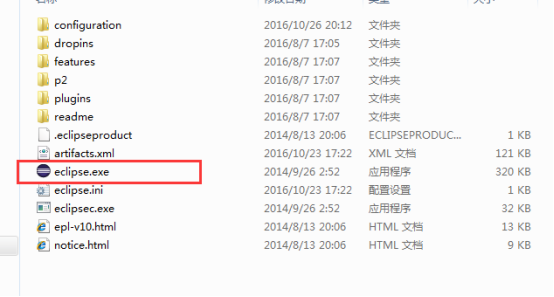
下载后解压到指定目录,点击启动程序文件即可打开eclipse如下图
|
|
2.2 eclipse中安装testNG插件
在线安装:
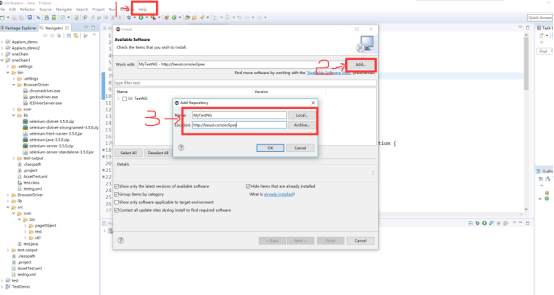
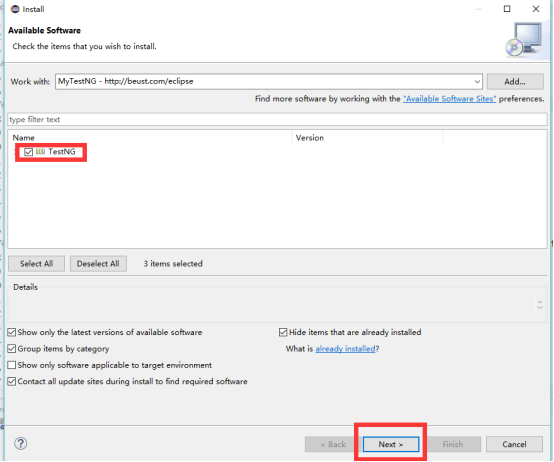
打开eclipse-->Help-->Install New Software-->Add-->Name和Location中输入MyTestNG和http://beust.com/eclipse-->出现TestNG勾选-->Next-->安装成功后重启eclipse
|
|
|
|
离线安装:
1.下载附件(eclipse-testng离线包.zip),并解压;
2.将解压后的文件..\eclipse-testng离线包\features\目录下的文件夹org.testng.eclipse_6.8.6.20130607_0745放到eclipse--》features目录下;
3.将解压后的文件..\eclipse-testng离线包\org.testng.eclipse_6.8.6.20130607_0745文件夹放到eclipse--》plugins目录下;
4.重启eclipse.
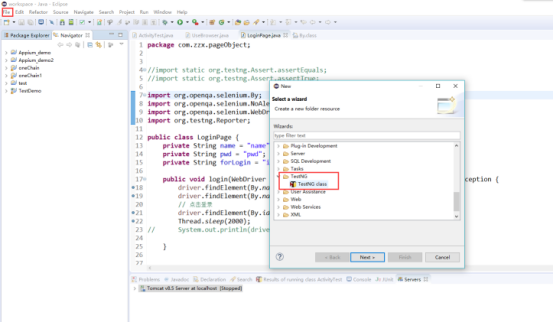
验证成功安装testNG的方法:file-->new-->other-->TestNg
|
|
3 Eclipse执行Selenium的Java实例
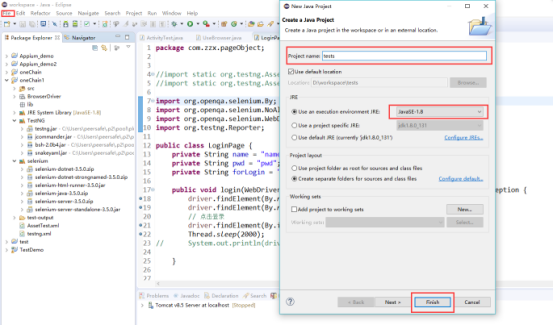
3.1新建java工程
File-->new-->other-->Java Project-->输入工程名,选择Java运行环境的版本,点击Finish
|
|
3.2导入Selenium相关的包
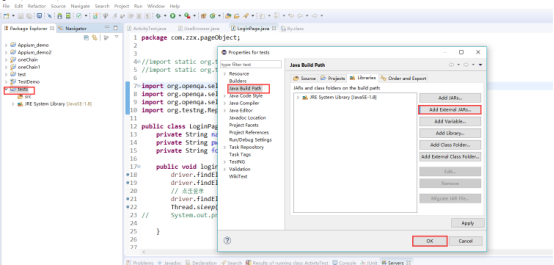
在tests上右键,Properties-->Java Build Path-->Libraries-->Add External Jars-->选择下载好的Selenium相关包全部导入-->点击OK
|
|
|
|
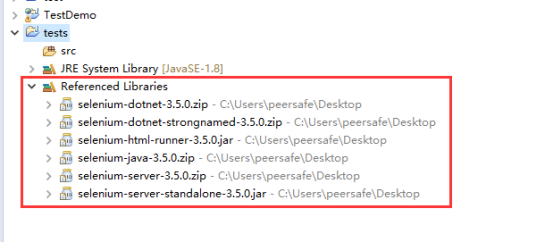
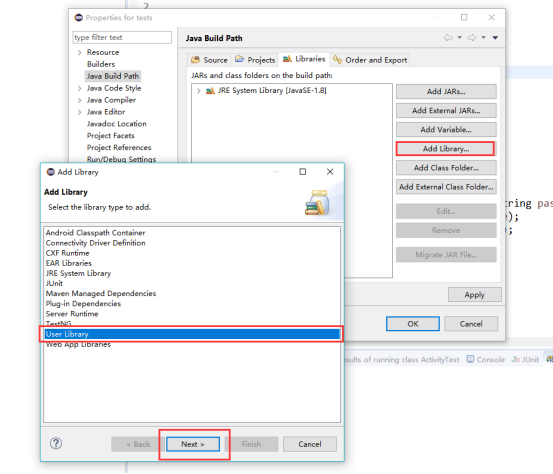
以上方法导入若新建一个工程就要重新导入所有的jar包,现我们用另一种方法解决这种重复导入jar包的麻烦。同样在tests上右键,Properties-->Java Build Path-->Libraries-->Add Library -->User Library-->Next-->User Librarys-->New-->输入Library名(selenium Library 方便记)-->OK-->Add External Jars-->选择下载好的Selenium相关包全部导入-->点击OK-->选择刚创建的User Library-->Finish-->OK
|
|
|
|
|
|
|
|
|
|
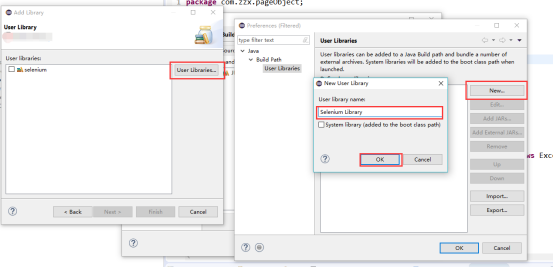
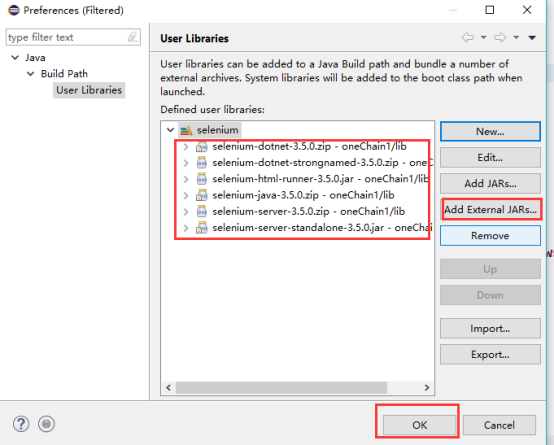
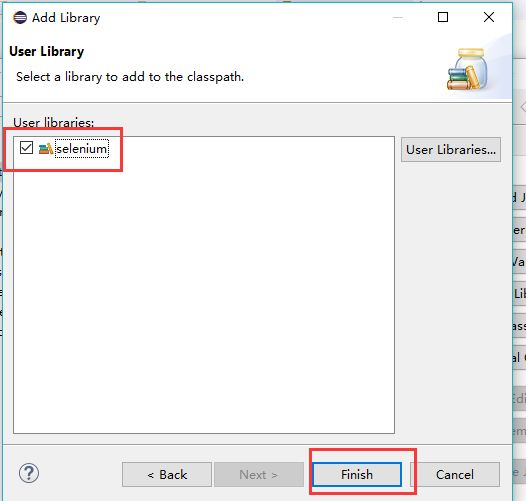
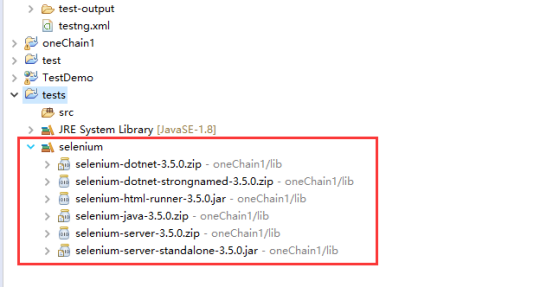
3.3导入testNG库
同样在tests上右键,Properties-->Java Build Path-->Libraries-->Add Library -->TestNG-->Next-->OK
|
|
|
|

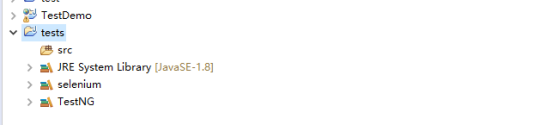
3.4 浏览器驱动
下载ChromeDriver.exe,并拷贝到Chrome安装目录中
|
|
|
|
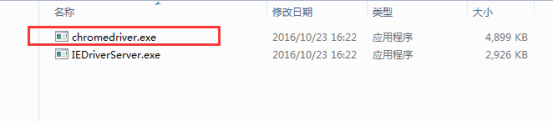
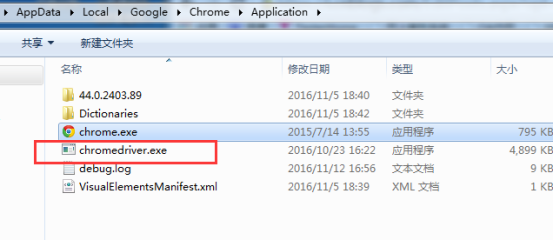
同样方法下载IEDriverServer.exe,并拷贝到IE浏览器的安装目录中,
由于selenium支持火狐浏览器,所以我们可以不用下载其驱动,但为了以防万一,我们还是要安装一下滴!(下载geckodriver.exe,拷贝到火狐的安装目录中)。
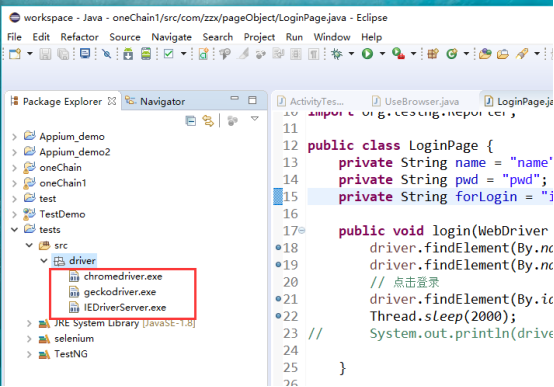
有时候我们要把代码压缩,发送给其他人用的时候,那些驱动就不能使用了,因为没有一起打包压缩,那么我们就可以将这些驱动全部加到项目的文件夹中。
首先,我们在tests项目下的src目录下,新建一个driver目录,将三个浏览器驱动拷贝到driver目录下,这样我们就可以将驱动一起打包压缩交给别人了。
|
|
3.5 编写代码
首先我们在SRC目录下新建几个Package
|
|
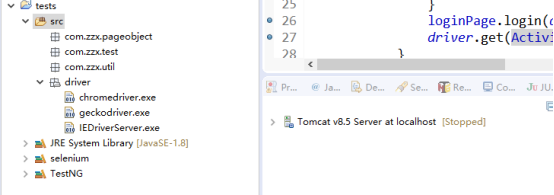
现在我们来说说这些package的作用吧。
Pageobject存放一些页面对象,一个页面一个类,类中存放和这个页面相关的所有方法(该页面的所有相关操作)。
Test存放要测试的类,一个类测试一个页面,类中存放多个测试案例,调用方法,使用数据进行测试的类。
Util 存放公共类代码,如UseBrowser.java,存放chrome,Firefox,IE等浏览器的相关代码。BaseTest.java,存放执行TestSuit前要执行的方法和执行TestSuit后要执行的方法的代码。
|
首先我们在Util包中编写要使用的浏览器的启动代码,一般有三种浏览器是比较常用的。分别是谷歌浏览器、火狐浏览器以及IE浏览器。下面是启动浏览器的相关代码: |
|
UseBrowser类 package com.zzx.util; import java.util.concurrent.TimeUnit; import org.openqa.selenium.WebDriver; import org.openqa.selenium.chrome.ChromeDriver; import org.openqa.selenium.firefox.FirefoxDriver; import org.openqa.selenium.ie.InternetExplorerDriver; public class UseBrowser { public static WebDriver driver; //启动谷歌浏览器 public WebDriver startChrome(String url) throws Exception { try { System.setProperty("webdriver.chrome.driver", "D:\\workspace\\tests\\src\\driver\\chromedriver.exe"); driver = new ChromeDriver(); driver.get(url); System.out.println("成功打开谷歌浏览器!"); // driver.manage().window().maximize(); driver.manage().timeouts().implicitlyWait(10, TimeUnit.SECONDS); } catch (Exception e) { System.out.println("打开谷歌浏览器时出错了"+e); } return driver; } //启动火狐浏览器 public WebDriver startFirefox(String url) throws Exception { try { // 默认支持火狐浏览器,能够正常打开,若不能打开火狐,则把下面的火狐的驱动放开 // System.setProperty("webdriver.firefox.marionette","D:\\workspace\\tests\\src\\driver\\geckodriver.exe"); driver = new FirefoxDriver(); driver.get(url); System.out.println("成功打开火狐浏览器!"); driver.manage().window().maximize(); driver.manage().timeouts().implicitlyWait(10, TimeUnit.SECONDS); Thread.sleep(2000); } catch (Exception e) { System.out.println("打开火狐浏览器时出错了"+e); } return driver; } //启动IE浏览器 public WebDriver startIE(String url) throws Exception { try { System.setProperty("webdriver.ie.driver", "D:\\workspace\\tests\\src\\driver\\IEDriverServer.exe"); driver = new InternetExplorerDriver(); driver.get(url); System.out.println("成功打开IE浏览器!"); driver.manage().window().maximize(); driver.manage().timeouts().implicitlyWait(10, TimeUnit.SECONDS); } catch (Exception e) { System.out.println("打开IE浏览器时出错了"+e); } return driver; } //关闭浏览器 public void tearDownBrowser() throws Exception { try { Thread.sleep(2000); driver.close(); System.out.println("成功关闭浏览器!"); } catch (Exception e) { System.out.println("关闭浏览器时出错了"+e); } } } |
|
在编写完启动浏览器的相关代码后,我们再编写基础类,当有测试类要执行时就要继承这个基础类,继承它的两个方法。这个类的主要功能就是在执行TestSuite之前要先打开相关的浏览器,然后进行相关测试,执行完TestSuite的测试用例之后,我们要关闭浏览器。具体代码如下: |
|
BaseTest类 package com.zzx.util; import org.openqa.selenium.WebDriver; import org.testng.annotations.AfterSuite; import org.testng.annotations.BeforeSuite; public class BaseTest { public String LoginURL = "http://*************"; private static String URL = "http://****************/"; UseBrowser useBrowser = new UseBrowser(); public static WebDriver driver; @BeforeSuite public void start() throws Exception { try { driver = useBrowser.startChrome(URL); // driver = useBrowser.startIE(URL); // driver = useBrowser.startFirefox(URL); } catch (Exception e) { System.out.println(e); } } @AfterSuite public void end() throws Exception { useBrowser.tearDownBrowser(); } } |
|
前期的准备工作算是已经完成了,现在我们要开始做最主要的事情,在pageobject包中新建一个LoginPage类,对页面元素的封装,这里我并没有二次封装对元素的操作。直接调用原生API方法进行元素的操作。要对元素的操作进行二次封装其实很简单,只要自己定义方法,重新封装,然后调用自己定义的方法就可以对元素进行相关的操作了。该页面对象中存放着该页面上要进行测试功能点的方法以及和测试功能点相关的其他辅助方法。具体代码如下: |
|
登录页面相关操作及方法 package com.zzx.pageObject; import org.openqa.selenium.By; import org.openqa.selenium.NoAlertPresentException; import org.openqa.selenium.WebDriver; import org.testng.Reporter; public class LoginPage { private String name = "name"; private String pwd = "pwd"; private String forLogin = "inputbutton"; public void login(WebDriver driver, String username, String password) throws Exception { driver.findElement(By.name(name)).sendKeys(username); driver.findElement(By.name(pwd)).sendKeys(password); // 点击登录 driver.findElement(By.id(forLogin)).click(); Thread.sleep(2000); // System.out.println(driver.getCurrentUrl()); } public boolean isLoginSuccess(WebDriver driver) throws Exception{ boolean flag = false; try { if(driver.findElement(By.id("asset")).isDisplayed()){ flag=true; } } catch (Exception e) { // e.printStackTrace(); // System.out.println(e); } return flag; } public boolean loginStatus(WebDriver driver) throws Exception { if (isAlertPresent(driver)) { Reporter.log(driver.switchTo().alert().getText()); System.out.println(driver.switchTo().alert().getText()); driver.switchTo().alert().accept(); driver.navigate().refresh(); return false; } else if (!(isLoginSuccess(driver))) { Reporter.log("用户名错误!"); System.out.println("用户名错误!"); driver.navigate().refresh(); Thread.sleep(2000); return false; } else { Reporter.log("登录成功!"); System.out.println("登录成功!"); return true; } } public boolean isAlertPresent(WebDriver driver) throws Exception { try { driver.switchTo().alert(); return true; } catch (NoAlertPresentException e) { // e.printStackTrace(); return false; } } public boolean isLoginPage(WebDriver driver) throws Exception { boolean flag = false; try { if (driver.findElement(By.id(forLogin)).getAttribute("value").equals("登录")) { flag = true; return flag; } } catch (Exception e) { // System.out.println(e); return flag; } return flag; } } |
|
写好了测试功能点的代码后,我们就要在test包中编写相关的测试用例的执行方法了,这里我只用了登录的相关测试用例作为例子。 |
|
登录页面相关测试用例 package com.zzx.test; import static org.testng.Assert.assertEquals; import org.testng.annotations.Test; import com.zzx.pageObject.LoginPage; import com.zzx.util.BaseTest; public class LoginTest extends BaseTest{ LoginPage loginPage = new LoginPage(); String LoginURL = "http://oneadmin.peersafe.cn/logout"; /** * 方法名称:loginTest1 * 方法描述: This method is testing the empty username and the right password * The end is Loginfailed ,I will print some error information on the console and * the page still stay on the login page * 创建人:zzx * 创建时间:2017年9月12日 下午5:33:27 * 修改人:zzx * 修改时间:2017年9月12日 下午5:33:27 * 修改备注: * @version 1.0 * @throws Exception maybe some exception will happen */ //空的用户名和正确的密码,登录失败,控制台输出“用户名错误!” @Test(priority=1) public void loginTest1() throws Exception{ if(!loginPage.isLoginPage(driver)){ driver.get(LoginURL); } try { loginPage.login(driver, "","$z58dSHE"); } catch (Exception e) { System.out.println(e); } finally { assertEquals(false, loginPage.loginStatus(driver)); } } /** * 方法名称:loginTest2 * 方法描述: This method is testing the empty username and the error password * The end is Loginfailed ,I will print some error information on the console and * the page still stay on the login page * 创建人:zzx * 创建时间:2017年9月12日 下午5:33:27 * 修改人:zzx * 修改时间:2017年9月12日 下午5:33:27 * 修改备注: * @version 1.0 * @throws Exception maybe some exception will happen */ //空的用户名和错误的密码,登录失败,控制台输出“用户名错误!” @Test(priority=2) public void loginTest2() throws Exception{ if(!loginPage.isLoginPage(driver)){ driver.get(LoginURL); } try { loginPage.login(driver, "","$z58dSH"); } catch (Exception e) { System.out.println(e); } finally { assertEquals(false, loginPage.loginStatus(driver)); } } /** * 方法名称:loginTest3 * 方法描述: This method is testing the right username and the empty password * The end is Loginfailed ,I will print some error information on the console and * the page still stay on the login page * 创建人:zzx * 创建时间:2017年9月12日 下午5:33:27 * 修改人:zzx * 修改时间:2017年9月12日 下午5:33:27 * 修改备注: * @version 1.0 * @throws Exception maybe some exception will happen */ //正确用户名和空的密码,登录失败,控制台输出“密码不正确” @Test(priority=3) public void loginTest3() throws Exception{ if(!loginPage.isLoginPage(driver)){ driver.get(LoginURL); } try { loginPage.login(driver, "admin",""); } catch (Exception e) { System.out.println(e); } finally { assertEquals(false, loginPage.loginStatus(driver)); } } /** * 方法名称:loginTest4 * 方法描述: This method is testing the error username and the empty password * The end is Loginfailed ,I will print some error information on the console and * the page still stay on the login page * 创建人:zzx * 创建时间:2017年9月12日 下午5:33:27 * 修改人:zzx * 修改时间:2017年9月12日 下午5:33:27 * 修改备注: * @version 1.0 * @throws Exception maybe some exception will happen */ //错误用户名和空的密码,登录失败,控制台输出“用户名错误!” @Test(priority=4) public void loginTest4() throws Exception{ if(!loginPage.isLoginPage(driver)){ driver.get(LoginURL); } try { loginPage.login(driver, "admim",""); } catch (Exception e) { System.out.println(e); } finally { assertEquals(false, loginPage.loginStatus(driver)); } } /** * 方法名称:loginTest5 * 方法描述: This method is testing the empty username and the empty password * The end is Loginfailed ,I will print some error information on the console and * the page still stay on the login page * 创建人:zzx * 创建时间:2017年9月12日 下午5:33:27 * 修改人:zzx * 修改时间:2017年9月12日 下午5:33:27 * 修改备注: * @version 1.0 * @throws Exception maybe some exception will happen */ //空的用户名和空的密码,登录失败,控制台输出“用户名错误!” @Test(priority=5) public void loginTest5() throws Exception{ if(!loginPage.isLoginPage(driver)){ driver.get(LoginURL); } try { loginPage.login(driver, "",""); } catch (Exception e) { System.out.println(e); } finally { assertEquals(false, loginPage.loginStatus(driver)); } } /** * 方法名称:loginTest6 * 方法描述: This method is testing the error username and the error password * The end is Loginfailed ,I will print some error information on the console and * the page still stay on the login page * 创建人:zzx * 创建时间:2017年9月12日 下午5:33:27 * 修改人:zzx * 修改时间:2017年9月12日 下午5:33:27 * 修改备注: * @version 1.0 * @throws Exception maybe some exception will happen */ //错误用户名和错误的密码,登录失败,控制台输出“用户名错误!” @Test(priority=6) public void loginTest6() throws Exception{ if(!loginPage.isLoginPage(driver)){ driver.get(LoginURL); } try { loginPage.login(driver, "admim","$z58dSH"); } catch (Exception e) { System.out.println(e); } finally { assertEquals(false, loginPage.loginStatus(driver)); } } /** * 方法名称:loginTest7 * 方法描述: This method is testing the right username and the error password * The end is Loginfailed ,I will print some error information on the console and * the page still stay on the login page * 创建人:zzx * 创建时间:2017年9月12日 下午5:33:27 * 修改人:zzx * 修改时间:2017年9月12日 下午5:33:27 * 修改备注: * @version 1.0 * @throws Exception maybe some exception will happen */ //正确用户名和错误的密码,登录失败,控制台输出“密码不正确” @Test(priority=7) public void loginTest7() throws Exception{ if(!loginPage.isLoginPage(driver)){ driver.get(LoginURL); } try { loginPage.login(driver, "admin","$z58dSH"); } catch (Exception e) { System.out.println(e); } finally { assertEquals(false, loginPage.loginStatus(driver)); } } /** * 方法名称:loginTest8 * 方法描述: This method is testing the error username and the right password * The end is Loginfailed ,I will print some error information on the console and * the page still stay on the login page * 创建人:zzx * 创建时间:2017年9月12日 下午5:33:27 * 修改人:zzx * 修改时间:2017年9月12日 下午5:33:27 * 修改备注: * @version 1.0 * @throws Exception maybe some exception will happen */ //错误用户名和正确密码,登录失败,控制台输出“用户名错误!” @Test(priority=8) public void loginTest8() throws Exception{ if(!loginPage.isLoginPage(driver)){ driver.get(LoginURL); } try { loginPage.login(driver, "admim","$z58dSHE"); } catch (Exception e) { System.out.println(e); } finally { assertEquals(false, loginPage.loginStatus(driver)); } } /** * 方法名称:loginTest9 * 方法描述: This method is testing the right username and the right password * The end is successed ,I will print some successed information on the console and * the page will into the home page * 创建人:zzx * 创建时间:2017年9月12日 下午5:33:27 * 修改人:zzx * 修改时间:2017年9月12日 下午5:33:27 * 修改备注: * @version 1.0 * @throws Exception maybe some exception will happen */ //正确用户名和正确密码,登录成功,控制台输出“登录成功!” @Test(priority=9) public void loginTest9() throws Exception{ if(!loginPage.isLoginPage(driver)){ driver.get(LoginURL); } try { loginPage.login(driver, "admin","$z58dSHE"); } catch (Exception e) { System.out.println(e); } finally { assertEquals(true, loginPage.loginStatus(driver)); } } } |
3.6 代码执行
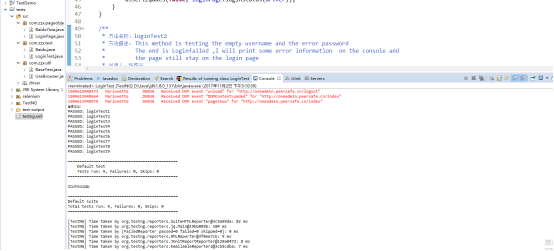
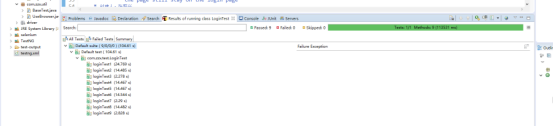
在所有的代码都已经编写完成后,我们就要开始去执行测试用例了,有两种执行方法。
第一种方法:在test包下的某个测试类页面下或在包下的某个类,点击右键出现Run As-->TestNG Test执行该测试类中的所有方法。
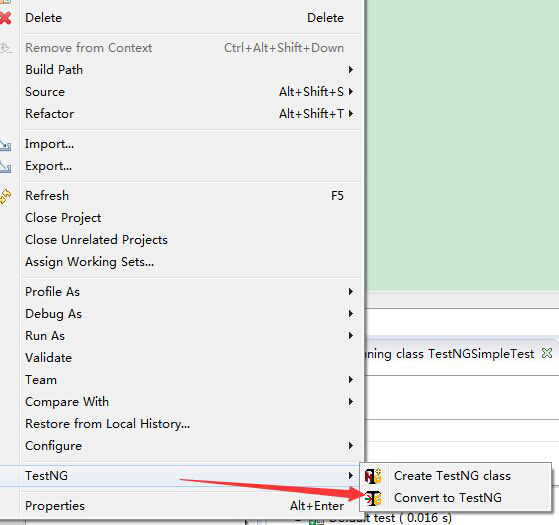
第二种方法:执行某个测试类则在test包下的某个测试类右键---TestNG -----> Convert to TestNG--->Finish,出现testng.xml,右键testng.xml--->Run As--->TestNG Suite执行测试方法,若要执行整个项目的所有测试方法,则项目右键--->TestNG--->Convert to TestNG--->Finish,出现testng.xml,右键testng.xml--->Run As--->TestNG Suite执行项目的所有测试方法
|
|
|
|
|
|
selenium+testNG自动化测试框架搭建的更多相关文章
- selenium+testN自动化测试框架搭建
自动化测试框架搭建 1 Java环境的搭建 1.1访问oracle的官网下载最新版本的jdk http://www.oracle.com/technetwork/java/javase/downloa ...
- Java+Selenium+Testng自动化测试学习(二)
Java+Selenium+TestNG自动化测试框架整合 1.简化代码 封装一个定位元素的类,类型为ElementLocation package com.test; import org.open ...
- Selenium终极自动化测试环境搭建(一) Selenium+Eclipse+Junit+TestNG
Selenium终极自动化测试环境搭建(一)Selenium+Eclipse+Junit+TestNG 第一步 安装JDK JDk1.7. 下载地址:http://www.oracle.com/tec ...
- selenium + python 自动化测试环境搭建
selenium + python 自动化测试 —— 环境搭建 关于 selenium Selenium 是一个用于Web应用程序测试的工具.Selenium测试直接运行在浏览器中,就像真正的用户在操 ...
- Selenium终极自动化测试环境搭建(二)Selenium+Eclipse+Python
Selenium终极自动化测试环境搭建(二)Selenium+Eclipse+Python 前面举例了Selenium+Eclipse+Junit+TestNG自动化测试环境的搭建,在前一篇的基础上, ...
- appium+Java+testng自动化框架搭建-第一季
app自动化越来越火,随着移动app的不断发展,手机端测试日益火爆,想成为一个高级软件测试工程师必须要掌握,那么我们今天就来搭建appium+Java+testng自动化测试框架. Appium环境搭 ...
- python web自动化测试框架搭建(功能&接口)——功能测试模块
功能测试使用selenium,模块有: 1.futil: 公共方法,如元素高亮显示 # coding=utf-8 """高亮显示元素""" ...
- python web自动化测试框架搭建(功能&接口)——环境搭建
自动化测试框架一般需要实现以下通用功能 执行前准备 结束后清理 执行步骤输出 执行结果输出 错误.失败截图 测试报告 发送邮件 日志 需要的软件和python第三方库有: 通用: JDK Eclips ...
- python web自动化测试框架搭建(功能&接口)——接口用例实现
测试用例基类: # coding=utf-8 import unittest import Logger log = Logger.Loger() class BaseCase(unittest.Te ...
随机推荐
- 3.python之文件操作
一.文件操作初识 f = open('文件路径', '编码方式', '操作方式') # 注意里面所有内容,需加引号 ” 打开一个文件需要知道的内容有: 文件路径:c:\文件.txt(绝对路径和相对路径 ...
- 【Offer】[3-2] 【不修改数组找出重复的数字】
题目描述 思路分析 Java代码 代码链接 题目描述 在一个长度为n+1的数组里的所有数字都在1~n的范围内,所以数组中至少有一个数字是重复的. 请找出数组中任意一个重复的数字,但不能修改输入的数组. ...
- 手工释放服务器的swap分区缓存
时间 恢复时间 状态 信息 主机 问题 • 严重性 持续时间 确认 动作 2019-03-21 20:29:30 09:51:30 -ai-代理 Lack of free sw ...
- Python作业本——第5章 字典和结构化数据
习题 1. {} 2. {'fow': 42} 3.字典是无序的 4.报错 (KeyError) 5.第一种是既搜索键又搜索值,第二种值搜索键 没有区别,in操作符检查一个值是不是字典的一 ...
- Spring MVC中返回JSON数据的几种方式
我们都知道Spring MVC 的Controller方法中默认可以返回ModeAndView 和String 类型,返回的这两种类型数据是被DispatcherServlet拿来给到视图解析器进行继 ...
- docker java环境 直接做成镜像 跑自己的java包
yum install docker #基于阿里源 可以直接下载 systemctl restart docker ifconfig #出现 docker0 说明环境部署成功 docker ver ...
- window 定时关机小程序bat
复制以下文本,新建txt文件并修改为bat后缀 如图: @echo off title 定时关机 echo 定时关机程序 echo ---------------------------------- ...
- b146: NOIP2004 1.不高兴的津津
题目: 津津上初中了.妈妈认为津津应该更加用功学习,所以津津除了上学之外,还要参加妈妈为她报名的各科复习班.另外每周妈妈还会送她去学习朗诵.舞蹈和钢琴.但是津津如果一天上课超过八个小时就会不高兴,而且 ...
- thymeleaf+layui加载页面渲染时TemplateProcessingException: Could not parse as expression
Caused by: org.attoparser.ParseException: Could not parse as expression: " {type: 'numbers'}, { ...
- Java后端面试经验总结分享(一)
今天下午两点的时候,我去面了一家招Java开发的公司,本人工作经验2年多一丢丢. 跟大部分公司类似,先做一份笔试题,题目都比较简单,基本都写完了.我把题目以及答案列在下面一下,给自己做一下总结的,也分 ...