
spring 5.x 系列第16篇 —— 整合dubbo (代码配置方式)
文章目录
源码Gitub地址:https://github.com/heibaiying/spring-samples-for-all
一、 项目结构说明
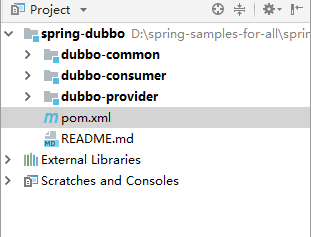
1.1 按照dubbo 文档推荐的服务最佳实践,建议将服务接口、服务模型、服务异常等均放在 API 包中,所以项目采用maven多模块的构建方式,在spring-dubbo-annotation下构建三个子模块:
- dubbo-ano-common 是公共模块,用于存放公共的接口和bean,被dubbo-ano-provider和dubbo-ano-provider在pom.xml中引用;
- dubbo-ano-provider 是服务的提供者,提供商品的查询服务;
- dubbo-ano-provider 是服务的消费者,调用provider提供的查询服务。
1.2 本项目dubbo的搭建采用zookeeper作为注册中心, 关于zookeeper的安装和基本操作可以参见我的手记Zookeeper 基础命令与Java客户端
二、项目依赖
在父工程的项目中统一导入依赖dubbo依赖的的jar包
这里需要注意的是ZooKeeper 3.5.x 和 ZooKeeper 3.4.x 是存在不兼容的情况 详见官网解释ZooKeeper Version Compatibility, zookeeper 3.5 目前是beta版本,所以zookeeper 我选择的版本是 zookeeper-3.4.9 作为服务端。但默认情况下 curator-framework自动引用的最新的3.5的版本客户端,会出现 KeeperException$UnimplementedException 异常
<!--dubbo 依赖-->
<groupId>com.alibaba</groupId>
<artifactId>dubbo</artifactId>
<version>2.6.2</version>
</dependency>
<dependency>
    <groupId>org.apache.curator</groupId>
    <artifactId>curator-framework</artifactId>
    <version>4.0.0</version>
    <exclusions>
        <exclusion>
            <groupId>org.apache.zookeeper</groupId>
            <artifactId>zookeeper</artifactId>
        </exclusion>
    </exclusions>
</dependency>
<dependency>
    <groupId>org.apache.zookeeper</groupId>
    <artifactId>zookeeper</artifactId>
    <version>3.4.13</version>
</dependency>
三、公共模块(dubbo-ano-common)
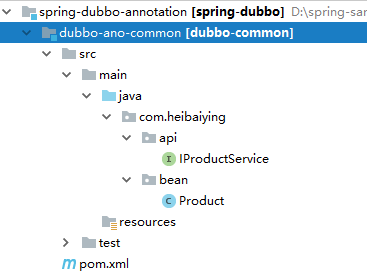
- api 下为公共的调用接口;
- bean 下为公共的实体类。
四、 服务提供者(dubbo-ano-provider)
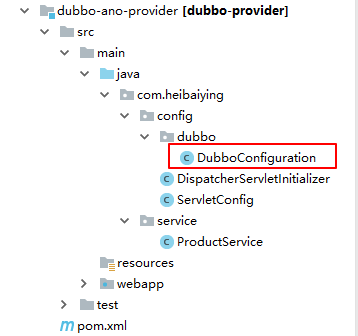
4.1 提供方配置
@Configuration
public class DubboConfiguration {

    /**
     * 提供方应用信息,用于计算依赖关系
     */
    @Bean
    public ApplicationConfig applicationConfig() {
        ApplicationConfig applicationConfig = new ApplicationConfig();
        applicationConfig.setName("dubbo-ano-provider");
        return applicationConfig;
    }

    /**
     *  使用zookeeper注册中心暴露服务地址
     */
    @Bean
    public RegistryConfig registryConfig() {
        RegistryConfig registryConfig = new RegistryConfig();
        registryConfig.setAddress("zookeeper://127.0.0.1:2181");
        registryConfig.setClient("curator");
        return registryConfig;
    }

    /**
     * 用dubbo协议在20880端口暴露服务
     */
    @Bean
    public ProtocolConfig protocolConfig() {
        ProtocolConfig protocolConfig = new ProtocolConfig();
        protocolConfig.setName("dubbo");
        protocolConfig.setPort(20880);
        return protocolConfig;
    }
}
4.2 使用注解@Service暴露服务
需要注意的是这里的@Service注解不是spring的注解,而是dubbo的注解 com.alibaba.dubbo.config.annotation.Service
package com.heibaiying.service;

import com.alibaba.dubbo.config.annotation.Service;
import com.heibaiying.api.IProductService;
import com.heibaiying.bean.Product;

import java.util.ArrayList;
import java.util.Date;
import java.util.List;

/**
 * @author : heibaiying
 * @description : 产品提供接口实现类
 */
@Service(timeout = 5000)
public class ProductService implements IProductService {

    private static List<Product> productList = new ArrayList<>();

    static {
        for (int i = 0; i < 20; i++) {
            productList.add(new Product(i, "产品" + i, i / 2 == 0, new Date(), 66.66f * i));
        }
    }

    public Product queryProductById(int id) {
        for (Product product : productList) {
            if (product.getId() == id) {
                return product;
            }
        }
        return null;
    }

    public List<Product> queryAllProducts() {
        return productList;
    }
}
五、服务消费者(dubbo-ano-consumer)
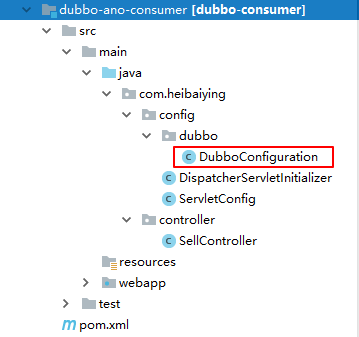
1.消费方的配置
@Configuration
public class DubboConfiguration {

    /**
     * 消费方应用名,用于计算依赖关系,不是匹配条件,不要与提供方一样
     */
    @Bean
    public ApplicationConfig applicationConfig() {
        ApplicationConfig applicationConfig = new ApplicationConfig();
        applicationConfig.setName("dubbo-ano-consumer");
        return applicationConfig;
    }

    /**
     * 设置调用服务超时时间
     * 关闭所有服务的启动时检查
     */
    @Bean
    public ConsumerConfig consumerConfig() {
        ConsumerConfig consumerConfig = new ConsumerConfig();
        consumerConfig.setTimeout(3000);
        consumerConfig.setCheck(false);
        return consumerConfig;
    }

    /**
     * 使用zookeeper注册中心暴露发现服务地址
     */
    @Bean
    public RegistryConfig registryConfig() {
        RegistryConfig registryConfig = new RegistryConfig();
        registryConfig.setAddress("zookeeper://127.0.0.1:2181");
        registryConfig.setClient("curator");
        return registryConfig;
    }

}
2.使用注解@Reference引用远程服务
package com.heibaiying.controller;

import com.alibaba.dubbo.config.annotation.Reference;
import com.heibaiying.api.IProductService;
import com.heibaiying.bean.Product;
import org.springframework.stereotype.Controller;
import org.springframework.ui.Model;
import org.springframework.web.bind.annotation.PathVariable;
import org.springframework.web.bind.annotation.RequestMapping;

import java.util.List;

@Controller
@RequestMapping("sell")
public class SellController {

    // dubbo远程引用注解
    @Reference
    private IProductService productService;

    @RequestMapping
    public String productList(Model model) {
        List<Product> products = productService.queryAllProducts();
        model.addAttribute("products", products);
        return "products";
    }

    @RequestMapping("product/{id}")
    public String productDetail(@PathVariable int id, Model model) {
        Product product = productService.queryProductById(id);
        model.addAttribute("product", product);
        return "product";
    }
}
六、项目构建的说明
因为在项目中,consumer和provider模块均依赖公共模块,所以在构建consumer和provider项目前需要将common 模块安装到本地仓库,依次对父工程和common模块执行:
mvn install -Dmaven.test.skip = true
consumer中 pom.xml如下
<?xml version="1.0" encoding="UTF-8"?>
<project xmlns="http://maven.apache.org/POM/4.0.0"
         xmlns:xsi="http://www.w3.org/2001/XMLSchema-instance"
         xsi:schemaLocation="http://maven.apache.org/POM/4.0.0 http://maven.apache.org/xsd/maven-4.0.0.xsd">
    <parent>
        <artifactId>spring-dubbo-annotation</artifactId>
        <groupId>com.heibaiying</groupId>
        <version>1.0-SNAPSHOT</version>
    </parent>
    <modelVersion>4.0.0</modelVersion>

    <artifactId>dubbo-ano-consumer</artifactId>

    <dependencies>
        <dependency>
            <groupId>com.heibaiying</groupId>
            <artifactId>dubbo-ano-common</artifactId>
            <version>1.0-SNAPSHOT</version>
            <scope>compile</scope>
        </dependency>
    </dependencies>

</project>
provider中 pom.xml如下
<?xml version="1.0" encoding="UTF-8"?>
<project xmlns="http://maven.apache.org/POM/4.0.0"
         xmlns:xsi="http://www.w3.org/2001/XMLSchema-instance"
         xsi:schemaLocation="http://maven.apache.org/POM/4.0.0 http://maven.apache.org/xsd/maven-4.0.0.xsd">
    <parent>
        <artifactId>spring-dubbo-annotation</artifactId>
        <groupId>com.heibaiying</groupId>
        <version>1.0-SNAPSHOT</version>
    </parent>
    <modelVersion>4.0.0</modelVersion>

    <artifactId>dubbo-ano-provider</artifactId>

    <dependencies>
        <dependency>
            <groupId>com.heibaiying</groupId>
            <artifactId>dubbo-ano-common</artifactId>
            <version>1.0-SNAPSHOT</version>
            <scope>compile</scope>
        </dependency>
    </dependencies>

</project>
七、关于dubbo新版本管理控制台的安装说明
安装:
git clone https://github.com/apache/incubator-dubbo-ops.git /var/tmp/dubbo-ops
cd /var/tmp/dubbo-ops
mvn clean package
配置:
配置文件为:
dubbo-admin-backend/src/main/resources/application.properties
主要的配置有 默认的配置就是127.0.0.1:2181:
dubbo.registry.address=zookeeper://127.0.0.1:2181
启动:
mvn --projects dubbo-admin-backend spring-boot:run
访问:
http://127.0.0.1:8080
附:源码Gitub地址:https://github.com/heibaiying/spring-samples-for-all
spring 5.x 系列第16篇 —— 整合dubbo (代码配置方式)的更多相关文章
- spring 5.x 系列第14篇 —— 整合RabbitMQ (代码配置方式)
源码Gitub地址:https://github.com/heibaiying/spring-samples-for-all 一.说明 1.1 项目结构说明 本用例关于rabbitmq的整合提供简单消 ...
- spring 5.x 系列第12篇 —— 整合memcached (代码配置方式)
文章目录 一.说明 1.1 XMemcached客户端说明 1.2 项目结构说明 1.3 依赖说明 二.spring 整合 memcached 2.1 单机配置 2.2 集群配置 2.3 存储基本类型 ...
- spring 5.x 系列第10篇 —— 整合mongodb (代码配置方式)
源码Gitub地址:https://github.com/heibaiying/spring-samples-for-all 一.说明 1.1 项目结构说明 配置文件位于com.heibaiying. ...
- spring 5.x 系列第18篇 —— 整合websocket (代码配置方式)
源码Gitub地址:https://github.com/heibaiying/spring-samples-for-all 一.说明 1.1 项目结构说明 项目模拟一个简单的群聊功能,为区分不同的聊 ...
- spring 5.x 系列第15篇 —— 整合dubbo (xml配置方式)
文章目录 一. 项目结构说明 二.项目依赖 三.公共模块(dubbo-common) 四. 服务提供者(dubbo-provider) 4.1 productService是服务的提供者( 商品数据用 ...
- spring 5.x 系列第2篇 —— springmvc基础 (代码配置方式)
文章目录 一.搭建hello spring工程 1.1 项目搭建 1.2 相关注解说明 二.配置自定义拦截器 三.全局异常处理 四.参数绑定 4.1 参数绑定 4.2 关于日期格式转换的三种方法 五. ...
- spring 5.x 系列第13篇 —— 整合RabbitMQ (xml配置方式)
源码Gitub地址:https://github.com/heibaiying/spring-samples-for-all 一.说明 1.1 项目结构说明 本用例关于rabbitmq的整合提供简单消 ...
- spring 5.x 系列第11篇 —— 整合memcached (xml配置方式)
文章目录 一.说明 1.1 XMemcached客户端说明 1.2 项目结构说明 1.3 依赖说明 二.spring 整合 memcached 2.1 单机配置 2.2 集群配置 2.3 存储基本类型 ...
- spring 5.x 系列第9篇 —— 整合mongodb (xml配置方式)
源码Gitub地址:https://github.com/heibaiying/spring-samples-for-all 一.说明 1.1 项目结构说明 配置文件位于resources下,项目以单 ...
随机推荐
- C# Winform在win10里弹出无焦点的窗口
原文:C# Winform在win10里弹出无焦点的窗口 版权声明:本文为博主原创文章,未经博主允许不得转载. https://blog.csdn.net/wangmy1988/article/det ...
- Python Numpy基础教程
Python Numpy基础教程 本文是一个关于Python numpy的基础学习教程,其中,Python版本为Python 3.x 什么是Numpy Numpy = Numerical + Pyth ...
- 大约laravel错误的解决方案
2015-3-13 夜晚 9:13 执行laravel发生错误Indirect modification of overloaded element of BbsArticle has no effe ...
- Chrome扩展,应用开发学习笔记之2---恶搞百度一下
Chrome扩展,应用开发学习笔记之2 恶搞百度一下 前面我们介绍了一个最简单的chrome扩展时钟,如今我来介绍一下一个恶搞百度一下的chrome扩展程序. 前面说过,manifest.json文件 ...
- OpenStack Summit Paris 会议记录 - 11-05-2014
Ops/Design Summit - 2014-11-05 Record 1. Keystone Operators, Deployers, and DevOps 1. Icehouse中,SAML ...
- 正确 zip 压缩和解压码
网上流传zip压缩和解压缩 该代码有一个非常大的问题 尽管使用了ant压缩和解压缩.但任务流或使用java.util.zip 的方式来写,我在压缩的文件夹结构中所使用的过程遇到是不正确,即使是不同的文 ...
- DJango xadmin 表头和标底设置,显示隐藏和显示
xadmin文件中的xadmin.pyfrom xadmin import views class GlobalSetting(object): site_title = "zwb" ...
- System.Data.SQLite 中GUID的处理
原文:System.Data.SQLite 中GUID的处理 项目中正好用到System.Data.SQLite,在手持上使用这个数据库,因为要做数据同步,所以表中的主键都是Guid的数据类型. 在数 ...
- 小米手机销量暴跌36% 雷军做错了什么?(人的需求是复杂的,而不是仅仅是一个性价比;要做体验价格比,而不是配置价格比)good
小米手机销量暴跌36% 雷军做错了什么? 日前,小米科技创始人雷军在美国马萨诸塞州剑桥市出席了第20届哈佛中国论坛开幕式并发表了演讲.在演讲中,雷军说但小米却只用两年半的时间一跃成为了中国第一,世界第 ...
- INS-13001—win10系统安装oracle11g时遇到INS-13001环境不满足最低要求
升级win10系统之后,需要重新安装Oracle,因为在安装Oralce11g时,使用64位的会出现各种不兼容问题,我每次安装都是使用32位的数据库. 在安装时点击setup.exe之后,出现了:[I ...