
记第一次用python写界面
花了两三个小时学了Tkinter,做了一个将数据绘制成图的小工具。
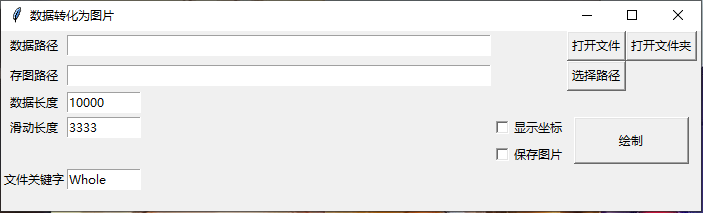
1. 获取路径下的所有文件or获取路径下指定名称的文件
1.1 打开文件
//1. 用来放文本框中的文字
filename = StringVar()

//2. 新建一个单行文本框

txtDataPath = tkinter.Entry(window,width=60,textvariable=filename).grid(row=0,column = 1)

def OpenFile():

    file = filedialog.askopenfilename()

    if(file):

      filename.set(file)//3. 打开文件后把文件名写在文本框中
1.2 打开文件夹
选数据的时候要打开文件夹,存图的时候也要,所以if...else...
def OpenDirectory(IsOpenOrSave):

    directory = filedialog.askdirectory()

    if(directory):

        if(IsOpenOrSave == 0):

            filename.set(directory)

        else:

            savepath.set(directory)
1.3 获取路径下指定名称的文件
def listSameFile(dir):

    str = "Whole"

    for x in os.listdir(dir):

        path = os.path.join(dir, x)

        if os.path.isfile(path) and str in os.path.splitext(x)[0]:

            split_data(path)

        if os.path.isdir(path):

            listSameFile(path)
2. 读取数据进行切割
数据生成的图片将用于深度学习,因此越多越好。两张图片的数据有固定的交集。
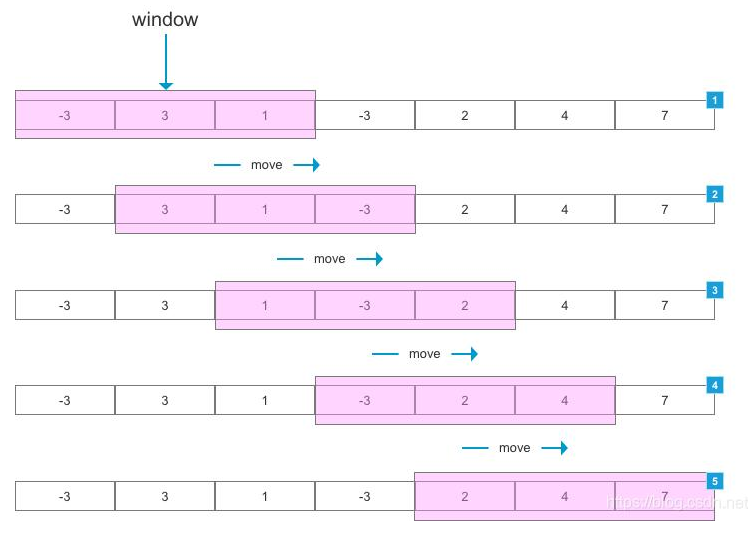
代码:
def split_data(data,stride, size):

    length = data.shape[0]

    start = 0

    end = start + size

    while(start<length-size):

        print(start)

        print(end)

        start+=stride

        end = start+size

        if(end>length):

            end = length

            start = length-size

            print(start)

            print(end)
写的很烂,绞尽脑汁也没有想到可以只打印一次
3. 绘图
绘图时我希望可以直接保存不要画出来,但是
代码必须是先plt.savefig(‘save.jpg’)再plt.show()才能够保存显示的图像
如果先plt.show()再plt.savefig('save.jpg')图像保存的是白色空白图
如果去掉plt.show()只保存图像plt.savefig('save.jpg'),单幅图像可以,如果循环文件夹里的图像,保存的图像会叠加,我白把数据切开了。

加了一个close()后:(忘记哪条数据了,换了条数据。。。

切片+画图:
def split_data(filepath):

    data = pd.read_csv(filepath, sep=' ')

    size = data.shape[0]

    #print(size)

    len = int(datalength.get())

    stride = int(datastride.get())

    start = 0

    end = start + len

    while(end<size):

        plot_data(data,start,end)

        start += stride

        end = start + len

    end = size

    start = end-len

    plot_data(data,start,end)

def plot_data(data,start,end):

    i = pic_index.get()

    i += 1

    pic_index.set(i)

    #print(i)

    #print(start)

    #print(end)

    data_cut = data[start:end]

    ax = plt.gca()

    ax.yaxis.set_major_locator(MultipleLocator(0.01))

    plt.plot(data_cut, color = 'black')

    if (IsShowCoordinate.get() == 0):

        plt.axis('off')

    if (IsSavePic.get() == 1):

        plt.savefig(savepath.get() + "/{}.png".format(i))

        plt.close()

    else:

        plt.show()
     plt.close()
4. 全代码

import tkinter

from tkinter import *

import os

from tkinter import filedialog

import pandas as pd

from matplotlib import pyplot as plt

from matplotlib.ticker import MultipleLocator

LOGO_PATH = "./fish.ico"

window = tkinter.Tk()

window.title("数据转化为图片")

window.iconbitmap(LOGO_PATH)

window.geometry("700x200")

window.maxsize(1000, 1200)

# ----------------------------------

filename = StringVar()

datastride = StringVar()

datalength = StringVar()

savepath = StringVar()

lblDataPath = tkinter.Label(window, text="数据路径").grid(row=0,column = 0)

lblSavePath = tkinter.Label(window, text="存图路径").grid(row=1,column = 0)

lblDataLength = tkinter.Label(window, text="数据长度").grid(row=2,column = 0)

lblDataStride = tkinter.Label(window, text="滑动长度").grid(row=3,column = 0)

txtDataPath = tkinter.Entry(window,width=60,textvariable=filename).grid(row=0,column = 1)

txtSavePath = tkinter.Entry(window,width=60,textvariable = savepath).grid(row=1,column = 1)

txtDataLength = tkinter.Entry(window,width=10,textvariable = datalength).grid(row=2,column = 1)

txtDataStride = tkinter.Entry(window,width=10,textvariable = datastride).grid(row=3,column = 1)

IsShowCoordinate = IntVar()

IsSavePic = IntVar()

ckbCoordinate = Checkbutton(window, text = "显示坐标", variable = IsShowCoordinate).grid(row=5,column = 3)

ckbSavePic= Checkbutton(window, text = "保存图片", variable = IsSavePic).grid(row=6,column = 3)

pic_index = IntVar()

IsDrawOnce = IntVar()

def OpenFile():

    IsDrawOnce.set(0)

    file = filedialog.askopenfilename()

    if(file):

      filename.set(file)

def OpenDirectory(IsOpenOrSave):

    directory = filedialog.askdirectory()

    if(directory):

        if(IsOpenOrSave == 0):

            filename.set(directory)

        else:

            savepath.set(directory)

def split_data(filepath):

    i = pic_index.get()

    data = pd.read_csv(filepath, sep=' ')

    len = int(datalength.get())

    stride = int(datastride.get())

    start = 0

    end = start + len

    size = data.shape[0]

    arr = []

    while(end<size):

        i+=1

        pic_index.set(i)

        data_cut = data[start:end]

        ax = plt.gca()

        ax.yaxis.set_major_locator(MultipleLocator(0.01))

        plt.plot(data_cut,color='black')

        if(IsShowCoordinate.get() == 0):

            plt.axis('off')

        if(IsSavePic.get() ==1):

            plt.savefig(savepath.get()+"/{}.png".format(i))

            plt.close()

        else:

            plt.plot(data_cut)

            plt.show()

        start+=stride

        end = start+len

def listSameFile(dir):

    str = "Whole"

    for x in os.listdir(dir):

        path = os.path.join(dir, x)

        if os.path.isfile(path) and str in os.path.splitext(x)[0]:

            split_data(path)

        if os.path.isdir(path):

            listSameFile(path)

def drawing():

    listSameFile(filename.get())

def draw_one_pic():

    split_data(filename.get())

def btn_OpenFile_click():

    IsDrawOnce.set(0)

    OpenFile()

def btn_OpenDirectory_click():

    IsDrawOnce.set(1)

    OpenDirectory(0)

def btn_SaveDirectory_click():

    OpenDirectory(1)

def btn_draw_click():

    pic_index.set(0)

    if(IsDrawOnce.get()==0):

        draw_one_pic()

    else:

        drawing()

Button(window, text="打开文件", command=btn_OpenFile_click).grid(row=0,column = 4)

Button(window, text="打开文件夹", command=btn_OpenDirectory_click).grid(row=0,column = 5)

Button(window, text="选择路径", command=btn_SaveDirectory_click).grid(row=1,column = 4)

Button(window, text="绘制", command=btn_draw_click).grid(row=5,column = 4)

window.mainloop()
写的实在烂,堪堪运行。
想要设置一个变量以命名图片的名字,不会。。。
控件不会靠左。。。(已解决)
新代码更新在 https://gitee.com/yurj0403/line1.git
生成exe后,ico总是会报错,只好把ico去掉了。
记第一次用python写界面的更多相关文章
- 记一次python写爬虫爬取学校官网的文章
有一位老师想要把官网上有关数字化的文章全部下载下来,于是找到我,使用python来达到目的 首先先查看了文章的网址 获取了网页的源代码发现一个问题,源代码里面没有url,这里的话就需要用到抓包了,因为 ...
- 第一次用python 写的简单爬虫 记录在自己的博客
#python.py from bs4 import BeautifulSoup import urllib.request from MySqlite import MySqlite global ...
- Python写的贪吃蛇游戏例子
第一次用Python写这种比较实用且好玩的东西,权当练手吧 游戏说明: * P键控制“暂停/开始”* 方向键控制贪吃蛇的方向 源代码如下: 复制代码代码如下: from Tkinter import ...
- 【python】界面学习
最近开始要用python做界面了,又是在百度的洪流中不断呛水.下面列举了很多我在过程中查询的内容以及我认为相对对我的认知有益的链接. 1.python有哪些做界面的工具 三个:python gui 中 ...
- 用aardio给python写个图形界面
前阵子在用python写一些小程序,写完后就开始思考怎么给python程序配一个图形界面,毕竟控制台实在太丑陋了. 于是百度了下python的图形界面库,眼花缭乱的一整页,拣了几件有“特色”有“噱头” ...
- 【Python】如何基于Python写一个TCP反向连接后门
首发安全客 如何基于Python写一个TCP反向连接后门 https://www.anquanke.com/post/id/92401 0x0 介绍 在Linux系统做未授权测试,我们须准备一个安全的 ...
- 玩蛇记之用python实现易宝快速支付接口
玩蛇记之用python实现易宝快速支付接口 现在很多这种快速支付的通道,易宝支持的通道算是很全面的,正好最近需要集成易宝的支付通道到平台中,所以写一贴来记录一下,顺便鄙视一下国内的支付平台,api的支 ...
- 记一次python + selenium小项目出现的问题与解决办法
记一次python + selenium小项目出现的问题与解决办法 如何接入代理 def crawl_xdaili(self):#代理 可不用 需要时 解除注释 """ ...
- Python写各大聊天系统的屏蔽脏话功能原理
Python写各大聊天系统的屏蔽脏话功能原理 突然想到一个视频里面弹幕被和谐的一满屏的*号觉得很有趣,然后就想用python来试试写写看,结果还真玩出了点效果,思路是首先你得有一个脏话存放的仓库好到时 ...
- python图形界面(GUI)设计
不要问我为什么要用 python 来做这种事,我回到“高兴咋地”也不是不可以,总之好奇有没有好的解决方案.逛了一圈下来,总体上来说,python 图形界面有以下几个可行度比较高的解决方案. 1. py ...
随机推荐
- 获取电脑真实的IP地址,忽略虚拟机等IP地址的干扰
/** * @author yins * @date 2018年8月12日下午9:53:58 */ import java.net.Inet4Address; import java.net.Inet ...
- 【Oracle】使用PL/SQL快速查询出1-9数字
[Oracle]使用PL/SQL快速查询出1-9数字 简单来说,直接Recursive WITH Clauses 在Oracle 里面就直接使用WITH result(参数)即可 WITH resul ...
- 力扣628(java)-三个数的最大乘积(简单)
题目: 给你一个整型数组 nums ,在数组中找出由三个数组成的最大乘积,并输出这个乘积. 示例 1: 输入:nums = [1,2,3]输出:6示例 2: 输入:nums = [1,2,3,4]输出 ...
- 力扣175(MySQL)-组合两个表(简单)
题目: 表: Person 表: Address 编写一个SQL查询来报告 Person 表中每个人的姓.名.城市和州.如果 personId 的地址不在 Address 表中,则报告为空 null ...
- [ML] 可视化编写运行 Python 脚本的工具 Jupyter
Jupyter 提供了可视化的编写和运行 python 程序的 Web 界面. https://jupyter.org/install 使用只需要两步: $ pip install jupyterla ...
- [Caddy2] The Caddy Web Server 常见 Caddyfile 模式
Caddyfile 是 JSON 配置的易用写法,支持通常用的功能,完整功能还是需要 JSON 配置的. 以下适用于 Caddy2 版本的配置. 静态文件服务器 example.com root * ...
- Mysql带条件取多条随机记录
有个文章段落表part,有两种类型的段落,即part_type取1或2,要从表中随机取多条任意类型的段落,比如3条. 方法一 ORDER BY后接RAND() select * from part w ...
- 8.prometheus监控--监控Mysql8.0
一.环境搭建 docker-compose安装mysql mkdir /data/mysql -p cd /data/mysql cat > docker-compose.yaml <&l ...
- 10.Sidecar代理:日志架构
官方文档:https://kubernetes.io/zh-cn/docs/concepts/cluster-administration/logging/ 题目:Sidecar代理 设置配置环境ku ...
- 自动化测试数据生成:Asp.Net Core单元测试利器AutoFixture详解
引言 在我们之前的文章中介绍过使用Bogus生成模拟测试数据,今天来讲解一下功能更加强大自动生成测试数据的工具的库"AutoFixture". 什么是AutoFixture? Au ...