
centos8平台编译安装nginx1.18.0
一,nginx的官网:
http://nginx.org/
说明:刘宏缔的架构森林是一个专注架构的博客,地址:https://www.cnblogs.com/architectforest
对应的源码可以访问这里获取: https://github.com/liuhongdi/
说明:作者:刘宏缔 邮箱: 371125307@qq.com
二,下载与解压nginx
1,下载
[root@centos8 source]# wget http://nginx.org/download/nginx-1.18.0.tar.gz
2, 解压缩
[root@centos8 source]# tar -zxvf nginx-1.18.0.tar.gz
三,编译与安装nginx
1,configure
#--prefix 指定安装路径
#--with-http_stub_status_module 允许查看nginx状态的模块
# --with-http_ssl_module 支持https的模块
[root@centos8 nginx-1.18.0]# ./configure --prefix=/usr/local/soft/nginx-1.18.0 --with-http_stub_status_module --with-http_ssl_module
2,编译并安装
[root@centos8 nginx-1.18.0]# make && make install
四, configure报错的解决
说明:如果相应的软件包已安装不会报错,写在这里供参考
1,问题1,configure提示:
./configure: error: the HTTP rewrite module requires the PCRE library.

You can either disable the module by using --without-http_rewrite_module

option, or install the PCRE library into the system, or build the PCRE library

statically from the source with nginx by using --with-pcre=<path> option.
解决:
[root@os3 nginx-1.18.0]# yum install pcre-devel
2,问题2,configure提示:
./configure: error: SSL modules require the OpenSSL library.

You can either do not enable the modules, or install the OpenSSL library

into the system, or build the OpenSSL library statically from the source

with nginx by using --with-openssl=<path> option.
解决:
[root@os3 nginx-1.18.0]# yum install openssl openssl-devel
五,测试编译安装的效果:查看nginx的版本
[root@centos8 nginx-1.18.0]# /usr/local/soft/nginx-1.18.0/sbin/nginx -v

nginx version: nginx/1.18.0
六,如何查看nginx的配置编译参数?
[root@centos8 nginx-1.18.0]# /usr/local/soft/nginx-1.18.0/sbin/nginx -V

nginx version: nginx/1.18.0

built by gcc 8.3.1 20190507 (Red Hat 8.3.1-4) (GCC)

built with OpenSSL 1.1.1c FIPS  28 May 2019

TLS SNI support enabled

configure arguments: --prefix=/usr/local/soft/nginx-1.18.0 --with-http_stub_status_module --with-http_ssl_module
注意区分和上一条查看版本命令的区别: -v参数分别是小写和大写
七,使systemctl能管理运行nginx服务
1,运行的准备工作:配置日志目录
[root@centos8 conf]# mkdir /data/nginx

[root@centos8 conf]# mkdir /data/nginx/logs
2,运行的准备工作:创建nginx用户
[root@centos8 conf]# groupadd nginx
#-g:指定所属的group
#-s:指定shell,因为它不需要登录,所以用/sbin/nologin
#-M:不创建home目录,因为它不需要登录
[root@centos8 conf]# useradd -g nginx -s /sbin/nologin -M nginx
3,简单配置nginx
[root@centos8 conf]# vi nginx.conf
内容:
指定运行nginx的用户和组是:nginx
user nginx nginx;
发生错误时要写入到错误日志(目录用上面创建好的)
error_log /data/nginx/logs/error.log;
指定pid的路径
pid logs/nginx.pid;
日志格式(取消注释即可)
   log_format  main  '$remote_addr - $remote_user [$time_local] "$request" '

                      '$status $body_bytes_sent "$http_referer" '

                      '"$http_user_agent" "$http_x_forwarded_for"';
指定访问日志的路径和格式(目录用上面创建好的)
access_log /data/nginx/logs/access.log main;
4,生成service文件:
[root@centos8 ~]# vi /usr/lib/systemd/system/nginx.service
内容:
[Unit]

Description=nginx-The High-performance HTTP Server

After=network.target

[Service]

Type=forking

PIDFile=/usr/local/soft/nginx-1.18.0/logs/nginx.pid

ExecStartPre=/usr/local/soft/nginx-1.18.0/sbin/nginx -t -c /usr/local/soft/nginx-1.18.0/conf/nginx.conf

ExecStart=/usr/local/soft/nginx-1.18.0/sbin/nginx -c /usr/local/soft/nginx-1.18.0/conf/nginx.conf

ExecReload=/usr/local/soft/nginx-1.18.0/sbin/nginx -s reload

ExecStop=/usr/local/soft/nginx-1.18.0/sbin/nginx -s stop

PrivateTmp=true

[Install]

WantedBy=multi-user.target
5,启动服务
重新加载服务文件
[root@centos8 ~]# systemctl daemon-reload
启动:
[root@centos8 ~]# systemctl start nginx
6,查看效果:
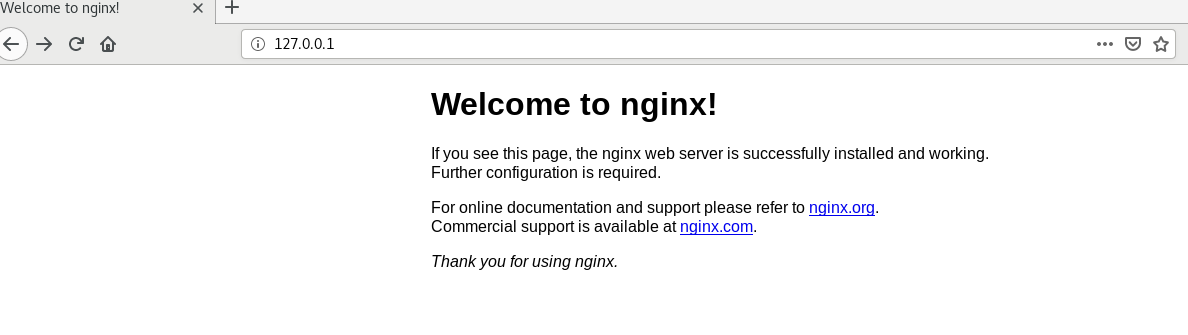
从浏览器访问安装机器的ip的80端口即可:
看例子截图:
7,查看日志目录
[root@centos8 conf]# ll /data/nginx/logs/

总用量 8

-rw-r--r-- 1 root root 1477 4月  22 18:49 access.log

-rw-r--r-- 1 root root 1195 4月  22 18:32 error.log
日志已成功写入
八,查看centos版本
[root@centos8 ~]# cat /etc/redhat-release

CentOS Linux release 8.1.1911 (Core)
centos8平台编译安装nginx1.18.0的更多相关文章
- CentOS 6.2编译安装Nginx1.2.0+MySQL5.5.25+PHP5.3.13
CentOS 6.2编译安装Nginx1.2.0+MySQL5.5.25+PHP5.3.132013-10-24 15:31:12标签:服务器 防火墙 file 配置文件 written 一.配置好I ...
- CentOS 7.0编译安装Nginx1.6.0+MySQL5.6.19+PHP5.5.14
准备篇: CentOS 7.0系统安装配置图解教程 http://www.osyunwei.com/archives/7829.html 一.配置防火墙,开启80端口.3306端口 CentOS 7. ...
- CentOS7 编译安装 nginx-1.10.0
对于NGINX 支持epoll模型 epoll模型的优点 定义: epoll是Linux内核为处理大批句柄而作改进的poll,是Linux下多路复用IO接口select/poll的增强版本,它能显著的 ...
- CentOS 6.2编译安装Nginx1.2.0+MySQL5.5.25+PHP5.3.13+博客系统WordPress3.3.2
说明: 操作系统:CentOS 6.2 32位 系统安装教程:CentOS 6.2安装(超级详细图解教程): http://www.osyunwei.com/archives/1537.html 准备 ...
- CentOS 7.0编译安装Nginx1.6.0+MySQL5.6.19+PHP5.5.14方法分享
一.配置防火墙,开启80端口.3306端口 CentOS 7.0默认使用的是firewall作为防火墙,这里改为iptables防火墙. 1.关闭firewall: systemctl stop fi ...
- ansible:安装nginx1.18.0(使用role功能)
一,ansible使用role的用途? roles分别将变量/文件/任务/模板/handler等放置于单独的目录中, 并可以方便的include各目录下的功能 roles使playbook能实现代码被 ...
- centos7 安装 nginx-1.18.0 并设置开机自启动
一.到官网下载nginx Mainline version: nginx主力版本,为开发版 Stable version: 稳定版,在生产环境中选择此版本进行安装 Legacy versions: ...
- centos7下编译安装nginx-1.16.0
一.下载nginx源码 http://nginx.org/en/download.html 如:nginx-1.16.0.tar.gz 二.创建用户和组,并解压 groupadd www userad ...
- centos7 编译安装nginx1.16.0( 完整版 )
一.安装依赖包 yum install -y gcc gcc-c++ pcre pcre-devel zlib zlib-devel openssl openssl-devel 依赖包说明: 1.编译 ...
随机推荐
- mariadb 2
mariadb第二章-增删改 MariaDB 数据类型 MariaDB数据类型可以分为数字,日期和时间以及字符串值. 使用数据类型的原则:够用就行, 尽量使用范围小的,而不用大的 常用的数据类型 ...
- C#开发PACS医学影像处理系统(十九):Dicom影像放大镜
在XAML代码设计器中,添加canvas画布与圆形几何对象,利用VisualBrush笔刷来复制画面内容到指定容器: <Canvas x:Name="CvsGlass" Wi ...
- rocketmq-console修改logo,修改ip,修改port及完整编译安装图文版
一.下载源码到本地 这里使用IDEA,作为编译工具 https://gitee.com/mrliuNumberOne/rocketmq-externals.git 导入成功后如图: 二.Maven编译 ...
- hystrix元素详解
转自https://www.cnblogs.com/wanggangblog/p/8550218.html package com.example.demo.service; import org.s ...
- Docker 容器化部署 Python 应用
Docker 是一个开源项目,为开发人员和系统管理员提供了一个开放平台,可以将应用程序构建.打包为一个轻量级容器,并在任何地方运行.Docker 会在软件容器中自动部署应用程序. 在本篇中,我将介绍如 ...
- python ---倒酒!!
#!/usr/bin/env python3# -*- coding: utf-8 -*-import numbersimport numpyimport math'''三个容器分别为12升.8升.5 ...
- 实战:一种在http请求中使用protobuffer+nginx+lua收集打点日志的方案
背景 app打点日志的上报和收集,是互联网公司的基本需求. 一.方案选择 1.1 protobuffer vs json 探究一种以最高效的方式上报和解析打点数据是一个系统性的问题,需要解决的子问题有 ...
- Spring Cloud实战 | 最终篇:Spring Cloud Gateway+Spring Security OAuth2集成统一认证授权平台下实现注销使JWT失效方案
一. 前言 在上一篇文章介绍 youlai-mall 项目中,通过整合Spring Cloud Gateway.Spring Security OAuth2.JWT等技术实现了微服务下统一认证授权平台 ...
- Devops实战(一)Docker的部署安装以及Docker-Compose的使用
Docker的部署安装以及Docker-Compose的使用 1.docker和docker-Compose简介 Docker是一组平台即服务(PaaS)产品,它们使用操作系统级虚拟化以称为容器的软件 ...
- if else与switch for与foreach
if...else...适用于变量判断 switch适用于常量判断(switch只判断一次,if else 判断多次) foreach只适用于集合和数组查询(foreach不支持增加删除操作) for ...