
Bootstrap5 如何创建多媒体对象
一、在Bootstra5中使用媒体对象
Bootstrap 媒体对象在版本 5 中已经停止支持了。但是,我们仍然可以使用 flex 和 margin 创建包含左对齐或右对齐媒体对象(如图像或视频)以及文本内容(如博客评论、推文等)的布局 。
<!doctype html>

<html lang="zh-CN">

<head>

<meta charset="utf-8">

<meta name="viewport" content="width=device-width, initial-scale=1">

<link href="https://cdn.jsdelivr.net/npm/bootstrap@5.1.3/dist/css/bootstrap.min.css" rel="stylesheet">

<script src="https://cdn.jsdelivr.net/npm/bootstrap@5.1.3/dist/js/bootstrap.bundle.min.js"></script>

</head>

<body>

<div class="container-fluid">

    <div class="row">

        <div class="col-md-2"></div>

        <div class="col-md-8">

        <br>

        <div class="d-flex">

            <div class="flex-shrink-0">

                <img src="img/xyz.png" class="rounded-circle" alt="Sample Image">

            </div>

            <div class="flex-grow-1 ms-3">

                <h5>Bootstrap 5 <small class="text-muted"><i>iyuyi.xyz@gmail.com</i></small></h5>

                <p>Will you do the same for me? It's time to face the music I'm no longer your muse. Heard it's beautiful, be the judge and my girls gonna take a vote. I can feel a phoenix inside of me. Heaven is jealous of our love, angels are crying from up above. Yeah, you take me to utopia.</p>

            </div>

        </div>

        <div class="col-md-2"></div>

    </div>

 </div>

</body>

</html>
显示的结果如下

我们还可以创建媒体对象的其他变体。
将 .rounded 或 .rounded-circle 等图像修饰符类应用于图像来创建圆角或圆形图像。
<div class="d-flex">

    <div class="flex-shrink-0">

        <img src="img/xyz.png" class="rounded-circle" alt="Sample Image">

    </div>

    <div class="flex-grow-1 ms-3">

        <h5>Bootstrap 5 <small class="text-muted"><i>iyuyi.xyz@gmail.com</i></small></h5>

        <p>Will you do the same for me? It's time to face the music I'm no longer your muse. Heard it's beautiful, be the judge and my girls gonna take a vote. I can feel a phoenix inside of me. Heaven is jealous of our love, angels are crying from up above. Yeah, you take me to utopia.</p>

    </div>

</div>
显示的结果如下

二、创建嵌套的媒体对象
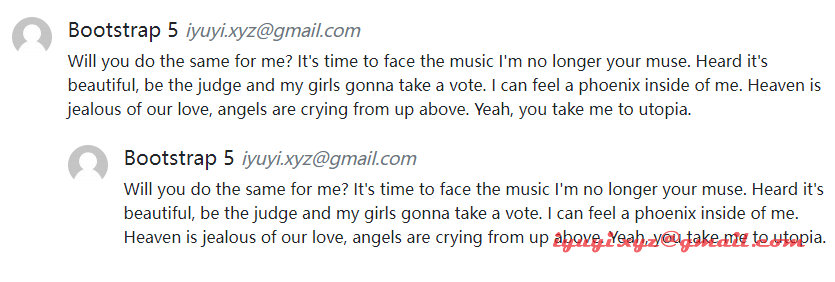
媒体对象也可以嵌套在其他媒体对象中。
<div class="d-flex">

    <div class="flex-shrink-0">

        <img src="img/xyz.png" class="rounded-circle" alt="Sample Image">

    </div>

    <div class="flex-grow-1 ms-3">

        <h5>Bootstrap 5 <small class="text-muted"><i>iyuyi.xyz@gmail.com</i></small></h5>

        <p>Will you do the same for me? It's time to face the music I'm no longer your muse. Heard it's beautiful, be the judge and my girls gonna take a vote. I can feel a phoenix inside of me. Heaven is jealous of our love, angels are crying from up above. Yeah, you take me to utopia.</p>

        <!-- Nested media object -->

        <div class="d-flex mt-4">

            <div class="flex-shrink-0">

                <img src="img/xyz.png" class="rounded-circle" alt="Sample Image">

            </div>

            <div class="flex-grow-1 ms-3">

                <h5>Bootstrap 5 <small class="text-muted"><i>iyuyi.xyz@gmail.com</i></small></h5>

                <p>Will you do the same for me? It's time to face the music I'm no longer your muse. Heard it's beautiful, be the judge and my girls gonna take a vote. I can feel a phoenix inside of me. Heaven is jealous of our love, angels are crying from up above. Yeah, you take me to utopia.</p>

            </div>

        </div>

    </div>

</div>
嵌套媒体对象显示的结果如下
三、媒体对象对齐
我们还可以通过简单地调整 HTML 代码本身来更改内容以及媒体对象的水平对齐方式。
<div class="d-flex">

     <div class="flex-grow-1 me-3">

         <h5>Bootstrap 5 <small class="text-muted"><i>iyuyi.xyz@gmail.com</i></small></h5>

         <p>Will you do the same for me? It's time to face the music I'm no longer your muse. Heard it's beautiful, be the judge and my girls gonna take a vote. I can feel a phoenix inside of me. Heaven is jealous of our love, angels are crying from up above. Yeah, you take me to utopia.</p>

     </div>

     <div class="flex-shrink-0">

         <img src="img/xyz.png" alt="Sample Image">

     </div>

</div>
显示的结果如下

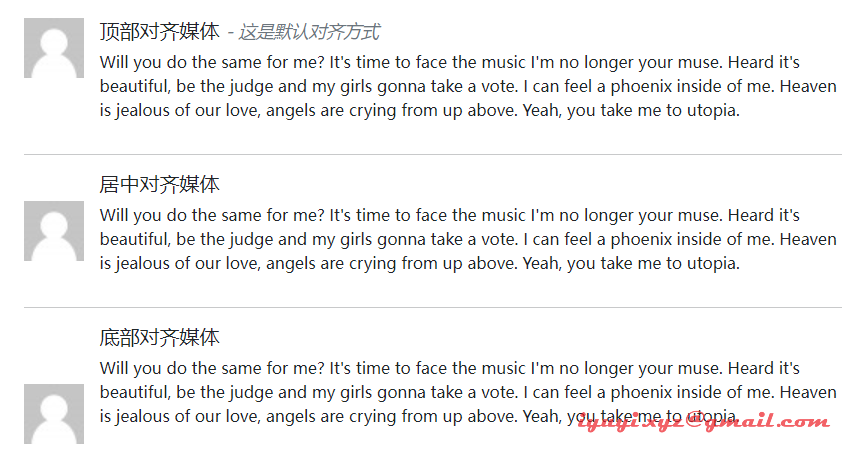
除此之外,我们还可以使用 flexbox 实用程序类在内容块的中间或底部对齐图像或其他媒体对象,例如,可以使用 .align-self-center 类进行垂直居中对齐,使用 .align-self-end 类用于底部对齐。
默认情况下,媒体对象内的媒体是顶部对齐的。
<!--顶部对齐媒体-->

<div class="d-flex">

    <div class="flex-shrink-0">

        <img src="img/xyz.png" width="60" height="60" alt="Sample Image">

    </div>

    <div class="flex-grow-1 ms-3">

        <h5>顶部对齐媒体 <small class="text-muted"><i>- 这是默认对齐方式</i></small></h5>

        <p>Will you do the same for me? It's time to face the music I'm no longer your muse. Heard it's beautiful, be the judge and my girls gonna take a vote. I can feel a phoenix inside of me. Heaven is jealous of our love, angels are crying from up above. Yeah, you take me to utopia.</p>

    </div>

</div>

<hr>

<!--居中对齐媒体-->

<div class="d-flex">

    <div class="flex-shrink-0 align-self-center">

        <img src="img/xyz.png" width="60" height="60" alt="Sample Image">

    </div>

    <div class="flex-grow-1 ms-3">

        <h5>居中对齐媒体</h5>

        <p>Will you do the same for me? It's time to face the music I'm no longer your muse. Heard it's beautiful, be the judge and my girls gonna take a vote. I can feel a phoenix inside of me. Heaven is jealous of our love, angels are crying from up above. Yeah, you take me to utopia.</p>

    </div>

</div>

<hr>

<!--底部对齐媒体-->

<div class="d-flex">

    <div class="flex-shrink-0 align-self-end">

        <img src="img/xyz.png" width="60" height="60" alt="Sample Image">

    </div>

    <div class="flex-grow-1 ms-3">

        <h5>底部对齐媒体</h5>

        <p>Will you do the same for me? It's time to face the music I'm no longer your muse. Heard it's beautiful, be the judge and my girls gonna take a vote. I can feel a phoenix inside of me. Heaven is jealous of our love, angels are crying from up above. Yeah, you take me to utopia.</p>

    </div>

</div>
显示的结果如下
Bootstrap5 如何创建多媒体对象的更多相关文章
- Bootstrap<基础二十七> 多媒体对象(Media Object)
Bootstrap 中的多媒体对象(Media Object).这些抽象的对象样式用于创建各种类型的组件(比如:博客评论),我们可以在组件中使用图文混排,图像可以左对齐或者右对齐.媒体对象可以用更少的 ...
- BootStrap学习(5)_多媒体对象&列表组
一.多媒体对象 这些抽象的对象样式用于创建各种类型的组件(比如:博客评论),我们可以在组件中使用图文混排,图像可以左对齐或者右对齐.媒体对象可以用更少的代码来实现媒体对象与文字的混排. .media: ...
- Bootstrap-CL:多媒体对象
ylbtech-Bootstrap-CL:多媒体对象 1.返回顶部 1. Bootstrap 多媒体对象(Media Object) 本章我们将讲解 Bootstrap 中的多媒体对象(Media O ...
- bootstrap学习笔记 多媒体对象
本文将介绍Bootstrap中的多媒体对象(Media Object).这些抽象的对象样式用于创建各种类型的组件(比如博客评论),我们可以在组件中使用图文混排,图像可以左对齐或者右对齐.媒体对象可以用 ...
- 创建javaScript对象的方法
一.工厂模式 function person (name,age) { var p=new Object(); p.name=name; p.age=age; p.showMessage=functi ...
- .net下灰度模式图像在创建Graphics时出现:无法从带有索引像素格式的图像创建graphics对象 问题的解决方案。
在.net下,如果你加载了一副8位的灰度图像,然后想向其中绘制一些线条.或者填充一些矩形.椭圆等,都需要通过Grahpics.FromImage创建Grahphics对象,而此时会出现:无法从带有索引 ...
- win7 装了VB虚拟机 开始挺好用 后来突然就打不开了 提示如下错误:(如图)创建 COM 对象失败.
创建 COM 对象失败. 应用程序将被中断. Start tag expected, '<' not found. Location: 'C:\Users\Mike/.VirtualBox\Vi ...
- 在这个看脸的世界,该如何优雅的创建JS对象
Javascript是一门解释型的语言,是基于对象的,严格来说并不怎么符合的面向对象的标准,显著的特点就是函数就是“一等对象”,与传统的面向对象语言不同的时,Javascript有“一千种”方法来创建 ...
- java 创建string对象机制 字符串缓冲池 字符串拼接机制
对于创建String对象的机制,在这一过程中涉及的东西还是值得探究一番的. 首先看通过new String对象和直接赋值的方式有什么区别,看如下代码: public static void main( ...
随机推荐
- 多态的好处和instanceof关键字
多态的好处: 可替换性:多态对已经存在的代码具有可替换性 可扩展性:多态对待吗具有可扩展性,增加新的子类不影响已经存在类的多态性,继承性,以及其他特征的运行和操作.实际上新家子类更容易获得多态功能 接 ...
- python 日志类
简介 在所有项目中必不可少的一定是日志记录系统,python为我们提供了一个比较方便的日志模块logging,通常,我们都会基于此模块编写一个日志记录类,方便将项目中的日志记录到文件中. loggin ...
- Linux—文件系统结构
1.文件目录结构 /:是Linux系统的根目录 /bin:存放用户经常使用的命令 /boot:启动加载程序的静态文件 /dev:设备文件目录,不能单独分区 /etc:系统配置文件目录 /home:普通 ...
- 1000-ms-HashMap 线程安全安全问题
问题: HashMap是否是线程安全 详解 http://www.importnew.com/21396.html 有源码分析 和代码性能比较 CHM性能最好 HashMap不是线程安全的:Hasht ...
- mysql常见用法
查看连接数show processlist; 查看慢日志 show variables like '%slow_query_log%'; show variables like 'long_query ...
- Linux—搭建Apache(httpd)服务
1.httpd简介? http是Apache超文本传输协议服务器的主程序.它是一个独立的后台进程,能够处理请求的子进程和线程. http常用用的两个版本是httpd-2.2和httpd-2.4 Cen ...
- MQ系列3:RocketMQ 架构分析
MQ系列1:消息中间件执行原理 MQ系列2:消息中间件的技术选型 1 背景 我们前面两篇对主流消息队列的基本构成和技术选型做了详细的分析.从本篇开始,我们会专注当下主流MQ之一的RocketMQ. 从 ...
- 贪吃蛇(C语言版)链表实现
贪吃蛇 gitee:贪吃蛇C语言版: Snake 蛇的结构 typedef struct Snake { int x; int y; struct Snake *next; }; 游戏开始欢迎界面 / ...
- Python入门系列(七)开发常说的“累”与“对象”
类与对象 Python是一种面向对象的编程语言. 要创建类,请使用关键字class class MyClass: x = 5 创建一个名为p1的对象,并打印x的值 p1 = MyClass() pri ...
- day33-线程基础03
线程基础03 6.用户线程和守护线程 用户线程:也叫工作线程,当线程的任务执行完或者通知方法结束.平时用到的普通线程均是用户线程,当在Java程序中创建一个线程,它就被称为用户线程 守护线程(Daem ...