
Service是什么?Service又不是什么?
在Android王国中,Service是一个劳动模范,总是默默的在后台运行,无怨无悔,且总是干最脏最累的活,比如下载文件,倾听音乐,网络操作等这些耗时的操作,所以我们请尊重的叫他一声:"劳模,您辛苦了".
- Service是什么?
- A Service is an application component. ☆ Service 是一个应用程序组件
- that can perform long-running operations in the background. ☆ 它能在后台执行一些耗时较长的操作.
- and does not provide a user interface. ☆ 并且不提供用户界面
- Another application component can start a service and it will continue to run in the background event if the user switches to another application. ☆ 服务能被其它的应用程序组件启动,即使用户切换到其他的应用程序时还能保持在后台运行.
- Additionally,a component can bind to a service to interact with it and even perform interprocess communcation(IPC). ☆ 此外,组件还能绑定服务,并与服务交互,甚至执行进程间通信(IPC).
- For example,a service might handle network transactions,play music,perform file I/O,or interact with a content provider,all from the background. ☆ 比如,一个服务可以处理网络传输,听音乐,执行文件操作,或者与内容提供者进行交互,所有这些都在后台进行.
- A service can essentially tack two forms.☆ 服务有以下两种基本类型
- Started --> startService()
- Bound --> bindService()
- Service又不是什么?
- A service is not a separate process.☆ 服务不是一个单独的进程.
- A service is not a thread.it runs in the main thread of its hosting process. ☆ 服务不是一个线程,它运行在主线程.
- the service does not create its own thread and does not run in a separate process(unless you specify otherwise). ☆ 服务不能自己创建并且不能运行在单独的进程中(除非你明确指定).
- This means that, if your service is going to do any CPU intensive work ot blocking operations(such as MP3 playback or network). ☆ 这意味着如果你的服务要执行一些很耗CUP的工作或者阻塞的操作(比如播放mp3或网络操作),you should create a new thread within the service to do that work. ☆ 你应该在服务中创建一个新的线程来执行这些工作.
- By using a separate thread, you will reduce the risk of Application Not Responding(ANR) errors and the application's main thread can remain dedicated to user interaction with your activities. ☆ 利用一个分离的进程,将减少你的activities发生应用程序停止响应(ANR)错误的风险.
- 如何创建一个Started服务
- 继承service
- publicclassFirstServiceextendsService{
privatestaticfinalString TAG ="--FirstService-->";publicFirstService(){Log.i(TAG,"Service is running.");}@Overridepublicvoid onCreate(){Log.i(TAG,"onCreate is running.");super.onCreate();}@Overridepublicint onStartCommand(Intent intent,int flags,int startId){Log.i(TAG,"onStartCommand is running.");returnsuper.onStartCommand(intent, flags, startId);}@OverridepublicIBinder onBind(Intent intent){Log.i(TAG,"IBinder is running.");returnnull;}}
- 四大组件都需要在manifests.xml中注册,这个也不例外.
- 如何启动它
- Intent intent =newIntent(ServiceActivity.this,FirstService.class);
startService(intent);
- 生命周期onCreate(), onStartCommand(), onDestory()就这三个生命周期
- --FirstService-->:Service is running.
--FirstService-->: onCreate is running.--FirstService-->: onStartCommand is running.
- 我们在onStartCommand方法中打印下当前线程
- @Override
publicint onStartCommand(Intent intent,int flags,int startId){Log.i(TAG,"onStartCommand is running.Thread:"+Thread.currentThread());returnsuper.onStartCommand(intent, flags, startId);}
打印结果如下:- onStartCommand is running.Thread:Thread[main,5,main]
验证了两点:①由于是第二次运行,构造方法和onStart都没有打印,说明服务一旦启动是默默运行在后台的;②服务是运行在主线程的 - 如何结束服务:①调用stopService()方法 ,会回调service的onDestory()方法;
- Intent intent2 =newIntent(ServiceActivity.this,FirstService.class);
stopService(intent2);
还可以在Android系统设置-->应用-->正在运行-->找到后是如下样式,会告诉我们有一个服务在运行; 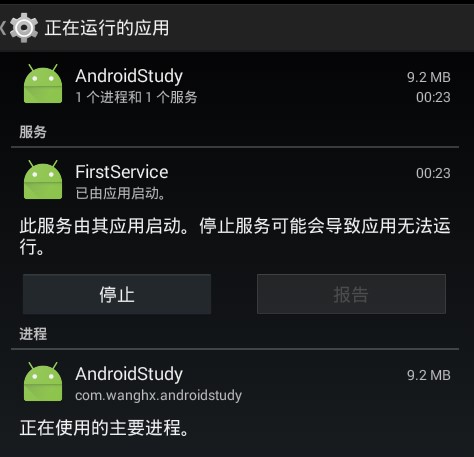
- onStartCommand的返回值:
- START_STICKY:粘性的,被意外中止后自动重启,重新调用onStartCommand(),但会丢失原来激活它的Intent,会用一个null intent来调用onStartCommand(),可以用于播放器.值为1
- START_NOT_STICKY:非粘性的,被意外中止后不会重启,除非还存在未发送的Intent,这是避免服务运行的最安全选项; 值为2
- START_REDELIVER_INTENT:粘性的且重新发送Intent,被意外中止后重新启动,且该service组件将得到用于激活它的Intent对象,这中服务适用于需要立即恢复工作的活跃服务,比如下载文件; 值为3
- onStartCommand的参数:
- @Override //第一个参数:为我们传入的intent;第二个flags:启动服务的方式,与返回值有关;第三个为我们启动service的次数.
publicint onStartCommand(Intent intent,int flags,int startId){Log.i(TAG,"onStartCommand is running.Thread:"+Thread.currentThread());Log.i(TAG,"flags:"+flags);Log.i(TAG,"startId:"+startId);returnsuper.onStartCommand(intent, flags, startId);}
因为前面服务已经启动了,这次我们连续点了三次启动服务的按钮,打印日志如下:- 11-1602:56:28.3859039-9039/com.wanghx.androidstudy I/--FirstService-->: onStartCommand is running.Thread:Thread[main,5,main]
11-1602:56:28.3859039-9039/com.wanghx.androidstudy I/--FirstService-->: flags:011-1602:56:28.3859039-9039/com.wanghx.androidstudy I/--FirstService-->: startId:211-1602:56:33.9859039-9039/com.wanghx.androidstudy I/--FirstService-->: onStartCommand is running.Thread:Thread[main,5,main]11-1602:56:33.9859039-9039/com.wanghx.androidstudy I/--FirstService-->: flags:011-1602:56:33.9859039-9039/com.wanghx.androidstudy I/--FirstService-->: startId:311-1602:56:35.5359039-9039/com.wanghx.androidstudy I/--FirstService-->: onStartCommand is running.Thread:Thread[main,5,main]11-1602:56:35.5359039-9039/com.wanghx.androidstudy I/--FirstService-->: flags:011-1602:56:35.5359039-9039/com.wanghx.androidstudy I/--FirstService-->: startId:4
我们发现flags的值没有发生改变,而startId再按顺序增加. - 如何启动一个绑定服务
- 在activity中创建一个内部类,继承ServiceConnection.
- classMyServiceConnectionimplementsServiceConnection{
@Overridepublicvoid onServiceConnected(ComponentName name,IBinder service){Log.i(TAG,"onServiceConnected");}@Overridepublicvoid onServiceDisconnected(ComponentName name){Log.i(TAG,"onServiceDisconnected");}}
- 在activity中定义一个成员connection
privateMyServiceConnection connection =newMyServiceConnection();
- 在绑定服务按钮中加入绑定代码
Intent intent3 =newIntent(ServiceActivity.this,FirstService.class);bindService(intent3, connection, BIND_AUTO_CREATE);
按钮点击后打印如下日志:I/--FirstService-->:Service is running.I/--FirstService-->: onCreate is running.I/--FirstService-->:IBinder is running.
- 在解绑服务中加入代码,这里的connection必须和上边的绑定服务的connection实例一致.
unbindService(connection);
- Service和Thread的关系
- 其实他两个没有一毛钱关系.只是因为service需要做耗时操作,需要重新建立一线程来处理工作,而不阻塞主线程;
- service是运行在主线程的;
- activity启动service后,即使activity被销毁了,如果没有主动关闭服务,服务还是会在后台默默运行的;
- 如何连接远程的service,只需要在manifests.xml中这样写即可
- <service
android:name="com.example.servicetest.MyService"android:process=":remote"></service>
如何让activity与远程的service进行通信呢?这就要使用AIDL进行跨进程通信(IPC)了. - AIDL:Android Interface Definition Language:Android接口定义语言,它可以用于让多个service与多个应用程序组件之间进行跨进程通信;
- 这些都不是重点,我们还是弄一下在我们自己的程序中service与activity之间的通信吧;
- activity-->service 通过intent传递数据给service;
- activity调用onServiceConnected()中的IBind对象来访问service中的方法;
- IBinder通信的关键是利用activity中的IBinder对象获得service对象,然后调用方法;
- publicclassFirstServiceextendsService{
privatestaticfinalString TAG ="FirstService-->";privateMyBinder myBinder =newMyBinder();publicFirstService(){Log.i(TAG,"Service is running.");}@Overridepublicvoid onCreate(){Log.i(TAG,"onCreate is running.");super.onCreate();}@Overridepublicint onStartCommand(Intent intent,int flags,int startId){String name = intent.getStringExtra("name");Log.i(TAG,"onStartCommand is running.Thread:"+Thread.currentThread());Log.i(TAG,"flags:"+flags);Log.i(TAG,"startId:"+startId);Log.i(TAG,"name:"+name);return START_STICKY;}@Overridepublicvoid onDestroy(){Log.i(TAG,"onDestroy is running.");super.onDestroy();}@OverridepublicIBinder onBind(Intent intent){Log.i(TAG,"IBinder is running.");return myBinder;}publicclassMyBinderextendsBinder{publicFirstService getService(){returnFirstService.this;}}publicint getRandomNumber(){returnnewRandom().nextInt(10)+1;}}
- publicclassServiceActivityextendsAppCompatActivityimplementsView.OnClickListener{
privateMyServiceConnection connection =newMyServiceConnection();privatestaticfinalString TAG ="ServiceActivity-->";privateFirstService mFirstService;privateboolean isBinder;// 服务是否绑定@Overrideprotectedvoid onCreate(Bundle savedInstanceState){super.onCreate(savedInstanceState);setContentView(R.layout.activity_service);findViewById(R.id.btn_start_service).setOnClickListener(this);findViewById(R.id.btn_stop_service).setOnClickListener(this);findViewById(R.id.btn_bound_service).setOnClickListener(this);findViewById(R.id.btn_unbound_service).setOnClickListener(this);findViewById(R.id.btn_get_number).setOnClickListener(this);}@Overridepublicvoid onClick(View v){switch(v.getId()){case R.id.btn_start_service:Intent intent =newIntent(ServiceActivity.this,FirstService.class);intent.putExtra("name","Zhangsan");startService(intent);break;case R.id.btn_stop_service:Intent intent2 =newIntent(ServiceActivity.this,FirstService.class);stopService(intent2);break;case R.id.btn_bound_service:if(!isBinder){Intent intent3 =newIntent(ServiceActivity.this,FirstService.class);bindService(intent3, connection, BIND_AUTO_CREATE);isBinder =true;}break;case R.id.btn_unbound_service:if(isBinder){unbindService(connection);isBinder =false;}break;case R.id.btn_get_number:if(mFirstService ==null){Toast.makeText(getApplicationContext(),"请先绑定服务",Toast.LENGTH_SHORT).show();}else{Toast.makeText(getApplicationContext(),"得到的随机数为:"+ mFirstService.getRandomNumber(),Toast.LENGTH_SHORT).show();}break;}}classMyServiceConnectionimplementsServiceConnection{@Overridepublicvoid onServiceConnected(ComponentName name,IBinder service){Log.i(TAG,"onServiceConnected");FirstService.MyBinder myBinder =(FirstService.MyBinder) service;mFirstService = myBinder.getService();}@Overridepublicvoid onServiceDisconnected(ComponentName name){Log.i(TAG,"onServiceDisconnected");}}}
这里有一个小插曲:一起写出来大家分享下:记得以前学java基础时,老师曾说过一个java文件中只能有一个public类,类名称必须与java文件名相同,为什么这个FirstService中有两个public类,只是因为MyBinder虽然是一个public class,但是MyBinder是一个内部类,这里必须要用public修饰,否则其他包就访问不到这个内部类了;
Service是什么?Service又不是什么?的更多相关文章
- Failed to stop iptables.service: Unit iptables.service not loaded.
redhat 7 [root@lk0 ~]# service iptables stop Redirecting to /bin/systemctl stop iptables.service Fai ...
- Local System、Local Service與Network Service
CreateService参数介绍SC_HANDLE CreateService( SC_HANDLE hSCManager, //服务控制管理程序维护的登记数据库的句柄,由系统函数OpenSCMan ...
- 关于Failed to check the status of the service com.taotao.service.ItemService. No provider available fo
原文:http://www.bubuko.com/infodetail-2250226.html 项目中用dubbo发生: Failed to check the status of the serv ...
- Failed to stop iptables.service: Unit iptables.service not loaded.解决方法
CentOS7中执行 service iptables start/stop 会报错Failed to start iptables.service: Unit iptables.service fa ...
- 从Web Service和Remoting Service引出WCF服务
本篇先通过Web Service和Remoting Service创建服务,抛砖引玉,再体验WCF服务.首先一些基本面: 什么是WCF? Windows Communication Foundatio ...
- Android Service总结02 service介绍
Android Service总结02 service介绍 版本 版本说明 发布时间 发布人 V1.0 介绍了Service的种类,常用API,生命周期等内容. 2013-03-16 Skywang ...
- Service Fabric —— Stateful Service 概念
作者:潘罡 (Van Pan) @ Microsoft 上节中我们谈到了Service Fabric最底层的两个概念,一个是针对硬件层面而言的Node Type和Node.另一个是Applicatio ...
- CentOS 7 防火墙 出现Failed to start iptables.service: Unit iptables.service failed to load
错误信息如下: [root]# service iptables start Redirecting to /bin/systemctl start iptables.service Failed t ...
- service: no such service mysqld 与MySQL的开启,关闭和重启
1.问题原因与解决办法 因为修改了MySQL临时文件的目录后,使用service mysqld restart重启MySQL出现如下错误: service: no such service mysql ...
- dubbo Failed to check the status of the service com.user.service.UserService. No provider available for the service
Caused by: org.springframework.beans.factory.BeanCreationException: Error creating bean with name 'u ...
随机推荐
- 几款主流 NoSql 数据库的对比
最近小组准备启动一个 node 开源项目,从前端亲和力.大数据下的IO性能.可扩展性几点入手挑选了 NoSql 数据库,但具体使用哪一款产品还需要做一次选型. 我们最终把选项范围缩窄在 HBase.R ...
- Hadoop3 在eclipse中访问hadoop并运行WordCount实例
前言: 毕业两年了,之前的工作一直没有接触过大数据的东西,对hadoop等比较陌生,所以最近开始学习了.对于我这样第一次学的人,过程还是充满了很多疑惑和不解的,不过我采取的策略是还是先让环 ...
- ucos实时操作系统学习笔记——任务间通信(互斥锁)
想讲一下ucos任务间通信中的mutex,感觉其设计挺巧妙,同sem一样使用的是event机制实现的,代码不每一行都分析,因为讲的没邵贝贝老师清楚,主要讲一下mutex的内核是如何实现的.可以理解互斥 ...
- HBase笔记:对HBase原理的简单理解
早些时候学习hadoop的技术,我一直对里面两项技术倍感困惑,一个是zookeeper,一个就是Hbase了.现在有机会专职做大数据相关的项目,终于看到了HBase实战的项目,也因此有机会搞懂Hbas ...
- java中文乱码解决之道(九)-----总结
乱码,我们前台展示的杀手,可能有些朋友和我的经历一样:遇到乱码先按照自己的经验来解决,如果没有解决就google,运气好一搜就可以解决,运气不好可能够你折腾一番了.LZ之所以写这个系列博客就是因为遇到 ...
- Leetcode 笔记 110 - Balanced Binary Tree
题目链接:Balanced Binary Tree | LeetCode OJ Given a binary tree, determine if it is height-balanced. For ...
- Happy New Year 2016
大学之前的时间都是按天来过的,期盼着一天一天地快快长大,期盼着过年穿新衣,阖家团聚,其乐融融: 大学的时间都是按周来过的,根据每周的课表周而复始,虽然单调但也是自由自在,简单充实: 刚工作的几年时间是 ...
- 利用select实现IO多路复用TCP服务端
一.相关函数 1. int select(int maxfdp, fd_set *readset, fd_set *writeset, fd_set *exceptset,struct timeva ...
- HTML5 之拖放(drag与drop)
拖放(Drag 和 drop)是 HTML5 标准的组成部分. 拖放是一种常见的特性,即抓取对象以后拖到另一个位置. 在 HTML5 中,拖放是标准的一部分,任何元素都能够拖放. HTML5 拖放实例 ...
- 理解 Neutorn LBaaS - 每天5分钟玩转 OpenStack(120)
Load Balance as a Service(LBaaS)是 Neutron 提供的一项高级网络服务.LBaaS 允许租户在自己的网络中创建和管理 load balancer. load bal ...