
第04项目:淘淘商城(SpringMVC+Spring+Mybatis)【第八天】(solr服务器搭建、搜索功能实现)
https://pan.baidu.com/s/1bptYGAb#list/path=%2F&parentPath=%2Fsharelink389619878-229862621083040
第04项目:淘淘商城(SpringMVC+Spring+Mybatis) 的学习实践总结【第五天】
第04项目:淘淘商城(SpringMVC+Spring+Mybatis) 的学习实践总结【第六天】
第04项目:淘淘商城(SpringMVC+Spring+Mybatis)【第七天】(redis缓存)
第04项目:淘淘商城(SpringMVC+Spring+Mybatis)【第八天】(solr服务器搭建、搜索功能实现)
第04项目:淘淘商城(SpringMVC+Spring+Mybatis)【第八天】(solr服务器搭建、搜索功能实现)
今天内容:
商品搜索功能:
1、使用solr实现。
2、搭建搜索服务层。
3、使用poratl调用搜索服务,实现商品搜索。
在安装使用solr前,需要先安装并配置好jdk1.8.0和tomcat8.5在CentOS7.5虚拟机系统中。具体步骤详情请见本文末尾的参考资料。
03.solr配置中文分析器及业务字段
启动tomcat服务:
cd /usr/local/tomcat8.5/bin
./startup.sh
关闭tomcat服务:
cd /usr/local/tomcat8.5/bin
./shutdown.sh
浏览器访问地址
04.索引库的维护
05.solrJ维护索引库
<!-- solrJ客户端 -->

<dependency>

  <groupId>org.apache.solr</groupId>

  <artifactId>solr-solrj</artifactId>

  <version>7.7.2</version>

</dependency>
HttpSolrClient solrServer = new HttpSolrClient.Builder("http://192.168.179.128:8080/solr/collection1").build();
package com.taotao.rest.jedis;

import org.apache.solr.client.solrj.impl.HttpSolrClient;

import org.apache.solr.common.SolrInputDocument;

import org.junit.Test;

public class SolrJTest {

    @Test

    public void addDocument() throws Exception {

        // https://www.cnblogs.com/jepson6669/p/9142676.html#headline1-11

        // 创建一连接,solr7的URL需要在solr/后面补全core的名称

        HttpSolrClient solrServer = new HttpSolrClient.Builder("http://192.168.179.128:8080/solr/collection1").build();

        //创建一个文档对象

        SolrInputDocument document = new SolrInputDocument();

        document.addField("id", "test001");

        document.addField("item_title", "测试商品001");

        document.addField("item_price", 123456);

        //把文档对象写入索引库

        solrServer.add(document);

        //提交

        solrServer.commit();

        //Solr中没有update,只需要id一致覆盖重写即可

    }

    @Test

    public void deleteDocument() throws Exception {

        //创建一连接Solr4

        //SolrServer solrServer = new HttpSolrServer("http://192.168.25.154:8080/solr");

        //创建一连接Solr7

        HttpSolrClient solrServer = new HttpSolrClient.Builder("http://192.168.179.128:8080/solr/collection1").build();

        //solrServer.deleteById("test001");

        solrServer.deleteByQuery("*:*");

        solrServer.commit();

    }

}
把商品信息导入到索引库
使用java程序读取mysql数据库中的商品信息,然后创建solr文档对象,把商品信息写入索引库。
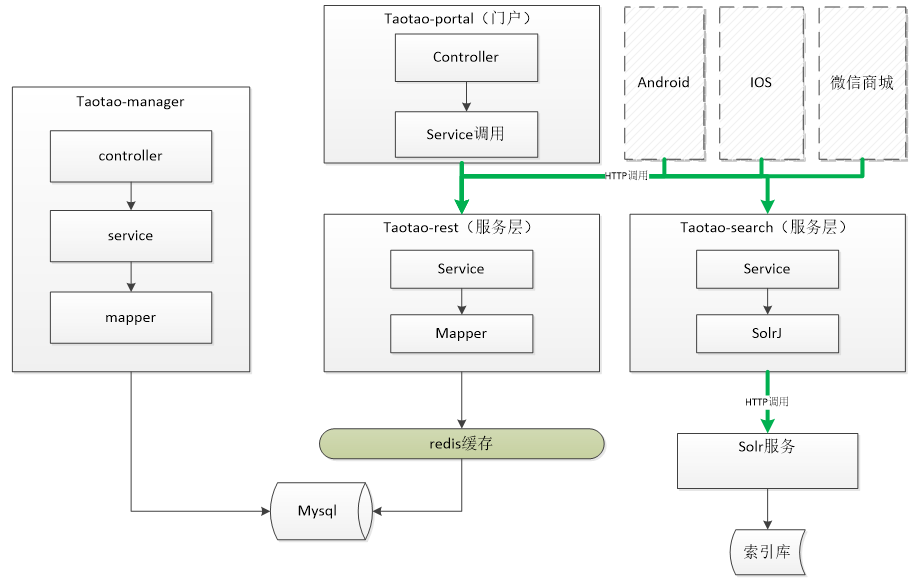
需要发布一个服务。
为了灵活的进行分布式部署需要创建一搜素的服务工程发布 搜素服务。Taotao-search。
3.3 导入商品数据
3.3.1 需要使用的表


3.3.2 Sql语句
SELECT

    a.id,

    a.title,

    a.sell_point,

    a.price,

    a.image,

    b.`name` category_name,

    c.item_desc

FROM

    tb_item a

LEFT JOIN tb_item_cat b ON a.cid = b.id

LEFT JOIN tb_item_desc c ON a.id = c.item_id
3.3.3 Dao层
需要创建一个mapper接口+mapper映射文件。名称相同且在同一目录下。
package com.taotao.search.pojo;

public class Item {

    private String id;

    private String title;

    private String sell_point;

    private long price;

    private String image;

    private String category_name;

    private String item_des;

//==============================

}
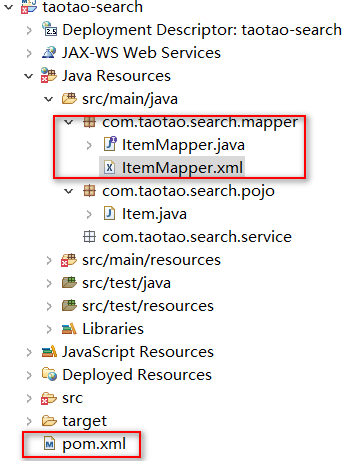
ItemMapper.xml
<?xml version="1.0" encoding="UTF-8"?>

<!DOCTYPE mapper PUBLIC "-//mybatis.org//DTD Mapper 3.0//EN" "http://mybatis.org/dtd/mybatis-3-mapper.dtd" >

<mapper namespace="com.taotao.search.mapper.ItemMapper">

    <select id="getItemList"

        resultType="com.taotao.search.pojo.Item">

        SELECT

        a.id,

        a.title,

        a.sell_point,

        a.price,

        a.image,

        b.name category_name

        FROM

        tb_item a

        LEFT JOIN tb_item_cat b ON a.cid = b.id

    </select>

</mapper>
applicationContext-solr.xml
<?xml version="1.0" encoding="UTF-8"?>

<beans xmlns="http://www.springframework.org/schema/beans"

    xmlns:context="http://www.springframework.org/schema/context"

    xmlns:p="http://www.springframework.org/schema/p"

    xmlns:aop="http://www.springframework.org/schema/aop"

    xmlns:tx="http://www.springframework.org/schema/tx"

    xmlns:xsi="http://www.w3.org/2001/XMLSchema-instance"

    xsi:schemaLocation="http://www.springframework.org/schema/beans http://www.springframework.org/schema/beans/spring-beans-4.0.xsd

    http://www.springframework.org/schema/context http://www.springframework.org/schema/context/spring-context-4.0.xsd">

    <!-- 扫描包加载Service实现类 -->

    <!-- 配置spring创建容器时,开启注解要扫描的包,不扫描@Controller 注解的 JAVA 类-->

    <context:component-scan

        base-package="com.taotao.search.service" />

    <!-- 配置单机版7.7.2的Solr的HttpSolrClient对象 -->

    <bean id="httpSolrClient"  class="org.apache.solr.client.solrj.impl.HttpSolrClient">

        <constructor-arg name="builder"  value="${SOLR.SERVER.URL}"></constructor-arg>

    </bean>

</beans>
solr.properties
#solr服务器虚拟机core地址的baseUrl

SOLR.SERVER.URL=http://192.168.179.128:8080/solr/collection1
Service层
@Service

public class ItemServiceImpl implements ItemService {

    @Value("SOLR.SERVER.URL")

    private String SOLR_SERVER_URL;

    @Autowired

    private ItemMapper itemMapper;

    @Autowired

    private HttpSolrClient httpSolrClient;

    @Override

    public TaotaoResult importAllItems() {

        try {

            // 查询商品列表

            List<Item> list = itemMapper.getItemLsit();

            // 把商品信息写入索引库

            for (Item item : list) {

                // 创建一个SolrInputDocument对象

                SolrInputDocument document = new SolrInputDocument();

                document.setField("id", item.getId());

                document.setField("item_title", item.getTitle());

                document.setField("item_sell_point", item.getSell_point());

                document.setField("item_price", item.getPrice());

                document.setField("item_image", item.getImage());

                document.setField("item_category_name", item.getCategory_name());

                document.setField("item_desc", item.getItem_des());

                // 写入索引库

                httpSolrClient.add(document);

            }

            // 提交修改

            httpSolrClient.commit();

        } catch (Exception e) {

            e.printStackTrace();

            return TaotaoResult.build(500, ExceptionUtil.getStackTrace(e));

        }

        return TaotaoResult.ok();

    }

}
java的web项目使用maven管理工程,要把src/main/java目录下的package里的.xml和.properties文件也编译build
        <resources>

            <resource>

                <directory>src/main/java</directory>

                <includes>

                    <include>**/*.properties</include>

                    <include>**/*.xml</include>

                </includes>

                <filtering>false</filtering>

            </resource>

            <resource>

                <directory>src/main/resources</directory>

                <includes>

                    <include>**/*.properties</include>

                    <include>**/*.xml</include>

                </includes>

                <filtering>false</filtering>

            </resource>

        </resources>
3.3.5 Controller层
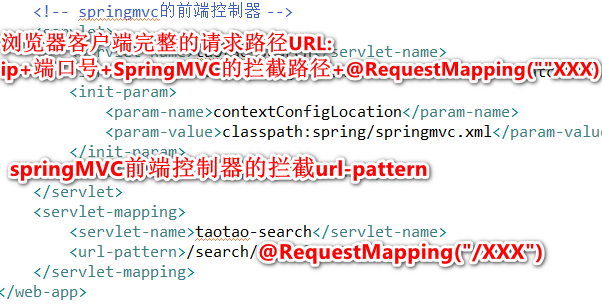
功能:发布一个rest形式的服务。调用Service的服务方法,把数据导入到索引库中,返回TaotaoResult。
Url:/search/manager/importall
@Controller

@RequestMapping("/manager")

public class ItemController {

    @Autowired

    private ItemService itemService;

    /**

     * 导入商品数据到索引库

     */

    @RequestMapping("/importall")

    @ResponseBody

    public TaotaoResult importAllItems() {

        TaotaoResult result = itemService.importAllItems();

        return result;

    }

}
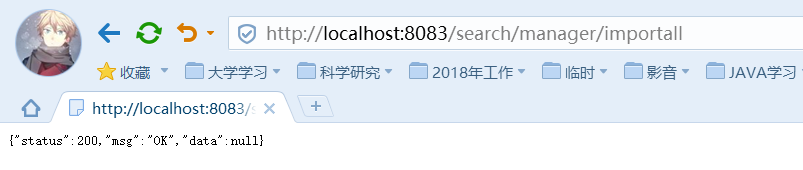
http://localhost:8083/search/manager/importall
4 搜索服务发布
4.1 需求分析
http形式的服务。对外提供搜索服务是一个get形式的服务。调用此服务时需要查询条件,分页条件可以使用page(要显示第几页)、rows(每页显示的记录数)。返回一个json格式的数据。可以使用TaotaoResult包装一个商品列表转换成json。
请求的url:/search/query/{查询条件}/{page}/{rows}
/search/query?q={查询条件}&page={page}&rows={rows}
返回的结果:TaotaoResult包装商品列表。
package com.taotao.common.pojo;

import java.util.List;

public class SearchResult {

    //商品列表

    private List<Item> itemList;

    //总记录数

    private long recordCount;

    //总页数

    private long pageCount;

    //当前页

    private long curPage;

//==========get/set=======//

}
/**

 *   商品搜索DAO

 * @author kangy

 *

 */

@Repository //DAO层IOC注解

public class SearchDaoImpl implements SearchDao {

    @Autowired //在applicationContext-solr.xml里注入对象

    private HttpSolrClient httpSolrClient;

    @Override

    public SearchResult search(SolrQuery query) throws Exception {

        //new一个返回值对象

        SearchResult result = new SearchResult();

        //1.根据查询条件查询索引库

        QueryResponse queryResponse = httpSolrClient.query(query);

//2.取查询结果

        SolrDocumentList solrDocumentList = queryResponse.getResults();

//3.1取查询结果总数量

        result.setRecordCount(solrDocumentList.getNumFound());

        //new一个商品列表

        List<Item> itemList = new ArrayList<>();

        //取高亮显示

        Map<String, Map<String, List<String>>> highlighting = queryResponse.getHighlighting();

        //取商品列表

        for (SolrDocument solrDocument : solrDocumentList) {

//new创建一商品对象

            Item item = new Item();

            item.setId((String) solrDocument.get("id"));

            //取高亮显示的结果

            List<String> list = highlighting.get(solrDocument.get("id")).get("item_title");

            String title = "";

            if (list != null && list.size()>0) {

                title = list.get(0);

            } else {

                title = (String) solrDocument.get("item_title");

            }

            item.setTitle(title);

            item.setImage((String) solrDocument.get("item_image"));

            item.setPrice((long) solrDocument.get("item_price"));

            item.setSell_point((String) solrDocument.get("item_sell_point"));

            item.setCategory_name((String) solrDocument.get("item_category_name"));

            //把item的结果添加到商品列表

            itemList.add(item);

        }

        //返回商品查询结果集合

        result.setItemList(itemList);

        return result;

    }

}
4.3 Service层
功能:接收查询条件。查询条件及分页条件(page、rows),创建一个SolrQuery对象。指定查询条件、分页条件、默认搜索域、高亮显示。调用dao层执行查询。得到查询结果计算总页数。
返回SearchResult对象。
@Service

public class SearchServiceImpl implements SearchService {

    @Autowired

    private SearchDao searchDao;

    @Override

    public SearchResult search(String queryString, int page, int rows) throws Exception {

        // 创建查询条件对象

        SolrQuery query = new SolrQuery();

        // 1.设置查询条件

        query.setQuery(queryString);

        // 2.设置分页

        query.setRows(rows);

        query.setStart((page - 1) * rows);

        // 3.设置默认搜索域

        query.set("df", "item_keywords");

        // 设置高亮显示

        query.setHighlight(true);

        query.addHighlightField("item_title");

        query.setHighlightSimplePre("<em style=\"color:red\">");

        query.setHighlightSimplePost("</em>");

        // 4.执行查询

        SearchResult searchResult = searchDao.search(query);

        // 5.计算查询结果总页数

        long recordCount = searchResult.getRecordCount();

        long pageCount = recordCount / rows;

        if (recordCount % rows > 0) {

            pageCount++;

        }

        searchResult.setPageCount(pageCount);

        searchResult.setCurPage(page);

        return searchResult;

    }

}
4.4 Controller层
接收查询参数:查询条件、page、rows
调用Service执行查询返回一个查询结果对象。
把查询结果包装到TaotaoResult中返回,结果是json格式的数据。
如果查询条件为空,返回状态码:400,消息:查询条件不能为空。
Page为空:默认为1
Rows 为空:默认为60
@Controller

public class SearchController {

    @Autowired

    private SearchService searchService;

    @GetMapping(value="/query")

    @ResponseBody

    public TaotaoResult search(@RequestParam("q")String queryString,

            @RequestParam(defaultValue="1")Integer page,

            @RequestParam(defaultValue="60")Integer rows) {

        //查询条件不能为空

        //commons.lang3.StringUtils

        if (StringUtils.isBlank(queryString)) {

            return TaotaoResult.build(400, "查询条件不能为空");

        }

        //com.taotao.common.pojo.SearchResult

        SearchResult searchResult = null;

        try {

            //解决get乱码问题

            queryString = new String(queryString.getBytes("iso-8859-1"),"utf-8");

            searchResult = searchService.search(queryString, page, rows);

        } catch (Exception e) {

            e.printStackTrace();

            //com.taotao.common.utils.ExceptionUtil

            return TaotaoResult.build(500, ExceptionUtil.getStackTrace(e));

        }

        return TaotaoResult.ok(searchResult);

    }

}
扫描dao的applicationContext-dao.xml配置:
<?xml version="1.0" encoding="UTF-8"?>

<beans xmlns="http://www.springframework.org/schema/beans"

    xmlns:context="http://www.springframework.org/schema/context"

    xmlns:p="http://www.springframework.org/schema/p"

    xmlns:aop="http://www.springframework.org/schema/aop"

    xmlns:tx="http://www.springframework.org/schema/tx"

    xmlns:xsi="http://www.w3.org/2001/XMLSchema-instance"

    xsi:schemaLocation="http://www.springframework.org/schema/beans http://www.springframework.org/schema/beans/spring-beans-4.0.xsd

    http://www.springframework.org/schema/context http://www.springframework.org/schema/context/spring-context-4.0.xsd">

    <!--扫描包加载DAO层和Service层 -->

    <!-- 配置spring创建容器时,开启注解要扫描的包,不扫描@Controller 注解的 JAVA 类-->

    <context:component-scan base-package="com.taotao.search">

        <context:exclude-filter type="annotation" expression="org.springframework.stereotype.Controller"/>

    </context:component-scan>
http://localhost:8083/search/query?q=手机

===============================================================
在VMware® Workstation 中的CentOS7系统虚拟机下安装jdk-8u231-linux-x64.tar.gz
win10环境下使用VM15PRO虚拟机CentOS7系统下安装tomcat8.5
拼音分析器的安装 :https://www.cnblogs.com/jepson6669/p/9134652.html
未完待续。。。
第04项目:淘淘商城(SpringMVC+Spring+Mybatis)【第八天】(solr服务器搭建、搜索功能实现)的更多相关文章
- 第04项目:淘淘商城(SpringMVC+Spring+Mybatis) 的学习实践总结【第二天】
淘淘商城(SpringMVC+Spring+Mybatis) 是传智播客在2015年9月份录制的,几年过去了.由于视频里课上老师敲的代码和项目笔记有些细节上存在出入,只有根据日志报错信息作出适当的调 ...
- 第04项目:淘淘商城(SpringMVC+Spring+Mybatis) 的学习实践总结【第一天】
本人做过一年的MATLAB编程和简单维护过VB和C++的项目.是跟着网上获得的黑马的Java双元视频课来自学入门Java知识和常用框架的使用. 淘淘商城(SpringMVC+Spring+Mybati ...
- 第04项目:淘淘商城(SpringMVC+Spring+Mybatis)【第十二天】(系统架构讲解、nginx)
https://pan.baidu.com/s/1bptYGAb#list/path=%2F&parentPath=%2Fsharelink389619878-229862621083040 ...
- 第04项目:淘淘商城(SpringMVC+Spring+Mybatis)【第十一天】(购物车+订单)
https://pan.baidu.com/s/1bptYGAb#list/path=%2F&parentPath=%2Fsharelink389619878-229862621083040 ...
- 第04项目:淘淘商城(SpringMVC+Spring+Mybatis)【第十天】(单点登录系统实现)
https://pan.baidu.com/s/1bptYGAb#list/path=%2F&parentPath=%2Fsharelink389619878-229862621083040 ...
- 第04项目:淘淘商城(SpringMVC+Spring+Mybatis)【第九天】(商品详情页面实现)
https://pan.baidu.com/s/1bptYGAb#list/path=%2F&parentPath=%2Fsharelink389619878-229862621083040 ...
- 第04项目:淘淘商城(SpringMVC+Spring+Mybatis)【第七天】(redis缓存)
https://pan.baidu.com/s/1bptYGAb#list/path=%2F&parentPath=%2Fsharelink389619878-229862621083040 ...
- 第04项目:淘淘商城(SpringMVC+Spring+Mybatis) 的学习实践总结【第六天】
https://pan.baidu.com/s/1bptYGAb#list/path=%2F&parentPath=%2Fsharelink389619878-229862621083040 ...
- 第04项目:淘淘商城(SpringMVC+Spring+Mybatis) 的学习实践总结【第五天】
https://pan.baidu.com/s/1bptYGAb#list/path=%2F&parentPath=%2Fsharelink389619878-229862621083040 ...
随机推荐
- Vue点击按钮下载对应图片
最近有用到点击某个按钮 自动下载对应图片,可是对于浏览器不同的问题,会有‘个别’浏览器出现不能下载的或者下载的效果不同等的问题, 可以直接用创建canvas方法: 定义图片地址Img: "w ...
- 使用ansible tasks生成linux巡检报告
一直想做个关于资源巡检的功能,其需求就是通过邮件的形式来查看linux资源的使用情况,超出一定的阈值时高亮显示出来.也有人说啦,这个需求通过监控zabbix, prometheus都能做呀,何必自己重 ...
- 在开发过程中遇到的Oracle的坑及开发技巧
本人与2018年毕业,工作一年多,仍是菜鸟,自毕业以来一直从事java软件开发工作,工作中大部分数据库都是使用的Oracle,碰到的问题总结一下(随时更新). 1.sql中使用group by 分组时 ...
- jQuery下拉框联动(JQ遍历&JQ中DOM操作)
1.下载jQuery,并导入:https://blog.csdn.net/weixin_44718300/article/details/88746796 2.代码实现: <!DOCTYPE h ...
- POJ 3438:Look and Say
Look and Say Time Limit: 5000MS Memory Limit: 65536K Total Submissions: 9196 Accepted: 5566 Desc ...
- Java IO流操作 (I)
1.FileWriter 写数据---输出流---由控制台向文件中写数据 import java.io.FileWriter; import java.io.IOException; /* * 写数据 ...
- dp--树形dp P1352 没有上司的舞会
题目描述 某大学有N个职员,编号为1~N.他们之间有从属关系,也就是说他们的关系就像一棵以校长为根的树,父结点就是子结点的直接上司.现在有个周年庆宴会,宴会每邀请来一个职员都会增加一定的快乐指数Ri, ...
- Android如何用一个TextView显示不同颜色得字符
最近做一个项目,需要一个字符串显示不同的颜色.当时直接想到的就是用多个TextView来拼接,但是如果字符数量多的话,这样写是非常麻烦得.而且还要增加很多控件. 后来发现一个非常方便得方法.直接看代码 ...
- postfix简单记录
1.将/etc/postfix/main.cf编辑 myhostname和mydomain等 2.即可测试发送邮件 3.安装DNS功能,其中13和21行改成any yum install bind b ...
- Hough直线and圆环变换(如何检测直线、圆环)
1.霍夫变换 2.cv2.HoughLines() 返回值就是(ρ, θ).ρ 的单位是像素,θ 的单位是弧度.这个函数的第一个参 数是一个二值化图像,所以在进行霍夫变换之前要首先进行二值化,或者进行 ...