
Linux - Ubuntu下执行apt-get update报错:Some index files failed to download. They have been ignored, or old ones used instead.
报错命令
root@ubuntu:/etc/apt# apt-get update

Err: http://mirrors.aliyun.com/ubuntu trusty InRelease

  Could not resolve 'mirrors.aliyun.com'

Err: http://mirrors.aliyun.com/ubuntu trusty-backports InRelease

  Could not resolve 'mirrors.aliyun.com'

Err: http://mirrors.aliyun.com/ubuntu trusty-proposed InRelease

  Could not resolve 'mirrors.aliyun.com'

Err: http://mirrors.aliyun.com/ubuntu trusty-security InRelease

  Could not resolve 'mirrors.aliyun.com'

Err: http://mirrors.aliyun.com/ubuntu trusty-updates InRelease

  Could not resolve 'mirrors.aliyun.com'

Reading package lists... Done

W: Failed to fetch http://mirrors.aliyun.com/ubuntu/dists/trusty/InRelease  Could not resolve 'mirrors.aliyun.com'

W: Failed to fetch http://mirrors.aliyun.com/ubuntu/dists/trusty-backports/InRelease  Could not resolve 'mirrors.aliyun.com'

W: Failed to fetch http://mirrors.aliyun.com/ubuntu/dists/trusty-proposed/InRelease  Could not resolve 'mirrors.aliyun.com'

W: Failed to fetch http://mirrors.aliyun.com/ubuntu/dists/trusty-security/InRelease  Could not resolve 'mirrors.aliyun.com'

W: Failed to fetch http://mirrors.aliyun.com/ubuntu/dists/trusty-updates/InRelease  Could not resolve 'mirrors.aliyun.com'

W: Some index files failed to download. They have been ignored, or old ones used instead.
报错原因
解析域名不对
解决方案
vim /etc/systemd/resolved.conf
dns改成8.8.8.8
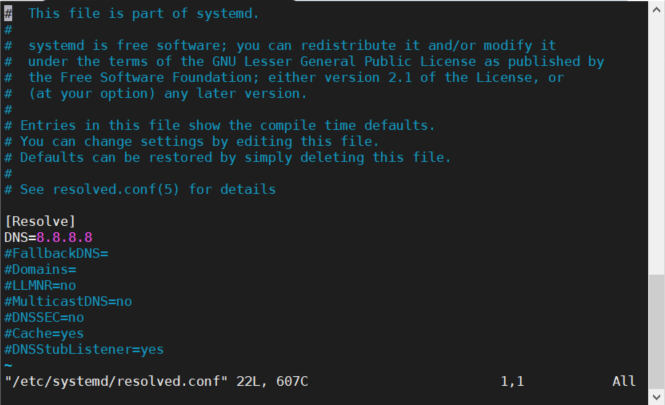
保存,重启机器即可
Linux - Ubuntu下执行apt-get update报错:Some index files failed to download. They have been ignored, or old ones used instead.的更多相关文章
- 【Problem】xampp in ubuntu下命令行启动mysql报错: ERROR 2002 (HY000): Can't connect to local MySQL server through socket '/opt/lampp/var/mysql/mysql.sock' (2)
xampp in ubuntu下命令行启动mysql报错: reddevil@reddevil-Lenovo:/opt/lampp$ ./bin/mysql -u root -p Enter pass ...
- 在ubuntu更新时,出现错误E: Some index files failed to download, they have been ignored, or old ones used inst
原文:https://blog.csdn.net/tian_ciomp/article/details/51339635 在ubuntu更新时,出现错误E: Some index files fail ...
- ubuntu 14.04 解决apt-get update报错
apt-get update 报如下错误: 忽略 http://cn.archive.ubuntu.com trusty-backports/multiverse Translation-zh 忽略 ...
- 执行sudo apt-get update报错
1.在官网源https://mirrors.ustc.edu.cn/repogen/下载对应版本最新的源,比如我是16.04版本的ubuntu,对应下载的是这个 2.下载sources.list完成之 ...
- 解决方法:loadrunner 场景下执行webservice脚本是---报错10492 Error: Exception was raised when calling per-process-init function in extens
在vug下执行时,脚本无异常,但是在controller下执行时报下面错误,网上查了下,解决方法千奇百怪,但无一可行. 分析了下错误,似乎是初始化进程有关.想到rts中的设置习惯时以线程方式执行. 遂 ...
- Ubuntu执行sudo apt-get update报错E: 无法获得锁 /var/lib/apt/lists/lock - open (11: 资源暂时不可用) E: 无法对目录 /var/lib/apt/lists/ 加锁
一.强制解锁,执行语句 sudo rm /var/lib/apt/lists/lock 二.终端输入 ps -aux | grep apt-get 查看一下apt-get的相关进程.然后sudo ki ...
- Linux - ubuntu下Vim安装失败,报The following packages have unmet dependencies: vim : Depends: vim-common
错误命令行 root@ubuntu:/etc/apt# apt install vim Reading package lists... Done Building dependency tree R ...
- ubuntu下安装pip install mysqlclient 报错 command "python setup.py egg_info" failed with error.....解决方案
我的环境: ubuntu 1604 版本, 在黑屏终端已经安装了django和virtualenv虚拟环境, 在创建了django的models后开始迁移的操作, 出现错误, 错误代码最后如题目 可以 ...
- ubuntu下npm全局安装包报错的解决方案
大概就是 npm WARN registry Unexpected warning for https://registry.npmjs.org/: Miscellaneous Warning ERR ...
随机推荐
- 什么是SSH与SSH客户端
1.什么是SSH? SSH 为 Secure Shell 的缩写,由 IETF 的网络工作小组(Network Working Group)所制定:SSH 为建立在应用层和传输层基础上的安全协议.SS ...
- 转:标签中的href如何调用js
在HTML中,<a>标签的href属性用于指定超链接的目标的URL.在所有浏览器中,链接的默认外观是: 未被访问的链接带有下划线而且是蓝色的 已被访问的链接带有下划线而且是紫色的 活动 ...
- MySQL记录操作(多表查询)
准备 建表与数据准备 #建表 create table department( id int, name varchar(20) ); create table employee( id int pr ...
- 机器学习——详解经典聚类算法Kmeans
本文始发于个人公众号:TechFlow,原创不易,求个关注 今天是机器学习专题的第12篇文章,我们一起来看下Kmeans聚类算法. 在上一篇文章当中我们讨论了KNN算法,KNN算法非常形象,通过距离公 ...
- synchronized实现原理及其优化-(自旋锁,偏向锁,轻量锁,重量锁)
1.synchronized概述: synchronized修饰的方法或代码块相当于并发中的临界区,即在同一时刻jvm只允许一个线程进入执行.synchronized是通过锁机制实现同一时刻只允许一个 ...
- 有关KMP算法
KMP算法: 此算法的本质是首先对于模板字符串进行计算,生成一个数组(next数组),该数组反映了模板字符串的情况. 例: S: ABADACABABCD P: ABAB 当我们查询到P3与S3(B和 ...
- 【转】不怕难之BlockingQueue及其实现
1. 前言 BlockingQueue即阻塞队列,它是基于ReentrantLock,依据它的基本原理,我们可以实现Web中的长连接聊天功能,当然其最常用的还是用于实现生产者与消费者模式,大致如下图所 ...
- 【python 数据结构】相同某个字段值的所有数据(整理成数组包字典的形式)
class MonitoredKeywordMore(APIView): def post(self, request): try: # 设置原生命令并且请求数据 parents_asin = str ...
- CSRF和XSS区别和预防
名词解释 CSRF(Cross-site request forgery)跨站请求伪造 XSS (Cross-site scripting)跨站脚本攻击,这里缩写css被前端层叠样式表(Cascadi ...
- 关于MySQL 建表的一些建议
由于在生产环境下,我们对MySQL数据库的操作通常是通过命令行进行操作,因此,建议建表的时候也手写MySQL语句(不建议用图形界面建表). 1.添加注释的格式 在编写MySQL语句时,我们通常会被要求 ...