
Vue_(基础)商品管理-demo
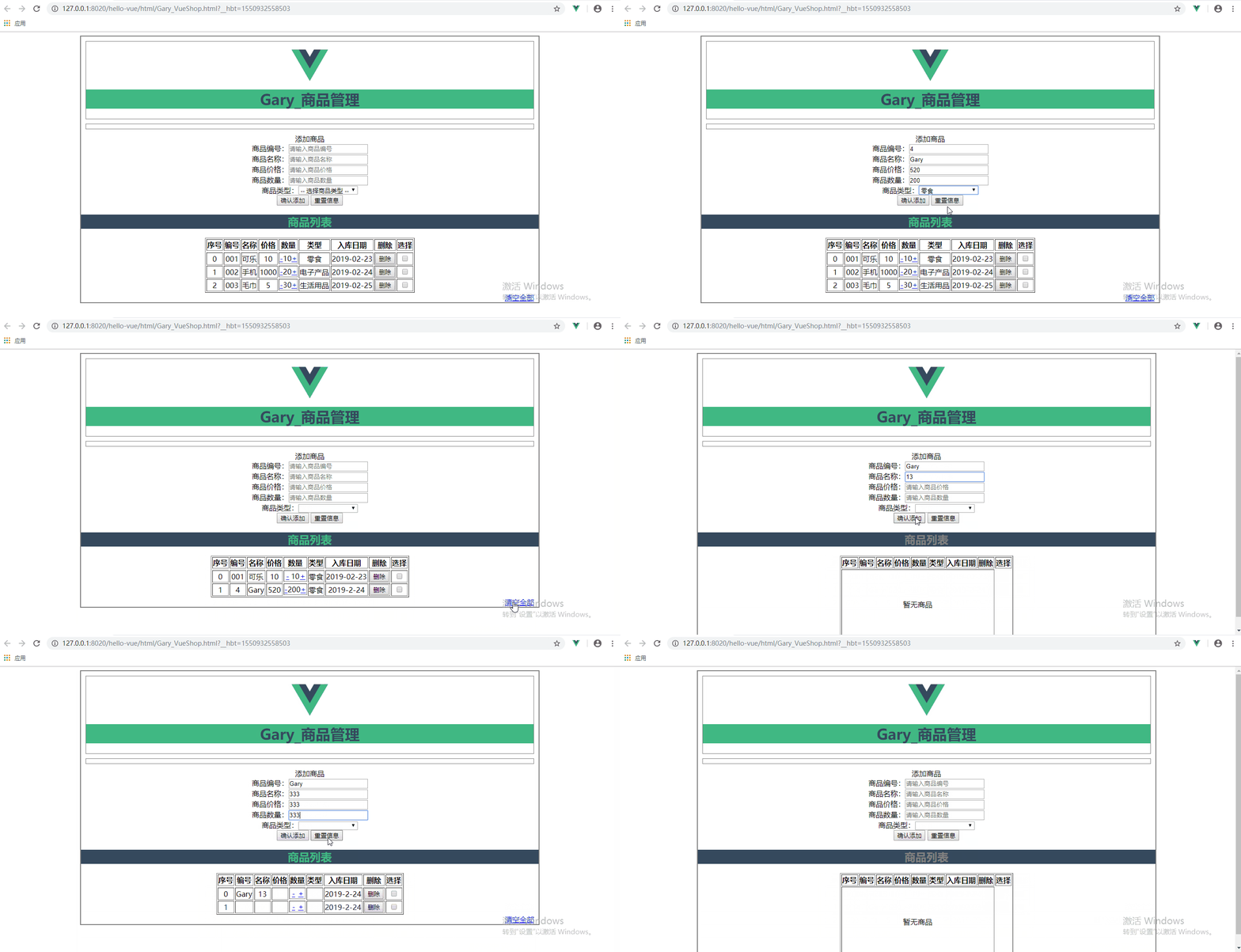
实现对商品的增加、删除、数量的修改功能
删除商品可选择直接删除当前商品、删除选中商品、删除所有商品
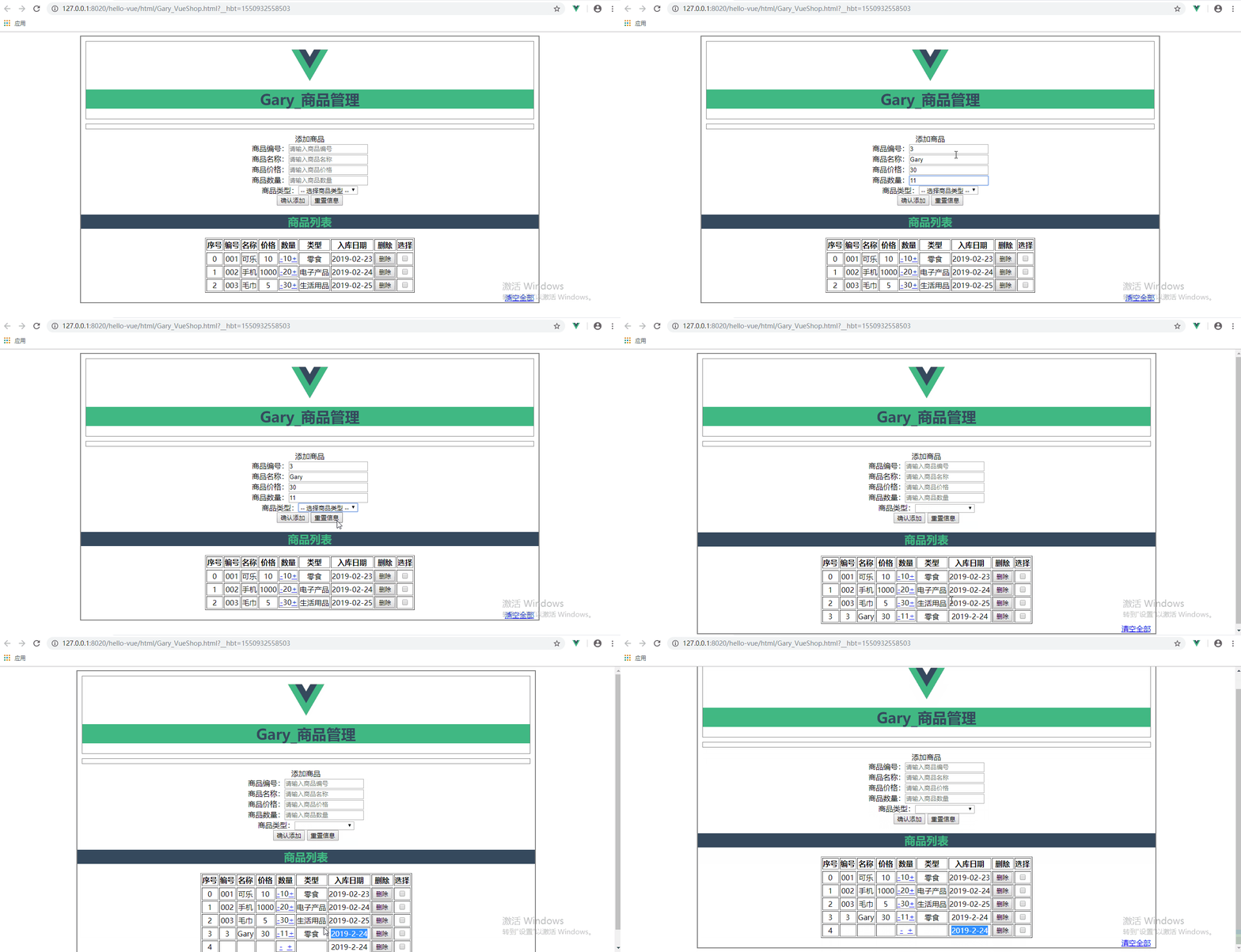
添加商品时会自动添加日期字段
商品的属性
goods : {

    id : '',

    name : '',

    price : '',

    num : '',

    type : '',

    addDate : ''

}
<!DOCTYPE html>

<html>

    <head>

        <meta charset="UTF-8">

        <title>Gary商品管理</title>

        <script type="text/javascript" src="../js/vue.js" ></script>

        <script>

            window.onload = () => {

                let vm = new Vue({

                    el : '.container',

                    data : {

                        imgUrl : '../res/images/',

                        imgName : 'logo.png',

                        goods : {

                            id : '',

                            name : '',

                            price : '',

                            num : '',

                            type : '',

                            addDate : ''

                        },

                        goodsType : ['零食', '电子产品', '生活用品'],

                        goodsArray : [

                            {id : '001', name : '可乐', price : 10, num : 10, type : '零食', addDate : '2019-02-23'},

                            {id : '002', name : '手机', price : 1000, num : 20, type : '电子产品', addDate : '2019-02-24'},

                            {id : '003', name : '毛巾', price : 5, num : 30, type : '生活用品', addDate : '2019-02-25'}

                        ],

                        colNum : 8,

                        delArray:[]    //删除选中的索引

                    },

                    methods : {

                        addGoods(){

                            var d = new Date();

                            var y = d.getFullYear();

                            var m = d.getMonth()+1;

                            var day =d.getDate()<10?'0'+d.getDate() : d.getDate();

                            var myDate = y+ '-' + m +'-'+day;

                            this.goods.addDate = myDate ;

                            this.goodsArray.push(this.goods);

                            this.goods = {};

                        },

                        delGoods(index){

                            this.goodsArray.splice(index, 1);

                        },

                        clearGoodsArray(){

                            this.goodsArray = [];

                        },

                        delSelected(){

                            this.delArray.sort((a, b)=>{

                                return a - b;

                            });

                            for(var i=0; i<this.delArray.length; i++){

                                this.goodsArray.splice(this.delArray[i] - i, 1);

                            }

                            this.delArray = [];

                        }

                    }

                });

            }

        </script>

        <style type="text/css">

            .container{

                margin: 0 auto;

                text-align: center;

                width: 1000px;

                border: 2px solid gray;

            }

            .header{

                margin: 10px;

                border: 1px solid gray;

            }

            .header .title{

                color: rgb(53, 73, 93);

                background: rgb(65, 184, 131);

            }

            .logo{

                position: relative;

                top: 12px;

            }

            .form-warp{

                margin: 10px;

                padding-bottom: 10px;

                border: 1px solid gray;

            }

            .form-warp .content{

                line-height: 35px;

            }

            .form-warp input{

                width: 150px;

                height: 18px;

            }

            .form-warp select{

                width: 154px;

                height: 24px;

            }

            .sub-title{

                color: rgb(65, 184, 131);

                background: rgb(53, 73, 93);

            }

            .table-warp{

                margin: 10px;

                padding-bottom: 10px;

                border: 1px solid gray;

            }

            .table-warp th{

                width: 80px;

                color: #FFF;

                background-color: rgb(53, 73, 93);

            }

            .table-warp a{

                text-decoration: none;

            }

            .clear-btn{

                text-align: right;

                padding-right: 10px;

            }

            .fontColor{

                color: gray;

            }

            .myBackgounrdColor{

                background: rgb(65, 184, 131);

            }

            .myFontSize{

                font-size: 200px;

            }

        </style>

    </head>

    <body>

            <div class="container">

                <!--有logo和title-->

                <div class="header">

                    <img :src="imgUrl + imgName" class="logo" height="80px" />

                    <h1 class="title">Gary_商品管理</h1>

                </div>

                <!--输入部分input-->

                <div class="form-warp"></div>

                    <div class = "title">添加商品</div>

                <div class="content">

                    商品编号:<input type="text" placeholder="请输入商品编号" v-model="goods.id"/><br />

                    商品名称:<input type="text" placeholder="请输入商品名称" v-model="goods.name"/><br />

                    商品价格:<input type="text" placeholder="请输入商品价格" v-model="goods.price"/><br />

                    商品数量:<input type="text" placeholder="请输入商品数量" v-model="goods.num"/><br />

                    商品类型:<select v-model="goods.type">

                                        <option value=""> -- 选择商品类型 --</option>

                                        <option v-for="type in goodsType">{{type}}</option>

                                    </select>

                </div>

                    <div class="form-btn"></div>

                        <button @click="addGoods">确认添加</button>

                        <button @click="goods = {}">重置信息</button>

                <!--显示 表格-->

                <div class="table-wrap">

                        <h2 :class="{fontColor : goodsArray.length <= 0}" class="sub-title">商品列表</h2>

                    <div class="content">

                        <table border="1" align="center" cellspacing="" cellpadding="">

                            <tr>

                                <th>序号</th>

                                <th>编号</th>

                                <th>名称</th>

                                <th>价格</th>

                                <th>数量</th>

                                <th>类型</th>

                                <th>入库日期</th>

                                <th>删除</th>

                                <th>选择</th>

                            </tr>

                            <tr>

                                        <td :colspan="colNum" height="150px" v-show="goodsArray.length <= 0">暂无商品</td>

                            </tr>

                            <tr v-for="(item, index) in goodsArray" :key="item.id">

                                <td>{{index}}</td>

                                <td>{{item.id}}</td>

                                <td>{{item.name}}</td>

                                <td>{{item.price}}</td>

                                <td style="display: flex;">

                                <a style="flex: 0.5;" href="#" @click.prevent="item.num = item.num-- <= 0 ? 0 : item.num--">-</a>

                                {{item.num}}

                                <a style="flex: 0.5;" href="#" @click.prevent="item.num++">+</a>

                            </td>

                                <td>{{item.type}}</td>

                                <td>{{item.addDate }}</td>

                                <td>

                                    <button @click="delGoods(index)">删除</button>

                                </td>

                                <td>

                                    <input type="checkbox" :value="index"  v-model="delArray"/>

                                </td>

                            </tr>

                        </table>

                    </div>

                    <div class="clear-btn">

                        <a href="#" @click.prevent="delSelected" v-show="delArray.length > 0">删除选中</a>

                        <a href="#" @click.prevent="clearGoodsArray" v-show="goodsArray.length > 0">清空全部</a>

                    </div>

                </div>

            </div>

    </body>

</html>
Gary_VueShop.html
Learn
一、创建页面与部分属性
二、添加商品
三、给项目添加样式
四、删除商品与提示
五、删除用户选中商品
六、修改商品数量 增加入库信息属性
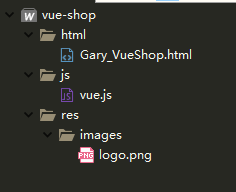
项目结构
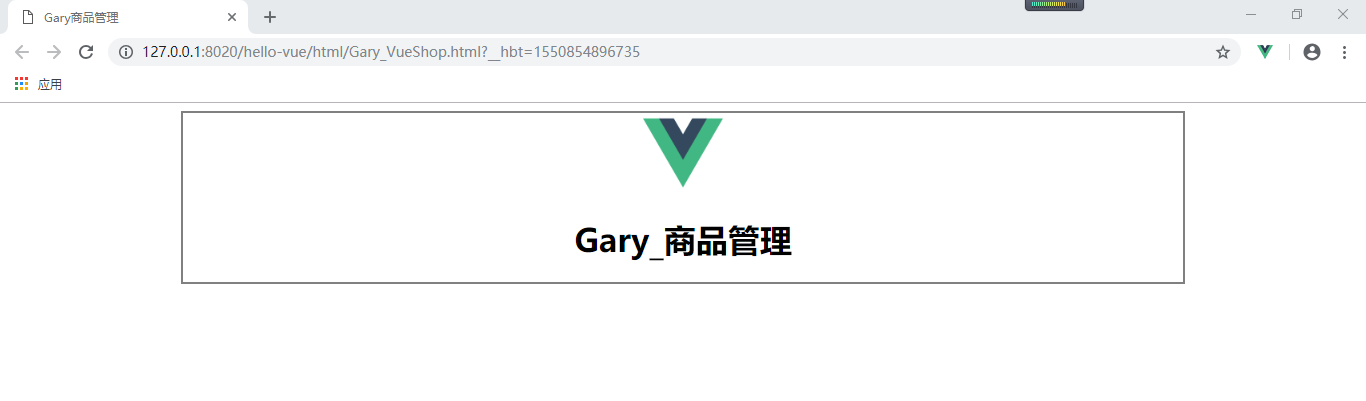
一、创建页面与部分属性
商品头部数据域
                    data : {

                        imgUrl : '../res/images/',

                        imgName : 'logo.png'

                    }
商品头部样式
            .container{

                margin: 0 auto;

                text-align: center;

                width: 1000px;

                border: 2px solid gray;

            }
                <!--有logo和title-->

                <div class="header">

                    <img :src="imgUrl + imgName" class="logo" height="80px" />

                    <h1 class="title">Gary_商品管理</h1>

                </div>
<!DOCTYPE html>

<html>

    <head>

        <meta charset="UTF-8">

        <title>Gary商品管理</title>

        <script type="text/javascript" src="../js/vue.js" ></script>

        <script>

            window.onload = () => {

                let vm = new Vue({

                    el : '.container',

                    data : {

                        imgUrl : '../res/images/',

                        imgName : 'logo.png'

                    },

                    methods : {

                    }

                });

            }

        </script>

        <style type="text/css">

            .container{

                margin: 0 auto;

                text-align: center;

                width: 1000px;

                border: 2px solid gray;

            }

        </style>

    </head>

    <body>

            <div class="container">

                <!--有logo和title-->

                <div class="header">

                    <img :src="imgUrl + imgName" class="logo" height="80px" />

                    <h1 class="title">Gary_商品管理</h1>

                </div>

                <!--输入部分input-->

                <div class="form-warp"></div>

                <!--显示 表格-->

                <div class="table-wrap"></div>

            </div>

    </body>

</html>
Gary_VueShop.html
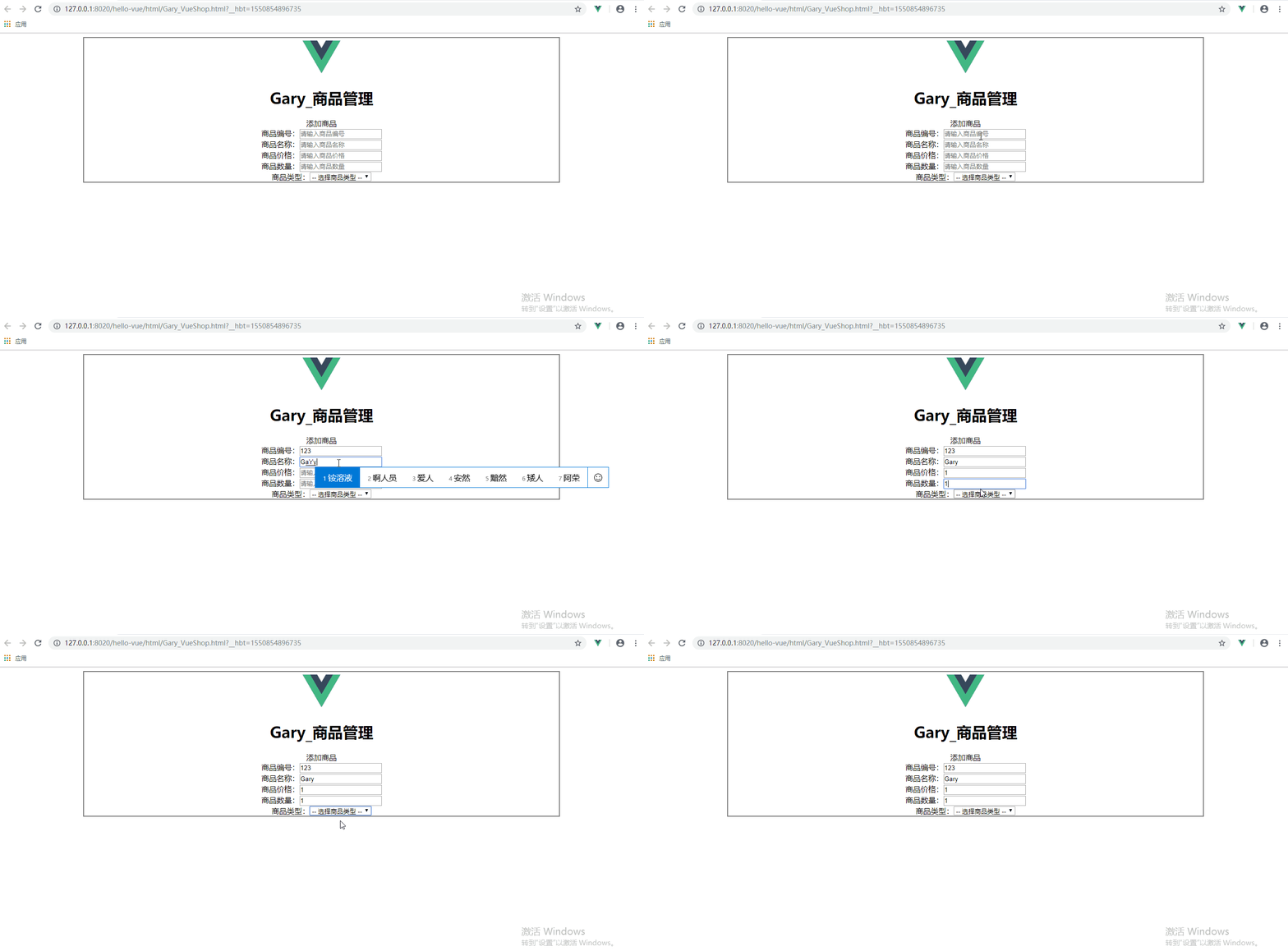
添加商品的部分属性
                    data : {

                        imgUrl : '../res/images/',

                        imgName : 'logo.png',

                        goods : {

                            id : '',

                            name : '',

                            price : '',

                            num : '',

                            type : '',

                        },

                        goodsType : ['零食', '电子产品', '生活用品']

                    }
<!--输入部分input-->

                <div class="form-warp"></div>

                    <div class = "title">添加商品</div>

                <div class="content">

                    商品编号:<input type="text" placeholder="请输入商品编号" v-model="goods.id"/><br />

                    商品名称:<input type="text" placeholder="请输入商品名称" v-model="goods.name"/><br />

                    商品价格:<input type="text" placeholder="请输入商品价格" v-model="goods.price"/><br />

                    商品数量:<input type="text" placeholder="请输入商品数量" v-model="goods.num"/><br />

                    商品类型:<select v-model="goods.type">

                                        <option value=""> -- 选择商品类型 --</option>

                                        <option v-for="type in goodsType">{{type}}</option>

                                    </select>

                </div>
<!DOCTYPE html>

<html>

    <head>

        <meta charset="UTF-8">

        <title>Gary商品管理</title>

        <script type="text/javascript" src="../js/vue.js" ></script>

        <script>

            window.onload = () => {

                let vm = new Vue({

                    el : '.container',

                    data : {

                        imgUrl : '../res/images/',

                        imgName : 'logo.png',

                        goods : {

                            id : '',

                            name : '',

                            price : '',

                            num : '',

                            type : '',

                        },

                        goodsType : ['零食', '电子产品', '生活用品']

                    }

                    methods : {

                    }

                });

            }

        </script>

        <style type="text/css">

            .container{

                margin: 0 auto;

                text-align: center;

                width: 1000px;

                border: 2px solid gray;

            }

        </style>

    </head>

    <body>

            <div class="container">

                <!--有logo和title-->

                <div class="header">

                    <img :src="imgUrl + imgName" class="logo" height="80px" />

                    <h1 class="title">Gary_商品管理</h1>

                </div>

                <!--输入部分input-->

                <div class="form-warp"></div>

                    <div class = "title">添加商品</div>

                <div class="content">

                    商品编号:<input type="text" placeholder="请输入商品编号" v-model="goods.id"/><br />

                    商品名称:<input type="text" placeholder="请输入商品名称" v-model="goods.name"/><br />

                    商品价格:<input type="text" placeholder="请输入商品价格" v-model="goods.price"/><br />

                    商品数量:<input type="text" placeholder="请输入商品数量" v-model="goods.num"/><br />

                    商品类型:<select v-model="goods.type">

                                        <option value=""> -- 选择商品类型 --</option>

                                        <option v-for="type in goodsType">{{type}}</option>

                                    </select>

                </div>

                    <div class="form-btn"></div>

                <!--显示 表格-->

                <div class="table-wrap"></div>

            </div>

    </body>

</html>
Gary_VueShop.html
二、添加商品
在Vue数据域中添加商品实例
                        goodsArray : [

                            {id : '001', name : '可乐', price : 10, num : 10, type : '零食', addDate : '2019-02-23'},

                            {id : '002', name : '手机', price : 1000, num : 20, type : '电子产品', addDate : '2019-02-24'},

                            {id : '003', name : '毛巾', price : 5, num : 30, type : '生活用品', addDate : '2019-02-25'}
在body中添加列出商品详情
                        <table border="1" align="center" cellspacing="" cellpadding="">

                            <tr>

                                <th>序号</th>

                                <th>编号</th>

                                <th>名称</th>

                                <th>价格</th>

                                <th>数量</th>

                                <th>类型</th>

                            </tr>

                            <tr v-for="(item, index) in goodsArray" :key="item.id">

                                <td>{{index}}</td>

                                <td>{{item.id}}</td>

                                <td>{{item.name}}</td>

                                <td>{{item.price}}</td>

                                <td>{{item.num}}</td>

                                <td>{{item.type}}</td>

                            </tr>

                        </table>
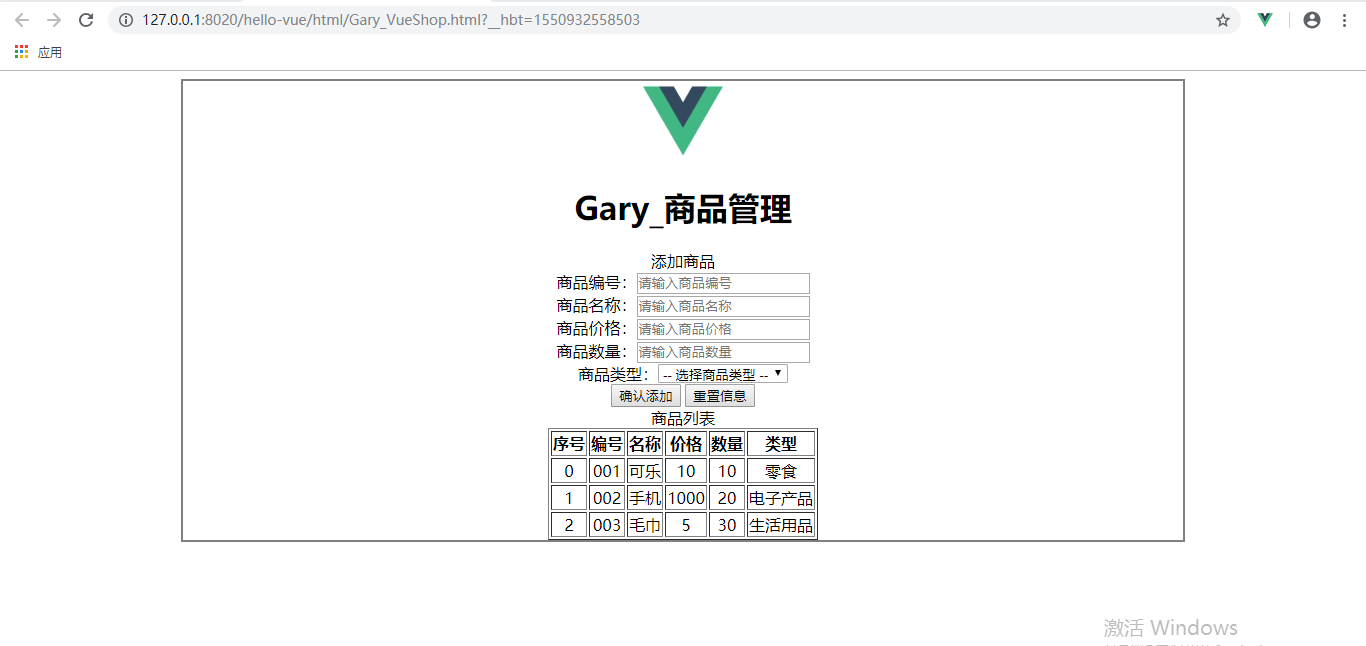
<!DOCTYPE html>

<html>

    <head>

        <meta charset="UTF-8">

        <title>Gary商品管理</title>

        <script type="text/javascript" src="../js/vue.js" ></script>

        <script>

            window.onload = () => {

                let vm = new Vue({

                    el : '.container',

                    data : {

                        imgUrl : '../res/images/',

                        imgName : 'logo.png',

                        goods : {

                            id : '',

                            name : '',

                            price : '',

                            num : '',

                            type : ''

                        },

                        goodsType : ['零食', '电子产品', '生活用品'],

                        goodsArray : [

                            {id : '001', name : '可乐', price : 10, num : 10, type : '零食', addDate : '2019-02-23'},

                            {id : '002', name : '手机', price : 1000, num : 20, type : '电子产品', addDate : '2019-02-24'},

                            {id : '003', name : '毛巾', price : 5, num : 30, type : '生活用品', addDate : '2019-02-25'}

                        ]

                    },

                    methods : {

                    }

                });

            }

        </script>

        <style type="text/css">

            .container{

                margin: 0 auto;

                text-align: center;

                width: 1000px;

                border: 2px solid gray;

            }

        </style>

    </head>

    <body>

            <div class="container">

                <!--有logo和title-->

                <div class="header">

                    <img :src="imgUrl + imgName" class="logo" height="80px" />

                    <h1 class="title">Gary_商品管理</h1>

                </div>

                <!--输入部分input-->

                <div class="form-warp"></div>

                    <div class = "title">添加商品</div>

                <div class="content">

                    商品编号:<input type="text" placeholder="请输入商品编号" v-model="goods.id"/><br />

                    商品名称:<input type="text" placeholder="请输入商品名称" v-model="goods.name"/><br />

                    商品价格:<input type="text" placeholder="请输入商品价格" v-model="goods.price"/><br />

                    商品数量:<input type="text" placeholder="请输入商品数量" v-model="goods.num"/><br />

                    商品类型:<select v-model="goods.type">

                                        <option value=""> -- 选择商品类型 --</option>

                                        <option v-for="type in goodsType">{{type}}</option>

                                    </select>

                </div>

                    <div class="form-btn"></div>

                        <button>确认添加</button>

                        <button>重置信息</button>

                <!--显示 表格-->

                <div class="table-wrap">

                    <div class="title">商品列表</div>

                    <div class="content">

                        <table border="1" align="center" cellspacing="" cellpadding="">

                            <tr>

                                <th>序号</th>

                                <th>编号</th>

                                <th>名称</th>

                                <th>价格</th>

                                <th>数量</th>

                                <th>类型</th>

                            </tr>

                            <tr v-for="(item, index) in goodsArray" :key="item.id">

                                <td>{{index}}</td>

                                <td>{{item.id}}</td>

                                <td>{{item.name}}</td>

                                <td>{{item.price}}</td>

                                <td>{{item.num}}</td>

                                <td>{{item.type}}</td>

                            </tr>

                        </table>

                    </div>

                </div>

            </div>

    </body>

</html>
Gary_VueShop.html
给"确认添加"和"重置信息"绑定事件响应
                    methods : {

                        addGoods(){

                            this.goodsArray.push(this.goods);

                            this.goods = {};

                        }

                    }
                        <button @click="addGoods">确认添加</button>

                        <button @click="goods = {}">重置信息</button>
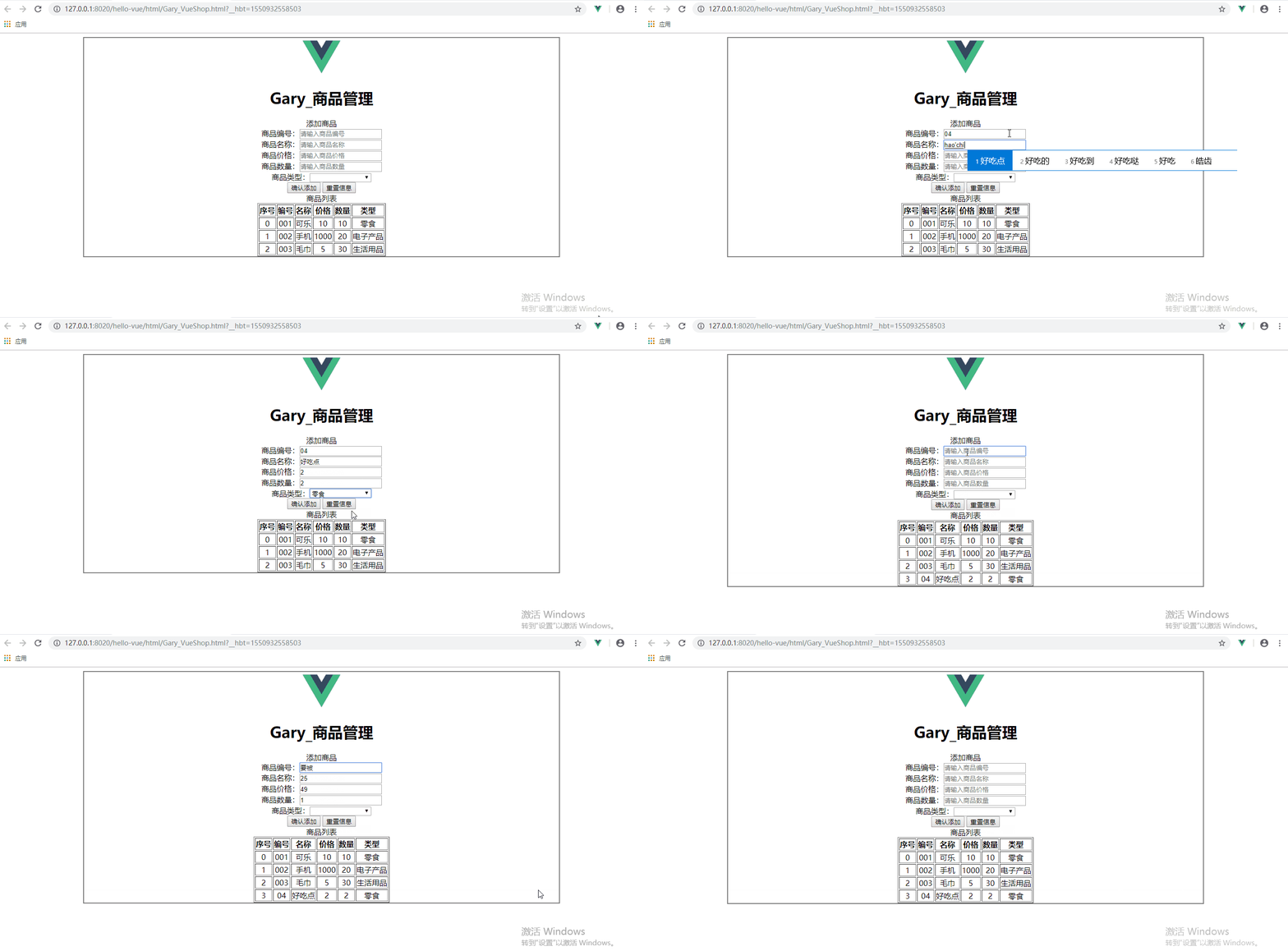
<!DOCTYPE html>

<html>

    <head>

        <meta charset="UTF-8">

        <title>Gary商品管理</title>

        <script type="text/javascript" src="../js/vue.js" ></script>

        <script>

            window.onload = () => {

                let vm = new Vue({

                    el : '.container',

                    data : {

                        imgUrl : '../res/images/',

                        imgName : 'logo.png',

                        goods : {

                            id : '',

                            name : '',

                            price : '',

                            num : '',

                            type : ''

                        },

                        goodsType : ['零食', '电子产品', '生活用品'],

                        goodsArray : [

                            {id : '001', name : '可乐', price : 10, num : 10, type : '零食', addDate : '2019-02-23'},

                            {id : '002', name : '手机', price : 1000, num : 20, type : '电子产品', addDate : '2019-02-24'},

                            {id : '003', name : '毛巾', price : 5, num : 30, type : '生活用品', addDate : '2019-02-25'}

                        ]

                    },

                    methods : {

                        addGoods(){

                            this.goodsArray.push(this.goods);

                            this.goods = {};

                        }

                    }

                });

            }

        </script>

        <style type="text/css">

            .container{

                margin: 0 auto;

                text-align: center;

                width: 1000px;

                border: 2px solid gray;

            }

        </style>

    </head>

    <body>

            <div class="container">

                <!--有logo和title-->

                <div class="header">

                    <img :src="imgUrl + imgName" class="logo" height="80px" />

                    <h1 class="title">Gary_商品管理</h1>

                </div>

                <!--输入部分input-->

                <div class="form-warp"></div>

                    <div class = "title">添加商品</div>

                <div class="content">

                    商品编号:<input type="text" placeholder="请输入商品编号" v-model="goods.id"/><br />

                    商品名称:<input type="text" placeholder="请输入商品名称" v-model="goods.name"/><br />

                    商品价格:<input type="text" placeholder="请输入商品价格" v-model="goods.price"/><br />

                    商品数量:<input type="text" placeholder="请输入商品数量" v-model="goods.num"/><br />

                    商品类型:<select v-model="goods.type">

                                        <option value=""> -- 选择商品类型 --</option>

                                        <option v-for="type in goodsType">{{type}}</option>

                                    </select>

                </div>

                    <div class="form-btn"></div>

                        <button @click="addGoods">确认添加</button>

                        <button @click="goods = {}">重置信息</button>

                <!--显示 表格-->

                <div class="table-wrap">

                    <div class="title">商品列表</div>

                    <div class="content">

                        <table border="1" align="center" cellspacing="" cellpadding="">

                            <tr>

                                <th>序号</th>

                                <th>编号</th>

                                <th>名称</th>

                                <th>价格</th>

                                <th>数量</th>

                                <th>类型</th>

                            </tr>

                            <tr v-for="(item, index) in goodsArray" :key="item.id">

                                <td>{{index}}</td>

                                <td>{{item.id}}</td>

                                <td>{{item.name}}</td>

                                <td>{{item.price}}</td>

                                <td>{{item.num}}</td>

                                <td>{{item.type}}</td>

                            </tr>

                        </table>

                    </div>

                </div>

            </div>

    </body>

</html>
Gary_VueShop.html
三、给项目添加样式
直接在<style type="text/css"></style>中为项目添加样式
<style type="text/css">

            .container{

                margin: 0 auto;

                text-align: center;

                width: 1000px;

                border: 2px solid gray;

            }

            .header{

                margin: 10px;

                border: 1px solid gray;

            }

            .header .title{

                color: rgb(53, 73, 93);

                background: rgb(65, 184, 131);

            }

            .logo{

                position: relative;

                top: 12px;

            }

            .form-warp{

                margin: 10px;

                padding-bottom: 10px;

                border: 1px solid gray;

            }

            .form-warp .content{

                line-height: 35px;

            }

            .form-warp input{

                width: 150px;

                height: 18px;

            }

            .form-warp select{

                width: 154px;

                height: 24px;

            }

            .sub-title{

                color: rgb(65, 184, 131);

                background: rgb(53, 73, 93);

            }

            .table-warp{

                margin: 10px;

                padding-bottom: 10px;

                border: 1px solid gray;

            }

            .table-warp th{

                width: 80px;

                color: #FFF;

                background-color: rgb(53, 73, 93);

            }

            .table-warp a{

                text-decoration: none;

            }

            .clear-btn{

                text-align: right;

                padding-right: 10px;

            }

            .fontColor{

                color: gray;

            }

            .myBackgounrdColor{

                background: rgb(65, 184, 131);

            }

            .myFontSize{

                font-size: 200px;

            }

        </style>
CSS

<!DOCTYPE html>

<html>

    <head>

        <meta charset="UTF-8">

        <title>Gary商品管理</title>

        <script type="text/javascript" src="../js/vue.js" ></script>

        <script>

            window.onload = () => {

                let vm = new Vue({

                    el : '.container',

                    data : {

                        imgUrl : '../res/images/',

                        imgName : 'logo.png',

                        goods : {

                            id : '',

                            name : '',

                            price : '',

                            num : '',

                            type : ''

                        },

                        goodsType : ['零食', '电子产品', '生活用品'],

                        goodsArray : [

                            {id : '001', name : '可乐', price : 10, num : 10, type : '零食', addDate : '2019-02-23'},

                            {id : '002', name : '手机', price : 1000, num : 20, type : '电子产品', addDate : '2019-02-24'},

                            {id : '003', name : '毛巾', price : 5, num : 30, type : '生活用品', addDate : '2019-02-25'}

                        ]

                    },

                    methods : {

                        addGoods(){

                            this.goodsArray.push(this.goods);

                            this.goods = {};

                        }

                    }

                });

            }

        </script>

        <style type="text/css">

            .container{

                margin: 0 auto;

                text-align: center;

                width: 1000px;

                border: 2px solid gray;

            }

            .header{

                margin: 10px;

                border: 1px solid gray;

            }

            .header .title{

                color: rgb(53, 73, 93);

                background: rgb(65, 184, 131);

            }

            .logo{

                position: relative;

                top: 12px;

            }

            .form-warp{

                margin: 10px;

                padding-bottom: 10px;

                border: 1px solid gray;

            }

            .form-warp .content{

                line-height: 35px;

            }

            .form-warp input{

                width: 150px;

                height: 18px;

            }

            .form-warp select{

                width: 154px;

                height: 24px;

            }

            .sub-title{

                color: rgb(65, 184, 131);

                background: rgb(53, 73, 93);

            }

            .table-warp{

                margin: 10px;

                padding-bottom: 10px;

                border: 1px solid gray;

            }

            .table-warp th{

                width: 80px;

                color: #FFF;

                background-color: rgb(53, 73, 93);

            }

            .table-warp a{

                text-decoration: none;

            }

            .clear-btn{

                text-align: right;

                padding-right: 10px;

            }

            .fontColor{

                color: gray;

            }

            .myBackgounrdColor{

                background: rgb(65, 184, 131);

            }

            .myFontSize{

                font-size: 200px;

            }

        </style>

    </head>

    <body>

            <div class="container">

                <!--有logo和title-->

                <div class="header">

                    <img :src="imgUrl + imgName" class="logo" height="80px" />

                    <h1 class="title">Gary_商品管理</h1>

                </div>

                <!--输入部分input-->

                <div class="form-warp"></div>

                    <div class = "title">添加商品</div>

                <div class="content">

                    商品编号:<input type="text" placeholder="请输入商品编号" v-model="goods.id"/><br />

                    商品名称:<input type="text" placeholder="请输入商品名称" v-model="goods.name"/><br />

                    商品价格:<input type="text" placeholder="请输入商品价格" v-model="goods.price"/><br />

                    商品数量:<input type="text" placeholder="请输入商品数量" v-model="goods.num"/><br />

                    商品类型:<select v-model="goods.type">

                                        <option value=""> -- 选择商品类型 --</option>

                                        <option v-for="type in goodsType">{{type}}</option>

                                    </select>

                </div>

                    <div class="form-btn"></div>

                        <button @click="addGoods">确认添加</button>

                        <button @click="goods = {}">重置信息</button>

                <!--显示 表格-->

                <div class="table-wrap">

                    <div class="title">商品列表</div>

                    <div class="content">

                        <table border="1" align="center" cellspacing="" cellpadding="">

                            <tr>

                                <th>序号</th>

                                <th>编号</th>

                                <th>名称</th>

                                <th>价格</th>

                                <th>数量</th>

                                <th>类型</th>

                            </tr>

                            <tr v-for="(item, index) in goodsArray" :key="item.id">

                                <td>{{index}}</td>

                                <td>{{item.id}}</td>

                                <td>{{item.name}}</td>

                                <td>{{item.price}}</td>

                                <td>{{item.num}}</td>

                                <td>{{item.type}}</td>

                            </tr>

                        </table>

                    </div>

                </div>

            </div>

    </body>

</html>
Gary_VueShop.html
四、删除商品与提示
添加删除商品button放入表单个中
                        <table border="1" align="center" cellspacing="" cellpadding="">

                            <tr>

                                <th>序号</th>

                                <th>编号</th>

                                <th>名称</th>

                                <th>价格</th>

                                <th>数量</th>

                                <th>类型</th>

                                <th>删除</th>

                            </tr>

                            <tr>

                                        <td :colspan="colNum" height="150px" v-show="goodsArray.length <= 0">暂无商品</td>

                            </tr>

                            <tr v-for="(item, index) in goodsArray" :key="item.id">

                                <td>{{index}}</td>

                                <td>{{item.id}}</td>

                                <td>{{item.name}}</td>

                                <td>{{item.price}}</td>

                                <td>{{item.num}}</td>

                                <td>{{item.type}}</td>

                                <td>

                                    <button @click="delGoods(index)">删除</button>

                                </td>

                            </tr>

                        </table>
添加清空全部商品按钮点击控件
使用@click.prevent可以阻止删除<a>标签默认跳转事件,使用v-show="goodsArray.length > 0判断当商品个数大于0的时候才将次链接显示出来
                    <div>

                        <a href="#" @click.prevent="clearGoodsArray" v-show="goodsArray.length > 0">清空全部</a>

                    </div>
添加绑定删除单个商品和全部商品的函数
                    methods : {

                        addGoods(){

                            this.goodsArray.push(this.goods);

                            this.goods = {};

                        },

                        delGoods(index){

                            this.goodsArray.splice(index, 1);

                        },

                        clearGoodsArray(){

                            this.goodsArray = [];

                        }

                    }
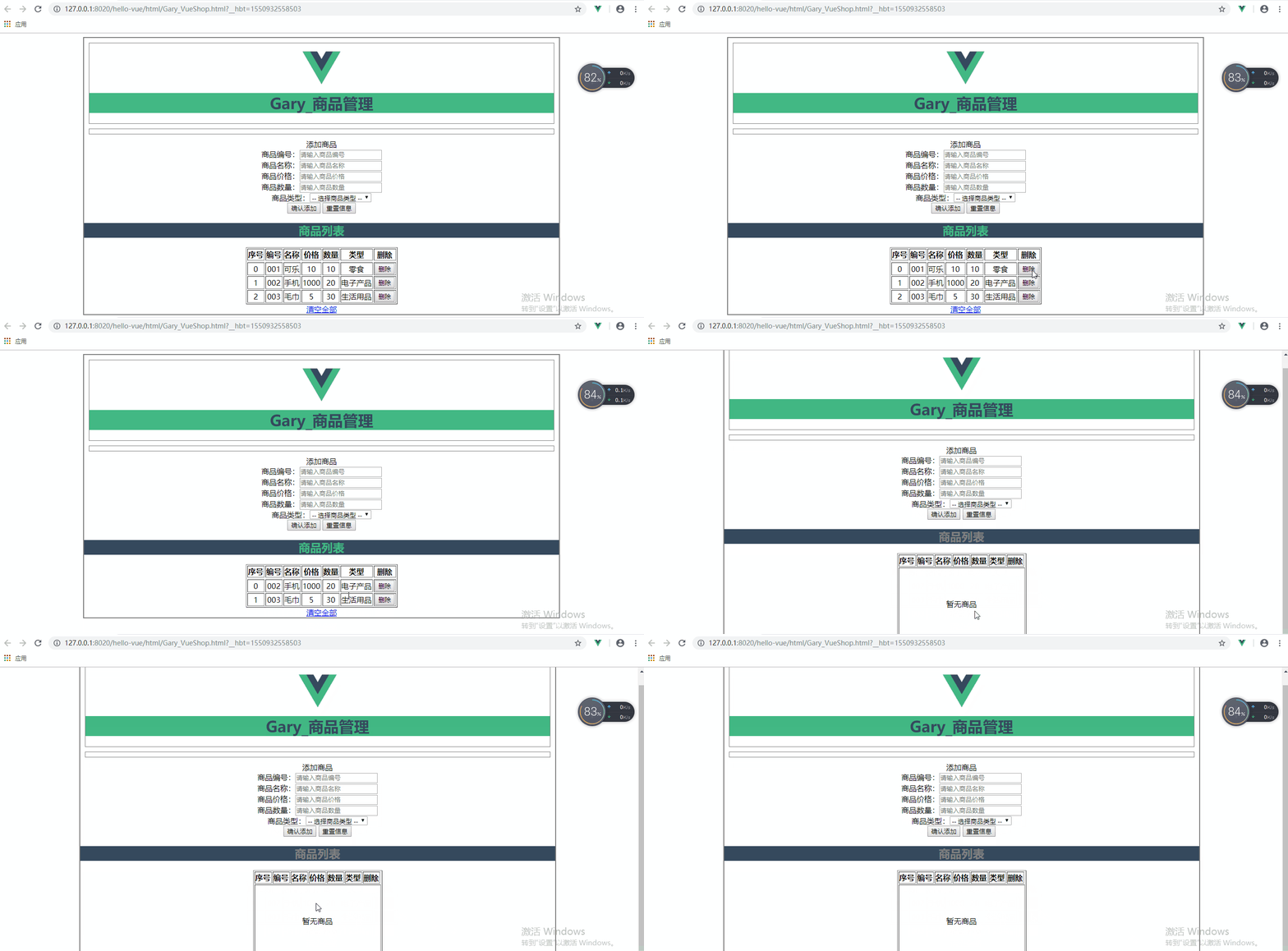
<!DOCTYPE html>

<html>

    <head>

        <meta charset="UTF-8">

        <title>Gary商品管理</title>

        <script type="text/javascript" src="../js/vue.js" ></script>

        <script>

            window.onload = () => {

                let vm = new Vue({

                    el : '.container',

                    data : {

                        imgUrl : '../res/images/',

                        imgName : 'logo.png',

                        goods : {

                            id : '',

                            name : '',

                            price : '',

                            num : '',

                            type : ''

                        },

                        goodsType : ['零食', '电子产品', '生活用品'],

                        goodsArray : [

                            {id : '001', name : '可乐', price : 10, num : 10, type : '零食', addDate : '2019-02-23'},

                            {id : '002', name : '手机', price : 1000, num : 20, type : '电子产品', addDate : '2019-02-24'},

                            {id : '003', name : '毛巾', price : 5, num : 30, type : '生活用品', addDate : '2019-02-25'}

                        ],

                        colNum : 8

                    },

                    methods : {

                        addGoods(){

                            this.goodsArray.push(this.goods);

                            this.goods = {};

                        },

                        delGoods(index){

                            this.goodsArray.splice(index, 1);

                        },

                        clearGoodsArray(){

                            this.goodsArray = [];

                        }

                    }

                });

            }

        </script>

        <style type="text/css">

            .container{

                margin: 0 auto;

                text-align: center;

                width: 1000px;

                border: 2px solid gray;

            }

            .header{

                margin: 10px;

                border: 1px solid gray;

            }

            .header .title{

                color: rgb(53, 73, 93);

                background: rgb(65, 184, 131);

            }

            .logo{

                position: relative;

                top: 12px;

            }

            .form-warp{

                margin: 10px;

                padding-bottom: 10px;

                border: 1px solid gray;

            }

            .form-warp .content{

                line-height: 35px;

            }

            .form-warp input{

                width: 150px;

                height: 18px;

            }

            .form-warp select{

                width: 154px;

                height: 24px;

            }

            .sub-title{

                color: rgb(65, 184, 131);

                background: rgb(53, 73, 93);

            }

            .table-warp{

                margin: 10px;

                padding-bottom: 10px;

                border: 1px solid gray;

            }

            .table-warp th{

                width: 80px;

                color: #FFF;

                background-color: rgb(53, 73, 93);

            }

            .table-warp a{

                text-decoration: none;

            }

            .clear-btn{

                text-align: right;

                padding-right: 10px;

            }

            .fontColor{

                color: gray;

            }

            .myBackgounrdColor{

                background: rgb(65, 184, 131);

            }

            .myFontSize{

                font-size: 200px;

            }

        </style>

    </head>

    <body>

            <div class="container">

                <!--有logo和title-->

                <div class="header">

                    <img :src="imgUrl + imgName" class="logo" height="80px" />

                    <h1 class="title">Gary_商品管理</h1>

                </div>

                <!--输入部分input-->

                <div class="form-warp"></div>

                    <div class = "title">添加商品</div>

                <div class="content">

                    商品编号:<input type="text" placeholder="请输入商品编号" v-model="goods.id"/><br />

                    商品名称:<input type="text" placeholder="请输入商品名称" v-model="goods.name"/><br />

                    商品价格:<input type="text" placeholder="请输入商品价格" v-model="goods.price"/><br />

                    商品数量:<input type="text" placeholder="请输入商品数量" v-model="goods.num"/><br />

                    商品类型:<select v-model="goods.type">

                                        <option value=""> -- 选择商品类型 --</option>

                                        <option v-for="type in goodsType">{{type}}</option>

                                    </select>

                </div>

                    <div class="form-btn"></div>

                        <button @click="addGoods">确认添加</button>

                        <button @click="goods = {}">重置信息</button>

                <!--显示 表格-->

                <div class="table-wrap">

                        <h2 :class="{fontColor : goodsArray.length <= 0}" class="sub-title">商品列表</h2>

                    <div class="content">

                        <table border="1" align="center" cellspacing="" cellpadding="">

                            <tr>

                                <th>序号</th>

                                <th>编号</th>

                                <th>名称</th>

                                <th>价格</th>

                                <th>数量</th>

                                <th>类型</th>

                                <th>删除</th>

                            </tr>

                            <tr>

                                        <td :colspan="colNum" height="150px" v-show="goodsArray.length <= 0">暂无商品</td>

                            </tr>

                            <tr v-for="(item, index) in goodsArray" :key="item.id">

                                <td>{{index}}</td>

                                <td>{{item.id}}</td>

                                <td>{{item.name}}</td>

                                <td>{{item.price}}</td>

                                <td>{{item.num}}</td>

                                <td>{{item.type}}</td>

                                <td>

                                    <button @click="delGoods(index)">删除</button>

                                </td>

                            </tr>

                        </table>

                    </div>

                    <div>

                        <a href="#" @click.prevent="clearGoodsArray" v-show="goodsArray.length > 0">清空全部</a>

                    </div>

                </div>

            </div>

    </body>

</html>
Gary_VueShop.html
五、删除用户选中商品
使用input来存放选中商品的索引
在Vue数据域中添加delArray数据
delArray:[] //删除选中的索引
   <td>

       <input type="checkbox" :value="index"  v-model="delArray"/>

   </td>

   {{delArray}}

<!DOCTYPE html>

<html>

    <head>

        <meta charset="UTF-8">

        <title>Gary商品管理</title>

        <script type="text/javascript" src="../js/vue.js" ></script>

        <script>

            window.onload = () => {

                let vm = new Vue({

                    el : '.container',

                    data : {

                        imgUrl : '../res/images/',

                        imgName : 'logo.png',

                        goods : {

                            id : '',

                            name : '',

                            price : '',

                            num : '',

                            type : ''

                        },

                        goodsType : ['零食', '电子产品', '生活用品'],

                        goodsArray : [

                            {id : '001', name : '可乐', price : 10, num : 10, type : '零食', addDate : '2019-02-23'},

                            {id : '002', name : '手机', price : 1000, num : 20, type : '电子产品', addDate : '2019-02-24'},

                            {id : '003', name : '毛巾', price : 5, num : 30, type : '生活用品', addDate : '2019-02-25'}

                        ],

                        colNum : 8,

                        delArray:[]    //删除选中的索引

                    },

                    methods : {

                        addGoods(){

                            this.goodsArray.push(this.goods);

                            this.goods = {};

                        },

                        delGoods(index){

                            this.goodsArray.splice(index, 1);

                        },

                        clearGoodsArray(){

                            this.goodsArray = [];

                        }

                    }

                });

            }

        </script>

        <style type="text/css">

            .container{

                margin: 0 auto;

                text-align: center;

                width: 1000px;

                border: 2px solid gray;

            }

            .header{

                margin: 10px;

                border: 1px solid gray;

            }

            .header .title{

                color: rgb(53, 73, 93);

                background: rgb(65, 184, 131);

            }

            .logo{

                position: relative;

                top: 12px;

            }

            .form-warp{

                margin: 10px;

                padding-bottom: 10px;

                border: 1px solid gray;

            }

            .form-warp .content{

                line-height: 35px;

            }

            .form-warp input{

                width: 150px;

                height: 18px;

            }

            .form-warp select{

                width: 154px;

                height: 24px;

            }

            .sub-title{

                color: rgb(65, 184, 131);

                background: rgb(53, 73, 93);

            }

            .table-warp{

                margin: 10px;

                padding-bottom: 10px;

                border: 1px solid gray;

            }

            .table-warp th{

                width: 80px;

                color: #FFF;

                background-color: rgb(53, 73, 93);

            }

            .table-warp a{

                text-decoration: none;

            }

            .clear-btn{

                text-align: right;

                padding-right: 10px;

            }

            .fontColor{

                color: gray;

            }

            .myBackgounrdColor{

                background: rgb(65, 184, 131);

            }

            .myFontSize{

                font-size: 200px;

            }

        </style>

    </head>

    <body>

            <div class="container">

                <!--有logo和title-->

                <div class="header">

                    <img :src="imgUrl + imgName" class="logo" height="80px" />

                    <h1 class="title">Gary_商品管理</h1>

                </div>

                <!--输入部分input-->

                <div class="form-warp"></div>

                    <div class = "title">添加商品</div>

                <div class="content">

                    商品编号:<input type="text" placeholder="请输入商品编号" v-model="goods.id"/><br />

                    商品名称:<input type="text" placeholder="请输入商品名称" v-model="goods.name"/><br />

                    商品价格:<input type="text" placeholder="请输入商品价格" v-model="goods.price"/><br />

                    商品数量:<input type="text" placeholder="请输入商品数量" v-model="goods.num"/><br />

                    商品类型:<select v-model="goods.type">

                                        <option value=""> -- 选择商品类型 --</option>

                                        <option v-for="type in goodsType">{{type}}</option>

                                    </select>

                </div>

                    <div class="form-btn"></div>

                        <button @click="addGoods">确认添加</button>

                        <button @click="goods = {}">重置信息</button>

                <!--显示 表格-->

                <div class="table-wrap">

                        <h2 :class="{fontColor : goodsArray.length <= 0}" class="sub-title">商品列表</h2>

                    <div class="content">

                        <table border="1" align="center" cellspacing="" cellpadding="">

                            <tr>

                                <th>序号</th>

                                <th>编号</th>

                                <th>名称</th>

                                <th>价格</th>

                                <th>数量</th>

                                <th>类型</th>

                                <th>删除</th>

                                <th>选择</th>

                            </tr>

                            <tr>

                                        <td :colspan="colNum" height="150px" v-show="goodsArray.length <= 0">暂无商品</td>

                            </tr>

                            <tr v-for="(item, index) in goodsArray" :key="item.id">

                                <td>{{index}}</td>

                                <td>{{item.id}}</td>

                                <td>{{item.name}}</td>

                                <td>{{item.price}}</td>

                                <td>{{item.num}}</td>

                                <td>{{item.type}}</td>

                                <td>

                                    <button @click="delGoods(index)">删除</button>

                                </td>

                                <td>

                                    <input type="checkbox" :value="index"  v-model="delArray"/>

                                </td>

                                {{delArray}}

                            </tr>

                        </table>

                    </div>

                    <div>

                        <a href="#" @click.prevent="clearGoodsArray" v-show="goodsArray.length > 0">清空全部</a>

                    </div>

                </div>

            </div>

    </body>

</html>
Gary_VueShop.html
为方便点击清空全部与删除选中索引,可以把清空全部按钮放置在右下角
添加选中商品链接
                    <div class="clear-btn">

                        <a href="#" @click.prevent="delSelected" v-show="delArray.length > 0">删除选中</a>

                        <a href="#" @click.prevent="clearGoodsArray" v-show="goodsArray.length > 0">清空全部</a>

                    </div>
    delSelected(){

                            this.delArray.sort((a, b)=>{

                                return a - b;

                            });

                            for(var i=0; i<this.delArray.length; i++){

                                this.goodsArray.splice(this.delArray[i] - i, 1);

                            }

                            this.delArray = [];

                        }

                    }
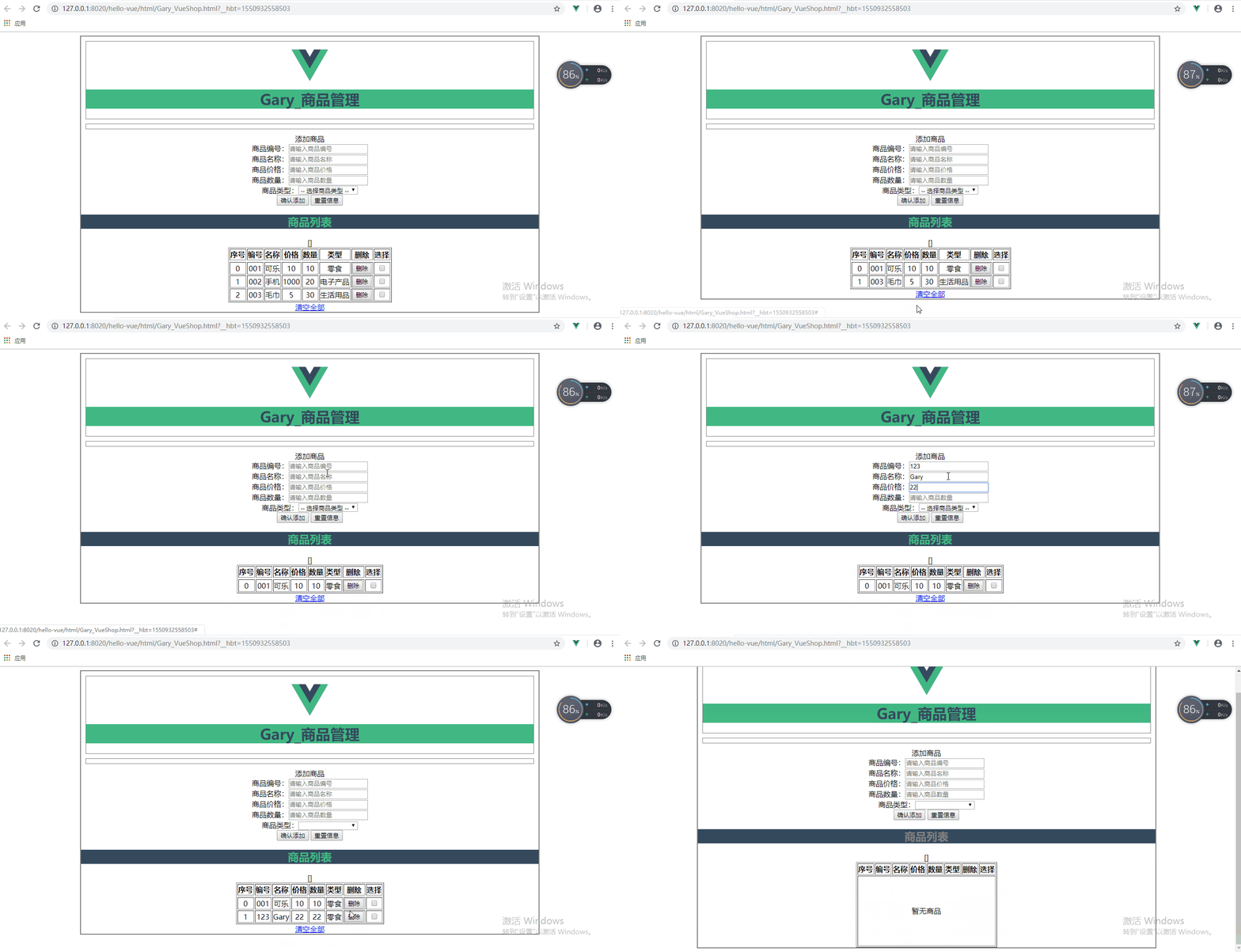
<!DOCTYPE html>

<html>

    <head>

        <meta charset="UTF-8">

        <title>Gary商品管理</title>

        <script type="text/javascript" src="../js/vue.js" ></script>

        <script>

            window.onload = () => {

                let vm = new Vue({

                    el : '.container',

                    data : {

                        imgUrl : '../res/images/',

                        imgName : 'logo.png',

                        goods : {

                            id : '',

                            name : '',

                            price : '',

                            num : '',

                            type : ''

                        },

                        goodsType : ['零食', '电子产品', '生活用品'],

                        goodsArray : [

                            {id : '001', name : '可乐', price : 10, num : 10, type : '零食', addDate : '2019-02-23'},

                            {id : '002', name : '手机', price : 1000, num : 20, type : '电子产品', addDate : '2019-02-24'},

                            {id : '003', name : '毛巾', price : 5, num : 30, type : '生活用品', addDate : '2019-02-25'}

                        ],

                        colNum : 8,

                        delArray:[]    //删除选中的索引

                    },

                    methods : {

                        addGoods(){

                            this.goodsArray.push(this.goods);

                            this.goods = {};

                        },

                        delGoods(index){

                            this.goodsArray.splice(index, 1);

                        },

                        clearGoodsArray(){

                            this.goodsArray = [];

                        },

                        delSelected(){

                            this.delArray.sort((a, b)=>{

                                return a - b;

                            });

                            for(var i=0; i<this.delArray.length; i++){

                                this.goodsArray.splice(this.delArray[i] - i, 1);

                            }

                            this.delArray = [];

                        }

                    }

                });

            }

        </script>

        <style type="text/css">

            .container{

                margin: 0 auto;

                text-align: center;

                width: 1000px;

                border: 2px solid gray;

            }

            .header{

                margin: 10px;

                border: 1px solid gray;

            }

            .header .title{

                color: rgb(53, 73, 93);

                background: rgb(65, 184, 131);

            }

            .logo{

                position: relative;

                top: 12px;

            }

            .form-warp{

                margin: 10px;

                padding-bottom: 10px;

                border: 1px solid gray;

            }

            .form-warp .content{

                line-height: 35px;

            }

            .form-warp input{

                width: 150px;

                height: 18px;

            }

            .form-warp select{

                width: 154px;

                height: 24px;

            }

            .sub-title{

                color: rgb(65, 184, 131);

                background: rgb(53, 73, 93);

            }

            .table-warp{

                margin: 10px;

                padding-bottom: 10px;

                border: 1px solid gray;

            }

            .table-warp th{

                width: 80px;

                color: #FFF;

                background-color: rgb(53, 73, 93);

            }

            .table-warp a{

                text-decoration: none;

            }

            .clear-btn{

                text-align: right;

                padding-right: 10px;

            }

            .fontColor{

                color: gray;

            }

            .myBackgounrdColor{

                background: rgb(65, 184, 131);

            }

            .myFontSize{

                font-size: 200px;

            }

        </style>

    </head>

    <body>

            <div class="container">

                <!--有logo和title-->

                <div class="header">

                    <img :src="imgUrl + imgName" class="logo" height="80px" />

                    <h1 class="title">Gary_商品管理</h1>

                </div>

                <!--输入部分input-->

                <div class="form-warp"></div>

                    <div class = "title">添加商品</div>

                <div class="content">

                    商品编号:<input type="text" placeholder="请输入商品编号" v-model="goods.id"/><br />

                    商品名称:<input type="text" placeholder="请输入商品名称" v-model="goods.name"/><br />

                    商品价格:<input type="text" placeholder="请输入商品价格" v-model="goods.price"/><br />

                    商品数量:<input type="text" placeholder="请输入商品数量" v-model="goods.num"/><br />

                    商品类型:<select v-model="goods.type">

                                        <option value=""> -- 选择商品类型 --</option>

                                        <option v-for="type in goodsType">{{type}}</option>

                                    </select>

                </div>

                    <div class="form-btn"></div>

                        <button @click="addGoods">确认添加</button>

                        <button @click="goods = {}">重置信息</button>

                <!--显示 表格-->

                <div class="table-wrap">

                        <h2 :class="{fontColor : goodsArray.length <= 0}" class="sub-title">商品列表</h2>

                    <div class="content">

                        <table border="1" align="center" cellspacing="" cellpadding="">

                            <tr>

                                <th>序号</th>

                                <th>编号</th>

                                <th>名称</th>

                                <th>价格</th>

                                <th>数量</th>

                                <th>类型</th>

                                <th>删除</th>

                                <th>选择</th>

                            </tr>

                            <tr>

                                        <td :colspan="colNum" height="150px" v-show="goodsArray.length <= 0">暂无商品</td>

                            </tr>

                            <tr v-for="(item, index) in goodsArray" :key="item.id">

                                <td>{{index}}</td>

                                <td>{{item.id}}</td>

                                <td>{{item.name}}</td>

                                <td>{{item.price}}</td>

                                <td>{{item.num}}</td>

                                <td>{{item.type}}</td>

                                <td>

                                    <button @click="delGoods(index)">删除</button>

                                </td>

                                <td>

                                    <input type="checkbox" :value="index"  v-model="delArray"/>

                                </td>

                                {{delArray}}

                            </tr>

                        </table>

                    </div>

                    <div class="clear-btn">

                        <a href="#" @click.prevent="delSelected" v-show="delArray.length > 0">删除选中</a>

                        <a href="#" @click.prevent="clearGoodsArray" v-show="goodsArray.length > 0">清空全部</a>

                    </div>

                </div>

            </div>

    </body>

</html>
Gary_VueShop.html
六、修改商品数量 增加入库信息属性
直接使用@click.prevent对商品数量的修改
                                <td style="display: flex;">

                                <a style="flex: 0.5;" href="#" @click.prevent="item.num = item.num-- <= 0 ? 0 : item.num--">-</a>

                                {{item.num}}

                                <a style="flex: 0.5;" href="#" @click.prevent="item.num++">+</a>

                            </td>

添加商品日期字段
data : {

                        imgUrl : '../res/images/',

                        imgName : 'logo.png',

                        goods : {

                            id : '',

                            name : '',

                            price : '',

                            num : '',

                            type : '',

                            addDate : ''

                        },

                        goodsType : ['零食', '电子产品', '生活用品'],

                        goodsArray : [

                            {id : '001', name : '可乐', price : 10, num : 10, type : '零食', addDate : '2019-02-23'},

                            {id : '002', name : '手机', price : 1000, num : 20, type : '电子产品', addDate : '2019-02-24'},

                            {id : '003', name : '毛巾', price : 5, num : 30, type : '生活用品', addDate : '2019-02-25'}

                        ],

                        colNum : 8,

                        delArray:[]    //删除选中的索引

                    }
将商品信息字段添加进表格当中
<th>入库日期</th>

<td>{{item.addDate }}</td>
修改增加商品addGoods()函数
        addGoods(){

                            var d = new Date();

                            var y = d.getFullYear();

                            var m = d.getMonth()+1;

                            var day =d.getDate()<10?'0'+d.getDate() : d.getDate();

                            var myDate = y+ '-' + m +'-'+day;

                            this.goods.addDate = myDate ;

                            this.goodsArray.push(this.goods);

                            this.goods = {};

                        }
<!DOCTYPE html>

<html>

    <head>

        <meta charset="UTF-8">

        <title>Gary商品管理</title>

        <script type="text/javascript" src="../js/vue.js" ></script>

        <script>

            window.onload = () => {

                let vm = new Vue({

                    el : '.container',

                    data : {

                        imgUrl : '../res/images/',

                        imgName : 'logo.png',

                        goods : {

                            id : '',

                            name : '',

                            price : '',

                            num : '',

                            type : '',

                            addDate : ''

                        },

                        goodsType : ['零食', '电子产品', '生活用品'],

                        goodsArray : [

                            {id : '001', name : '可乐', price : 10, num : 10, type : '零食', addDate : '2019-02-23'},

                            {id : '002', name : '手机', price : 1000, num : 20, type : '电子产品', addDate : '2019-02-24'},

                            {id : '003', name : '毛巾', price : 5, num : 30, type : '生活用品', addDate : '2019-02-25'}

                        ],

                        colNum : 8,

                        delArray:[]    //删除选中的索引

                    },

                    methods : {

                        addGoods(){

                            var d = new Date();

                            var y = d.getFullYear();

                            var m = d.getMonth()+1;

                            var day =d.getDate()<10?'0'+d.getDate() : d.getDate();

                            var myDate = y+ '-' + m +'-'+day;

                            this.goods.addDate = myDate ;

                            this.goodsArray.push(this.goods);

                            this.goods = {};

                        },

                        delGoods(index){

                            this.goodsArray.splice(index, 1);

                        },

                        clearGoodsArray(){

                            this.goodsArray = [];

                        },

                        delSelected(){

                            this.delArray.sort((a, b)=>{

                                return a - b;

                            });

                            for(var i=0; i<this.delArray.length; i++){

                                this.goodsArray.splice(this.delArray[i] - i, 1);

                            }

                            this.delArray = [];

                        }

                    }

                });

            }

        </script>

        <style type="text/css">

            .container{

                margin: 0 auto;

                text-align: center;

                width: 1000px;

                border: 2px solid gray;

            }

            .header{

                margin: 10px;

                border: 1px solid gray;

            }

            .header .title{

                color: rgb(53, 73, 93);

                background: rgb(65, 184, 131);

            }

            .logo{

                position: relative;

                top: 12px;

            }

            .form-warp{

                margin: 10px;

                padding-bottom: 10px;

                border: 1px solid gray;

            }

            .form-warp .content{

                line-height: 35px;

            }

            .form-warp input{

                width: 150px;

                height: 18px;

            }

            .form-warp select{

                width: 154px;

                height: 24px;

            }

            .sub-title{

                color: rgb(65, 184, 131);

                background: rgb(53, 73, 93);

            }

            .table-warp{

                margin: 10px;

                padding-bottom: 10px;

                border: 1px solid gray;

            }

            .table-warp th{

                width: 80px;

                color: #FFF;

                background-color: rgb(53, 73, 93);

            }

            .table-warp a{

                text-decoration: none;

            }

            .clear-btn{

                text-align: right;

                padding-right: 10px;

            }

            .fontColor{

                color: gray;

            }

            .myBackgounrdColor{

                background: rgb(65, 184, 131);

            }

            .myFontSize{

                font-size: 200px;

            }

        </style>

    </head>

    <body>

            <div class="container">

                <!--有logo和title-->

                <div class="header">

                    <img :src="imgUrl + imgName" class="logo" height="80px" />

                    <h1 class="title">Gary_商品管理</h1>

                </div>

                <!--输入部分input-->

                <div class="form-warp"></div>

                    <div class = "title">添加商品</div>

                <div class="content">

                    商品编号:<input type="text" placeholder="请输入商品编号" v-model="goods.id"/><br />

                    商品名称:<input type="text" placeholder="请输入商品名称" v-model="goods.name"/><br />

                    商品价格:<input type="text" placeholder="请输入商品价格" v-model="goods.price"/><br />

                    商品数量:<input type="text" placeholder="请输入商品数量" v-model="goods.num"/><br />

                    商品类型:<select v-model="goods.type">

                                        <option value=""> -- 选择商品类型 --</option>

                                        <option v-for="type in goodsType">{{type}}</option>

                                    </select>

                </div>

                    <div class="form-btn"></div>

                        <button @click="addGoods">确认添加</button>

                        <button @click="goods = {}">重置信息</button>

                <!--显示 表格-->

                <div class="table-wrap">

                        <h2 :class="{fontColor : goodsArray.length <= 0}" class="sub-title">商品列表</h2>

                    <div class="content">

                        <table border="1" align="center" cellspacing="" cellpadding="">

                            <tr>

                                <th>序号</th>

                                <th>编号</th>

                                <th>名称</th>

                                <th>价格</th>

                                <th>数量</th>

                                <th>类型</th>

                                <th>入库日期</th>

                                <th>删除</th>

                                <th>选择</th>

                            </tr>

                            <tr>

                                        <td :colspan="colNum" height="150px" v-show="goodsArray.length <= 0">暂无商品</td>

                            </tr>

                            <tr v-for="(item, index) in goodsArray" :key="item.id">

                                <td>{{index}}</td>

                                <td>{{item.id}}</td>

                                <td>{{item.name}}</td>

                                <td>{{item.price}}</td>

                                <td style="display: flex;">

                                <a style="flex: 0.5;" href="#" @click.prevent="item.num = item.num-- <= 0 ? 0 : item.num--">-</a>

                                {{item.num}}

                                <a style="flex: 0.5;" href="#" @click.prevent="item.num++">+</a>

                            </td>

                                <td>{{item.type}}</td>

                                <td>{{item.addDate }}</td>

                                <td>

                                    <button @click="delGoods(index)">删除</button>

                                </td>

                                <td>

                                    <input type="checkbox" :value="index"  v-model="delArray"/>

                                </td>

                            </tr>

                        </table>

                    </div>

                    <div class="clear-btn">

                        <a href="#" @click.prevent="delSelected" v-show="delArray.length > 0">删除选中</a>

                        <a href="#" @click.prevent="clearGoodsArray" v-show="goodsArray.length > 0">清空全部</a>

                    </div>

                </div>

            </div>

    </body>

</html>
Gary_VueShop.html
Vue_(基础)商品管理-demo的更多相关文章
- Super超级ERP系统---(3)基础信息管理--商品管理
商品管理主要包括商品的添加,修改,维护商品所在分类,单位,供应商,品牌,名称,价格,尺寸,规格等属性的维护. 1.商品添加 2.商品列表展示 商品列表界面左侧商品分类,右侧是商品信息
- C#开发微信门户及应用(23)-微信小店商品管理接口的封装和测试
在上篇<C#开发微信门户及应用(22)-微信小店的开发和使用>里面介绍了一些微信小店的基础知识,以及对应的对象模型,本篇继续微信小店的主题,介绍其中API接口的封装和测试使用.微信小店的相 ...
- SQL Server 【附】创建"商品管理数据库"、"学生选课数据库"的SQL语句
附:(创建“商品管理数据库”的SQL语句) --建立"商品管理数据库"数据库-- create database 商品管理数据库 on(name='商品管理数据库_m', file ...
- mvc 权限管理 demo
http://blog.csdn.net/zht666/article/details/8529646 new http://www.cnblogs.com/fengxing/archive/2012 ...
- vue实现图书管理demo
年后公司的项目要求用到vue.js知识,我angular没有学,node.js和react也只是了解了一点点,所以学起来比较困难.如果你想学vue.js的知识,推荐网址:http://vuejs.or ...
- Vue小案例 之 商品管理------学习过滤器 使用过滤器处理日期的格式
代码学习过滤器 过滤器介绍:过滤模型数据,在数据显示前做预处理操作: 内置过滤器:在1.x中,Vue提供了内置过滤器,但是在2.x中已经完全废除: 解决办法: (1)使用第三方库来替代1.x中的内置过 ...
- 【一起学源码-微服务】Hystrix 源码一:Hystrix基础原理与Demo搭建
说明 原创不易,如若转载 请标明来源! 欢迎关注本人微信公众号:壹枝花算不算浪漫 更多内容也可查看本人博客:一枝花算不算浪漫 前言 前情回顾 上一个系列文章讲解了Feign的源码,主要是Feign动态 ...
- 「超市管理系统——商品管理」 · Java Swing + MySQL JDBC开发
项目下载:https://download.csdn.net/download/weixin_44893902/13715024 1.9元付费赞助下载:https://download.csdn.ne ...
- EasyUI+MVC+EF简单用户管理Demo(问题及解决)
写在前面 iframe-src EntityFramework版本 connectionStrings View.Action.页面跳转 EasyUI中DataGrid绑定 新增.修改和删除数据 效果 ...
随机推荐
- 在Win10上运行ESXI-Comstomer
在Win10上运行ESXI-Comstomer 来源 https://www.v-front.de/p/esxi-community-packaging-tools.html ESXi-Customi ...
- .NET监视程序运行时间
使用Stopwatch类(命名空间:System.Diagnostics;) 示例: using System; using System.Collections.Generic; using Sys ...
- O045、理解 Cinder 架构
参考https://www.cnblogs.com/CloudMan6/p/5573159.html 从本节开始我们学习OpenStack 的 Block Storage Service ,Cin ...
- Lab 色彩模型和取值范围
L∈(0,100) a∈(-128,127) b∈(-128,127) opencv 的Lab数据对齐做了量化,使其处于0-255范围 L=L*2.55 a=a+128 b=b+128
- ubuntu18.3完美安装qq
创建一个脚本全自动安装 #!/bin/bash # 安装 deepin-wine sudo mkdir deepin-wine deepin-qq cd deepin-wine git clone h ...
- Unknown column '字段名' in 'field list' 错误解决方案
当后台报这个错误的时候,说明实体类中的字段名出错了,解决方案: 1,检查数据库中的字段名与实体类中的字段名是否一致,特别要注意单词字母, 2,检查数据库中的字段是否与实体类中的字段一致.比如数据库中没 ...
- PHP之配置
1) 错误日志 一.相关配置 需要将php.ini中的配置指令做如下修改: . error_reporting = E_ALL ;将会向PHP报告发生的每个错误 . display_errors = ...
- uni app以及小程序 --环境搭建以及编辑器
https://developers.weixin.qq.com/miniprogram/dev/devtools/download.html 根据以上网页下载自己电脑相应的版本的微信开发者工具(目录 ...
- JPanel实现滚动条
之前一直用JScrollPane里面放一个JTextArea,就可以在文本框内实现滚动条. 但是最近做一个小demo,需要在JPanel中实现滚动条,就找了下资料,做好了,现在记录一下,防止以后再用到 ...
- mysql 知识整理
前言 安装 使用 关于mysql程式的linux命令 启动mysqld 检查端口是否运行 查看数据库程式相关信息 查看mysql版本 查看配置文件位置 登陆mysql 修改密码 SQL命令 查看数据库 ...