
CSS 笔记三(Tables/Box Model/Outline)
CSS Tables
border
border: border-width border-style border-color|initial|inherit;
border-width
border-width: medium|thin|thick|length|initial|inherit;
border-style
border-style:none|hidden|dotted|dashed|solid|double|groove|ridge|inset|outset|initial|inherit;
Table Borders
Example
 table, th, td {

    border: 1px solid black;

 }
border-collapse
- Specify whether the table borders are collapsed into a single border or detached as in standard HTML.
border-collapse: separate|collapse|initial|inherit;
border-spacing
- Specify the distance between the borders of adjacent cells (only for the "separated borders" model).
border-spacing: length|initial|inherit;
Example
 table {

     border-collapse: separate;

     border-spacing: 10px 50px;

 }
Horizontal Alignment
text-align: left|right|center;
Vertical Alignment
vertical-align: top|bottom|middle;
Caption-side
- Specify the placement of a table caption.
caption-side: top|bottom|initial|inherit;
Table-layout
- Specify the table layout algorithm to be used for a table.
table-layout: auto|fixed|initial|inherit;
| Value | Description |
|---|---|
| auto | Automatic table layout algorithm (this is default):
|
| fixed | Fixed table layout algorithm:
|
Empty-cells
- Specify whether or not to display borders and background on empty cells in a table (only for the "separated borders" model).
empty-cells: show|hide|initial|inherit;
Table Padding
- Control the space between the border and the content in a table
Example
th, td {

    padding: 15px;

    text-align: left;

}
- Use the
:hoverselector on <tr> to highlight table rows on mouse over
tr:hover {background-color: #f5f5f5}
Striped Tables
- Use the
nth-child()selector and add abackground-colorto all even (or odd) table rows
tr:nth-child(even) {background-color: #f2f2f2}
Responsive Table
- display a horizontal scroll bar if the screen is too small to display the full content
Example
 <div style="overflow-x:auto;">

 <table>

 ... table content ...

 </table>

 </div>
CSS Box Model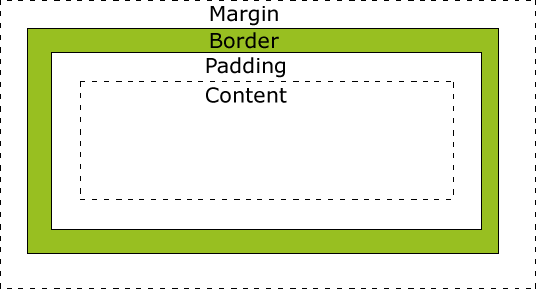
Explanation of the different parts:
- Content - The content of the box, where text and images appear
- Padding - Clears an area around the content. The padding is transparent
- Border - A border that goes around the padding and content
- Margin - Clears an area outside the border. The margin is transparent
Width and Height of an Element
Important:
When you set the width and height properties of an element with CSS, you just set the width and height of the content area. To calculate the full size of an element, you must also add padding, borders and margins.
Example
 div {

     width: 320px;

     padding: 10px;

     border: 5px solid gray;

     margin:;

 }
Total element width = width + left padding + right padding + left border + right border + left margin + right margin
CSS Outline
- An outline is a line drawn around an element - outside the border.
- The outline is NOT a part of an element's dimensions.
- the element's total width and height is not affected by the width of the outline.
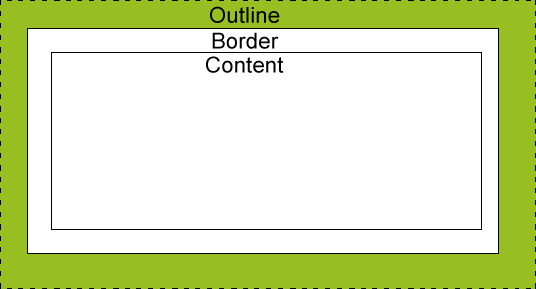
outline-style values
dotted- Defines a dotted outlinedashed- Defines a dashed outlinesolid- Defines a solid outlinedouble- Defines a double outlinegroove- Defines a 3D grooved outline. The effect depends on the outline-color valueridge- Defines a 3D ridged outline. The effect depends on the outline-color valueinset- Defines a 3D inset outline. The effect depends on the outline-color valueoutset- Defines a 3D outset outline. The effect depends on the outline-color valuenone- Defines no outlinehidden- Defines a hidden outline
Example
 p {

     border: 1px solid black;

     outline-color: red;

 }

 p.dotted {outline-style: dotted;}

 p.dashed {outline-style: dashed;}

 p.solid {outline-style: solid;}

 p.double {outline-style: double;}

 p.groove {outline-style: groove;}

 p.ridge {outline-style: ridge;}

 p.inset {outline-style: inset;}

 p.outset {outline-style: outset;}
Result
A dotted outline.
A dashed outline.
A solid outline.
A double outline.
A groove outline. The effect depends on the outline-color value.
A ridge outline. The effect depends on the outline-color value.
An inset outline. The effect depends on the outline-color value.
An outset outline. The effect depends on the outline-color value.
Outline - Shorthand property
- same to border
Example
 p {

     border: 1px solid black;

     outline: 5px dotted red;

 }
- Specify the space between an outline and the edge or border of an element
outline-offset: length|initial|inherit;
Example:
div {

    border: 2px solid black;

    outline: 2px solid red;

    outline-offset: 15px;

}
CSS 笔记三(Tables/Box Model/Outline)的更多相关文章
- CSS 盒子模型(Box model)中的 padding 与 margin
本文将讲述 HTML 和 CSS 的关键—盒子模型 (Box model) .理解 Box model 的关键便是 margin 和 padding 属性,而正确理解这两个属性也是学习用 CSS 布局 ...
- HTML和CSS的盒子模型(Box model)
本文作为属性篇的最后一篇文章, 将讲述HTML和CSS的关键—盒子模型(Box model). 理解Box model的关键便是margin和padding属性, 而正确理解这两个属性也是学习用css ...
- 教你吃透CSS的盒子模型(Box Model)
CSS 盒子模型(Box Model) 所有HTML元素可以看作盒子,在CSS中,"box model"这一术语是用来设计和布局时使用. CSS盒模型本质上是一个盒子,封装周围的H ...
- CSS盒子模型(Box Model)
一.背景 作为CSS的重点,三大模块之一的盒子模型,这部分无论如何也要精通透彻.在任何一个网页当中,都有自己的布局方式,所谓网页布局方式就是如何把网页里面的文字.图片,很好的排版成美工设计的样式,这时 ...
- CSS盒模型(Box Model)
阅读目录 1. 什么是CSS盒模型 2. IE盒模型和W3C盒模型 3. CSS3属性box-sizing 4. 关于盒模型的使用 在最初接触CSS的时候,对于CSS盒模型的不了解,撞了很多次的南墙呀 ...
- CSS3与页面布局学习笔记(二)——盒子模型(Box Model)、边距折叠、内联与块标签、CSSReset
一.盒子模型(Box Model) 盒子模型也有人称为框模型,HTML中的多数元素都会在浏览器中生成一个矩形的区域,每个区域包含四个组成部分,从外向内依次是:外边距(Margin).边框(Border ...
- CSS魔法堂:重新认识Box Model、IFC、BFC和Collapsing margins
前言 盒子模型作为CSS基础中的基础,曾一度以为掌握了IE和W3C标准下的块级盒子模型即可,但近日在学习行级盒子模型时发现原来当初是如此幼稚可笑.本文尝试全面叙述块级.行级盒子模型的特性.作为近日 ...
- css盒模型(Box Model)
所有HTML元素可以看作盒子,在CSS中,"box model"这一术语是用来设计和布局时使用. CSS盒模型本质上是一个盒子,封装周围的HTML元素,它包括:边距,边框,填充,和 ...
- CSS Box Model(盒子模型)
CSS Box Model(盒子模型) 一.简介 所有HTML元素可以看作盒子,在CSS中,"box model"这一术语是用来设计和布局时使用. CSS盒模型本质上是一个盒子,封 ...
随机推荐
- 19.创建如下三个类:(People类中的三个方法分别输出一些信息,ChinaPeople 和AmericanPeople类重写父类的三个方法)。
package zuoye2; public class People { protected double height; protected double weight; private Stri ...
- Hadoop.2.x_伪分布环境搭建
一. 基本环境搭建 1. 设置主机名.静态IP/DNS.主机映射.windows主机映射(方便ssh访问与IP修改)等 设置主机名: vi /etc/sysconfig/network # 重启系统生 ...
- php随笔(一)
之前的开发一直用的都是Thinkphp框架,对原生的php很不了解,近日打算把以前的项目拿一个出来用原生php再重写一次,顺便再把TP框架拆开好好分析分析. 之前的android开发虽说对面向对象的思 ...
- MUI - Dialog 提示窗
Mui基本简介 MUI不依赖任何第三方JS库,压缩后的JS和CSS文件仅有100+K和60+K MUI的开发手册和下载地址 http://dev.dcloud.net.cn/mui/ui/ https ...
- 新建一个新的spring boot项目
简单几步,在Eclipse中创建一个新的spring Boot项目: 1.Eclipse中安装STS插件: Help -> Eclipse Marketplace... Search或选择&qu ...
- java之接口(笔记)
1.特征 (1)所有成员变量都是public, static, final.(2)所有方法都是public, abstract.(3)所有嵌套类型都是public, static. 2.接口也是继承自 ...
- IOS第15天(3,事件处理,手势处理)
7> 手势识别 使用UIImageView原因:之前既能看见图片,又能监听点击的只有UIButton,学了手势,我们的UIImageView也可以. * tap(代理:左边不能点,右 ...
- HDU 3695 Computer Virus on Planet Pandora(AC自动机模版题)
Computer Virus on Planet Pandora Time Limit: 6000/2000 MS (Java/Others) Memory Limit: 256000/1280 ...
- Java 内存区域划分
JVM的内存区域划分 学过C语言的朋友都知道C编译器在划分内存区域的时候经常将管理的区域划分为数据段和代码段,数据段包括堆.栈以及静态数据区.那么在Java语言当中,内存又是如何划分的 ...
- [LeetCode]题解(python):114 Flatten Binary Tree to Linked List
题目来源 https://leetcode.com/problems/flatten-binary-tree-to-linked-list/ Given a binary tree, flatten ...