
Unreal Engine4 学习笔记1 状态机 动画蓝图
1.动画蓝图 包含 状态机 包含 混合空间BlendSpace,即状态机包含在动画蓝图的"动画图表中",而混合空间可用于在状态机中向某(没)一个状态输出最终POSE:
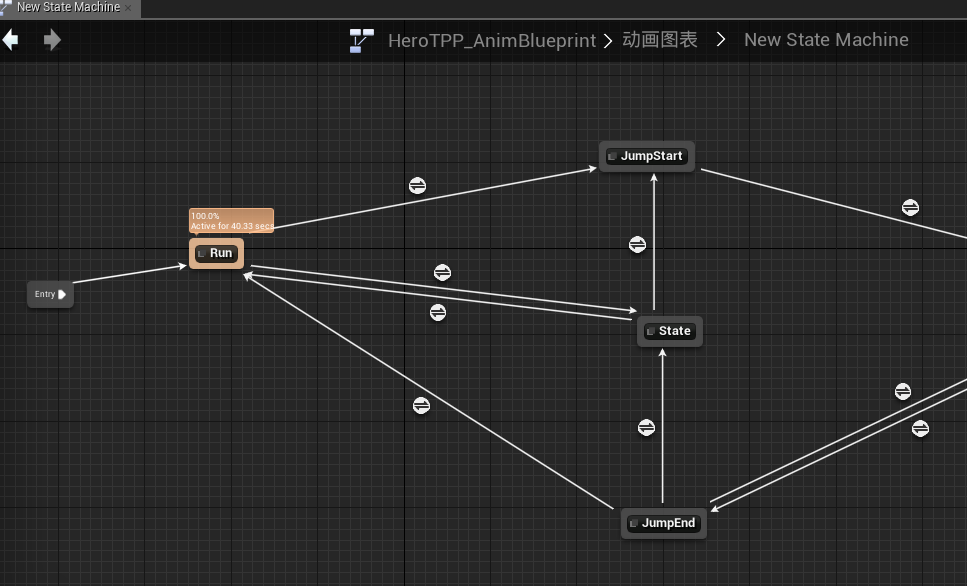
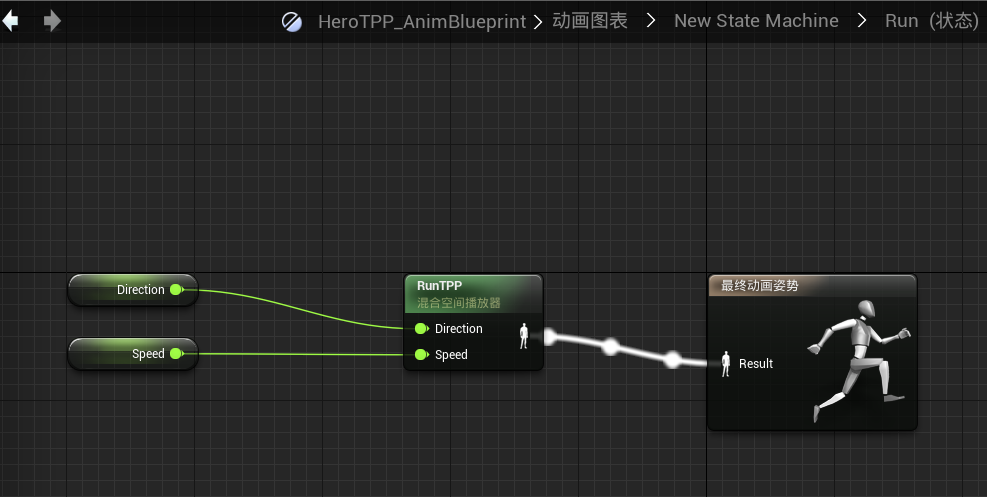
动画蓝图一共包含两个东西,除了上面提到的动画图表,还包括了一个事件图表。动画图表中,状态机内肯定有一些变量来决定状态的转换,比如"isInAir","speed"等。而这些都可以在"事件图表"中得到并设置:
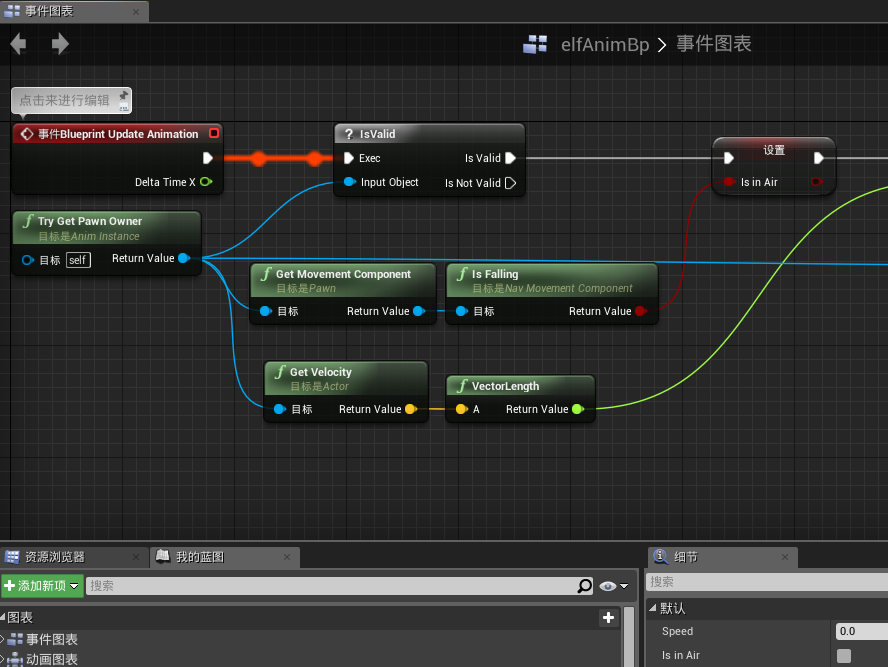
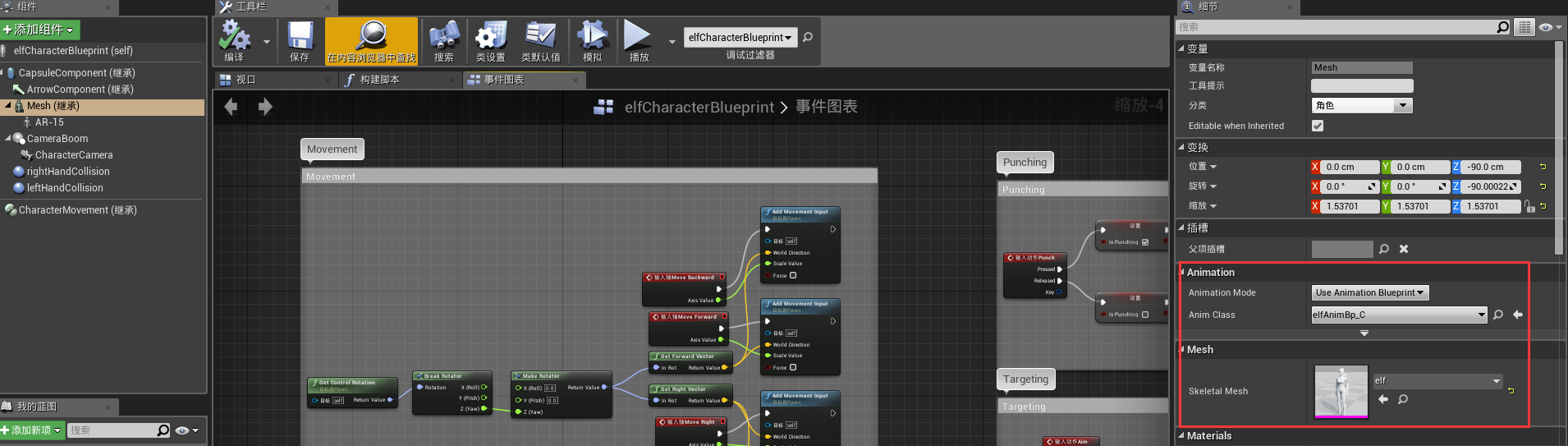
动画又是怎么和我们控制的角色关联起来的呢?
第一种方式是通过Character蓝图,然后如图有相关选项进行关联,下图的例子关联了动画和Mesh
2.新建的c++项目,是不包含Character类的, 但包含一个parent class 为 GameMode的类
关于出生点,最好是在GameMode类的基础上新建一个GameMode蓝图,然后在蓝图中设置Default Pawn Class:
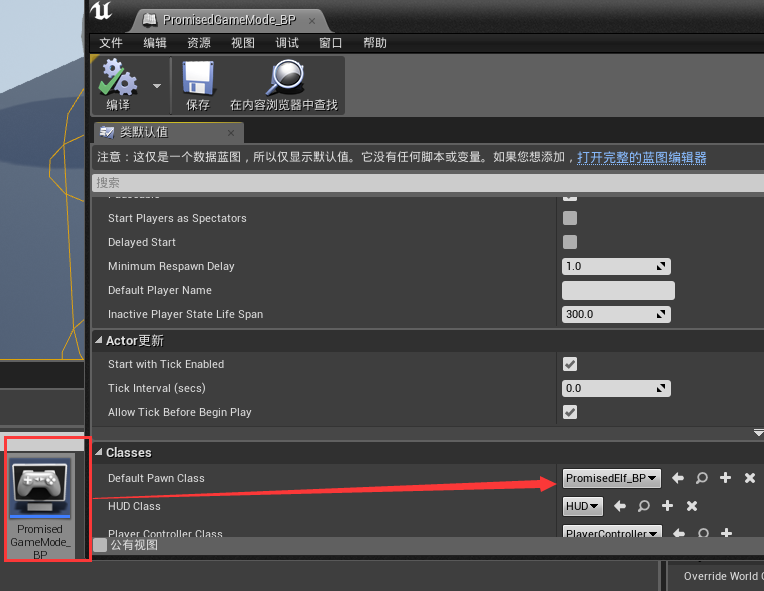
然后还要在设置->世界设置中进行设置:
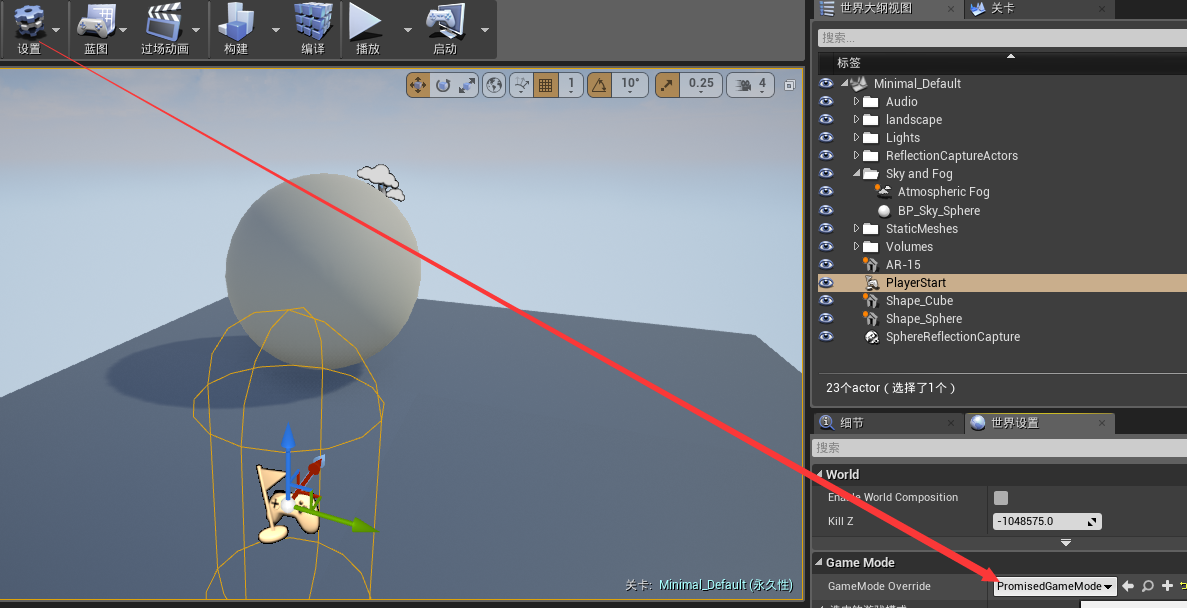
关于输入,这样的代码出现在Character类中:
void ABatteryCollectorCharacter::SetupPlayerInputComponent(class UInputComponent* InputComponent)

{

    // Set up gameplay key bindings

    check(InputComponent);

    InputComponent->BindAction("Jump", IE_Pressed, this, &ACharacter::Jump);

    InputComponent->BindAction("Jump", IE_Released, this, &ACharacter::StopJumping);

    InputComponent->BindAction("Collect", IE_Pressed, this, &ABatteryCollectorCharacter::CollectPickups);

    InputComponent->BindAxis("MoveForward", this, &ABatteryCollectorCharacter::MoveForward);

    InputComponent->BindAxis("MoveRight", this, &ABatteryCollectorCharacter::MoveRight);

    // We have 2 versions of the rotation bindings to handle different kinds of devices differently

    // "turn" handles devices that provide an absolute delta, such as a mouse.

    // "turnrate" is for devices that we choose to treat as a rate of change, such as an analog joystick

    InputComponent->BindAxis("Turn", this, &APawn::AddControllerYawInput);

    InputComponent->BindAxis("TurnRate", this, &ABatteryCollectorCharacter::TurnAtRate);

    InputComponent->BindAxis("LookUp", this, &APawn::AddControllerPitchInput);

    InputComponent->BindAxis("LookUpRate", this, &ABatteryCollectorCharacter::LookUpAtRate);

    // handle touch devices

    InputComponent->BindTouch(IE_Pressed, this, &ABatteryCollectorCharacter::TouchStarted);

    InputComponent->BindTouch(IE_Released, this, &ABatteryCollectorCharacter::TouchStopped);

}
Unreal Engine4 学习笔记1 状态机 动画蓝图的更多相关文章
- Unreal Engine4 学习笔记2 动画蒙太奇
动画蒙太奇出现的位置是在动画蓝图的动画图表和事件图表中,如下图 事件图表,可以看出在主线执行的结尾,如果is Punching 为true,则会执行一个我们自定义的Punch Event,用来播放动画 ...
- iOS学习笔记-自定义过渡动画
代码地址如下:http://www.demodashi.com/demo/11678.html 这篇笔记翻译自raywenderlick网站的过渡动画的一篇文章,原文用的swift,由于考虑到swif ...
- jquery学习笔记(四):动画
内容来自[汇智网]jquery学习课程 4.1 显示和隐藏 在jQuery中使用 hide() 和 show() 方法来隐藏和显示 HTML 元素: hide()的语法形式:$(selector).h ...
- jquery学习笔记-----事件和动画
一.ready机制 $(document).ready( function(){} ) $().ready( function(){} ) $( function(){} ) jquery的read ...
- !!学习笔记:CSS3动画
一句话就有css3动画: 2016-6-29 <style type="text/css"> h1{background:#999;} h1:hover{border- ...
- iOS学习笔记09-核心动画CoreAnimation
http://www.cnblogs.com/liutingIOS/p/5368536.html 一.CALayer CALayer包含在QuartzCore框架中,具有跨平台性,在iOS中使用Cor ...
- Unity Shader学习笔记 - 用UV动画实现沙滩上的泡沫
这个泡沫效果来自远古时代的Unity官方海岛Demo, 原效果直接复制3个材质球在js脚本中做UV动画偏移,这里尝试在shader中做动画并且一个pass中完成: // Upgrade NOTE: r ...
- CSS3学习笔记之loading动画
效果截图: HTML代码: <div class="divBox"> <div class="loader"> <div clas ...
- IOS开发学习笔记022-imageView实现动画
这里要播放的动画是很多张连续的动画,连续播放就会显示出动画效果. 大概过程是: 新建一个single view application ,然后添加一个image View控件到视图.给image vi ...
随机推荐
- OpenGL官方教程——着色器语言概述
OpenGL官方教程——着色器语言概述 OpenGL官方教程——着色器语言概述 可编程图形硬件管线(流水线) 可编程顶点处理器 可编程几何处理器 可编程片元处理器 语言 可编程图形硬件管线(流水线) ...
- centos 谷歌浏览器安装
首先,这个是坑 http://www.tecmint.com/install-google-chrome-on-redhat-centos-fedora-linux/ 安装会报错,按照错误找到以下资源 ...
- php for循环建数据
$data = []; ; $i<; $i++) { $data[] = $i; } print_r($data); 执行后打印的结果为: Array ( [] => [] => [ ...
- pycharm 2016 注册码
43B4A73YYJ-eyJsaWNlbnNlSWQiOiI0M0I0QTczWVlKIiwibGljZW5zZWVOYW1lIjoibGFuIHl1IiwiYXNzaWduZWVOYW1lIjoiI ...
- JavaScript——特殊点总结
首先,== equality 等同,=== identity 恒等. ==, 两边值类型不同的时候,要先进行类型转换,再比较. ===,不做类型转换,类型不同的一定不等. 下面分别说明: 先说 === ...
- poj 1521
http://poj.org/problem?id=1521 题意:给你一个字符串,首先是计算出一个按正常编码的编码长度,其次是计算出一个用霍夫曼编码的编码长度,最后求正常编码的长度除以霍夫曼编码长度 ...
- redis+crontab+php异步处理任务
2016年1月8日 16:08:43 星期五 情景: 用户登录日志, 发邮件, 发短信等等实时性要求不怎么高的业务通常会异步执行 之前接触过几种redis+crontab配套的实现方法, 比如: cr ...
- Innodb锁机制:Next-Key Lock 浅谈
数据库使用锁是为了支持更好的并发,提供数据的完整性和一致性.InnoDB是一个支持行锁的存储引擎,锁的类型有:共享锁(S).排他锁(X).意向共享(IS).意向排他(IX).为了提供更好的并发,Inn ...
- 欧洲杯 2016 高清直播 - 观看工具 UEFA-EURO-2016-Play.7z
OnlineTV-MPlayer-nocache.exe 占 CPU 内存 较少 OnlineTV-FFPlay.exe 可截取图像 UEFA-EURO-2016-Play-v5.7z UEFA-EU ...
- [转]Git远程操作详解
原文:http://www.ruanyifeng.com/blog/2014/06/git_remote.html Git是目前最流行的版本管理系统,学会Git几乎成了开发者的必备技能. Git有很多 ...