
在 Windows Server Container 中运行 Azure Storage Emulator(三):运行在容器中
上一节中,我们已经准备好了 SQL Server,那么接下来,我们要把 ASE 放到容器里了。
首先,新建 Start.ps1,内容如下:
 param(

     [Parameter(Mandatory=$true)][string]$HostName,

     [string]$AccountName,

     [string]$AuthKey,

     [string]$SqlServerInstance)

 # Initialized?

 if (Test-Path Initialized)

 {

     &"C:\Program Files (x86)\Microsoft SDKs\Azure\Storage Emulator\AzureStorageEmulator.exe" start -inporcess

 }

 if ([string]::IsNullOrEmpty($AccountName))

 {

     Write-Output "AccountName argument not specified, use the default: devstoreaccount1"

     $AccountName = "devstoreaccount1"

 }

 if ([string]::IsNullOrEmpty($AuthKey))

 {

     Write-Output "AuthKey argument not specified, use the default: Eby8vdM02xNOcqFlqUwJPLlmEtlCDXJ1OUzFT50uSRZ6IFsuFq2UVErCz4I6tq/K1SZFPTOtr/KBHBeksoGMGw=="

     $AuthKey = "Eby8vdM02xNOcqFlqUwJPLlmEtlCDXJ1OUzFT50uSRZ6IFsuFq2UVErCz4I6tq/K1SZFPTOtr/KBHBeksoGMGw=="

 }

 if ([string]::IsNullOrEmpty($SqlServerInstance))

 {

     Write-Output "SqlServerInstance argument not specified, use the default: (localdb)\MSSQLLocalDB"

     $SqlServerInstance = "(localdb)\MSSQLLocalDB"

 }

 # Replace the configuration

 $config = "C:\Program Files (x86)\Microsoft SDKs\Azure\Storage Emulator\AzureStorageEmulator.exe.config"

 (get-content $config)`

     -Replace "<service name=""Blob"" url=""http://127.0.0.1:10000/""/>", "<service name=""Blob"" url=""http://$AccountName.blob.$HostName/"" />"`

     -Replace "<service name=""Queue"" url=""http://127.0.0.1:10001/""/>", "<service name=""Queue"" url=""http://$AccountName.queue.$HostName/"" />"`

     -Replace"<service name=""Table"" url=""http://127.0.0.1:10002/""/>", "<service name=""Table"" url=""http://$AccountName.table.$HostName/"" />"`

     -Replace "<account name=""devstoreaccount1"" authKey=""Eby8vdM02xNOcqFlqUwJPLlmEtlCDXJ1OUzFT50uSRZ6IFsuFq2UVErCz4I6tq/K1SZFPTOtr/KBHBeksoGMGw=="" />",`

         "<account name=""$AccountName"" authKey=""$AuthKey"" />"`

         | Out-File $config

 # Init the emulator

 & "C:\Program Files (x86)\Microsoft SDKs\Azure\Storage Emulator\AzureStorageEmulator.exe" init -server $SqlServerInstance

 # Set Initialized flag

 New-Item Initialized

 # Start!

 & "C:\Program Files (x86)\Microsoft SDKs\Azure\Storage Emulator\AzureStorageEmulator.exe" start -inprocess
Dockerfile:
# escape=`

FROM microsoft/windowsservercore

ADD https://go.microsoft.com/fwlink/?linkid=717179&clcid=0x409 MicrosoftAzureStorageEmulator.msi

RUN msiexec /q /i MicrosoftAzureStorageEmulator.msi

RUN del MicrosoftAzureStorageEmulator.msi

COPY Start.ps1 .

# Azure Storage Emulator

EXPOSE 80

# Configure and launch

ENTRYPOINT powershell .\Start.ps1
或许把 AzureStorageEmulator.exe" init 放到 Dockerfile 里也是个好主意,但是这样每个环境都要 build 不同的 image,这不是我想要的。
现在可以 Build 我们的 image 了:
docker build -t charmsan/azurestorageemulator .
为了使用 gMSA 运行容器,还有一步(有关容器中使用 gMSA,请见我的另一篇博文:《在 Windows 容器中使用 gMSA》):
New-CredentialSpec -Name AseSvc -AccountName AseSvc
Launch!
docker run -it -h ASE-DEV --name AzureStorageEmulator-Dev --network external --ip 192.168.11.1 --dns 192.168.15.1 --dns 192.168.15.2 --security-opt "credentialspec=file://AseSvc.json" --restart unless-stopped charmsan/azurestorageemulator -HostName contoso.com -AccountName dev -SqlServerInstance CONTOSO-ENV-DB\CONTOSO_DEV
运行结果:
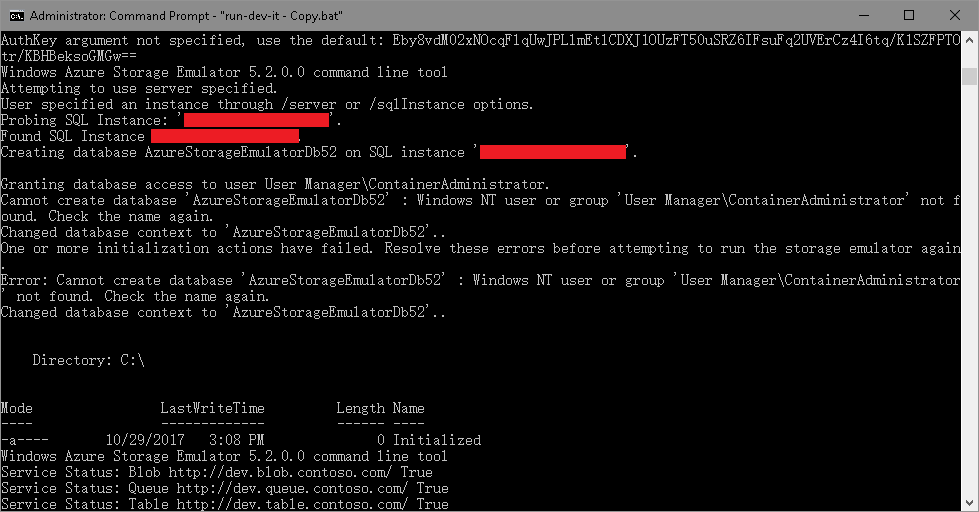
请无视掉里面的两个错误,配置 Azure Storage Explorer 连接:
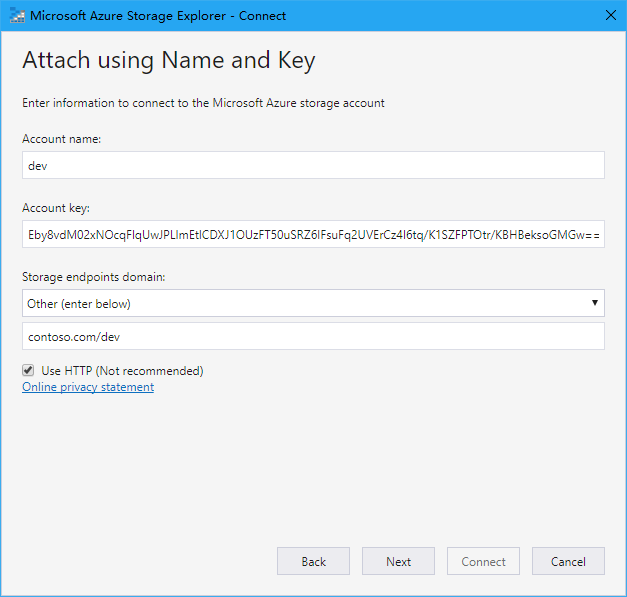
运行结果:
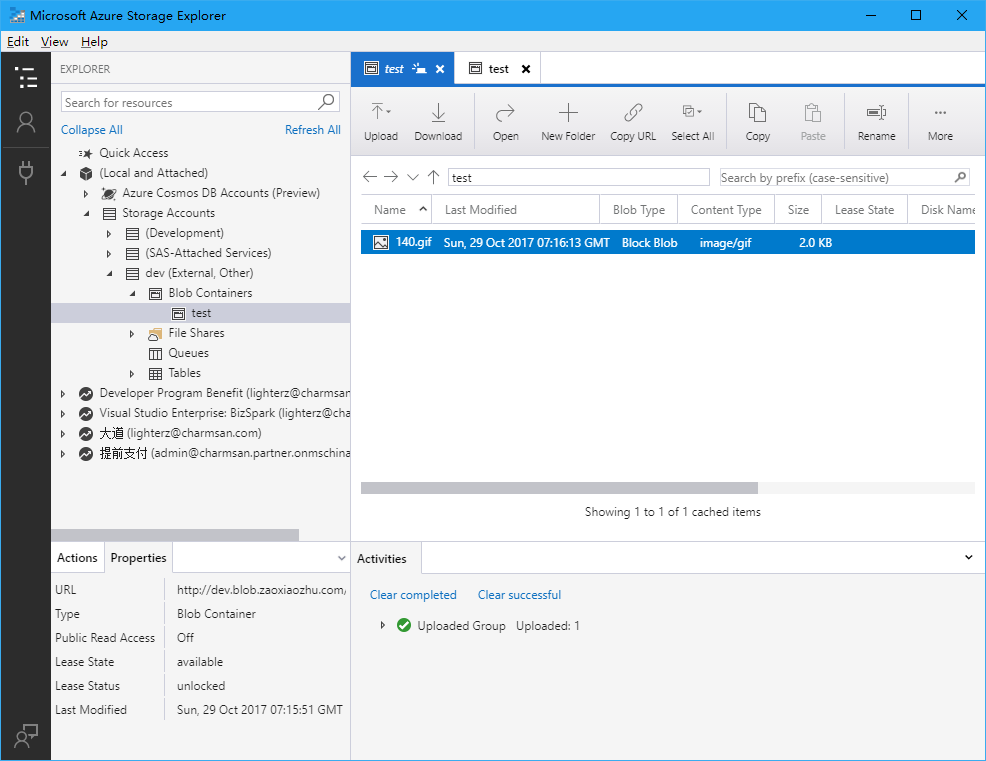
现在,我们可以修改 Web.Debug.config 来把连接串 transform 一下了:
<add xdt:Transform="SetAttributes" xdt:Locator="Match(key)" key="StorageAccountConnectionString" value="DefaultEndpointsProtocol=http;AccountName=dev;AccountKey=Eby8vdM02xNOcqFlqUwJPLlmEtlCDXJ1OUzFT50uSRZ6IFsuFq2UVErCz4I6tq/K1SZFPTOtr/KBHBeksoGMGw==;BlobEndpoint=http://dev.blob.contoso.com/dev;" />
不要问我连接串中的 URL 为什么长成这样子,因为你肯定没认真看第一节:)
在 Windows Server Container 中运行 Azure Storage Emulator(三):运行在容器中的更多相关文章
- 在 Windows Server Container 中运行 Azure Storage Emulator(二):使用自定义的 SQL Server Instance
上一节,我们解决了 Azure Storage Emulator 自定义监听地址的问题,这远远不够,因为在我们 DEV/QA 环境有各自的 SQL Server Instance,我们需要将 ASE ...
- 在 Windows Server Container 中运行 Azure Storage Emulator(一):能否监听自定义地址?
我要做什么? 改 ASE 的监听地址.对于有强迫症的我来说,ASE 默认监听的是 127.0.0.1:10000-10002,这让我无法接受,所以我要将它改成域名 + 80 端口的方式: 放到容器中. ...
- 如何在ASP.NET Core中自定义Azure Storage File Provider
文章标题:如何在ASP.NET Core中自定义Azure Storage File Provider 作者:Lamond Lu 地址:https://www.cnblogs.com/lwqlun/p ...
- Azure开发者任务之一:解决Azure Storage Emulator初始化失败
初学Windows Azure: 我打算开始学习Windows Azure.我安装了Azure SDK,然后在“Cloud”标签下选择Windows Azure模板,创建了一个项目,然后又创建了一个W ...
- 说一说windows原生docker及windows Server Container , Hyper Container 之间的关系(学习总结)
前一段时间学习netcore的时候解除到了docker,感觉真是不错的技术.百度了不少教程.因为我用windows就下载安装了一下试试.但是没有安装成功,才发现 需要安装virtualbox虚拟机,与 ...
- Windows Server 2016软件定义存储:Storage Spaces Direct的关键特性
[TechTarget中国原创] 微软在Windows Server 2016 Technical Preview 2中引入了Storage Spaces Direct.这个特性将本地存储扩展为高可用 ...
- Windows Server 2016-客户端退域的三种方法
前边我们提到了客户端加域的操作方法,本章为大家补充域客户端退域的操作过程,包含图形化.netdom remove.Powershell三种方法,具体内容如下: 图形化退域方法: 1.Win键,计算机右 ...
- [转]探索 Windows Azure Storage
本文转自:https://msdn.microsoft.com/zh-tw/jj573842 概觀 儲存服務 (Storage services) 在 Windows Azure 運算模擬器中提供了可 ...
- Visual Studio 2017 调试 windows server 2016 Docker Container
网上很多文章都是在win10下,用Docker for windows工具进行Docker的安装部署的.用知道windows server 2016已经原生支持Docker了,其windows Con ...
随机推荐
- c++ ‘nullptr’ 在此作用域中尚未声明
编译加上如下选项:-std=c++11 g++ 1.cpp -o k -std=c++11
- docker 创建jdk镜像
基于上一个创建的基础镜像, wenbronk/centos Dockerfile ############################################ # version : we ...
- SpringMvc注解开发
1.四大注解的定义 (1)Controller注解:该注解使用在一个类上面,参数为value,值为访问该controller的名称,默认为空,如果为空 则值为该controller类名的首字母小写的值 ...
- [codeup] 1126 看电视
题目描述 暑假到了,小明终于可以开心的看电视了.但是小明喜欢的节目太多了,他希望尽量多的看到完整的节目. 现在他把他喜欢的电视节目的转播时间表给你,你能帮他合理安排吗? 输入 输入包含多组测试数据.每 ...
- css3如何实现圆角边框
圆角边框是css3新增属性,在圆角边框出现之前,前端开发有的采用整块的圆角图片作为背景,有的采用小的圆角图片分别放在元素的四角,非常麻烦,灵活性差,也达到降低了网站的整体性能,而圆角边的出现则降低了开 ...
- 使用 NodeJS+Express+MySQL 实现简单的增删改查
关于node.js暂时记录如下,以后有时间一定学习 文章来自简书,作者:sprint,2016-07 使用 Node.js + Express+MySQL 实现简单的增删改查 https://www. ...
- linux的文件基本属性
Linux系统是一种典型的多用户系统,不同的用户处于不同的地位,拥有不同的权限.为了保护系统的安全性,Linux系统对不同的用户访问同一文件(包括目录文件)的权限做了不同的规定 1.在Linux中我们 ...
- (一)面向对象的javascript
javascript是一门典型的动态类语言 一:鸭式辨型(指导我们关注对象的行为,而不关注对象本身). var duck = { duckString: function(){ console.log ...
- 基于 vue+element ui 的cdn网站(多页面,都是各种demo)
前言:这个网站持续更新中...,有网上预览,github上也有源码,喜欢记得star哦,欢迎留言讨论. 网站地址:我的个人vue+element ui demo网站 github地址:yuleGH g ...
- Spring Hibernate JPA 联表查询 复杂查询
今天刷网,才发现: 1)如果想用hibernate注解,是不是一定会用到jpa的? 是.如果hibernate认为jpa的注解够用,就直接用.否则会弄一个自己的出来作为补充. 2)jpa和hibern ...