
winPcap_3_获取设备列表
获取设备列表
int pcap_findalldevs_ex  (

    char *  source,

    //The 'source' is a parameter that tells the function where the lookup has to be done and it uses the same syntax of the pcap_open().

    //This source will be examined looking for adapters (local or remote) (e.g. source can be 'rpcap://' for local adapters or 'rpcap://host:port' for adapters on a remote host) or pcap files (e.g. source can be 'file://c:/myfolder/').

    struct pcap_rmtauth *  auth,

    //auth,:  a pointer to a pcap_rmtauth structure. This pointer keeps the information required to authenticate the RPCAP connection to the remote host. This parameter is not meaningful in case of a query to the local host: in that case it can be NULL.

    pcap_if_t **  alldevs,

    //alldevs,:  a 'struct pcap_if_t' pointer, which will be properly allocated inside this function. When the function returns, it is set to point to the first element of the interface list; each element of the list is of type 'struct pcap_if_t'.

    char *  errbuf

    //errbuf,:  a pointer to a user-allocated buffer (of size PCAP_ERRBUF_SIZE) that will contain the error message (in case there is one).

)
·功能:获得已连接的网络适配器列表;(Create a list of network devices that can be opened with pcap_open(). )
·该函数返回一个 pcap_if 结构的链表, 每个这样的结构都包含了一个适配器的详细信息;
·pcap_if结构链表中:数据域 name 和 description 表示一个适配器名称和一个可以让人们理解的描述;
·errbuf:一旦发生错误,这个参数将会被libpcap写入字符串类型的错误信息;
- Returns:
- '0' if everything is fine, '-1' if some errors occurred. The list of the devices is returned in the 'alldevs' variable. When the function returns correctly, 'alldevs' cannot be NULL. In other words, this function returns '-1' also in case the system does not have any interface to list.
The error message is returned in the 'errbuf' variable. An error could be due to several reasons:
- libpcap/WinPcap was not installed on the local/remote host
- the user does not have enough privileges to list the devices / files
- a network problem
- the RPCAP version negotiation failed
- other errors (not enough memory and others).
- Warning:
- There may be network devices that cannot be opened with pcap_open() by the process calling pcap_findalldevs(), because, for example, that process might not have sufficient privileges to open them for capturing; if so, those devices will not appear on the list.
The interface list must be deallocated manually by using the pcap_freealldevs().
struct pcap_rmtauth{

  int    type

     //Type of the authentication required.

  char *    username

     //Zero-terminated string containing the username that has to be used on the remote machine for authentication.

  char *    password

     //Zero-terminated string containing the password that has to be used on the remote machine for authentication.

};
pcap_rmtauth struct
typedef struct pcap_if pcap_if_t;
struct  pcap_if

{

    pcap_if *    next

    //if not NULL, a pointer to the next element in the list; NULL for the last element of the list

    char *    name

    //a pointer to a string giving a name for the device to pass to pcap_open_live()

    char *    description

    //if not NULL, a pointer to a string giving a human-readable description of the device

    pcap_addr *    addresses

    //a pointer to the first element of a list of addresses for the interface

    u_int    flags

    //PCAP_IF_ interface flags. Currently the only possible flag is PCAP_IF_LOOPBACK, that is set if the interface is a loopback interface.

};
pcap_if struct
typedef struct pcap_addr pcap_addr_t;
struct pcap_addr
{
pcap_addr * next
//if not NULL, a pointer to the next element in the list; NULL for the last element of the list
sockaddr * addr
//a pointer to a struct sockaddr containing an address
sockaddr * netmask
//if not NULL, a pointer to a struct sockaddr that contains the netmask corresponding to the address pointed to by addr.
sockaddr * broadaddr
//if not NULL, a pointer to a struct sockaddr that contains the broadcast address corre sponding to the address pointed to by addr; may be null if the interface doesn't support broadcasts
sockaddr * dstaddr
//if not NULL, a pointer to a struct sockaddr that contains the destination address corre sponding to the address pointed to by addr; may be null if the interface isn't a point- to-point interface
};
pcap_addr struct
void pcap_freealldevs ( pcap_if_t * alldevsp )
·功能:Free an interface list returned by pcap_findalldevs().(pcap_freealldevs() is used to free a list allocated by pcap_findalldevs().)
 #include "pcap.h"

 main()

 {

     pcap_if_t *alldevs;

     pcap_if_t *d;

     int i=;

     char errbuf[PCAP_ERRBUF_SIZE];

     /* 获取本地机器设备列表 */

     if (pcap_findalldevs_ex(PCAP_SRC_IF_STRING, NULL /* auth is not needed */, &alldevs, errbuf) == -)

     {

         fprintf(stderr,"Error in pcap_findalldevs_ex: %s\n", errbuf);

         exit();

     }

     /* 打印列表 */

     for(d= alldevs; d != NULL; d= d->next)

     {

         printf("%d. %s", ++i, d->name);

         if (d->description)

             printf(" (%s)\n", d->description);

         else

             printf(" (No description available)\n");

     }

     if (i == )

     {

         printf("\nNo interfaces found! Make sure WinPcap is installed.\n");

         return;

     }

     /* 不再需要设备列表了,释放它 */

     pcap_freealldevs(alldevs);

 }
获取设备列表.c
编译:在Windows平台上,您需要创建一个工程,并按照 使用WinPcap编程 里的步骤做。 然而,我们建议您使用WinPcap developer's pack ( 详情请访问WinPcap网站, http://www.winpcap.org ), 因为它提供了很多已经配置好的范例,包括本教程中的所有示例代码,以及在编译运行时需要的 包含文件(include) 和 库(libraries)
结果:
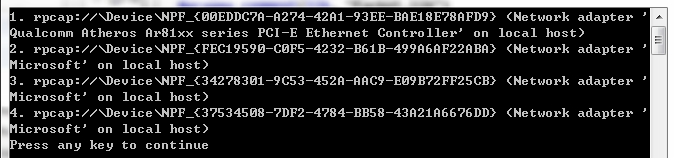
前部分为name,后面部分为description;
winPcap_3_获取设备列表的更多相关文章
- wxPython制作跑monkey工具(python3)-带显示设备列表界面
一. wxPython制作跑monkey工具(python3)-带显示设备列表界面 源代码 Run Monkey.py #!/usr/bin/env python import wx import ...
- appium自动化测试框架——封装获取设备信息类
在上一节中,我们已经解决了如何在python中执行cmd,并获取执行结果.下面就小小实战一下,获取设备信息. 一.思路 1.windows上获取设备信息的方法 输入dos命令“adb devices” ...
- 微信蓝牙设备开发教程之获取设备deviceid和二维码(3)
文章转载地址 http://www.vxzsk.com/87.html 设备授权 调用 设备授权新接口 ,获取deviceid和二维码,然后利用获取到的deviceid更新设备属性(如mac地址, ...
- Android获取定位权限,获取设备所在的经纬度
转载请标明出处:http://www.cnblogs.com/tangZH/p/8969898.html 前言: 有时候我们仅仅是想要获取设备所在的经纬度,那么直接调用Android相关的api就可 ...
- PhoneGap获取设备信息
一. 获取设备信息的方法列表(如果没有或者检测不出来就显示undefined) 1.device.name 设备名称(一些国产机检测不出来) 2.device.model ...
- iOS 获取设备唯一标示符的方法
在开发中会遇到应用需要记录设备标示,即使应用卸载后再安装也可重新识别的情况,在这写一种实现方式--读取设备的UUID(Universally Unique Identifier)并通过KeyChain ...
- ios获取设备信息总结
1.获取设备的信息 UIDevice *device = [[UIDevice alloc] int]; NSString *name = device.name; //获取设备所有者的名 ...
- 获取设备UDID、IMEI、ICCID、序列号、Mac地址等信息
在iOS7之前, 可以方便的使用 [[UIDevice currentDevice] uniqueIdentifier] 来获取设备的UDID,但是在iOS7之后这个方法不再适用. 你可以用[[UID ...
- iOS获取设备唯一标识的8种方法
8种iOS获取设备唯一标识的方法,希望对大家有用. UDID UDID(Unique Device Identifier),iOS 设备的唯一识别码,是一个40位十六进制序列(越狱的设备通过某些工具可 ...
随机推荐
- Swift: 继承
为了在属性值改变的时候获得通知,类可以为继承的属性添加属性观察者.属性观察者可以添加到任何属性上,不管这个属性原来是存储属性还是计算属性. Swift中的类没有一个统一的基类. 为了讲明白继承,我们先 ...
- JDK5-枚举
1. 使用普通类模拟枚举 public class Weekday { private Weekday() {} // 私有化 public static final Weekday MONDAY = ...
- 【转】ibatis的简介与初步搭建应用
[转]ibatis的简介与初步搭建应用 一.ibatis的简介 ibatis是什么东西就不介绍了,自己去找谷老师. 这里讲下自己的使用体会.之前自己学过Hibernate,是看尚学堂的视频教学的,看完 ...
- 关于android应用闪屏的几种情况
1.主菜单进入某应用闪屏: 常见是一个空的activity作为launcher属性,实际上它什么事业没干,真正干事情的是从它通过intent启动的activity. 例子: public class ...
- Oracle11G 数据库 expdp、impdp使用示例
expdp 备份数据库.expdp/impdp简单测试 操作系统层面创建目录 [root@Oracle11g ~]# mkdir -p /home/oracle/db_back/ 修改目录的所属用户. ...
- 【转】 iOS如何实现表格的折叠效果?
原文 : http://blog.csdn.net/youcanping2008/article/details/9202167 一.实现原理:就是在点击表格组头视图的时候,如果该表格视图的组展开了 ...
- 最全ASCLL码
结果 描述 实体编号 space ! exclamation mark ! " quotation mark " # number sign # $ dollar sign $ ...
- js函数--关于toString和valueOf
js函数--关于toString和valueOf 标签(空格分隔): JavaScript 今天看到一个试题,实现如下语法的功能: var a = add(2)(3)(4); //9 这个就是一个高阶 ...
- 第一个shell编程,输出hello world!
在计算机科学中,Shell俗称壳(用来区别于核),是指“提供使用者使用界面”的软件(命令解析器).它类似于DOS下的command和后来的cmd.exe.它接收用户命令,然后调用相应的应用程序.--- ...
- SqlParameter的用法和好处
关于Sql注入的基本概念,相信不需要多说,大家都清楚,经典的注入语句是' or 1=1--单引号而截断字符串,"or 1=1"的永真式的出现使得表的一些信息被暴露出来,如果sql语 ...