
Android Studio 如何打JAR包(修订版)
AndroidStudio项目打包成jar
前言:在eclipse中我们知道如何将一个项目导出为jar包,现在普遍AndroidStuido开发,这里一步一步详加介绍AS项目打包成jar,jar和arr的使用
在这里先补充一下我在编译时遇到的问题:
① Android 打包jarUnable to start the daemon process.
解决办法:(这个问题百度有答案,这里直接写出来,免得大家再找)
②报错:Unsupported major.minor version 52.0 (jar包对不同JDK版本的兼容性问题:
③ 在下面的步骤配置中,build/intermediates/bundles/release/路径下没有release文件夹。
解决办法:
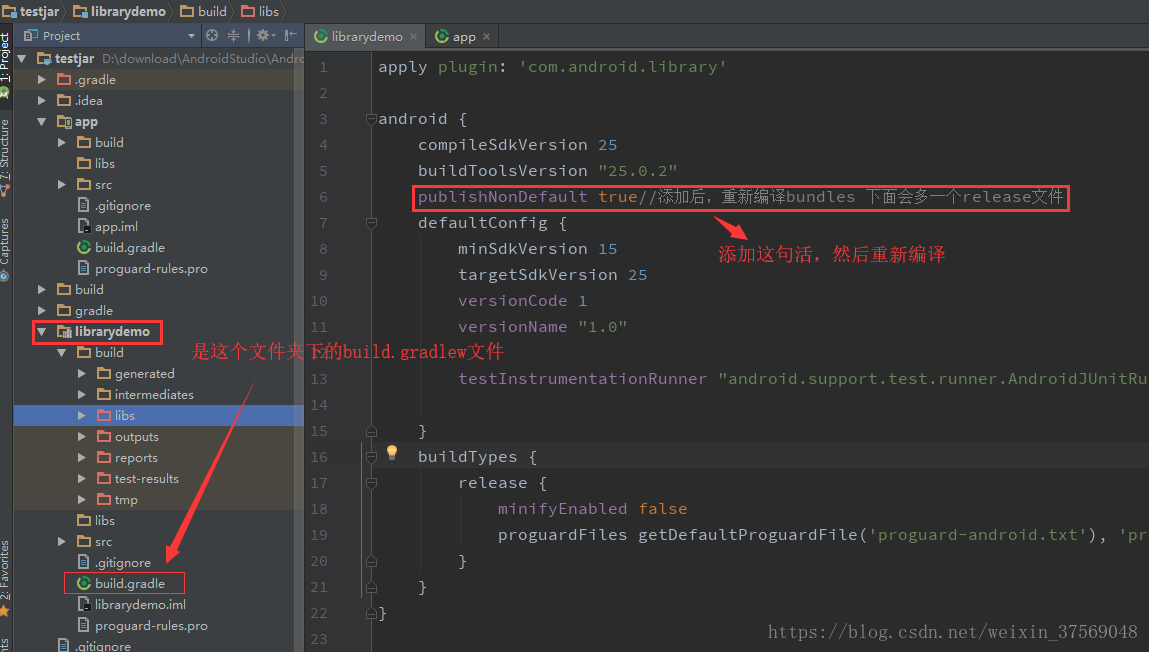
接下来按照下面的步骤就可以编译成功了。
一.作用:为了供其它项目使用,将项目打包成jar
二.步骤(AndroidStudio):
1.像平常一个样新建一个项目(步骤省略)
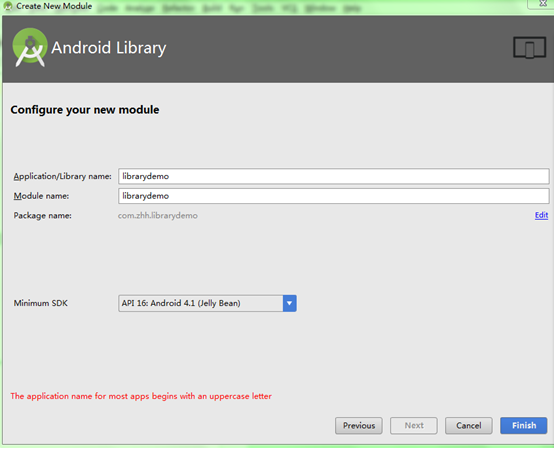
2.(在步骤1的基础上)点击File-->New-->New Module—>选择Android Library-->点击Next(如下图:)

定义好Library的工程名:librarydemo(如下图:)
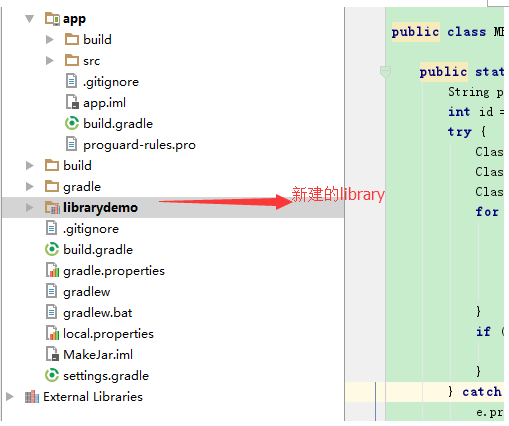
创建完成:
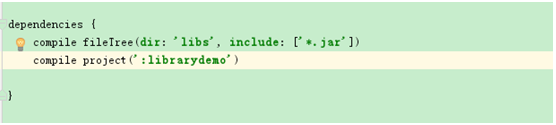
(步骤1建的)项目中会自动引入该Model (app下的build.gradle):(这个可以手动配置,在open moudle 配置依赖也可以)
3.生成jar:
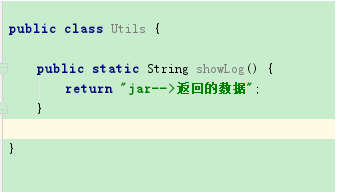
创建之前我先在librarydemo工程中建一个测试类,方便测试调用:
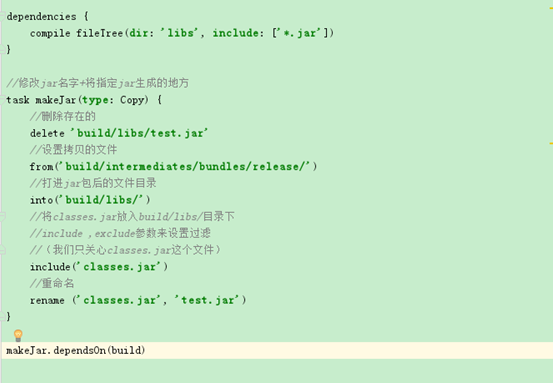
在librarydemo工程下的build.gradle中加上:
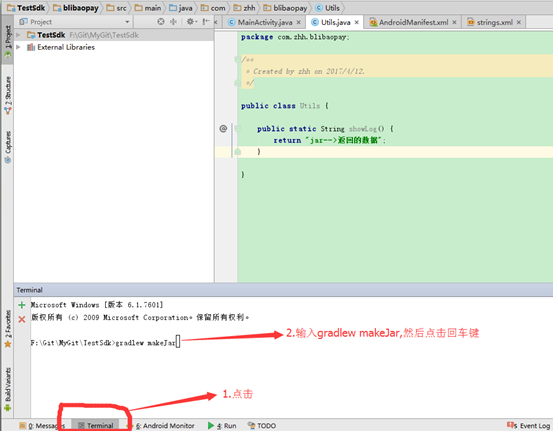
做如下操作:
(注:你的as从来没有生成过jar,那么第一次就会很慢,会去下载一些文件)
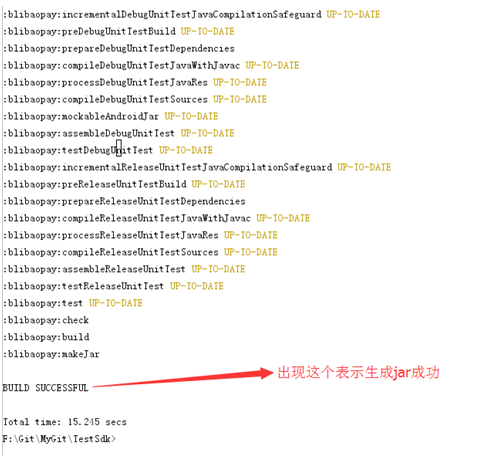
查看jar是否成功生成:

三、使用jar和arr:
在AndroidStudio中,创建的Model项目下:
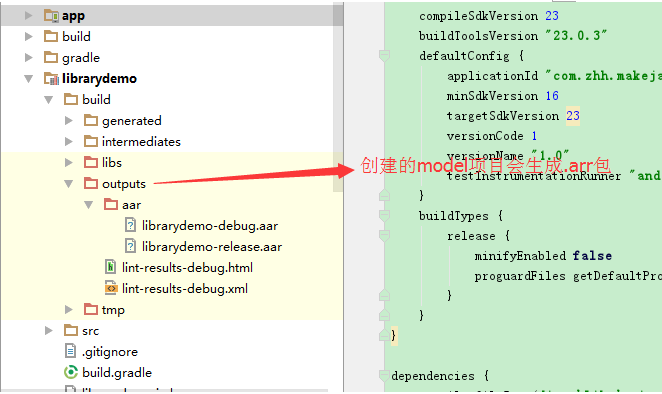
二者区别:
jar: 只包含了class文件与清单文件 ,不包含资源文件,如图片等所有res中的文件。
aar: 包含jar包和资源文件,如图片等所有res中的文件。
个人觉得还是用as提供的aar包比较好,编译完就生成了aar了,不用担心资源问题,
1. aar使用:
导入aar(jar一样):
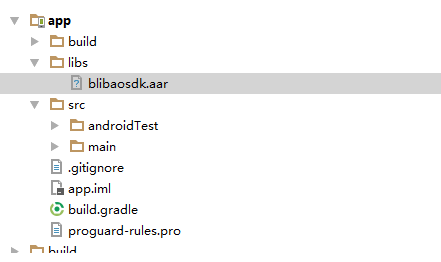
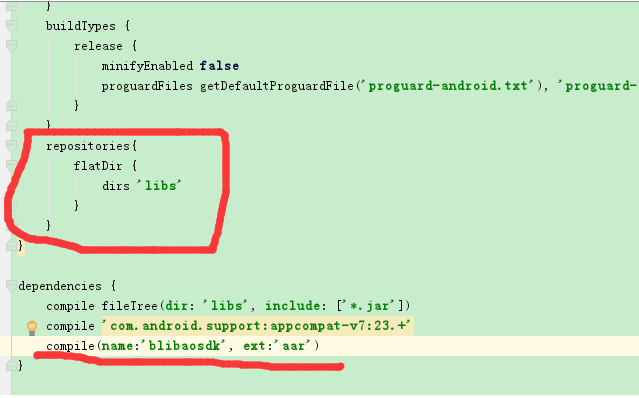
在app下的build.gradle中添加如下:
Sync Now一下,看
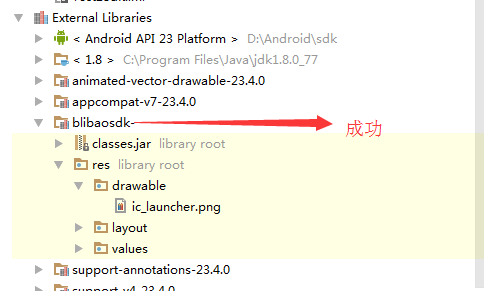
有资源文件和布局文件
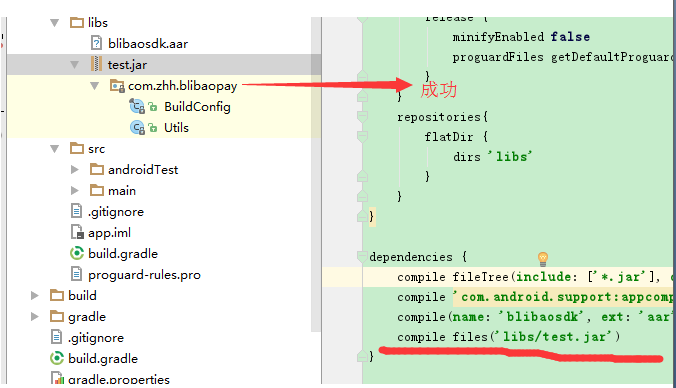
2. jar导入:
导入jar(同arr一样)-->选中jar-->右键-->点击Add As Library-->点击Ok
无资源文件
有人会想怎么把资源(图片,布局,string等)打进jar包呢?
例如:jar中有一个activity用到了布局文件和图片资源,那么怎么办呢?
解决如下:由于打包出来的jar只有源代码的.class 文件,不包含资源文件,我们就把jar包中用到的资源放到你使用
该jar的工程里面。然后通过反射即可,这里给出反射类:

public class MResource {
</span><span style="color:rgb(0,0,255);line-height:1.5;">public</span> <span style="color:rgb(0,0,255);line-height:1.5;">static</span> <span style="color:rgb(0,0,255);line-height:1.5;">int</span><span style="line-height:1.5;"> getIdByName(Context context, String className, String resName) {

    String packageName </span>=<span style="line-height:1.5;"> context.getPackageName();

    </span><span style="color:rgb(0,0,255);line-height:1.5;">int</span> id = 0<span style="line-height:1.5;">;

    </span><span style="color:rgb(0,0,255);line-height:1.5;">try</span><span style="line-height:1.5;"> {

        Class r </span>= Class.forName(packageName + ".R"<span style="line-height:1.5;">);

        Class[] classes </span>=<span style="line-height:1.5;"> r.getClasses();

        Class desireClass </span>= <span style="color:rgb(0,0,255);line-height:1.5;">null</span><span style="line-height:1.5;">;

        </span><span style="color:rgb(0,0,255);line-height:1.5;">for</span><span style="line-height:1.5;"> (Class cls : classes) {

            </span><span style="color:rgb(0,0,255);line-height:1.5;">if</span> (cls.getName().split("\\$")[1<span style="line-height:1.5;">].equals(className)) {

                desireClass </span>=<span style="line-height:1.5;"> cls;

                </span><span style="color:rgb(0,0,255);line-height:1.5;">break</span><span style="line-height:1.5;">;

            }

        }

        </span><span style="color:rgb(0,0,255);line-height:1.5;">if</span> (desireClass != <span style="color:rgb(0,0,255);line-height:1.5;">null</span><span style="line-height:1.5;">) {

            id </span>=<span style="line-height:1.5;"> desireClass.getField(resName).getInt(desireClass);

        }

    } </span><span style="color:rgb(0,0,255);line-height:1.5;">catch</span><span style="line-height:1.5;"> (Exception e) {

        e.printStackTrace();

    }

    </span><span style="color:rgb(0,0,255);line-height:1.5;">return</span><span style="line-height:1.5;"> id;

}


}
这里演示项目中打开jar中的activity的实例
这里给出jar中activity的代码:
public class JarActivity extends AppCompatActivity {
@Override

</span><span style="color:rgb(0,0,255);line-height:1.5;">protected</span> <span style="color:rgb(0,0,255);line-height:1.5;">void</span><span style="line-height:1.5;"> onCreate(@Nullable Bundle savedInstanceState) {

    </span><span style="color:rgb(0,0,255);line-height:1.5;">super</span><span style="line-height:1.5;">.onCreate(savedInstanceState);

    setContentView(MResource.getIdByName(</span><span style="color:rgb(0,0,255);line-height:1.5;">this</span>, "layout", "jar_layout"<span style="line-height:1.5;">));

    ImageView mPlayerLogo </span>= (ImageView) <span style="color:rgb(0,0,255);line-height:1.5;">this</span>.findViewById(MResource.getIdByName(<span style="color:rgb(0,0,255);line-height:1.5;">this</span><span style="line-height:1.5;">,

            </span>"id", "logo"<span style="line-height:1.5;">));

    mPlayerLogo.setImageResource(MResource.getIdByName(</span><span style="color:rgb(0,0,255);line-height:1.5;">this</span>, "drawable", "ic_launcher"<span style="line-height:1.5;">));

}


}
这里:利用反射根据资源名字获取资源ID加载布局+设置图片
在项目中打开jar的JarActivity的实现代码如下:
注:由于jar没有布局文件和资源文件,所以需要把布局(jar_layout)copy到项目中,aar则不需要
public class MainActivity extends AppCompatActivity {
@Override

</span><span style="color:rgb(0,0,255);line-height:1.5;">protected</span> <span style="color:rgb(0,0,255);line-height:1.5;">void</span><span style="line-height:1.5;"> onCreate(Bundle savedInstanceState) {

    </span><span style="color:rgb(0,0,255);line-height:1.5;">super</span><span style="line-height:1.5;">.onCreate(savedInstanceState);

    setContentView(R.layout.activity_main);

    findViewById(R.id.btn_jar).setOnClickListener(</span><span style="color:rgb(0,0,255);line-height:1.5;">new</span><span style="line-height:1.5;"> View.OnClickListener() {

        @Override

        </span><span style="color:rgb(0,0,255);line-height:1.5;">public</span> <span style="color:rgb(0,0,255);line-height:1.5;">void</span><span style="line-height:1.5;"> onClick(View v) {

            Intent intent </span>= <span style="color:rgb(0,0,255);line-height:1.5;">new</span><span style="line-height:1.5;"> Intent();

            intent.setClassName(getApplication(), </span>"com.zhh.librarydemo.JarActivity"<span style="line-height:1.5;">);

            startActivity(intent);

        }

    });

}


}
jar_layout布局:
<?xml version="1.0" encoding="utf-8"?>
<LinearLayout xmlns:android="http://schemas.android.com/apk/res/android"
android:layout_width="match_parent"
android:layout_height="match_parent"
android:orientation="vertical"><<span style="line-height:1.5;">ImageView
android:id</span>="@+id/logo"<span style="line-height:1.5;">
android:layout_width</span>="wrap_content"<span style="line-height:1.5;">
android:layout_height</span>="wrap_content" />
</LinearLayout>
在清单文件中注册:
<activity android:name="com.zhh.librarydemo.JarActivity"/>
Android Studio 如何打JAR包(修订版)的更多相关文章
- Android Studio 如何打JAR包
Android Studio 如何打JAR包 在eclipse中我们知道如何将一个项目导出为jar包,供其它项目使用. 在AS中可以通过修改gradle才处理. 我们新建一个项目MakeJar,在 ...
- Android Studio下导出jar包和aar包
Android Studio下导出jar包和aar包 jar包和aar包的区别 步骤 1. 创建Android工程 创建工程比较简单,不错复述 2. 创建一个Library(Module) 创建了一个 ...
- Android Studio导入第三方jar包或依赖工程的方法
Android Studio导入第三方jar包或依赖工程的方法 一 导入jar包的方法 1.打开自己的工程,将需要导入的jar包copy到libs文件夹下 2.在导入的jar包处单击菜单 Add ...
- Android Studio 怎样打JAR包
Android Studio 怎样打JAR包 在eclipse中我们知道怎样将一个项目导出为jar包,供其他项目使用. 在AS中能够通过改动gradle才处理. 我们新建一个项目MakeJar,在项目 ...
- Android Studio 导入系统 jar包
1.当前需要导入系统jar包的module所对应build.gradle中添加如下依赖: provided files('libs/classes-full-debug.jar') 也可以图形化设置: ...
- (转载) android studio library生成jar包和aar的方法总结
android studio library生成jar包和aar的方法总结 标签: android学习文档jar和aar的使用与生成gradle 2016-11-25 10:39 1782人阅读 评论 ...
- Android Studio下打jar包
在我们使用Eclipse时,我们常常使用的第三方类库文件大多都是jar包形式,用起来很方便.但是jar包只能打包class文件,对于Android UI类库而言,我们常常需要打包资源文件,对于界面不多 ...
- Eclipse / android studio 添加第三方jar包 步骤
eclipse 将第三方包放到libs文件夹后并没有引用. 基本步骤分为3步,具体介绍如下: 打开自己的Eclipse,在自己的Android工程上名上右键->Build Path ->C ...
- 关于Android Studio中第三方jar包的Javadoc绑定
原文地址:http://blog.csdn.net/a739697044/article/details/28116189 现在刚开始从Eclipse转用Android Studio,现在在尝试使 ...
随机推荐
- 怎么做好看的html5游戏界面
怎么做好看的html5游戏界面 一.总结 一句话总结:html5应该是完全可以做特别好看的游戏界面的.最下面那个背景图完全是一张图片动的雪和小动物可以是gif,或者是canvas,右边的那各个选择框就 ...
- 关于python的二维数组
test =[ [1, 2, 3], [4, 5, 6], [7, 8, 9]] #这个就可以看做是二维数组了,直接创建print(test)print(test[:][1]) ...
- __INLINE
- trunc与round
TRUNC(number[,num_digits]) number 需要截尾取整的数字. num_digits 用于指定取整精度的数字.Num_digits 的默认值为 0. 作用:截断数字和时间 ...
- 如何获取用户的地理位置-浏览器地理位置(Geolocation)API 简介
如何获取用户的地理位置-浏览器地理位置(Geolocation)API 简介 一.总结 一句话总结:Geolocation API(地理位置应用程序接口)提供了一个可以准确知道浏览器用户当前位置的方法 ...
- java学习笔记之基础语法(二)
1.数组: 概念:同一种类型数据的集合,其实,数组就是一个容器 优点:可以方便的对其进行操作,编号从0开始,方便操作这些元素. 2,数组的格式 元素类型[]数组名=new 元素类型[数组元素个数]: ...
- IIS FTP匿名登录不成功
FTP网站没有开启匿名登录的权限,对你没有看错.可能你的虚拟目录已经设置了如下所示的内容: 但是,单击上右图时,在其功能视图中的FTP身份验证中,可能并未启用"匿名身份验证",如下右图所示.启动 ...
- Java中使用org.json和json-lib解析JSON
文章目录 [隐藏] 一.JavaProject中org.json解析JSON 1.JSON的org.son-api下载 1)JSON网址 2)JSON的java解析org.json-api网址 3) ...
- sqlplus中怎么将你全部的操作和结果记录保存到你指定的文件里
[在sqlplus的操作中,非常多时候我们都想把自己的写的sql语句和改动日志或者结果信息做记录] [首先]肯定要正常连接到oralce数据库. [然后] 你用你指定的用户登录到oralce数据库之后 ...
- 简要分析unity3d中剪不断理还乱的yield
在学习unity3d的时候非常easy看到以下这个样例: void Start () { StartCoroutine(Destroy()); } IEnumerator Destroy(){ yie ...