
Cisco交换机IOS配置介绍
一、模式
• 用户模式(>):
• 特权模式(#):
• 全局配置模式(config#):
• 接口配置模式(config-if#):
• 线路模式(#config-line):
二、基本IOS命令结构
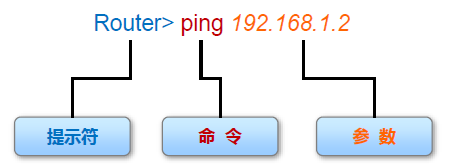
•每个IOS 命令都具有特定的格式或语法,并在相应的提示符下执行。
•常规命令语法为命令后接相应的关键字和参数。
•某些命令包含一个关键字和参数子集,此子集可提供额外功能。
三、相关配置
1、 进入用户模式,命令提示符是>号(正常登陆设备CLI(command-line interface,命令行界面)后的第一个配置模式,主要用于查看统计信息,可用的命令比较少,查看部分简单配置,不可修改,配置)
Switch>
Switch>?
Exec commands:
connect Open a terminal connection
disable Turn off privileged commands
disconnect Disconnect an existing network connection
enable Turn on privileged commands
exit Exit from the EXEC
logout Exit from the EXEC
ping Send echo messages
resume Resume an active network connection
show Show running system information
telnet Open a telnet connection
terminal Set terminal line parameters
traceroute Trace route to destination
2、 输入enable进入特权模式,命令提示符是#号(从用户模式进入,可用命令比较多,查看所有配置,部分修改(保存,恢复出厂等))
Switch>enable
Switch#
Switch#?
Exec commands:
clear Reset functions
clock Manage the system clock
configure Enter configuration mode
connect Open a terminal connection
copy Copy from one file to another
debug Debugging functions (see also 'undebug')
delete Delete a file
dir List files on a filesystem
disable Turn off privileged commands
disconnect Disconnect an existing network connection
enable Turn on privileged commands
erase Erase a filesystem
exit Exit from the EXEC
logout Exit from the EXEC
more Display the contents of a file
no Disable debugging informations
ping Send echo messages
reload Halt and perform a cold restart
resume Resume an active network connection
setup Run the SETUP command facility
show Show running system information
--More--
3、 输入disable从特权模式退到用户模式
Switch#disable
Switch>
4、 输入configure terminal进入全局配置模式(需要从特权模式进入,在全局模式下执行命令将影响整个设备,大配置操作都在这个模式下或从这个模式进入其他模式)
Switch#configure terminal
Switch(config)#
5、输入exit从全局配置模式退到特权模式
Switch(config)#exit
Switch#
6、在全局配置模式下可以设置特权密码(进入特权模式的密码,用于限制人员访问特权执行模式),输入enable password
Switch(config)#enable password 1234 #密码为1234
Switch>enable
Password: #再从用户模式进入特权模式提示输入密码
7、进入某个接口配置模式
Switch(config)#interface vlan 100
Switch(config-if)#
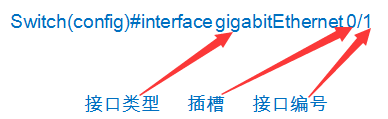
Switch(config)#interface gigabitEthernet 0/1
Switch(config-if)#
8、现在开始配置vlan 100 的管理ip 和子网掩码
Switch(config-if)#ip address 192.168.100.100 255.255.255.0
9、配置一条线路(实际线路或虚拟线路,每个连接这个设备的用户都要占用一个线路例Console、AUX 或VTY等连接方式,这里VTY(Virtual Type Terminal) 是虚拟终端的意思)
Switch(config)#line vty 0 4
line vty 0 4表示设置0到4号5个线路为远程登录,设置为0 3,0 2,0 1完全是可以的,0 4表示最多可以同时5个线路连接,默认0线路被Console占用)
Switch(config-line)#
10、在全局配置模式下可以设置Console密码(用于限制人员通过控制台(Console)连接访问设备)
Switch(config)#line console 0 #配置console线路
Switch(config-line)#password 1234 #密码为1234
Switch(config-line)#login #登录启用密码检查
11、在全局配置模式下可以设置VTY线路登录密码(用于限制人员通过VTY接访问设备)
Switch(config)#line vty 0 10 #通过VTY线路同时连接的最大用户是10
Switch(config-line)#password 12345 #VTY线路登录密码12345
Switch(config-line)#login #登录启用密码检查
Cisco交换机IOS配置介绍的更多相关文章
- Cisco交换机常见配置
-------查看当前系统基础信息-------- sh version //查看当前IOS版本. sh running-config //查看当前系统中运行的配置信息 -------清除当前系统配置 ...
- CISCO交换机-SNMP配置
1.1 SNMP基础配置 router> enable 进入路由器是用户模式 router# conf terminal 进入路由器的全局配置模式 #snmp-server commun ...
- Huawei交换机VRP配置介绍
一.命令视图• 用户视图<Huawei>• 系统视图 [Huawei]• 接口视图 [Huawei-GigabitEthernet0/0/1]• 协议视图 [Huawei-rip-1]• ...
- 通过python的paramiko模块获取cisco交换机的配置
import paramiko import time import os import threading,Queue class MyExpection(Exception): pass clas ...
- cisco 交换机 IOS命令
1 显示交换机的MAC地址表 user mode : show mac-address-table
- Cisco交换机管理员配置
conf tservice timestamps debug datetime msec localtime yearservice timestamps log datetime msec loca ...
- [CISCO] 思科交换机基本配置
思科交换机基本配置 交换机是局域网中最重要的设备,交换机是基于 MAC 来进行工作的.和路由器类似,交换 机也有 IOS,IOS 的基本使用方法是一样的.本章将简单介绍交换机的一些基本配置,以及交换 ...
- CiSCO 交换机配置 SSH 登陆
CiSCO 交换机配置 SSH 登陆 题目:在三层交换机上仅运行 SSH 服务,且用户名和密码的方式登录交换机. (一)了解主机名与域名 1."主机名" 为该设备的名称 2 ...
- Cisco 交换机配置的基本命令
1.不同的vlan 不同vlan需要路由 在路由的端口设置多个IP段 交换机模拟器实验六 2.查看端口名字 SWA#sh vlan default Active F0/1, F0/2, F0 ...
随机推荐
- 009实现一个算法来删除单链表中的一个结点,仅仅给出指向那个结点的指针(keep it up)
呵呵,这个题不能直接删除已知的结点.由于是单链表,不知道前驱,仅仅知道 后继结点,直接删除会使链表断开.只是我们能够删除已知结点的后继结点, 把后继结点的值赋值给已知结点. #include < ...
- Jquery控件jrumble
<!DOCTYPE HTML> <html> <head> <title>demo.html</title> <meta h ...
- Android OpenGL ES(七)----理解纹理与纹理过滤
1.理解纹理 OpenGL中的纹理能够用来表示图像.照片,甚至由一个数学算法生成的分形数据.每一个二维的纹理都由很多小的纹理元素组成.它们是小块的数据,类似于我们前面讨论过的片段和像素.要使用纹理,最 ...
- echarts 地图 动态 展示 结合css+js
echarts地图展示功能非常强大,官网上静态展示的样例非常多了,动态的资料少.研究了下.我眼下实现的通过ajax从server获取数据动态展示地图. 另外,我们有时候希望在地图之上做些自己定义的东西 ...
- codevs1052
题目地址:http://codevs.cn/problem/1053/ 分析: 模拟 代码: var s:string; a:array['a'..'z'] of longint; i,j,t,n:l ...
- laravel 自定义全局函数
在 app 目录下创建一个 Helpers 目录,在此目录下创建文件.这些文件就是全局函数文件.如叫:function.php 加载此文件: 1 . 在 bootstrap/autoload.php ...
- 与 JSON 相关的一些操作 (项目中用到一部分,后续逐渐完善)
1.JSON 打印 console.log(JSON.stringify(data, null, 4)); 2.JSON 格式判断 var isjson = typeof(obj) == " ...
- url链接打开本地应用(测试通过)
基于windows!! 类比mailto://XXXX 主要参考: https://www.cnblogs.com/snow365/p/6428212.html 应用 1.在网页上本地办公 网页应用越 ...
- 今日SGU 5.25
SGU 194 题意:无源汇有上下界的最大流 收获:https://wenku.baidu.com/view/0f3b691c59eef8c75fbfb35c.html #include<bit ...
- Unity 调用 Android Native 方法(一) 获得Android系统音量
学习雷锋,好榜样,接下来的这一系类教程里,将通过unity来实现Android端的一些常用功能, 不需要在 Asset/Plugins/Android 目录下引用jar包或者aar包,这是重点. us ...