
Azure ARM (7) ARM Template - 使用Visual Studio编辑
《Windows Azure Platform 系列文章目录》
之前介绍的ARM Template,都是使用文本编辑器来编辑JSON文件的。
文本讲介绍如何使用Visual Studio,编辑JSON Template。
本文使用Visual Studio 2015 with Update 3进行编辑,安装了Azure SDK 2.9。
如果读者使用的是Visual Studio 2013和Azure SDK 2.9,大部门的界面是和笔者的截图类似。笔者强烈建议安装最新的Visual Studio和Azure SDK。
前提:
1.安装Visual Studio 2015 with Update 3
2.安装Azure SDK 2.9
1.运行Visual Studio 2015 with Update 3
2.创建一个Azure Resource Group项目。如下图:

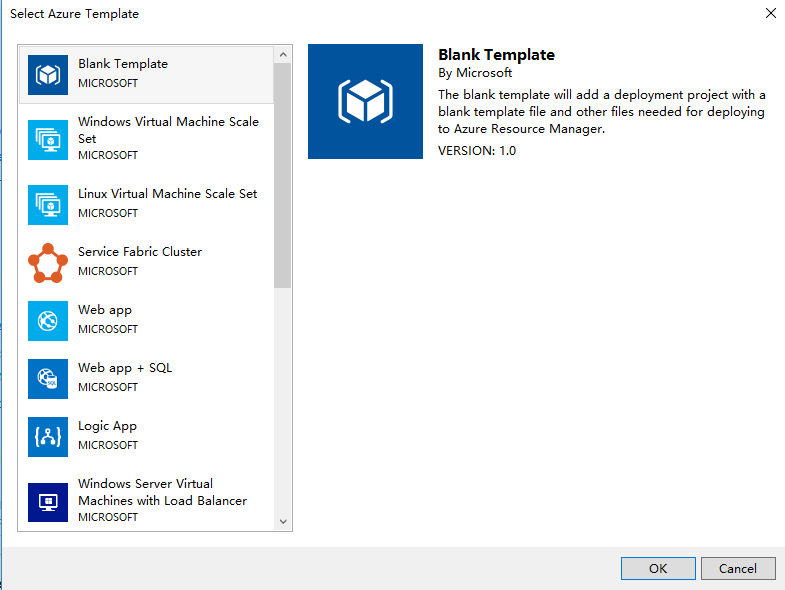
3.模板选择Blank Template
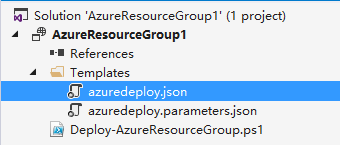
4.项目创建完毕后,不包含任何项目,我们选择Templates,双击 azuredeploy.json
5.显示如下图的JSON Outline,我们可以添加新的资源,点击resources,邮件,Add New Resource。如下图:

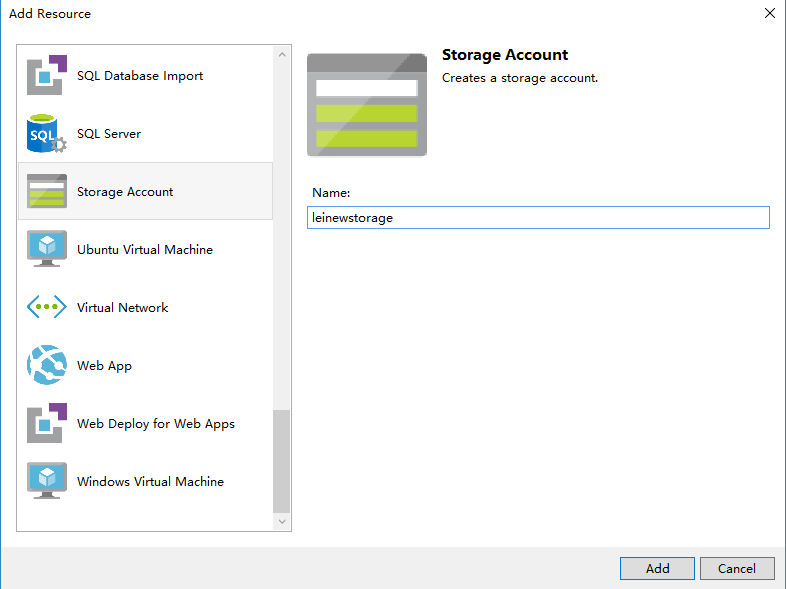
6.在弹出的界面中,输入Storage Account,然后色织storage account name (必须为小写英文),如下图:
7.修改Visual Studio项目中的azuredeploy.json文件,内容如下:
{

    "$schema": "https://schema.management.azure.com/schemas/2015-01-01/deploymentTemplate.json#",

    "contentVersion": "1.0.0.0",

  "parameters": {

          "leinewstorageType": {

            "type": "string",

            "defaultValue": "Standard_LRS",

            "allowedValues": [

              "Standard_LRS",

              "Standard_ZRS",

              "Standard_GRS",

              "Standard_RAGRS",

              "Premium_LRS"

            ]

          },

          "storageAccounts_leistorageaccount_name": {

            "defaultValue": "leistorageaccount",

            "type": "String"

          }

  },

    "variables": {

    },

    "resources": [

      {

        "name": "[parameters('storageAccounts_leistorageaccount_name')]",

        "type": "Microsoft.Storage/storageAccounts",

        "location": "[resourceGroup().location]",

        "apiVersion": "2015-06-15",

        "dependsOn": [],

        "tags": {

          "displayName": "leinewstorage"

        },

        "properties": {

          "accountType": "[parameters('leinewstorageType')]"

        }

      }

    ],

    "outputs": {

    }

}
8.修改azuredeploy.parameters.json文件,内容如下:
{

    "$schema": "https://schema.management.azure.com/schemas/2015-01-01/deploymentParameters.json#",

    "contentVersion": "1.0.0.0",

  "parameters": {

    "storageAccounts_leistorageaccount_name": {

      "value": "leinewstorageaccount"

    }

  }

}
最后通过Azure PowerShell进行发布,命令如下:
# sign in

Write-Host "Logging in...";

Add-AzureRmAccount -EnvironmentName AzureChinaCloud;

# select subscription

Write-Host "Selecting subscription '$subscriptionId'";

Select-AzureRmSubscription -SubscriptionID $subscriptionId;

#创建Resource Group

New-AzureRmResourceGroup -Name $resourceGroupName -Location $resourceGroupLocation

#部署Template

 New-AzureRmResourceGroupDeployment -ResourceGroupName "[ResourceGroupName]" -TemplateFile "[FilePath]" -TemplateParameterFile ["ParameterFilePath"];
Azure ARM (7) ARM Template - 使用Visual Studio编辑的更多相关文章
- Azure - Create your first function using Visual Studio
Azure Functions lets you execute your code in a serverless environment without having to first creat ...
- AngularJS SPA Template For Visual Studio
单页面应用程序(SPA)[使用JavaScript.CSS和HTML强大的功能,可以构建一个单页面应用程序(SPAs)],它提供了丰富的用户体验页面.导航技术和AJAX提供必要的功能,而不用重新加载页 ...
- How to export a template in Visual Studio?
Create a customize template file: 1.template arguments introduction like: 上图只是其中一部分,更多请查看文后的参考资源 tem ...
- ASP.NET Core + Angular 2 Template for Visual Studio
多个月以来,我和多个Github上的社区贡献者一起建立支持库.包,我们最终的目的是希望完成这样一个作为起点的模板,也就是基于把Typescript代码和Angular2宿主在ASP.NET Core项 ...
- Visual Studio编辑类模板的位置
VS的版本一直在不断更新,每个版本的安装目录都是有一点变化,所以模板文件的位置也是不一样的,下面是从StackOverflow看到的一个大合集,转发记录一下: Extract, edit and re ...
- 用Visual Studio编辑Linux代码
估计很多人都是用惯了Visual Studio的主,怎么也不适应Linux的一套编辑器,比如vim.source insight这些东西,可视化的eclipse效果还好点,但一般以远程共享一台Linu ...
- visual studio 编辑窗口 设置固定选项卡 使窗口选项卡多行显示
工具>选项> 确定后 如图就可以多行显示了.
- Visual studio 编辑combobox程序卡死的问题
问题描述:使用vs2017开发一个winform小程序,一用combobox就卡死. 问题解决:关闭有道词典的取词功能. 软件开多了,就容易有冲突啊!
- Visual Studio 编辑代码量大的文件时分屏技巧
随机推荐
- Django的virtualenv环境搭建
安装virtualenv好处多多,可以让当前的项目使用单独的类库,实现系统类库的隔离,所以能够自由地控制当前项目类库的版本,不受系统类库的影响:还有其他N多好处. 下面是安装说明和使用示例: 首先安装 ...
- WebLogic 8.1 部署问题记录
1.weblogic 8.1 不支持jdk1.4以上的版本,所以,如果在项目中用jdk1.4以上的版本编译之后的class直接部署到weblogic8.1 服务器上会报错,报错信息一般包括如下: Cl ...
- .net 调用php webservice报错404状态解决方法
添加引用的地址和实例的地址不一致 在程序中将实例的地址重新赋值即可 例子: test t=new test(); t.url=http://www.sdf.com/sdfdsf.php?wsdl
- ENode 2.0 - 深入分析ENode的内部实现流程和关键地方的幂等设计
前言 ENode是一个基于消息的架构,使用ENode开发的系统,每个环节都是处理消息,处理完后产生新的消息.本篇文章我想详细分析一下ENode框架内部是如何实现整个消息处理流程的.为了更好的理解我后面 ...
- 基于正则的INI读写工具类,支持加密解密
看到这个标题,有人会问,现在都用xml做配置文件了,谁还用INI文件啊!下面来简单对比一下xml和ini: 1.XML功能强大表达能力强,同时扩展性好. 2.它的主要优势是异构平台的整合.通讯. 3. ...
- 解决在onCreate()过程中获取View的width和Height为0的4种方法
很经常当我们动态创建某些View时,需要通过获取他们的width和height来确定别的view的布局,但是在onCreate()获取view的width和height会得到0.view.getWid ...
- AlwaysON 故障处理之辅助副本磁盘空间不足
用户反馈AlwaysON辅助副本数据库查询的结果与主库不一致, 远程到服务器后发现数据库的状态显示为“未同步/可疑”, 查看数据库的日志,定位到出现错误的时间点,可以看到提示日志文件所在磁盘的“磁盘空 ...
- JQuery checkbox check/uncheck
想通过JQuery来check或者uncheck页面上的checkbox控件,我们可能会想到用下面的代码: $('#chk-all').on('click', function(){ var chec ...
- 爱上MVC~在Views的多级文件夹
回到目录 在MVC里,你的控制器对应的视图一般是在Views目录,而如果希望在Views里再分几个模块文件夹默认是不允许的,我们需要做一下设置,就可以实现Views下的多次文件夹层次了,例如,我们有产 ...
- Java的概述以及语法
Java的语法分为标示符和数据类型 Java的概述: 一些手打的: long l = 12345; //隐式转换 int a = (int)121234567L; //强制转换 float f =12 ...