
D3.js绘制平行坐标图
参照:https://syntagmatic.github.io/parallel-coordinates/ 和 https://github.com/syntagmatic/parallel-coordinates
源码:
<!DOCTYPE html>

<html lang="en">

<head>

    <meta charset="UTF-8">

    <title>原始数据平行坐标图</title>

    <link rel="stylesheet" type="text/css" href="static/css/d3.parcoords.css">

    <link rel="stylesheet" type="text/css" href="static/css/style.css">

    <style>

        body, html {

            margin: 0;

            padding: 0;

            width: 100%;

            height: 100%;

        }

        /* parcoords */

        #nutrients {

            position: fixed;

            bottom: 4px;

            height: 180px;

            width: 98%;

            padding: 8px 1% 0;

            border-top: 1px solid #d0d0d0;

        }

        #nutrients text {

            font-size: 10px;

        }

        /* data table styles */

        #grid {

            position: fixed;

            bottom: 192px;

            width: 100%;

            height: 160px;

            overflow: auto;

            border-top: 1px solid #d0d0d0;

        }

        .row, .header {

            clear: left;

            font-size: 10px;

            line-height: 16px;

            height: 16px;

            width: 2000px;

            padding: 0 16px;

        }

        .row:nth-child(odd) {

            background: rgba(0, 0, 0, 0.05);

        }

        .header {

            font-weight: bold;

        }

        .cell {

            float: left;

            overflow: hidden;

            white-space: nowrap;

            width: 100px;

            height: 18px;

        }

        .col-0 {

            width: 180px;

        }

    </style>

    <script src="static/js/d3.min.js"></script>

    <script src="static/js/d3.parcoords.js"></script>

    <script src="static/js/divgrid.js"></script>

    <script src="static/js/underscore.js"></script>

    <script src="static/js/scatterplot.js"></script>

</head>

<body>

<div id="nutrients" class="parcoords"></div>

<svg id="scatter"></svg>

<div id="grid"></div>

<script id="brushing">

    var parcoords = d3.parcoords()("#nutrients");

    var transparency = d3.scale.pow()

        .exponent(0.15)

        .range([1, 0.12]);

    var colorList = ["#a50026", "#d73027", "#f46d43", "#fdae61", "#fee090", "#ffffbf", "#e0f3f8", "#abd9e9", "#74add1", "#4575b4", "#313695", "#67001f", "#b2182b", "#d6604d", "#f4a582", "#fddbc7", "#ffffff", "#e0e0e0", "#bababa", "#878787", "#4d4d4d", "#1a1a1a", "#40004b", "#762a83", "#9970ab", "#c2a5cf", "#e7d4e8", "#f7f7f7", "#d9f0d3", "#a6dba0", "#5aae61", "#1b7837", "#00441b"];

    var scatter = scatterplot()

        .key(function (d) {

            return d.name

        })

        .width(document.body.clientHeight - 350)

        .height(document.body.clientHeight - 350);

    // load csv file and create the chart

    d3.csv('data/nutrients.csv', function (data) {

        var colorMap = {};

        _(data).chain()

            .pluck('group')

            .uniq()

            .each(function (d, i) {

                colorMap[d] = colorList.length > i ? colorList[i] : "black";

            });

        var color = function (d) {

            return colorMap[d.group];

        };

        transparency.domain([1, data.length]);

        parcoords

            .data(data)

            .hideAxis(["name"])

            .alpha(transparency(data.length))

            .color(color)

            .composite("darken")

            .margin({top: 24, left: 140, bottom: 12, right: 0})

            .mode("queue")

            .render()

            .brushMode("1D-axes");  // enable brushing

        scatter.data(data)("#scatter");

        // create data table, row hover highlighting

        var grid = d3.divgrid();

        d3.select("#grid")

            .datum(data.slice(0, 10))

            .call(grid)

            .selectAll(".row")

            .on({

                "mouseover": function (d) {

                    parcoords.highlight([d])

                },

                "mouseout": parcoords.unhighlight

            });

        // update data table on brush event

        parcoords.on("brush", function (d) {

            parcoords.alpha(transparency(d.length));

            scatter.show(d);

            d3.select("#grid")

                .datum(d.slice(0, 30))

                .call(grid)

                .selectAll(".row")

                .on({

                    "mouseover": function (d) {

                        parcoords.highlight([d])

                    },

                    "mouseout": parcoords.unhighlight

                });

        });

        window.onresize = function () {

            parcoords.width(document.body.clientWidth);

            parcoords.resize();

            scatter

                .width(document.body.clientHeight - 350)

                .height(document.body.clientHeight - 350)

                .update();

        };

    });

</script>

</body>

</html>
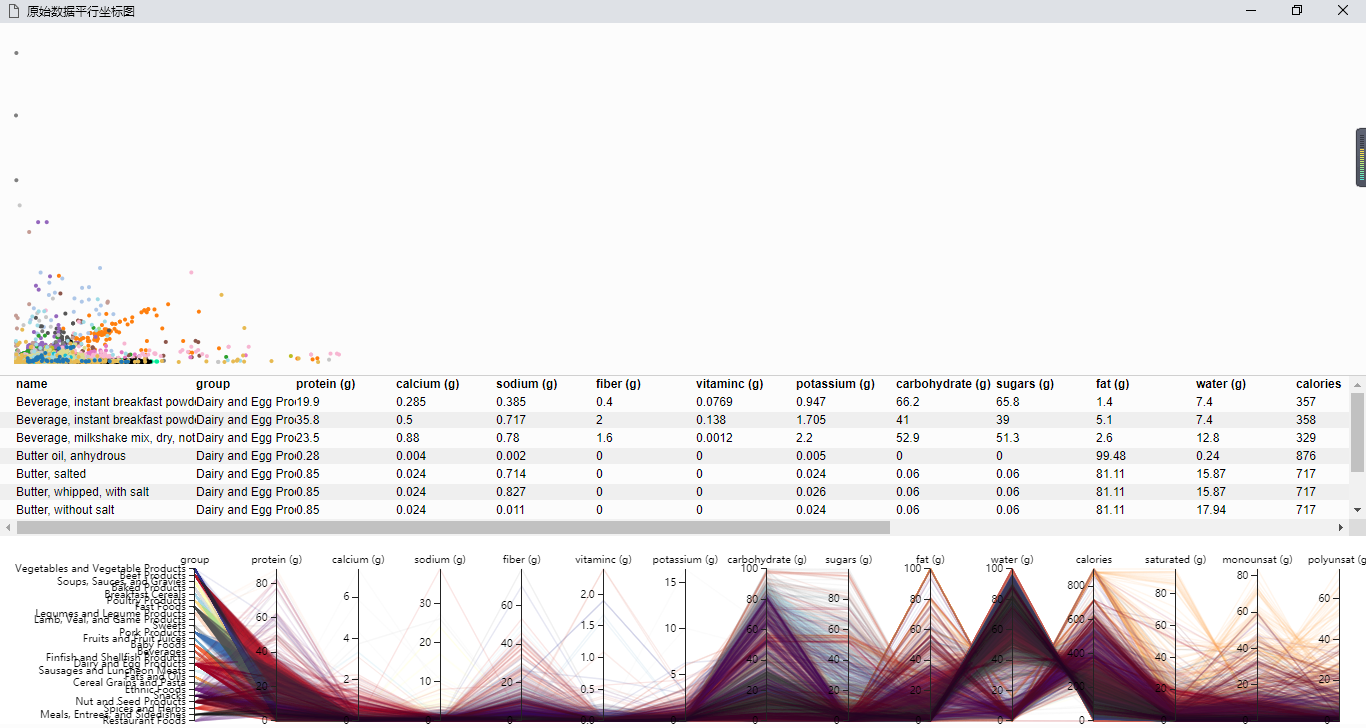
效果截图:
D3.js绘制平行坐标图的更多相关文章
- 利用d3.js绘制雷达图
利用d3,js将数据可视化,能够做到数据与代码的分离.方便以后改动数据. 这次利用d3.js绘制了一个五维的雷达图.即将多个对象的五种属性在一张图上对照. 数据写入data.csv.数据类型写入typ ...
- [js]d3.js绘制拓扑树
echart也支持拓扑树了 所需的json数据格式: children嵌套 vis.js也支持绘制拓扑树 数据格式: nodes: {id, label, title} edges: {from, t ...
- 利用d3.js绘制中国地图
d3.js是一个比較强的数据可视化js工具. 利用它画了一幅中国地图,例如以下图所看到的: watermark/2/text/aHR0cDovL2Jsb2cuY3Nkbi5uZXQvc3ZhcDE=/ ...
- d3.js 绘制极坐标图(polar plot)
0.引言 在极坐标系中,任意位置可由一个夹角和一段相对原点(极点)的距离表示.也就是说,我们可以用 (angle,r) 来表示极坐标系中的点. 1.数据 假设我们有如下数据集[ [10, 0.2], ...
- d3.js 绘制北京市地铁线路状况图(部分)
地铁线路图的可视化一直都是路网公司的重点,今天来和大家一起绘制线路图.先上图. 点击线路按钮,显示相应的线路.点击线路图下面的站间按钮(图上未显示),上报站间故障. 首先就是制作json文件,这个文件 ...
- D3.js绘制 颜色:RGB、HSL和插值 (V3版本)
颜色和插值 计算机中的颜色,常用的标准有RGB和HSL. RGB:色彩模式是通过对红(Red).绿(Green).蓝(Blue)三个颜色通道相互叠加来得到额各式各样的颜色.三个通道的值得范围都 ...
- R和Tableau平行坐标图
R平行坐标图 library(lattice)data(iris)parallelplot( ~ iris[1:4], iris, groups = Species, horizontal.a ...
- iOS绘制坐标图,折线图-Swift
坐标图,经常会在各种各样的App中使用,最常用的一种坐标图就是折线图,根据给定的点绘制出对应的坐标图是最基本的需求.由于本人的项目需要使用折线图,第一反应就是搜索已经存在的解决方案,因为这种需求应该很 ...
- D3.js (v3)+react框架 基础部分之认识选择集和如何绘制一个矢量图
首先需要下载安装d3.js : yarn add d3 然后在组建中引入 : import * as d3 from 'd3' 然后定义一个方法,在componentDidMount()这个钩子 ...
随机推荐
- Qt之生成pdf(转)
Qt中如何让图片.文本.HTML或者其他形式的内容生成pdf呢?主要利用QPrinter来实现,QPrinter不止可以操作打印机来打印纸张文件,并且可以将文件保存至磁盘,存储为pdf格式的文件. ...
- MySQL的四种外键
来自:某一位网友的博客 转自:http://blog.csdn.net/cnjsnt_s/article/details/5548280 具体使用时需要参考:http://blog.csdn.n ...
- C# 随机串的生成
/** * 生成随机串,随机串包含字母或数字 * @return 随机串 */ public static string GenerateNon ...
- 一类适合初学者的DP:最大子段和与最大子矩阵
最近在水简单DP题,遇到了两道层层递进的DP题,于是记录一下 一.最大子段和 题意: 给出一个长度为n(n<=1e5)的序列,求连续子段的最大值 比如说2 3 -4 5 的最大值是6 而 2 ...
- C# 调用带输入输出参数的存储过程
//调用存储过程执行类似于2//select count(*) from userinfo where username=username and pwd=pwd and grade=grade3// ...
- CentOS 下 zookeeper 安装
搭建zookeeper需要几个条件 a. 配置Java环境 c. centos d. 下载 xshell5 (下载它只是为了更方便的使用linux) 一.新建一个myapp目录: 二.下载 ...
- java web 中分布式 session 的实现
已经有现成的库现实现分布式的 session 管理: 1.memcached-session-manager. 2.tomcat-redis-session-manager. 3.spring-ses ...
- docker 命令大全
http://www.runoob.com/docker/docker-command-manual.html
- solr7.3集群搭建
solr集群搭建 原博客:https://blog.csdn.net/gdsgdh308227363/article/details/81004706 注意,在搭建solr集群前,建议最好有一个sol ...
- 转载:spring boot学习
Spring Boot学习 Spring Boot是为了简化Spring应用的创建.运行.调试.部署等而出现的,使用它可以做到专注于Spring应用的开发,而无需过多关注XML的配置. 简单来说,它提 ...