
webservice学习01:wsdl文档结构
webservice学习01:wsdl文档结构
wsdl文档结构
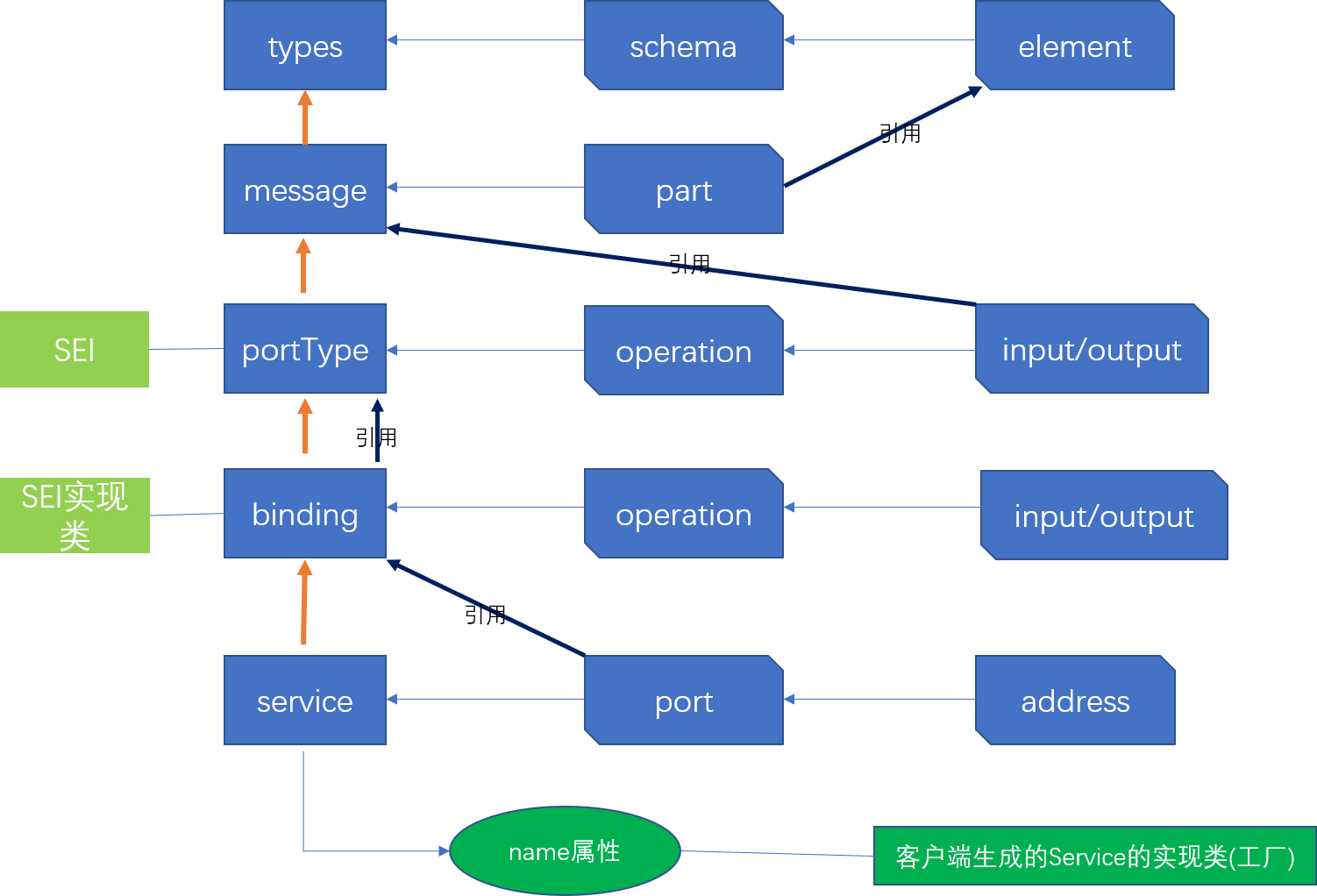
WSDL文档示例
<wsdl:definitions xmlns:xsd="http://www.w3.org/2001/XMLSchema" xmlns:wsdl="http://schemas.xmlsoap.org/wsdl/" xmlns:tns="http://impl.ws.newyork.zjport.gov.cn/" xmlns:soap="http://schemas.xmlsoap.org/wsdl/soap/" xmlns:ns2="http://schemas.xmlsoap.org/soap/http" xmlns:ns1="http://ws.newyork.zjport.gov.cn/" name="ReceiveEncryptDeclareServiceImplService" targetNamespace="http://impl.ws.newyork.zjport.gov.cn/">

    <wsdl:types>

        <xs:schema xmlns:xs="http://www.w3.org/2001/XMLSchema" xmlns:tns="http://ws.newyork.zjport.gov.cn/" elementFormDefault="unqualified" targetNamespace="http://ws.newyork.zjport.gov.cn/" version="1.0">

            <xs:element name="receive" type="tns:receive"/>

            <xs:element name="receiveResponse" type="tns:receiveResponse"/>

            <xs:complexType name="receive">

                <xs:sequence>

                    <xs:element minOccurs="0" name="content" type="xs:string"/>

                    <xs:element minOccurs="0" name="msgType" type="xs:string"/>

                    <xs:element minOccurs="0" name="dataDigest" type="xs:string"/>

                    <xs:element minOccurs="0" name="sendCode" type="xs:string"/>

                </xs:sequence>

            </xs:complexType>

            <xs:complexType name="receiveResponse">

                <xs:sequence>

                    <xs:element minOccurs="0" name="return" type="xs:string"/>

                </xs:sequence>

            </xs:complexType>

        </xs:schema>

    </wsdl:types>

    <wsdl:message name="receiveResponse">

        <wsdl:part element="ns1:receiveResponse" name="parameters"> </wsdl:part>

    </wsdl:message>

    <wsdl:message name="receive">

        <wsdl:part element="ns1:receive" name="parameters"> </wsdl:part>

    </wsdl:message>

    <wsdl:portType name="ReceiveEncryptDeclareService">

        <wsdl:operation name="receive">

            <wsdl:input message="ns1:receive" name="receive"> </wsdl:input>

            <wsdl:output message="ns1:receiveResponse" name="receiveResponse"> </wsdl:output>

        </wsdl:operation>

    </wsdl:portType>

    <wsdl:binding name="ReceiveEncryptDeclareServiceImplServiceSoapBinding" type="ns1:ReceiveEncryptDeclareService">

        <soap:binding style="document" transport="http://schemas.xmlsoap.org/soap/http"/>

        <wsdl:operation name="receive">

            <soap:operation soapAction="" style="document"/>

            <wsdl:input name="receive">

                <soap:body use="literal"/>

            </wsdl:input>

            <wsdl:output name="receiveResponse">

                <soap:body use="literal"/>

            </wsdl:output>

        </wsdl:operation>

    </wsdl:binding>

    <wsdl:service name="ReceiveEncryptDeclareServiceImplService">

        <wsdl:port binding="tns:ReceiveEncryptDeclareServiceImplServiceSoapBinding" name="ReceiveEncryptDeclareServiceImplPort">

            <soap:address location="http://122.224.230.4:18003/newyorkWS/ws/ReceiveEncryptDeclare"/>

        </wsdl:port>

    </wsdl:service>

</wsdl:definitions>
webservice学习01:wsdl文档结构的更多相关文章
- HTML5经典案例学习-----新元素添加文档结构
直接上代码了,大家如果发现问题了,记得提醒我哦,谢谢啦,嘻嘻 <!DOCTYPE html> <!-- 不区分大小写 --> <html lang="en&qu ...
- 【WebService】WebService之WSDL文档深入分析(三)
WSDL概念 WSDL(网络服务描述语言,Web Services Description Language)是一门基于 XML 的语言,用于描述 Web Services 以及如何对它们进行访问. ...
- WSDL 文档解析
学习webservice,就离不了WSDL文档,他是我们开发WebService的基础,虽说,现在现在有许多WebService的开源框架使得我们可以根据WSDL生成客户端代码,但是,了解WSDL文档 ...
- 4. svg学习笔记-文档结构元素和样式的使用
svg除了绘图元素之外还有一部分是专门用于文档结构的,这类元素有<g>,<use>,<defs>,<symbol>等 <g>元素 如果我们仅 ...
- 10LaTeX学习系列之---Latex的文档结构
目录 目录 前言 (一)对于Ctex宏包中的文档结构 1.说明 2.源代码 3.输出效果 4.技巧 (二)对于ctexart的文档结构 1.说明 2.源代码 3.输出效果 (三)对于ctexbook的 ...
- MongoDB学习笔记(四) 用MongoDB的文档结构描述数据关系
MongoDB的集合(collection)可以看做关系型数据库的表,文档对象(document)可以看做关系型数据库的一条记录.但两者并不完全对等.表的结构是固定的,MongoDB集合并没有这个约束 ...
- WSDL文档深入分析
借助jdk的wsimort.exe工具生成客户端代码 格式:wsimport -keep url //url为wsdl文件的路径 直接生成客户端代码会抛异常, 无法生成客户端代码, 解决办法: 将 ...
- (二)发布第一个WebService服务与DSWL文档解析
1. 编写接口 package service; import javax.jws.WebService; /** * 第一个webservice服务, * @WebService注解表示这是一个we ...
- HTML5的文档结构和新增标签
一.HTML5 文档结构1.第一步:打开 开发工具,打开指定文件夹:2.第二步:保存 index.html 文件到磁盘中,.html 是网页后缀:3.第三步:开始编写 HTML5 的基本格式.< ...
随机推荐
- 在MyEclipse使用Git新建分支,并上传分支---图文教程
1.选中项目,右键--->Team--->Switch To--->New Branch: 2.在弹出的窗口中,填写新建的分支名称,如下图 3.当前分支就会变成新建分支“test” ...
- 欢迎来到GitHub世界
什么是GitHub GitHub(Pronunciation:/githʌb/) 这是一个为开发者提供Git仓库的托管服务,这是一个让开发者们共享代码的完美场所.GitHub公司总部位于美国旧金山, ...
- Flutter windows环境安装 + 模拟设备 + 项目运行
目录: 一.JDK安装 1.1.JDK下载 1.2.环境变量配置 1.3.测试 二.ANDROID-SDK安装 2.1.下载 2.2.环境变量配置 三.Flutter安装 3.1.下载 3.2.环境变 ...
- IE8图片上传预览
$("#smallImg").attr('style', "filter:progid:DXImageTransform.Microsoft.AlphaImageLoad ...
- 质心坐标(barycentric coordinates)及其应用
一.什么是质心坐标? 在几何结构中,质心坐标是指图形中的点相对各顶点的位置. 以图1的线段 AB 为例,点 P 位于线段 AB 之间, 图1 线段AB和点P 此时计算点 P 的公式为 . 同理,在三角 ...
- MogoDB(6)--mongoDB高可用和4.0特性
5.1.MongoDB 用户管理 1.用户管理1.1.添加用户为 testdb 添加 tom 用户 use testdb db.createUser({user:"tom",pwd ...
- vue keep-alive 原理
前人种树:https://segmentfault.com/a/1190000011978825 add : 使用 keep-alive 组件后,组件生命周期会新引入两个钩子
- windows中,VS2017下,在Cmake中添加OpenCV依赖
OpenCV_DIR -----D:/OpenCV/3.3.0/opencv/build/x64/vc14/lib 只有这个目录 cmake才认..貌似是因为找到了对应的OpenCvConfig.c ...
- windows php exec()不生效问题
开始 $cmd = 'java -jar C:/xampp/htdocs/dev_env/replace_word_content.jar'; 报错java不是内部命令 换成 $cmd = 'C:\P ...
- Game Engine Architecture 3
[Game Engine Architecture 3] 1.Computing performance—typically measured in millions of instructions ...