
iOS 两个tableview的 瀑布流
iOS 两个tableview的 瀑布流
1. [代码]Objective-C
//
// DocViewController.m
// getrightbutton
//
// Created by 隋文涛 on 12-12-9.
// Copyright (c) 2012年 隋文涛. All rights reserved.
//
#import "DocViewController.h"
#define heightofimage(image) image.size.height*150.0/image.size.width
@interface DocViewController ()
{
NSMutableArray *arrdata;
NSMutableArray *arrdata1;
NSMutableArray *arrdata2;
NSMutableArray *arrdata1_1;
NSMutableArray *arrdata2_1;
float he1,he2;
}
@property (weak, nonatomic) IBOutlet UITableView *tableview01;
@property (weak, nonatomic) IBOutlet UITableView *tableview02;
@end
@implementation DocViewController
@synthesize tableview01,tableview02;
- (void)viewDidLoad
{
[super viewDidLoad];
// Do any additional setup after loading the view, typically from a nib.
[[NSNotificationCenter defaultCenter] addObserver:self selector:@selector(Backhome) name:@"Back" object:nil];
he1 = 0.0;
he2 = 0.0;
arrdata1 = [[NSMutableArray alloc] initWithCapacity:1];
arrdata2 = [[NSMutableArray alloc] initWithCapacity:1];
arrdata1_1 = [[NSMutableArray alloc] initWithCapacity:1];
arrdata2_1 = [[NSMutableArray alloc] initWithCapacity:1];
for (int i = 1; i < 11; i++) {
UIImage *image = [UIImage imageNamed:[NSString stringWithFormat:@"%d.jpeg",i]];
float hecu = image.size.height*150.0/image.size.width;
if (he2 >= he1) {
he1 = he1 + hecu;
NSArray *arr = [[NSArray alloc] initWithObjects:[NSString stringWithFormat:@"%d",i],[NSString stringWithFormat:@"%f",hecu], nil];
// [arrdata1_1 addObject:[NSString stringWithFormat:@"%d",i]];
// [arrdata1_1 addObject:[NSString stringWithFormat:@"%f",hecu]];
[arrdata1 addObject:arr];
}else{
he2 = he2 + hecu;
NSArray *arr = [[NSArray alloc] initWithObjects:[NSString stringWithFormat:@"%d",i],[NSString stringWithFormat:@"%f",hecu], nil];
[arrdata2 addObject:arr];
}
NSLog(@"%f(h1 = %f,,,,h2 = %f)",hecu,he1,he2);
}
tableview01.showsVerticalScrollIndicator = NO;
tableview02.showsVerticalScrollIndicator = NO;
NSLog(@"%@+++++++%@",arrdata1,arrdata2);
}
- (NSInteger)tableView:(UITableView *)tableView numberOfRowsInSection:(NSInteger)section{
// return 100;
if (tableView == tableview01) {
return [arrdata1 count];
}else{
return [arrdata2 count];
}
return 0;
}
- (UITableViewCell *)tableView:(UITableView *)tableView cellForRowAtIndexPath:(NSIndexPath *)indexPath{
NSInteger row = indexPath.row;
if (tableView == tableview01) {
// tableview02
// [tableview02 setContentOffset:tableview01.contentOffset];
static NSString *id1 = @"sd1";
UITableViewCell *cell = [tableView dequeueReusableCellWithIdentifier:id1];
if (cell == nil) {http://www.huiyi8.com/vi/
NSArray *nib = [[NSBundle mainBundle] loadNibNamed:@"CellView" owner:self options:nil];
if (nib > 0) {
cell = _ccell;
}
}
UIImage *image = [UIImage imageNamed:[NSString stringWithFormat:@"%d.jpeg",[[[arrdata1 objectAtIndex:row] objectAtIndex:0] integerValue]]];
UIImageView *imageview = (UIImageView *)[cell viewWithTag:101];
[imageview setImage:image];vi模版大全
CGRect rect = imageview.frame;
rect.size.height = [[[arrdata1 objectAtIndex:row] objectAtIndex:1] floatValue];
imageview.frame = rect;
return cell;
}else{
// [tableview01 setContentOffset:tableview02.contentOffset];
static NSString *id = @"sd";
UITableViewCell *cell = [tableView dequeueReusableCellWithIdentifier:id];
if (cell == nil) {
NSArray *nib = [[NSBundle mainBundle] loadNibNamed:@"CellView" owner:self options:nil];
if (nib > 0) {
cell = _ccell;
}
}
UIImage *image = [UIImage imageNamed:[NSString stringWithFormat:@"%d.jpeg",[[[arrdata2 objectAtIndex:row] objectAtIndex:0] integerValue]]];
UIImageView *imageview = (UIImageView *)[cell viewWithTag:101];
[imageview setImage:image];
CGRect rect = imageview.frame;
rect.size.height = [[[arrdata2 objectAtIndex:row] objectAtIndex:1] floatValue];
imageview.frame = rect;
return cell;
}
return nil;
}
- (float)tableView:(UITableView *)tableView heightForRowAtIndexPath:(NSIndexPath *)indexPath{
NSInteger row = indexPath.row;
if (tableView == tableview01) {
return [[[arrdata1 objectAtIndex:row] objectAtIndex:1] floatValue] +10;
}else{
return [[[arrdata2 objectAtIndex:row] objectAtIndex:1] floatValue] +10;
}
return 0.0;
}
- (void)tableView:(UITableView *)tableView didSelectRowAtIndexPath:(NSIndexPath *)indexPath{
DocwebViewController *controller = [[DocwebViewController alloc] init];
[self presentModalViewController:controller animated:YES];
}
- (void)Backhome{
[self dismissModalViewControllerAnimated:YES];
}
- (void)scrollViewDidScroll:(UIScrollView *)scrollView{
if (scrollView == tableview01) {
[tableview02 setContentOffset:tableview01.contentOffset];
}else{
[tableview01 setContentOffset:tableview02.contentOffset];
}
}
- (void)didReceiveMemoryWarning
{
[super didReceiveMemoryWarning];
// Dispose of any resources that can be recreated.
}
@end
效果图: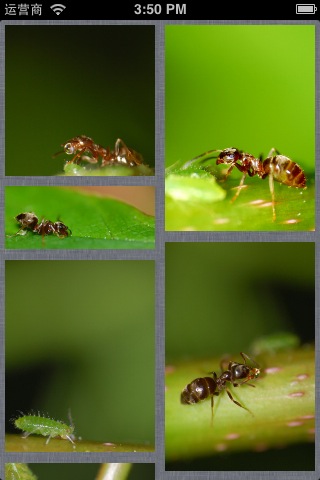
iOS 两个tableview的 瀑布流的更多相关文章
- iOS 使用两个tableview的瀑布流
代码 悦德财富:https://www.yuedecaifu.com 1 2 3 4 5 6 7 8 9 10 11 12 13 14 15 16 17 18 19 20 21 22 23 24 25 ...
- iOS教你轻松打造瀑布流Layout
前言 : 在写这篇文章之前, 先祝贺自己, 属于我的GitHub终于来了. 这也是我的GitHub的第一份代码, 以下文章的代码均可以在Demo clone或下载. 欢迎大家给予意见. 觉得写得不错的 ...
- iOS GZWaterfall任何形式的瀑布流
概述 使用UICollectionView可以布局各种各样的瀑布流,下面我写了几种不同布局的瀑布流样式 详细 代码下载:http://www.demodashi.com/demo/11018.html ...
- ios 两个 TableView 之间的联动, TableView 与 CollectionView 之间的联动
两个 TableView 之间的联动, TableView 与 CollectionView 之间的联动 这是一个创建于 359 天前的主题,其中的信息可能已经有所发展或是发生改变. [联动] :两个 ...
- iOS瀑布流实现(Swift)
这段时间突然想到一个很久之前用到的知识-瀑布流,本来想用一个简单的方法,发现自己走入了歧途,最终只能狠下心来重写UICollectionViewFlowLayout.下面我将用两种方法实现瀑布流,以及 ...
- IOS 瀑布流
本篇博客应该算的上CollectionView的高级应用了,从iOS开发之窥探UICollectionViewController(一)到今天的(五),可谓是由浅入深的窥探了一下UICollectio ...
- IOS 瀑布流UICollectionView实现
IOS 瀑布流UICollectionView实现 在实现瀑布流之前先来看看瀑布流的雏形(此方法的雏形 UICollectionView) 对于UICollectionView我们有几点注意事项 它和 ...
- iOS横向瀑布流的封装
前段时间, 做一个羡慕, 需要使用到瀑布流! 说道瀑布流, 或许大家都不陌生, 瀑布流的实现也有很多种! 从scrollView 到 tableView 书写的瀑布流, 然后再到2012年iOS6 苹 ...
- iOS 瀑布流之栅格布局
代码地址如下:http://www.demodashi.com/demo/14760.html 一 .效果预览 二.确定需求 由下面的需求示意图可知模块的最小单位是正方形,边长是屏幕宽除去边距间隔后的 ...
随机推荐
- 转 Windows串口过滤驱动程序的开发
在Windows系统上与安全软件相关的驱动开发过程中,“过滤(filter)”是极其重要的一个概念.过滤是在不影响上层和下层接口的情况下,在Windows系统内核中加入新的层,从而不需要修改上层的软件 ...
- 邁向IT專家成功之路的三十則鐵律 鐵律二十二:IT人升遷之道-無為
升遷管道是許多人求職時相當重要的考量之一,畢竟人除了很愛錢之外更愛顯赫的頭銜,然而在企業中越顯赫的頭銜,其背後通常有更多的罵名,因為許多人的高官厚爵都是踩著一群人的頭頂爬上去的,隨時哪一天跌了下來,都 ...
- npm升级所有可更新包
使用npm管理node的包,可以使用npm update <name>对单个包升级,对于npm的版本大于 2.6.1,可以使用命令: npm install -g 升级全局的本地包. 对于 ...
- SpringMVC:JSON
@ResponseBody params="json":访问我这个方法的时候一定要有参数名为json 返回值Userjackson-all-1.9.0.jar @RequestMa ...
- C语言-回溯例1
回溯法解N皇后问题 1,代码分析: 使用一个一维数组表示皇后的位置 其中数组的下标表示皇后所在的行 数组元素的值表示皇后所在的列 这样设计的棋盘,所有皇后必定不在同一行 假设前n-1行的皇后已经按照规 ...
- 【每日Scrum】第四天(4.25) TD学生助手Sprint2站立会议
站立会议 组员 昨天 今天 困难 签到 刘铸辉 (组长) 和小楠重写架构,使代码更加简洁,并增加了几个界面 今天增加了几个页面的子菜单,然后设计了几个要用的界面 遇到的困难是,菜单的事件处理真是神一样 ...
- HDMI
HDMI,全称为(High Definition Multimedia Interface)高清多媒体接口,主要用于传输高清音视频信号. 现在是HDMI2.0.新一代的HDMI2.0较上一代最大的提升 ...
- AngularJs + html 5 实现 裁剪上传
直接上代码 directive.js app.directive('fileUploadersm', function () { return { restrict: 'E', transclude: ...
- docker与jenkins学习
docker命令: docker create <image-id>docker start <container-id>docker run <image-id> ...
- wmware搬家
由于D盘空间不足D:\Users\Documents\Virtual Machines文件夹剪切至E:\Virtual Machines. 先关闭虚拟机 然后剪切 直接通过icon无法打开 先运行E: ...