
.NET Core R2安装及示例教程
.NET Core R2安装及示例教程
Install for Windows - Visual Studio 2015
- 1
Download Visual Studio 2015
Make sure you have Visual Studio 2015 Update 3 installed.
Download Visual Studio 2015 with Update 3
Or just download Visual Studio 2015 Update 3 if you already have Visual Studio 2015 installed.
- 2
Install the .NET Core tools preview for Visual Studio
.NET Core tools add support for .NET Core projects in Visual Studio 2015.
- 3
Create a new .NET Core project
Click on File / New project and select the project template C# / .NET Core / Console application (.NET Core).

- 4
Add some code
Write some code in your Main method.

- 5
Run your application
Click on the menu item Debug / Start debugging to launch and debug your new .NET Core application from Visual Studio.

And you're ready!
You now have .NET core running on your machine!
Visit the .NET Documentation to get access to additional tutorials, samples and the full .NET Core documentation.
前言
前几天.NET Core发布了.NET Core 1.0.1 R2 预览版,之前想着有时间尝试下.NET Core。由于各种原因,就没有初试。刚好,前几天看到.NET Core发布新版本了,决定要去一探究竟。于是乎,就立马去官网查找相关的信息,为初探做准备。
下面就开始今天的内容,有两个部分:安装和创建示例程序。
安装
本人使用的是Windows 10 64位系统,安装过Visual Studio 2015,如果没有安装,请先安装。
下载安装文件
进入.NET Core官网,进入下载页面1,进入下载页面2,下载所需的安装文件。 需要下载的文件:
- .NET Core Installer(RC2)
- .NET Core SDK Installer(Preview 1)
- Windows (Server Hosting)
- DotNetCore.1.0.0.RC2-VS2015Tools
- NuGet Manager extension for Visual Studio
| .NET Core 1.0.3 SDK - Installer | .NET Core 1.0.3 SDK - Binaries Only | |
|---|---|---|
| Windows | x64 / x86 .exe | x64 / x86 .zip |
| macOS | x64 .pkg | x64 .tar.gz |
| Linux | Installing .NET Core on Linux | |
| Docker | Installing .NET Core on Docker | |
| Visual Studio 2015 Tools (Preview 2) | x64 / x86 .exe | |
| Visual Studio 2017 Tools (Preview 3) | Installing .NET Core tools in Visual Studio 2017 Installing .NET Core RC3 tools for all other platforms | |
| .NET Core 1.0.3 runtime - Installer | .NET Core 1.0.3 runtime - Binaries Only | |
|---|---|---|
| Windows | x64 / x86 .exe | x64 / x86 .zip |
| Windows Server Hosting | x64 / x86 .exe | - |
| macOS | x64 .pkg | x64 .tar.gz |
| Linux | Installing .NET Core on Linux | |
| Docker | Installing .NET Core on Docker | |
| .NET Core 1.1 SDK - Installer | .NET Core 1.1 SDK - Binaries Only | |
|---|---|---|
| Windows | x64 / x86 .exe | x64 / x86 .zip |
| macOS | x64 .pkg | x64 .tar.gz |
| Linux | Installing .NET Core 1.1 on Linux | |
| Docker | Installing .NET Core 1.1 on Docker | |
| Visual Studio 2015 Tools (Preview 2) * | x64 / x86 .exe | |
| Visual Studio 2017 Tools (Preview 3) * | Installing .NET Core tools in Visual Studio 2017 Installing .NET Core RC3 tools for all other platforms | |
(*) Visual Studio tools include .NET Core 1.0.1. To add .NET Core 1.1 support you need to also install the .NET Core 1.1 runtime.
| .NET Core 1.1 runtime - Installer | .NET Core 1.1 runtime - Binaries Only | |
|---|---|---|
| Windows | x64 / x86 .exe | x64 / x86 .zip |
| Windows Server Hosting | x64 / x86 .exe | - |
| macOS | x64 .pkg | x64 .tar.gz |
| Linux | Installing .NET Core 1.1 on Linux | |
| Docker | Installing .NET Core 1.1 on Docker | |
Step-by-step instructions
 Windows
 macOS
macOS Linux
LinuxWindows系统直接下载安装文件即可。 Windows (Server Hosting)的作用相当于iis,是.NET Core Web项目的服务宿主程序,即可以直接使用Server Hosting运行Web项目。
安装.NET Core
提示:请先卸载.NET Core之前的版本,否则会报错。
报错信息: The project is configured to use .NET Core SDK version 1.0.0-preview1-002702 which is not installed or cannot be found under the path C:\Program Files\dotnet\bin. These components are required to build and run this project. NetCoreR2.Sample.ConsoleApp
双击下载的DotNetCore.1.0.0.RC2-Runtime-x64.exe,选择同意协议,然后点击"Insteall"安装,等待安装结束。 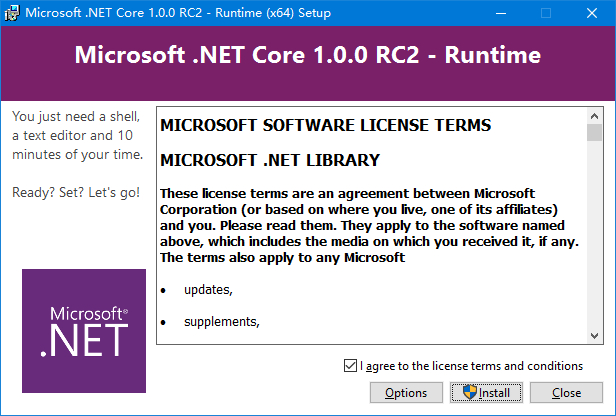
安装.NET Core SDK
双击下载的DotNetCore.1.0.0.RC2-SDK.Preview1-x64.exe,选择同意协议,然后点击"Insteall"安装,等待安装结束。 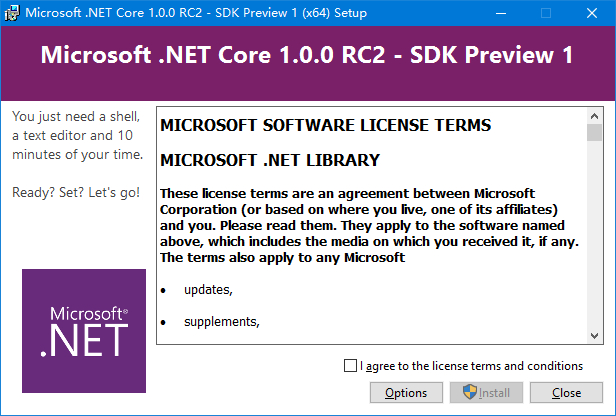
安装Server Hosting
双击下载的DotNetCore.1.0.0.RC2-WindowsHosting.exe,选择同意协议,然后点击"Insteall"安装,等待安装结束。 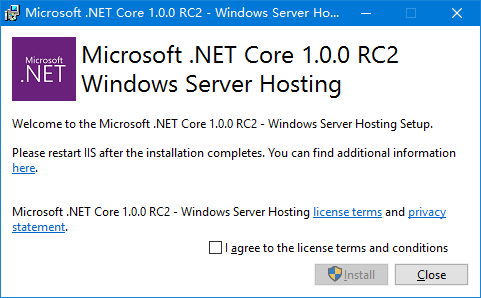
安装.NET Core VS2015Tools
双击下载的DotNetCore.1.0.0.RC2-VS2015Tools.Preview1.exe,选择同意协议,然后点击"Insteall"安装,等待安装结束。 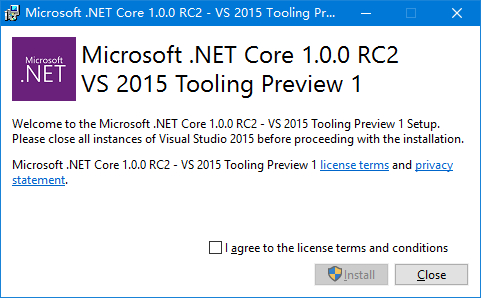
安装NuGet Manager extension for Visual Studio
双击下载的NuGet.Tools.vsix,选择同意协议,然后点击"Insteall"安装,等待安装结束。 NuGet Manager extension for Visual Studio Download
示例
示例有控制台程序和ASP.NET Core Web程序。
.NET Core控制台程序
打开Visual Studio 2015,新建一个项目:文件-新建-项目 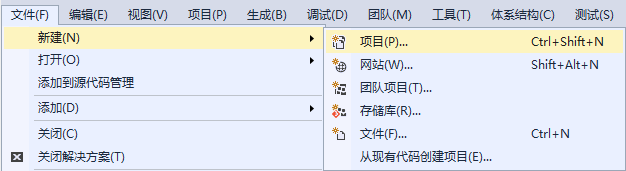
在左侧模板选择.NET Core,右侧选择控制台应用程序(.NET Core)。 输入名称NetCoreR2.Sample.ConsoleApp,点击"确定"按钮。 OK,.NET Core控制台应用程序创建完成。 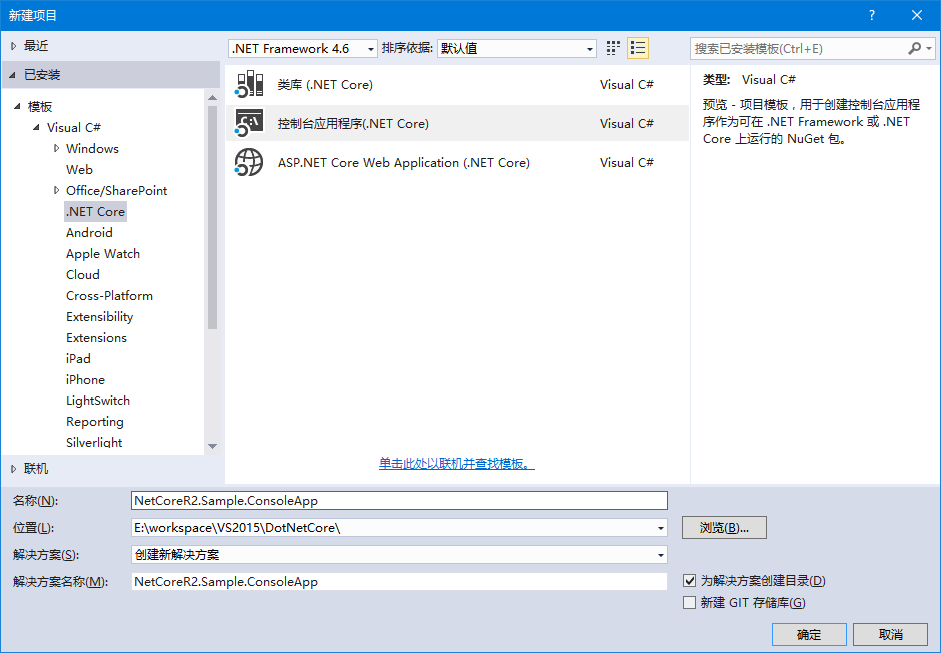
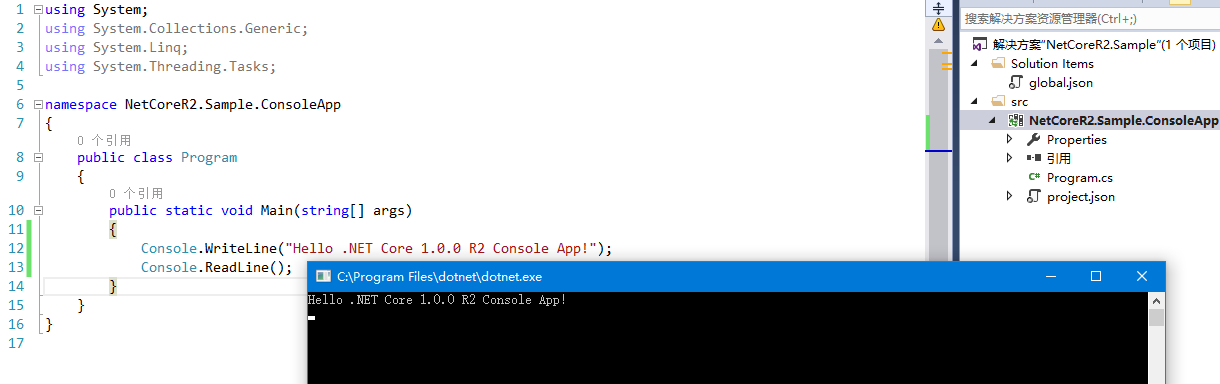
打开Program.cs文件,写入代码,运行。
using System;

using System.Collections.Generic;

using System.Linq;

using System.Threading.Tasks;

namespace NetCoreR2.Sample.ConsoleApp

{

    public class Program

    {

        public static void Main(string[] args)

        {

            Console.WriteLine("Hello .NET Core 1.0.0 R2 Console App!");

            Console.ReadLine();

        }

    }

}
如果在这里提示
ASP.NET Core Web项目
在上面的解决方案上新建一个ASP.NET Core Web项目:添加-新建项目 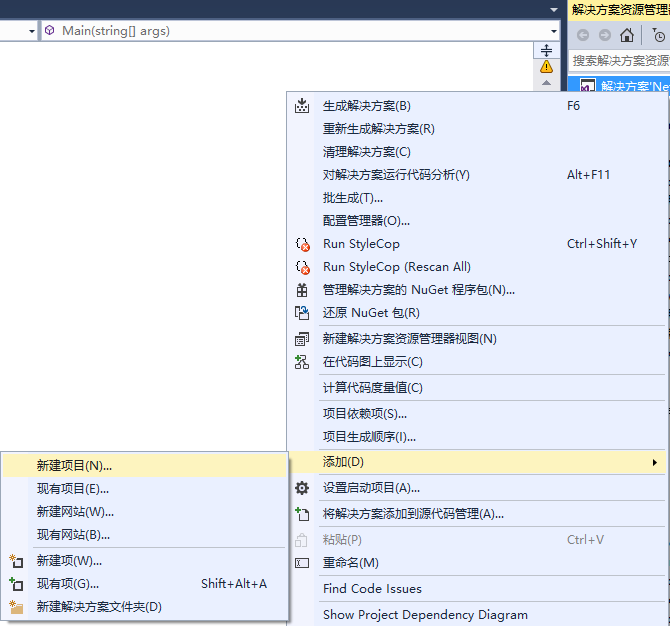
选择ASP.NET Core Web Application(.NET Core),点击"确定",创建项目。 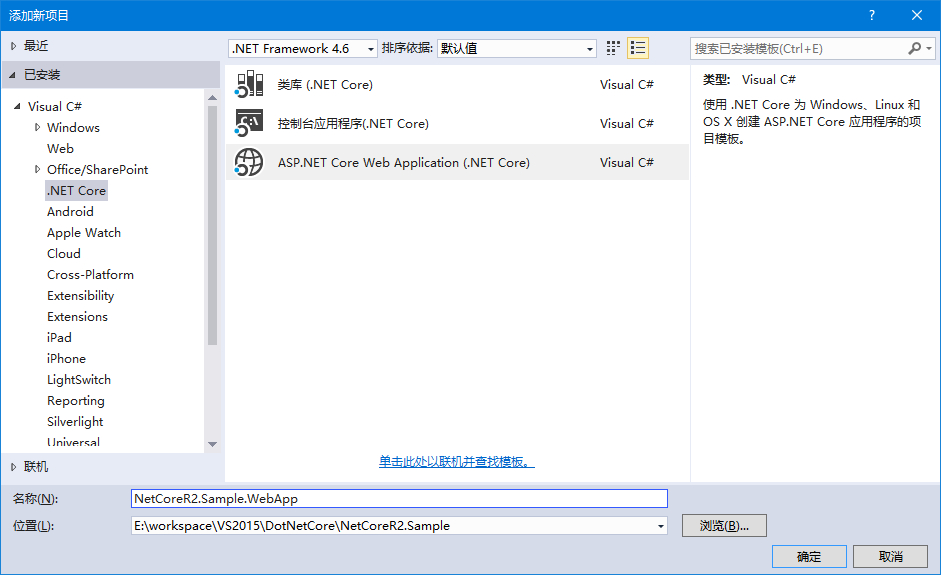
选择Web 应用程序 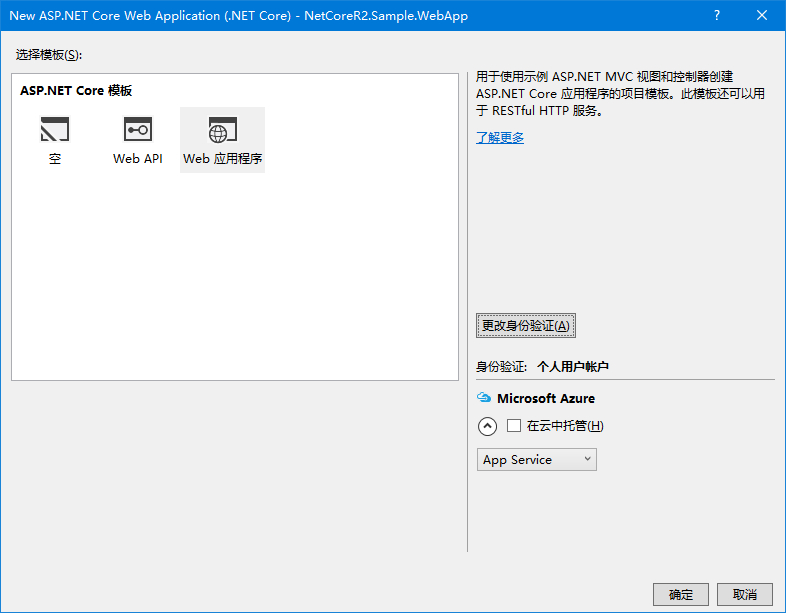
更改身份验证为:不进行身份验证,然后确定。 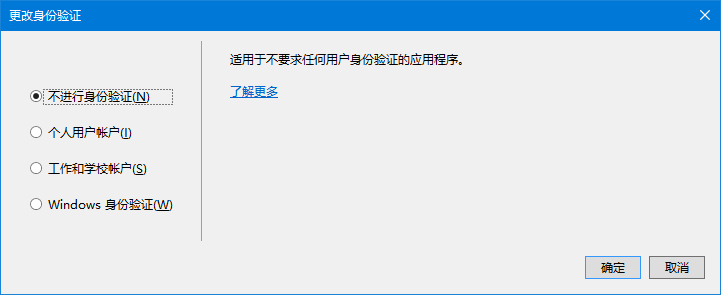
创建好项目后,等待Neget包还原,然后按"F5",调试运行。可以选择IIS或WindowsHosting,在这选用后者。 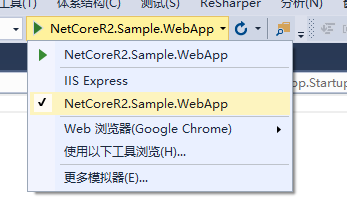
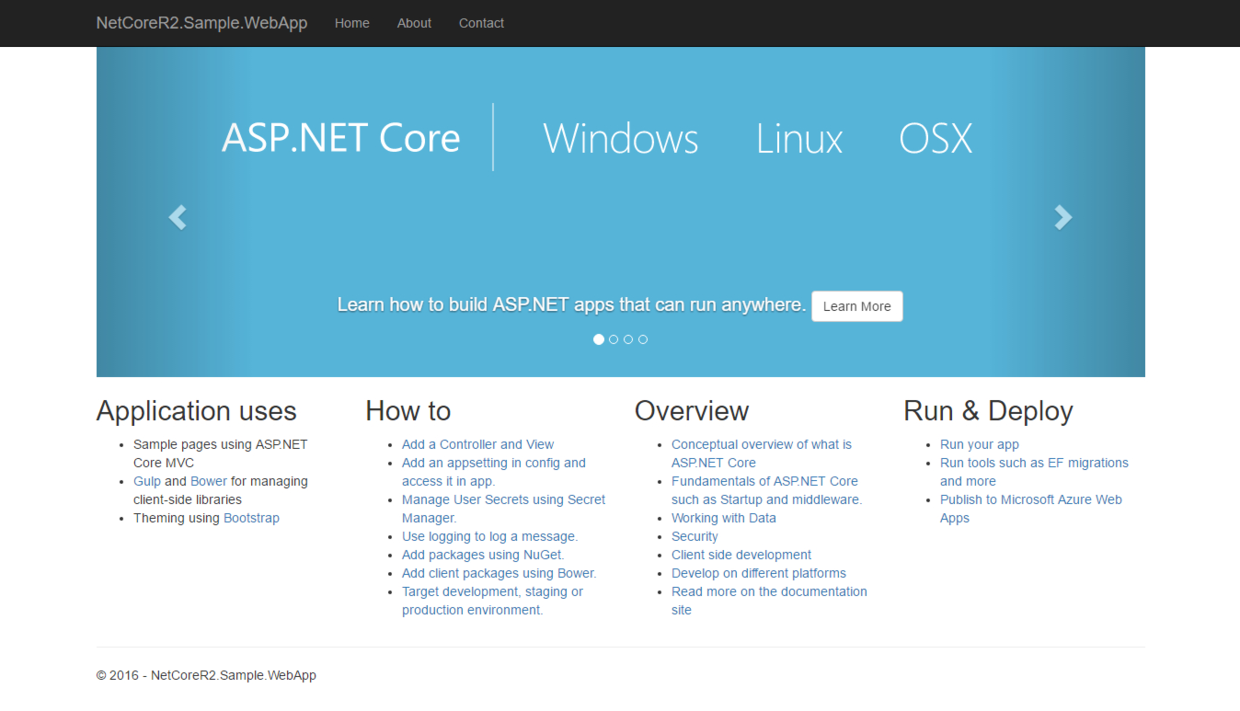
接下来,自己写一个控制器,并显示信息。 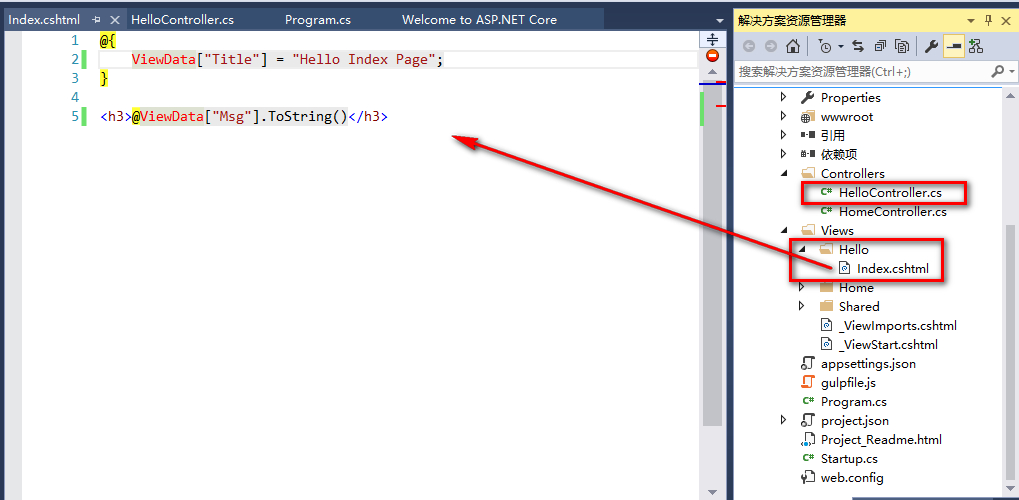
创建一个HelloController控制器,添加一个Index的Action:
using System;

using System.Collections.Generic;

using System.Linq;

using System.Threading.Tasks;

using Microsoft.AspNetCore.Mvc;

// For more information on enabling MVC for empty projects, visit http://go.microsoft.com/fwlink/?LinkID=397860

namespace NetCoreR2.Sample.WebApp.Controllers

{

    public class HelloController : Controller

    {

        // GET: /<controller>/

        public IActionResult Index()

        {

            ViewData["Msg"] = "Hello .NET Core 1.0.0 R2 Asp.Net Core MVC App!";

            return View();

        }

    }

}
创建对应的视图文件,写入代码:
@{

    ViewData["Title"] = "Hello Index Page";

}

<h3>@ViewData["Msg"].ToString()</h3>
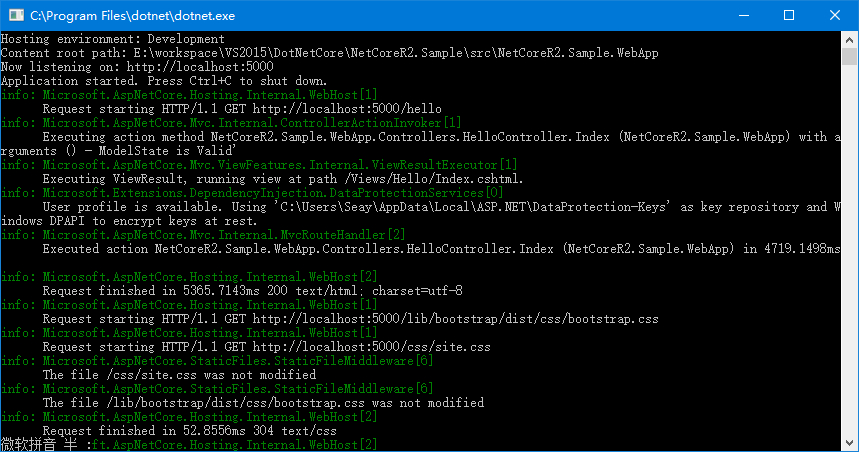
本文就介绍到这里。 如有疑问请联系我。
.NET Core R2安装及示例教程的更多相关文章
- [.NET Core].NET Core R2安装教程及Hello示例
前言 前几天.NET Core发布了.NET Core 1.0.1 R2 预览版,之前想着有时间尝试下.NET Core.由于各种原因,就没有初试.刚好,前几天看到.NET Core发布新版本了,决定 ...
- Oracle 11g R2安装手册(图文教程)For Windows
1.Oracle 11g R2安装手册(图文教程)For Windows 1.下载Oracle 11g R2 for Windows版本,下载地址如下 官方网站: http://download.or ...
- .NET Core 开发之旅 (1. .NET Core R2安装教程及Hello示例)
前言 前几天.NET Core发布了.NET Core 1.0.1 R2 预览版,之前想着有时间尝试下.NET Core.由于各种原因,就没有初试.刚好,前几天看到.NET Core发布新版本了,决定 ...
- .Net Core 1.0.0 RC2安装及示例教程
前几天微软发布了.Net Core1.0.0 RC2 Preview版本,一直都想尝试下跨平台的.Net Core,一直拖到今天,也参考了下园友们的经验,闲时整理了一下安装的步骤,供大家参考. 我们要 ...
- .Net Core 1.0.0正式版安装及示例教程
使用VS Code 从零开始开发调试.NET Core 1.0 RTM. .NET Core 是一个开源的.跨平台的 .NET 实现. VS Code 全称是 Visual Studio Code,V ...
- vscode 开发.net core 从安装到部署 教程详解
一:环境准备: windows系统需要 win7 sp1 / windows 8 / windows 2008 r2 sp1 / windows10: 其他版本的windows系统在安装.NET C ...
- 安卓模拟器Android SDK 4.0.3 R2安装完整图文教程
在最新的Android 4.0.3 R2模拟器中,已经加入了GPU支持,可以支持OpenGL ES 2.0标准,让开发者可以借助模拟器来测试自己的OpenGL游戏.在去年新增了摄像头支持之后,现在的新 ...
- .NET Core R2
.NET Core R2安装及示例教程 前言 前几天.NET Core发布了.NET Core 1.0.1 R2 预览版,之前想着有时间尝试下.NET Core.由于各种原因,就没有初试.刚好,前 ...
- Oracle 11g R2安装手册(…
1.Oracle 11g R2安装手册(图文教程)For Windows 1.下载Oracle 11g R2 for Windows版本,下载地址如下官方网站:http://download.orac ...
随机推荐
- Android版本对应的API号
Android版本 API 级别 1.5 API 3 1.6 API 4 2.1 API 7 2.2 API 8 2.3.3 API 10 3.0 API 11 3.1 API 12 3.2 API ...
- [python工具][pycharm]pycharm licence activation失效的解决方法
推荐网站: http://idea.lanyus.com/ 1 请将“0.0.0.0 account.jetbrains.com”添加到C:\Windows\System32\Drivers\etc\ ...
- 【.NET MVC分页】.NET MVC 使用pagelist 分页
1.安装 2. 在NuGet程序包管理控制台 ,输入Install-Package PagedList.mvc 安装PagedList 和PageList.Mvc; 3. @{ Layout = nu ...
- 监视网络接口TCP状态信息数据有多种工具或命令。下面举例一些:
nstat命令 nstat kernel ======= ss -s == netstat -i netstat -s ip -s link sar -n DEV 1
- 【线性基】51nod1312 最大异或和&LOJ114 k大异或和
1312 最大异或和 题目来源: TopCoder 基准时间限制:1 秒 空间限制:131072 KB 分值: 320 难度:7级算法题 有一个正整数数组S,S中有N个元素,这些元素分别是S[0] ...
- BZOJ3524 [Poi2014]Couriers 【主席树】
题目 给一个长度为n的序列a.1≤a[i]≤n. m组询问,每次询问一个区间[l,r],是否存在一个数在[l,r]中出现的次数大于(r-l+1)/2.如果存在,输出这个数,否则输出0. 输入格式 第一 ...
- 个人环境搭建——ANT安装
ANT安装 ant的安装有两种方式: 第一种,手动安装 (1)首先需要在Apache官网下载最新版的Ant,下载地址为:http://ant.apache.org/bindownload.cgi ...
- 纯js实现网页tab选项卡切换效果
纯js实现网页tab选项卡切换效果 百度搜索 js 点击菜单项就可以切换内容的效果
- MYSQL常用命令——【转】
MYSQL常用命令 1.导出整个数据库mysqldump -u 用户名 -p --default-character-set=latin1 数据库名 > 导出的文件名(数据库默认编码是latin ...
- duilib入门简明教程 -- VS环境配置(2) (转)
原文转自:http://www.cnblogs.com/Alberl/p/3342030.html 既然是入门教程,那当然得基础点,因为搜索duilib相关资料时,发现有些小伙伴到处都是编译错 ...