
AX2009 批处理作业中使用多线程---顶级采摘
顶级采摘
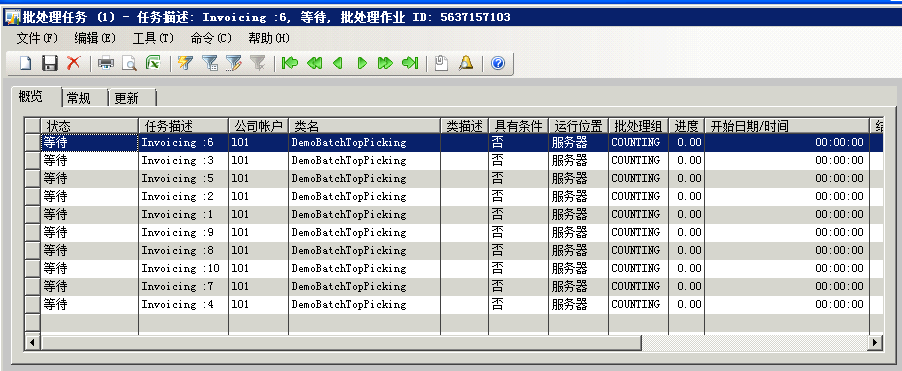
是前两种模式的一种混合,使用使用实体表存储单任务模式那样的每个工单,任务每次都取顶行做操作。单任务数不想单任务模式,一个工单一个任务。而是类似批量捆绑那样设置任务数。
表:demoTopPickProcessTrackTable
| 字段 | 类型 | |
| SalesId | String | SalesId |
| processedStatus | Enum | NoYes |
Class:
/*

顶级采摘

*/

class DemoBatchTopPicking extends RunBaseBatch

{

    str 20 fromSalesOrder, toSalesOrder;

    #define.CurrentVersion(1)

    #localmacro.CurrentList

        fromSalesOrder, toSalesOrder

    #endmacro

}

public void new()

{

    super();

}

void run()

{

    SalesTable                          salesTable;

    SalesFormLetter                     formletter;

    DemoTopPickProcessTrackTable        demoTopPickProcessTrackTable;

    Map                                 SalesMap;

    ;

    DemoTopPickProcessTrackTable.readPast(true);

    do

    {

        ttsBegin;

    // when it finds no more work item to process do-while loop will exit

        select pessimisticlock  firstOnly * from demoTopPickProcessTrackTable

            where demoTopPickProcessTrackTable.ProcessedStatus == NoYes::No;

        select * from salesTable

            where salesTable.salesId == demoTopPickProcessTrackTable.SalesID &&

                salesTable.documentStatus == DocumentStatus::none;

        if (salesTable)

        {

            formletter = SalesFormLetter::construct(DocumentStatus::Invoice);

            formletter.getLast();

            formletter.resetParmListCommonCS();

            formletter.allowEmptyTable(formletter.initAllowEmptyTable(true));

            SalesMap = new Map(Types::Int64,Types::Record);

            SalesMap.insert(salesTable.recid,salesTable);

//            formletter.parmDataSourceRecordsPacked(SalesMap.pack());

//            formletter.createParmUpdateFromParmUpdateRecord(SalesFormletterParmData::initSalesParmUpdateFormletter(DocumentStatus::Invoice, FormLetter.pack()));

            formletter.showQueryForm(false);

            formletter.initLinesQuery();

            formletter.update(salesTable, systemDateGet(), SalesUpdate::All, AccountOrder::None, false, false);

        }

        if(demoTopPickProcessTrackTable)

        {

            demoTopPickProcessTrackTable.ProcessedStatus = NoYes::Yes;

            demoTopPickProcessTrackTable.update();

        }

        ttsCommit;

    } while ( demoTopPickProcessTrackTable);

}

public static DemoBatchTopPicking construct()

{

    DemoBatchTopPicking  c;

    ;

    c = new DemoBatchTopPicking();

    return c;

}

public container pack()

{

    return [#CurrentVersion, #CurrentList];

}

public boolean unpack(container packedClass)

{

    Version version = RunBase::getVersion(packedClass);

    switch(version)

    {

        case #CurrentVersion:

            [version,#CurrentList] = packedClass;

            break;

        default:

            return false;

    }

    return true;

}
Job Test
static void scheduleDemoBatchTopPickingJob(Args _args)

{

    BatchHeader                     batchHeader;

    DemoBatchTopPicking             demoBatchTopPicking;

    DemoTopPickProcessTrackTable    demoTopPickProcessTrackTable;

    SalesTable                      salesTable;

    int                             totalNumberOfTasksNeeded = 10;

    int                             counter;

    SalesId                         _SalesIdFrom,_SalesIdTo;

    BatchInfo                       batchInfo;

    ;

    _SalesIdFrom = "SSO000001";

    _SalesIdTo = "SSO001000";

    ttsBegin;

    select count(RecId) from salesTable

        where salesTable.salesId >= _SalesIdFrom &&

            salesTable.salesId <= _SalesIdTo

            && salesTable.documentStatus == DocumentStatus::none;

    info(Strfmt("%1",salesTable.recid));

    delete_from demoTopPickProcessTrackTable;

    if (salesTable.recid > 0)

    {

        //Populating the staging table with the work items

        insert_recordset demoTopPickProcessTrackTable (SalesId)

            select SalesId from salesTable

                where salesTable.SalesId >= _SalesIdFrom &&

                    salesTable.SalesId <= _SalesIdTo   &&

                    salesTable.DocumentStatus == DocumentStatus::None;

        update_recordSet demoTopPickProcessTrackTable

            setting processedStatus = NoYes::No;

        batchHeader = BatchHeader::construct();

        batchHeader.parmCaption(strFmt('Batch job for demoBatchTopPicking'));

        //Creating predefined number of tasks

        for(counter = 1; counter <= totalNumberOfTasksNeeded; counter++)

        {

            info(strfmt("-->%1",counter));

            demoBatchTopPicking = DemoBatchTopPicking::construct();

            batchInfo = demoBatchTopPicking.batchInfo();

            BatchInfo.parmCaption(strfmt('Invoicing :%1 ',counter));

            batchInfo.parmGroupId("COUNTING");

            batchHeader.addTask(demoBatchTopPicking);

        }

        batchHeader.save();

    }

    ttsCommit;

    info('Done');

}

/*

顶级采摘:

假设,我们处理10万条记录

#创建的任务    #批处理线程(在我的测试服务器)    #可并行执行的并行任务

10             10                                 10

批处理整个时段,10个任务同时运行,直到队列中没有更多的项目(暂存表中没有要处理的项目)

*/
AX2009 批处理作业中使用多线程---顶级采摘的更多相关文章
- AX2009 批处理作业中使用多线程---批量捆绑
批量捆绑 由于Ax服务器中批处理线程是可以多个的,而实际批处理作业中线程往往只使用了一个 Class: /* 批量捆绑 */ /*class Code*/ public class DemoBat ...
- AX2009 批处理作业中使用多线程---独立任务模式
每个工单独立一个任务. Class /* 独立任务模式 */ class DemoBatchIndividualTasks extends RunBaseBatch { str 20 SalesOrd ...
- C#中的多线程 - 同步基础 z
原文:http://www.albahari.com/threading/part2.aspx 专题:C#中的多线程 1同步概要Permalink 在第 1 部分:基础知识中,我们描述了如何在线程上启 ...
- 细说.NET 中的多线程 (一 概念)
为什么使用多线程 使用户界面能够随时相应用户输入 当某个应用程序在进行大量运算时候,为了保证应用程序能够随时相应客户的输入,这个时候我们往往需要让大量运算和相应用户输入这两个行为在不同的线程中进行. ...
- 细说.NET中的多线程 (二 线程池)
上一章我们了解到,由于线程的创建,销毁都是需要耗费大量资源和时间的,开发者应该非常节约的使用线程资源.最好的办法是使用线程池,线程池能够避免当前进行中大量的线程导致操作系统不停的进行线程切换,当线程数 ...
- kettle作业中的js如何写日志文件
在kettle作业中JavaScript脚本有时候也扮演非常重要的角色,此时我们希望有一些日志记录.下面是job中JavaScript记录日志的方式. job的js写日志的方法. 得到日志输出实例 o ...
- [转载]ArcGIS Engine 中的多线程使用
ArcGIS Engine 中的多线程使用 原文链接 http://anshien.blog.163.com/blog/static/169966308201082441114173/ 一直都想写 ...
- python中的多线程【转】
转载自: http://c4fun.cn/blog/2014/05/06/python-threading/ python中关于多线程的操作可以使用thread和threading模块来实现,其中th ...
- 拒绝卡顿——在WPF中使用多线程更新UI
原文:拒绝卡顿--在WPF中使用多线程更新UI 有经验的程序员们都知道:不能在UI线程上进行耗时操作,那样会造成界面卡顿,如下就是一个简单的示例: public partial class MainW ...
随机推荐
- 从零开始mycat实验环境搭建
版本说明 本机: jdk 8 使用IntelliJ IDEA调试MyCAT 1.6 release 主机一:droplet CentOS 7.5 x86_64 MyCAT 1.6 release O ...
- 在windows 10 上使用aspnet_regiis.exe -i 命令报 “此操作系统版本不支持此选项” 的解决办法
用CMD窗口在C:\Windows\Microsoft.NET\Framework64\v4.0.30319下使用命令aspnet_regiis -i 报错: “此操作系统版本不支持此选项” .结果是 ...
- JS时间戳转时间
function timestampToTime(timestamp) { S = timestamp, T = new Date(1E3 * S), Format = function(Q){ret ...
- github PageHelper使用PageInfo数据错乱问题
如果出现了数据错乱,检查一下代码是否正确 PageHelper.start(1,10); List<MyEntity> lists = mapper.query(); PageInfo&l ...
- 运用node真机调试移动web项目
很多时候我们对移动端进行测试的时候,有pc端的测试,也有真机上的测试,pc的测试就不多说了,因为其实基本上大家都懂的.真机测试上也有几种方法,这里就推荐三种: 移动端真机调试方法 chrome真机调试 ...
- VB6 二维数组去重实现
关于VB6的二维数组去重算法实现 当然,这里还是有局限性,当我们的数组被填满了各个不同的值时,例如下方 700*700 = 490000 就要While49万次,这谁受得了? 所以以下仅适合小规模使用 ...
- [Kafka] |FAIL|rdkafka#producer-1 : Receive failed: Disconnected
Why am I seeing Receive failed: Disconnected? 1. broker 的空闲连接回收器关闭不活跃连接. 由 broker 的配置属性 connections. ...
- mysql安装好之后,查询显示MySQL不是内部命令或外部命令问题
使用cmd来调用MySQL的时候提示错误,错误是说MySQL不是内部或外部命令. 1.如图所示,遇到的mysql命令错误. 2.现在就要查询mysql是安装在哪,我们在计算机里面搜索mysql.exe ...
- 服务器端AJAX的Servlet代码实现
package com.itheima.servlet; import java.io.IOException; import javax.servlet.ServletException; impo ...
- 图解Windows 10下Visual Studio Code的下载和安装
1. 百度搜索“Visual Studio Code”,如下图所示: 2. 点击第一个搜索结果项,进入官方网站,然后点击“Download for Windows”,如下图所示: 3. 进入提示下载页 ...