
Spring的通知类型,切入表达式写法
转载自 https://www.cnblogs.com/ltfxy/p/9882697.html
Spring中通知类型:
- 前置通知:目标方法执行之前进行操作,可以获得切入点信息
- 后置通知: 目标方法执行之后进行操作,可以获得方法的返回值
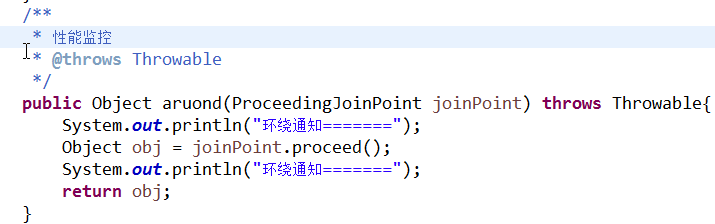
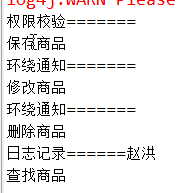
- 环绕通知:在目标方法执行之前和之后进行操作,可以终止目标方法的执行
- 异常抛出通知:在程序出现异常的时候进行的操作,可以返回异常信息
- 最终通知:无论代码是否有异常,总是执行,相当于finally
- 引介通知(了解即可):
切面类:
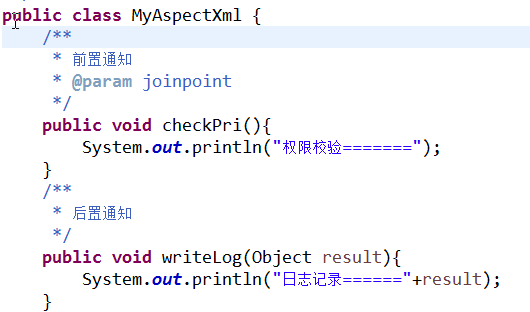
配置:
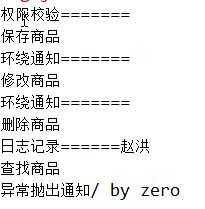
测试结果:
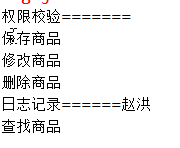
环绕通知:目标方法执行之前和之后进行操作(事务管理),可以阻止目标方法的执行


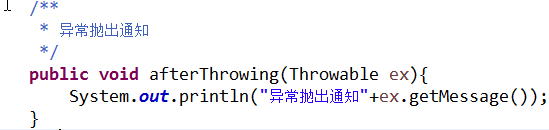
异常抛出通知:程序出现异常的时候进行的操作


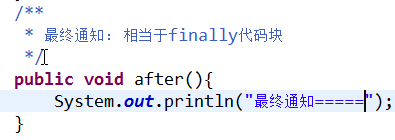
最终通知:无论代码是否有异常,总是会执行

引介通知:(了解)
applictionContext.xml

<?xml version="1.0" encoding="UTF-8"?>

<beans xmlns="http://www.springframework.org/schema/beans"

    xmlns:xsi="http://www.w3.org/2001/XMLSchema-instance" xmlns:aop="http://www.springframework.org/schema/aop"

    xsi:schemaLocation="

        http://www.springframework.org/schema/beans

        http://www.springframework.org/schema/beans/spring-beans.xsd

        http://www.springframework.org/schema/aop

         http://www.springframework.org/schema/aop/spring-aop.xsd">

    <!-- 配置目标对象(被增强对象) -->

    <bean id="productDao" class="com.spring4.demo3.ProductDaoImpl"></bean>

    <!-- 将切面类交给Spring管理 -->

    <bean id="myAspect" class="com.spring4.demo3.MyAspectXML">

    </bean>

    <!-- 通过Spring配置对目标类完成代理 -->

    <aop:config>

        <!-- 配置切入点,表达式配置哪些类的哪些方法需要进行增强,*代表任意返回值,...代表任意参数 -->

        <aop:pointcut expression="execution(* com.spring4.demo3.ProductDaoImpl.save(..))"

            id="pointcut1" />

        <aop:pointcut expression="execution(* com.spring4.demo3.ProductDaoImpl.delete(..))"

            id="pointcut2" />

        <aop:pointcut expression="execution(* com.spring4.demo3.ProductDaoImpl.update(..))"

            id="pointcut3" />

        <aop:pointcut expression="execution(* com.spring4.demo3.ProductDaoImpl.find(..))"

            id="pointcut4" />

        <!-- 配置切面 -->

        <aop:aspect ref="myAspect">

            <!-- 配置前置增强 -->

            <aop:before method="checkPri" pointcut-ref="pointcut1" />

            <!-- 配置后置增强,设置返回值为result -->

            <aop:after-returning method="log4j" pointcut-ref="pointcut2" returning="result" />

            <!-- 环绕通知 -->

            <aop:around method="around" pointcut-ref="pointcut3"/>

            <!-- 异常抛出通知,设置异常信息为ex -->

            <aop:after-throwing method="afterThtowing" pointcut-ref="pointcut4" throwing="ex"/>

            <!-- 最终通知 -->

            <aop:after method="after" pointcut-ref="pointcut4"/>

        </aop:aspect>

    </aop:config>

</beans>
Java
 1 package com.itheima.spring.demo3;

 2

 3 public class ProductDaoImpl implements ProductDao {

 4

 5     @Override

 6     public void save() {

 7         System.out.println("保存商品");

 8     }

 9     @Override

10     public void update() {

11         System.out.println("修改商品");

12     }

13     @Override

14     public void find() {

15         System.out.println("查找商品");

16 //        int i = 1/0;

17     }

18     @Override

19     public String delete() {

20         System.out.println("删除商品");

21         return "赵洪";

22

23     }

24

25 }

26

27

28 package com.itheima.spring.demo3;

29

30 import org.aspectj.lang.ProceedingJoinPoint;

31

32 /**

33  * 切面:切入点和通知的组合

34  * @author 李腾

35  */

36 public class MyAspectXml {

37     /**

38      * 前置通知

39      * @param joinpoint

40      */

41     public void checkPri(){

42         System.out.println("权限校验=======");

43     }

44     /**

45      * 后置通知

46      */

47     public void writeLog(Object result){

48         System.out.println("日志记录======"+result);

49     }

50     /**

51      * 环绕通知

52      * @throws Throwable

53      */

54     public Object aruond(ProceedingJoinPoint joinPoint) throws Throwable{

55         System.out.println("环绕通知=======");

56         Object obj = joinPoint.proceed();

57         System.out.println("环绕通知=======");

58         return obj;

59     }

60     /**

61      * 异常抛出通知

62      */

63     public void afterThrowing(Throwable ex){

64         System.out.println("异常抛出通知"+ex.getMessage());

65     }

66     /**

67      * 最终通知: 相当于finally代码块

68      */

69     public void after(){

70         System.out.println("最终通知=====");

71     }

72 }

73

74

75 package com.itheima.spring.demo3;

76 import javax.annotation.Resource;

77

78 import org.junit.Test;

79 import org.junit.runner.RunWith;

80 import org.springframework.test.context.ContextConfiguration;

81 import org.springframework.test.context.junit4.SpringJUnit4ClassRunner;

82 /**

83  *测试类

84  */

85 @RunWith(SpringJUnit4ClassRunner.class)

86 @ContextConfiguration("classpath:applicationContext.xml")

87 public class SpringDemo3 {

88

89     @Resource(name="productDao")

90     private ProductDao productDao;

91     @Test

92     public void demo1(){

93         productDao.save();

94         productDao.update();

95         productDao.delete();

96         productDao.find();

97

98     }

99 }
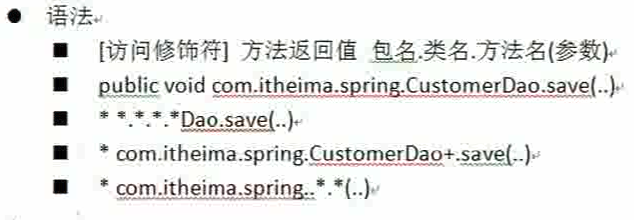
切入点表达式语法:基于execution函数完成的
Spring的通知类型,切入表达式写法的更多相关文章
- 十三 Spring的通知类型,切入表达式写法
Spring中通知类型: 前置通知:目标方法执行之前进行操作,可以获得切入点信息 后置通知: 目标方法执行之后进行操作,可以获得方法的返回值 环绕通知:在目标方法执行之前和之后进行操作,可以终止目标方 ...
- spring quartz 的定时器cronExpression表达式写法(转载)
转载来源:https://zhidao.baidu.com/question/240797777248343764.html====================================== ...
- JAVA框架 Spring AOP--切入点表达式和通知类型
一:AOP的相关术语: 1)Joinpoint(连接点):所谓的连接点是指那些可以被拦截点,在spring中这些点是指方法.因为在spring中支持方法类型的连接点. 2)Pointcut(切入点): ...
- 分享知识-快乐自己:Spring切入点的表达式和通知类型
1.切入点的表达式 表达式格式: execution([修饰符] 返回值类型 包名.类名.方法名(参数)) 其他的代替: <!-- 完全指定一个方法 --> <!-- <aop ...
- 7.Spring切入点的表达式和通知类型
1.切入点的表达式 表达式格式: execution([修饰符] 返回值类型 包名.类名.方法名(参数)) 其他的代替: <!-- 完全指定一个方法 --> <!-- <aop ...
- Java开发学习(十六)----AOP切入点表达式及五种通知类型解析
一.AOP切入点表达式 对于AOP中切入点表达式,总共有三个大的方面,分别是语法格式.通配符和书写技巧. 1.1 语法格式 首先我们先要明确两个概念: 切入点:要进行增强的方法 切入点表达式:要进行增 ...
- Spring AOP使用整理:各种通知类型的介绍
2.PersonImpl类的源码 public class PersonImpl implements Person { private String name; private int age; p ...
- spring.net AOP通知类型
上篇介绍了spring.net AOP的基本实现,其中有说到通知类型,首先在这里补充解释一下.最后出一个异常通知的实例,因为他的实现和别的通知有些不一样. 1.拦截环绕通知:在Spring中最基础的通 ...
- spring aop的五种通知类型
昨天在腾讯课堂看springboot的视频,老师随口提问,尼玛竟然回答错了.特此记录! 问题: Spring web项目如果程序启动时出现异常,调用的是aop中哪类通知? 正确答案是: 异常返回通知. ...
随机推荐
- [转]PHP开发者必须了解的工具—Composer
本文转自:https://blog.csdn.net/Zhihua_W/article/details/80345973 Composer是PHP 用来管理依赖(dependency)关系的工具.你可 ...
- WPF 窗口
在WPF中,经常需要对窗口进行设置,下面讲讲常用的几个设置. 窗口样式 1.无边框窗口 无边框透明窗体 设置 WindowStyle="None"--无边框,如果需要其它按钮,如缩 ...
- frp 初探
条件: (1) 服务器端要有公网 IP (2) 客户端能上网,能够访问服务器的公网 IP 下载 https://github.com/fatedier/frp/releases 根据服务器和客户端的操 ...
- SQL语句在数据库中可以执行在mybatis执行不了
这个问题竟然纠结了半个小时! 就问题而言,肯定是出在mybatis中 终于,找到了答案, 原来是DataSource配置问题, 我将配置连接池的数据写到了文件db.properties中, SqlMa ...
- 重装MacOS
从U盘启动 开启或重新启动您的 Mac 后,立即按住 Option 键。 当您看到“启动管理器”窗口时,松开 Option 键。 选择您的启动磁盘,然后点按箭头或按下 Return 键。 Mac 的启 ...
- Reinforcement Learning: An Introduction读书笔记(2)--多臂机
> 目 录 < k-armed bandit problem Incremental Implementation Tracking a Nonstationary Problem ...
- Fundebug累计处理1000万条错误事件!
摘要上线半年时间,Fundebug累计处理1000万条错误事件.10000000啊! 自从去年双11[正式上线](https://blog.fundebug.com/2016/11/11/fundeb ...
- Android view显示在软键盘上方
给EditText外加一个ScrollView,将高度设置统一,并给ScrollView设置属性 android:fillViewport="true". 注:ScrollVie ...
- K8S 高级调度方式
可以使用高级调度分为: 节点选择器: nodeSelector.nodeName 节点亲和性调度: nodeAffinity Pod亲和性调度:PodAffinity Pod反亲和性调度:podAnt ...
- php通过某个日期段的周几,获取选中周几对应的日期
最近在做课程表的项目里用到了这个,有个日期段,选择好周几之后,想获取在这个日期段内选中的星期对应的日期,如下图,代码如下 function getDateByWeek($data) { $start_ ...