
Cross-Browser HTML5 Placeholder Text
One of the nice enhancement in HTML5 web form is being able to add placeholder text to input fields. Placeholder attribute allows you to display text in a form input when it is empty and when it is not focused (it clears the field on focus). This is a nifty feature, but it is not supported by all browsers yet. This tutorial will show you how to use Modernizr to detect if placeholder is supported, or else use jQuery to display the fallback placeholder text dynamically.
Old School Javascript Way
Before we had the placeholder attribute, we relied on Javascript to fake the placeholder text. Below is an example. The text is inserted in the value attribute. On focus, it checks if the value is "search" and returns empty to clear the field. If the value is empty, it returns "search." As you can see, this way is not an efficient way because each field has to be checked.
<input type="text" value="Search" onfocus="if (this.value == 'Search') {this.value = '';}" onblur="if (this.value == '') {this.value = 'Search';}">
jQuery Placeholder Text (Demo)
Now with HTML5 placeholder, it is more semantic to use placeholder than value attribute. However, placeholder text is not supported by all browsers. To make it cross-browser, Modernizr and jQuery come in handy here.
Modernizr is used here to check if placeholder is supported. If placeholder is not supported, the jQuery code will run. It finds all elements with placeholder attribute and stores in a variable. It then compares the input value with the placeholder attribute. If the input value is empty, it will display the placeholder text and add a "placeholder" class to the input field. View Demo.
To use this on your site, download a copy of Modernizr and jQuery and paste the following code any where in your html page (be sure the jquery.js and modernizr.js file is in correct path).
<script src="jquery.js"></script>

<script src="modernizr.js"></script>
$(document).ready(function(){

if(!Modernizr.input.placeholder){

    $('[placeholder]').focus(function() {

      var input = $(this);

      if (input.val() == input.attr('placeholder')) {

        input.val('');

        input.removeClass('placeholder');

      }

    }).blur(function() {

      var input = $(this);

      if (input.val() == '' || input.val() == input.attr('placeholder')) {

        input.addClass('placeholder');

        input.val(input.attr('placeholder'));

      }

    }).blur();

    $('[placeholder]').parents('form').submit(function() {

      $(this).find('[placeholder]').each(function() {

        var input = $(this);

        if (input.val() == input.attr('placeholder')) {

          input.val('');

        }

      })

    });

}
Remove Webkit Search Input Styles
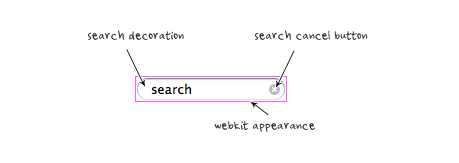
Webkit browsers add extra styling to the search input field. To remove them, add the following CSS code:
input[type=search] {    -webkit-appearance: none;}

input[type="search"]::-webkit-search-decoration,

input[type="search"]::-webkit-search-cancel-button {

    display: none;

}
Credit
The jQuery code is found at Nico Hagenburger.
http://webdesignerwall.com/tutorials/cross-browser-html5-placeholder-text
Cross-Browser HTML5 Placeholder Text的更多相关文章
- html5 placeholder ie 不兼容问题 解决方案
解决HTML5 placeholder的方案 来源: 时间:2013-09-05 20:06:49 阅读数:11375 分享到: 0 [导读] 使低版本浏览器支持Placeholder有很多方 ...
- (转)html5 Placeholder属性兼容IE6、7方法
使低版本浏览器支持Placeholder有很多方法,都不是很完美,或多或少有点问题,且有些原生支持的浏览器在获得焦点时会清空Placeholder提示.发现zhihu的解决方法不错,特记录下 wind ...
- 玩转 HTML5 Placeholder
Placeholder(占位符) 是 HTML5 新增的一个 HTML 属性,用来对可输入字段的期望值提供提示信息,目前已经得到主流浏览器的广泛支持,使用方式非常简单: <input id=&q ...
- IE8 不支持html5 placeholder的解决方案
IE8不支持html5 placeholder的解决方法. /** * jQuery EnPlaceholder plug * version 1.0 2014.07.01戈志刚 * by Frans ...
- HTML5 placeholder(空白提示) 属性
原文地址:HTML5′s placeholder Attribute 演示地址: placeholder演示 原文日期: 2010年08月09日 翻译日期: 2013年8月6日 浏览器引入了许多的HT ...
- 占位符(placeholder text)
占位符(placeholder text)是用户在input(输入)框输入任何东西之前放置在input(输入)框中的预定义文本. 你可以用如下方式创建占位符: <input type=" ...
- UITextField placeholder text color
iOS6 and Later 改变UITextField 中占位符 提示文本的文字颜色 在新版本中(iOS6以后)iOS提供一种 Key = value 属性的方式,来改变UI的属性内容.以UITex ...
- html5 placeholder
placeholder是html5<input>标签的一个属性,placeholder 属性提供可描述输入字段预期值的提示信息(hint).该提示会在输入字段为空时显示,并会在字段获得焦点 ...
- Html5 Canvas Text
html5 canvas中支持对text文本进行渲染;直接的理解就是把text绘制在画布上,并像图形一样处理它(可以加shadow.gradient.pattern.color fill等等):既然它 ...
随机推荐
- C# 对Excel文档打印时的页面设置
1.对打印页面的朝向,页宽,页高进行设置 参考源码[1] using Excel = Microsoft.Office.Interop.Excel; Excel.Application tmpExce ...
- Linux基本命令 目录
Linux基本命令 目录 Linux基本命令(1)管理文件和目录的命令 Linux基本命令(2)有关磁盘控件的命令 Linux基本命令(3)文件备份和压缩的命令 Linux基本命令(4)有关关机和查看 ...
- InputFormat 总结
在mr中的输入类,常见的InputFormat是TextInputFormat,也是mr默认的文件处理类,处理普通文本文件,作用是 1 每一行作为一个记录,将每一行在文件中的起始偏移量做为key,内容 ...
- 设计模式 命令-Command
命令-Command 当要向不同类的对象发出相同的请求时,可以将接收者和他的动作封装进一个命令对象.这样调用者只和命令产生依赖.而不会和众多的接收者发生依赖. Head First例子 要设计一款遥控 ...
- Embedded之Introduction
1 Embedded system An embedded system is a combination of computer hardware and software, and perhaps ...
- [转]天龙八部的BillingServer
从字面上看,Billing是计费的,应该处理玩家在线时间或者包月之类.但是天龙八部是免费游戏,不需要算时间来计费.从代码中看,BillingServer也比较简单,它有一个连接到Web服务器,并监听一 ...
- 总结调用Flash的几种方法
一.Adobe 提供的方法 <object width="200" height="200" classid="clsid:D27CDB6E-A ...
- 多台服务器最好加上相同的machineKey
<machineKey validationKey="6E993A81CF4BDCA1C1031528F55DADBB8AF1772A" decryptionKey=&q ...
- js混淆工具
1\ http://www.jasob.com 2\ http://developer.yahoo.com/yui/compressor
- [转]软件开发过程(CMMI/RUP/XP/MSF)是与非?
经常看到和听到大家在争论敏捷过程.RUP和CMM 哪个软件开发过程更好或者哪个过程不好,各自都有理由.争论得不亦乐乎......实际上,没有十全十美的过程,也不存在更好的过程.关键是什么样的过程适合自 ...