
ngrep 比 tcpdump 更方便查看的抓包显示工具
ngrep 是grep(在文本中搜索字符串的工具)的网络版,他力求更多的grep特征,
用于搜寻指定的数据包
一: ngrep的安装 CentOS6.2 64位
wget http://nchc.dl.sourceforge.net/sourceforge/ngrep/ngrep-1.45.tar.bz2
下载下来是一个 bz2的包, 用bzip2命令加压成tar包,在用tar解压
bzip2 -d ngrep-1.45.tar.bz2
tar xf ngrep-1.45.tar
二:安装 ngrep
cd 进入目录 ngrep-1.45
./configure
make
make install
三:我这样安装的时候报错了, 如下:

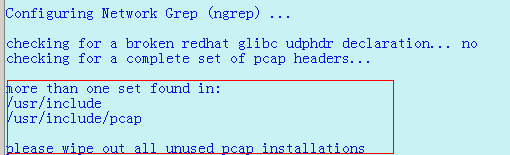
或者是这样的错误:

看错误说明,系统缺少 libpacp的包,那么yum安装 libpacp,
yum install libpcap libpcap-devel -y
重新安装ngrep
./configure --with-pcap-includes=/usr/local/include/pcap
make
make install
注意加上红色的部分,这样才正确的安装了
四:使用 http://blog.sina.com.cn/s/blog_4d14fb2b01012tqo.html
使用方法:()
usage: ngrep <-LhNXViwqpevxlDtTRM> <-IO pcap_dump> <-n num> <-d dev> <-A num>
<-s snaplen> <-S limitlen> <-W normal|byline|single|none> <-c cols>
<-P char> <-F file> <match expression> <bpf filter>
-h is help/usage
-V is version information
-q is be quiet (don't print packet reception hash marks)静默模式,如果没有此开关,未匹配的数据包都以“#”显示
-e is show empty packets 显示空数据包
-i is ignore case 忽略大小写
-v is invert match 反转匹配
-R is don't do privilege revocation logic
-x is print in alternate hexdump format 以16进制格式显示
-X is interpret match expression as hexadecimal 以16进制格式匹配
-w is word-regex (expression must match as a word) 整字匹配
-p is don't go into promiscuous mode 不使用混杂模式
-l is make stdout line buffered
-D is replay pcap_dumps with their recorded time intervals
-t is print timestamp every time a packet is matched在每个匹配的包之前显示时间戳
-T is print delta timestamp every time a packet is matched显示上一个匹配的数据包之间的时间间隔
-M is don't do multi-line match (do single-line match instead)仅进行单行匹配
-I is read packet stream from pcap format file pcap_dump 从文件中读取数据进行匹配
-O is dump matched packets in pcap format to pcap_dump 将匹配的数据保存到文件
-n is look at only num packets 仅捕获指定数目的数据包进行查看
-A is dump num packets after a match匹配到数据包后Dump随后的指定数目的数据包
-s is set the bpf caplen
-S is set the limitlen on matched packets
-W is set the dump format (normal, byline, single, none) 设置显示格式byline将解析包中的换行符
-c is force the column width to the specified size 强制显示列的宽度
-P is set the non-printable display char to what is specified
-F is read the bpf filter from the specified file 使用文件中定义的bpf(Berkeley Packet Filter)
-N is show sub protocol number 显示由IANA定义的子协议号
-d is use specified device (index) instead of the pcap default 使用哪个网卡,可以用-L选项查询
-L is show the winpcap device list index 查询网卡接口
五:应用示例:
1:捕获字符串".flv",比如要查看在Web Flash 视频中的flv文件的下载地址
ngrep -d3 -N -q \.flv
interface: \Device\TNT_40_1_{670F6B50-0A13-4BAB-9D9E-994A833F5BA9} (10.132.0.0/2
55.255.192.0)
match: \.flv
2:ngrep -W byline -d lo port 18080
捕捉cloudian:18080端口的request和response。-W byline用来解析包中的换行符,否则包里的所有数据都是连续的,可读性差。-d lo是监听本地网卡
ngrep -W byline -d eth0 port 80
捕捉amazon:80端口的request和response。-d eth0 是用来监听对外的网卡
3:可以用-d any来捕捉所有的包,这个很管用。
ngrep '[a-zA-Z]' -t -W byline -d any tcp port 18080
以下部分使用来自 这里:http://blog.58share.com/?p=37
4:ngrep -W byline -d lo port 18080
捕捉cloudian:18080端口的request和response。
-W byline : 用来解析包中的换行符,否则包里的所有数据都是连续的,可读性差。
-d lo : 是监听本地网卡
5:ngrep -W byline -d eth0 port 80
捕捉amazon:80端口的request和response。
-d eth0: 是用来监听对外的网卡
可以用-d any来捕捉所有的包,这个很管用。
6:ngrep ‘[a-zA-Z]‘ -t -W byline -d any tcp port 18080
抓取header头信息
ngrep 比 tcpdump 更方便查看的抓包显示工具的更多相关文章
- wireshark抓包分析工具的使用
# wireshark抓包分析工具的使用 ## 常用抓包指令 - `ip.src==192.168.60.26 and ip.dst==111.7.187.220 and tcp.port == 80 ...
- jmeter-Charles抓包显示的请求方式错误了,难道
抓包显示的请求方式为get,但是get一直报错见上图 将get修改为post就正确了
- Wireshark-配合tcpdump对Android(安卓)手机抓包
环境:Windows, 安装真机(可以获取Root权限), adb, Wireshark, tcpdump 原理: 使用 tcpdump 进行抓包, 然后用 Wireshark 进行分析 1.获取手机 ...
- Charles 抓包的工具
下面是整个链接. http://www.winshy.com/2013/08/something_about_charlesproxy/?utm_source=rss Charles:移动端抓包工具安 ...
- 用Web抓包分析工具Livepool 实现本地替换开发
这是官方的介绍: LivePool 是一个基于 NodeJS,类似 Fiddler 支持抓包和本地替换的 Web 开发调试工具,是 Tencent AlloyTeam 在开发实践过程总结出的一套的便捷 ...
- 安全测试6_Web安全工具第二节(代理抓包分析工具)
上节课讲了浏览器及扩展,这节课继续来学习下抓包分析. 首先看下下图,了解下代理工具的原理:代理就相当于收费站一样,任何要通过的车辆必须经过它. 浏览器的代理我们可以通过设置进行手动设置代理,或者通过P ...
- Wireshark网络抓包(四)——工具
一.基本信息统计工具 1)捕获文件属性(Summary) 1. File:了解抓包文件的各种属性,例如抓包文件的名称.路径.文件所含数据包的规模等信息 2. Time:获悉抓包的开始.结束和持续时间 ...
- 解决Charles https抓包显示<unknown>
用mac电脑开发安卓的都应该知道青花瓷吧~(不知道的都是小菜鸡,邪恶.jpg) Charles类似Windows版的Fiddler(没用过Fiddler的都是小菜鸡中的战斗机,嘲笑.png),基本用法 ...
- Charles抓包显示乱码解决方法
[问题现象] 在抓https协议请求时,Request和Response显示乱码了: [解决办法] 第一步:点击 [工具栏-->Proxy-->SSL Proxying Settings. ...
随机推荐
- C++STL——优先队列
一.相关定义 优先队列容器与队列一样,只能从队尾插入元素,从队首删除元素.但是它有一个特性,就是队列中最大的元素总是位于队首,所以出队时,并非按照先进先出的原则进行,而是将当前队列中最大的元素出队.这 ...
- 电梯调度系统(界面由C图形库编绘)
1.编程题目 电梯调度系统 2.结对编程组员 黄冠译,刘畅 3.编程语言 C语言图形库 4题目要求 编写人员:刘畅,黄冠译 代码如下: # include <stdio.h> # incl ...
- 个人博客week7
IBM大型机之父佛瑞德·布鲁克斯(Frederick P. Brooks, Jr.)在1986年发表的一篇关于软件工程的经典论文,便以<没有银弹:软件工程的本质性与附属性工作>(No Si ...
- Linux内核分析——Linux内核学习总结
马悦+原创作品转载请注明出处+<Linux内核分析>MOOC课程http://mooc.study.163.com/course/USTC-1000029000 Linux内核学习总结 一 ...
- [福大软工] Z班 评测作业对应表
学号 测试组号 011500908 8 031501102 3 031501118 8 031502106 6 031502109 9 031502113 3 031502142 2 03150220 ...
- Java设计模式之工厂模式(Factory模式)介绍(转载)
原文见:http://www.jb51.net/article/62068.htm 这篇文章主要介绍了Java设计模式之工厂模式(Factory模式)介绍,本文讲解了为何使用工厂模式.工厂方法.抽象工 ...
- JSON数据格式解析
JSON数据的语法规则 1.数据以键值对的形式 2.数据由逗号分隔 3.花括号保存对象 4.方括号保存数组 以PHP的数组为例: <?php $arr = array( "aaaa&q ...
- js核心对象
- 面象对象设计原则之一:单一职责原则(Single Responsibility Principle, SRP)
单一职责原则是最简单的面向对象设计原则,它用于控制类的粒度大小.单一职责原则定义如下:单一职责原则(Single Responsibility Principle, SRP):一个类只负责一个功能领域 ...
- vue render function & dataset
vue render function & dataset https://vuejs.org/v2/guide/render-function.html#The-Data-Object-In ...