
python读取文本文件数据
本文要点刚要:
(一)读文本文件格式的数据函数:read_csv,read_table
1.读不同分隔符的文本文件,用参数sep
2.读无字段名(表头)的文本文件 ,用参数names
3.为文本文件制定索引,用index_col
4.跳行读取文本文件,用skiprows
5.数据太大时需要逐块读取文本数据用chunksize进行分块。
(二)将数据写成文本文件格式函数:to_csv
范例如下:
(一)读取文本文件格式的数据集
1.read_csv和read_table的区别:
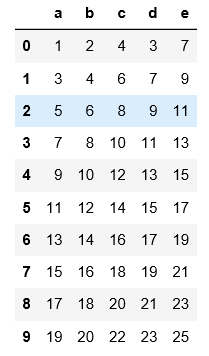
#read_csv默认读取用逗号分隔符的文件,不需要用sep来指定分隔符
import pandas as pd
pd.read_csv('C:\\Users\\xiaoxiaodexiao\\pythonlianxi\\test0424\\data.csv')
#read_csv如果读的是用非逗号分隔符的文件,必须要用sep指定分割符,不然读出来的是原文件的样子,数据没被分割开

import pandas as pd

pd.read_csv('C:\\Users\\xiaoxiaodexiao\\pythonlianxi\\test0424\\data.txt')
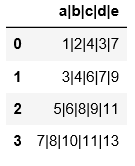
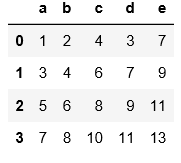
#与上面的例子可以对比一下区别

import pandas as pd

pd.read_csv('C:\\Users\\xiaoxiaodexiao\\pythonlianxi\\test0424\\data.txt',sep='|')
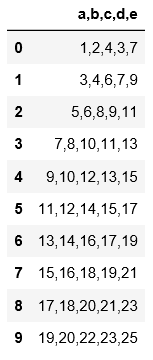
#read_table读取文件时必须要用sep来指定分隔符,否则读出来的数据是原始文件,没有分割开。

import pandas as pd

pd.read_table('C:\\Users\\xiaoxiaodexiao\\pythonlianxi\\test0424\\data.csv')
#read_table读取数据必须指定分隔符

import pandas as pd

pd.read_table('C:\\Users\\xiaoxiaodexiao\\pythonlianxi\\test0424\\data.txt',sep='|')
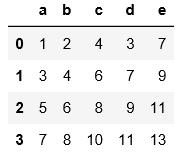
2.读取文本文件时不用header和names指定表头时,默认第一行为表头
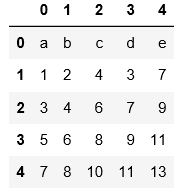
#用header=None表示数据集没有表头,会默认用阿拉伯数字填充表头和索引

pd.read_table('C:\\Users\\xiaoxiaodexiao\\pythonlianxi\\test0424\\data.txt',sep='|',header=None)
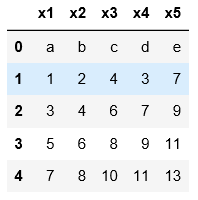
#用names可以自定义表头

pd.read_table('C:\\Users\\xiaoxiaodexiao\\pythonlianxi\\test0424\\data.txt',sep='|',
                    names=['x1','x2','x3','x4','x5'])
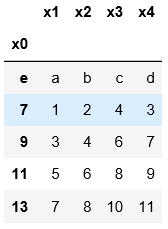
3.默认用阿拉伯数字指定索引;用index_col指定某一列作为索引
names=['x1','x2','x3','x4','x0']

pd.read_table('C:\\Users\\xiaoxiaodexiao\\pythonlianxi\\test0424\\data.txt',sep='|',

                   names=names,index_col='x0')
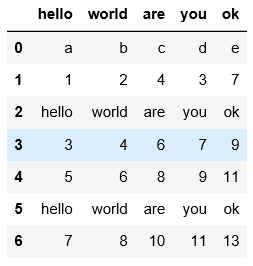
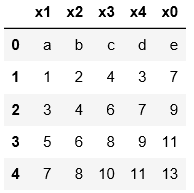
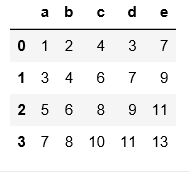
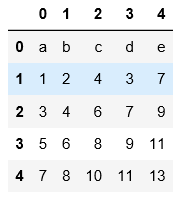
4.以下示例是用skiprows将hello对应的行跳过后读取其他行数据,不管首行是否作为表头,都是将表头作为第0行开始数
可以对比一下三个例子的区别进行理解
pd.read_csv('C:\\Users\\xiaoxiaodexiao\\pythonlianxi\\test0424\\data1.txt')
names=['x1','x2','x3','x4','x0']

pd.read_csv('C:\\Users\\xiaoxiaodexiao\\pythonlianxi\\test0424\\data1.txt',names=names,

            skiprows=[0,3,6])
pd.read_csv('C:\\Users\\xiaoxiaodexiao\\pythonlianxi\\test0424\\data1.txt',

            skiprows=[0,3,6])
pd.read_csv('C:\\Users\\xiaoxiaodexiao\\pythonlianxi\\test0424\\data1.txt',header=None,

            skiprows=[0,3,6])
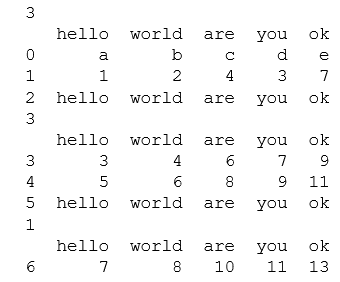
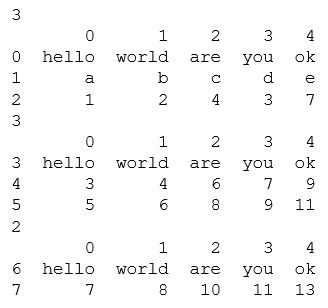
5.分块读取,data1.txt中总共8行数据,按照每块3行来分,会读3次,第一次3行,第二次3行,第三次1行数据进行读取。
注意这里在分块的时候跟跳行读取不同的是,表头没作为第一行进行分块读取,可通过一下两个例子对比进行理解。
chunker = pd.read_csv('C:\\Users\\xiaoxiaodexiao\\pythonlianxi\\test0424\\data1.txt',chunksize=3)

for m in chunker:

    print(len(m))

    print m
chunker = pd.read_csv('C:\\Users\\xiaoxiaodexiao\\pythonlianxi\\test0424\\data1.txt',header=None,

                      chunksize=3)

for m in chunker:

    print(len(m))

    print m
(二)将数据写入文本格式用to_csv
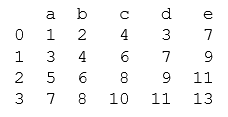
以data.txt为例,注意写出文件时,将索引也写入了
data=pd.read_table('C:\\Users\\xiaoxiaodexiao\\pythonlianxi\\test0424\\data.txt',sep='|')

print data
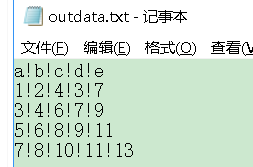
#可以用index=False禁止索引的写入。

data=pd.read_table('C:\\Users\\xiaoxiaodexiao\\pythonlianxi\\test0424\\data.txt',sep='|')

data.to_csv('C:\\Users\\xiaoxiaodexiao\\pythonlianxi\\test0424\\outdata.txt',sep='!',index=False)
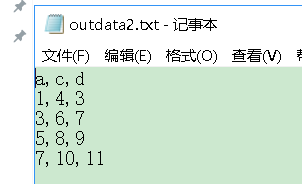
#可以用columns指定写入的列

data=pd.read_table('C:\\Users\\xiaoxiaodexiao\\pythonlianxi\\test0424\\data.txt',sep='|')

data.to_csv('C:\\Users\\xiaoxiaodexiao\\pythonlianxi\\test0424\\outdata2.txt',sep=',',index=False,

            columns=['a','c','d'])
python读取文本文件数据的更多相关文章
- Windows下Python读取GRIB数据
之前写了一篇<基于Python的GRIB数据可视化>的文章,好多博友在评论里问我Windows系统下如何读取GRIB数据,在这里我做一下说明. 一.在Windows下Python为什么无法 ...
- Python读取JSON数据,并解决字符集不匹配问题
今天来谈一谈Python解析JSON数据,并写入到本地文件的一个小例子. – 思路如下 从一个返回JSON天气数据的网站获取到目标JSON数据串 使用Python解析出需要的部分 写入到本地文件,供其 ...
- python 读取excel数据并将测试结果填入Excel
python 读取excel数据并将测试结果填入Excel 读取一个Excel中的一条数据用例,请求接口,然后返回结果并反填到excel中.过程中会生成请求回来的文本,当然还会生成一个xml文件.具体 ...
- python读取文本文件
1. 读取文本文件 代码: f = open('test.txt', 'r') print f.read() f.seek(0) print f.read(14) f.seek(0) print f. ...
- 利用Python读取外部数据文件
不论是数据分析,数据可视化,还是数据挖掘,一切的一切全都是以数据作为最基础的元素.利用Python进行数据分析,同样最重要的一步就是如何将数据导入到Python中,然后才可以实现后面的数据分析.数 ...
- Python读取文件数据
1题目要求: 文本文件有这些数据,需要的只有其中的5个属性,如下颜色标记 像以下的数据达到75万组: 1product/productId: B0000UIXZ4 2product/title: Ti ...
- Python读取Excel数据并根据列名取值
一直想将自己接触到的东西梳理一遍,可就是迈不出第一步,希望从这篇总结开始不要再做行动的矮人了. 最近测试过程中需要用到python读取excel用例数据,于是去了解和学习了下xlrd库,这里只记录使用 ...
- python——读取MATLAB数据文件 *.mat
鉴于以后的目标主要是利用现有的Matlab数据(.mat或者.txt),主要考虑python导入Matlab数据的问题.以下代码可以解决python读取.mat文件的问题.主要使用sicpy.io即可 ...
- python 读取二进制数据到可变缓冲区中
想直接读取二进制数据到一个可变缓冲区中,而不需要做任何的中间复制操作.或者你想原地修改数据并将它写回到一个文件中去. 为了读取数据到一个可变数组中,使用文件对象的readinto() 方法.比如 im ...
随机推荐
- Window7下安装Jmeter
解压Jmeter,存放位置为D:\apache-jmeter-2.11 用户变量——>新建变量名JMETER_HOME,变量值为存放目录 系统变量——>添加;%JMETER_HOME%/l ...
- JavaScript中Array数组的方法
查找: indexOf.lastIndexOf 迭代:every.filter.forEach.map.somereduce.reduceRight 用法: /* 1 查找方法: * arr.inde ...
- scrapy爬取西刺网站ip
# scrapy爬取西刺网站ip # -*- coding: utf-8 -*- import scrapy from xici.items import XiciItem class Xicispi ...
- Protobuf java版本安装步骤
1,安装mavena.下载apache-maven-3.2.5,链接:http://mirrors.hust.edu.cn/apache//maven/maven-3/3.2.5/binaries/b ...
- 闲聊 Exp/Imp 命令使用
1.Exp/Imp 命令可用的参数: 2.userid 参数必须跟在 Exp/Imp 命令的后面,可以省略,如 Exp Userid=用户名/密码@数据库实例名 或者 Exp 用户名/密码@数据库实例 ...
- HTC Vive 叠影器无法创建设备
今天使用笔记本电脑打开SteamVR发生错误:SteamVR启动失败,"Shared IPC Compositor Connected Fail(306)",然后启动失败,在UI界 ...
- PostgreSQL 常用系统自带方法
数据库字符编码问题: -- 查看PostgreSQL数据库服务器端编码: show server_encoding; -- 查看PostgreSQL客户端工具psql编码: s ...
- (hdu-4280)Island Transport~测试网络流模板速度~要加挂才能过啊
Problem Description In the vast waters far far away, there are many islands. People are living on th ...
- [LeetCode] Bold Words in String 字符串中的加粗单词
Given a set of keywords words and a string S, make all appearances of all keywords in S bold. Any le ...
- 阿里云在RSAC 2018上宣布 将在西雅图建立安全实验室
日前,2018年度的RSA Conference全球信息安全大会在美国加州旧金山市召开.作为全球三大云计算服务商之一,阿里云携3款全新安全产品亮相,并宣布今年将在西雅图设立全新的安全实验室,整合全球安 ...