
appium滑动
在app应用日常使用过程中,会经常用到在屏幕滑动操作。如刷朋友圈上下滑操作、浏览图片左右滑动操作等。在自动化脚本该如何实现这些操作呢?
在Appium中模拟用户滑动操作需要使用swipe方法,该方法定义如下:
def swipe(self, start_x, start_y, end_x, end_y, duration=None):
"""Swipe from one point to another point, for an optional duration.
:Args:
- start_x - x-coordinate at which to start
- start_y - y-coordinate at which to start
- end_x - x-coordinate at which to stop
- end_y - y-coordinate at which to stop
- duration - (optional) time to take the swipe, in ms.
:Usage:
driver.swipe(100, 100, 100, 400)
滑动解析
滑动主要分为:
- 水平滑动
- 垂直滑动
- 任意方向滑动
滑动轨迹图如下:
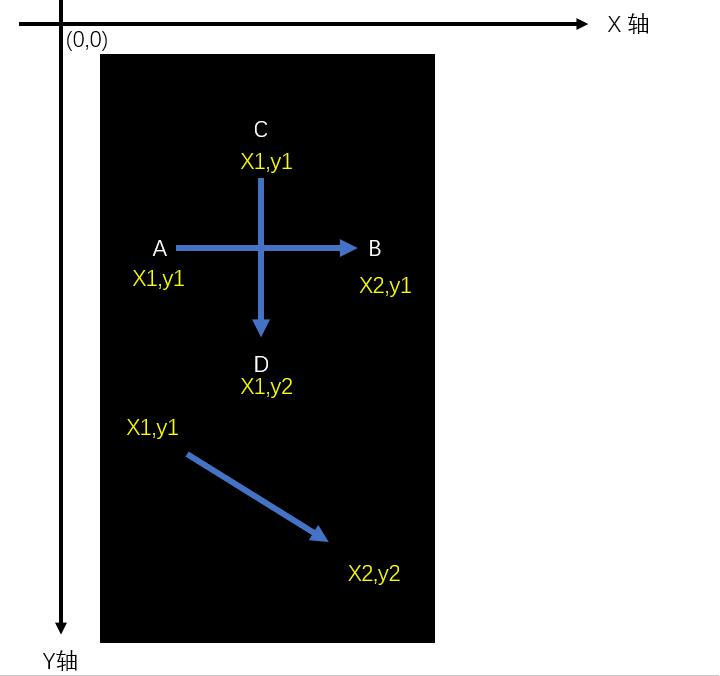
实践应用
测试场景
- 安装启动考研帮,手动向水平左滑动首页引导页面。
- 点击“立即体验”进入登录页面。
代码实现
from time import sleep
from find_element.capability import driver
#获取屏幕尺寸
def get_size():
x=driver.get_window_size()['width']
y=driver.get_window_size()['height']
return x,y
#显示屏幕尺寸(width,height)
l=get_size()
print(l)
#向左滑动
def swipeLeft():
l=get_size()
x1=int(l[0]*0.9)
y1=int(l[1]*0.5)
x2=int(l[0]*0.1)
driver.swipe(x1,y1,x2,y1,1000)
#向左滑动2次
for i in range(2):
swipeLeft()
sleep(0.5)
driver.find_element_by_id('com.tal.kaoyan:id/activity_splash_guidfinish').click()
注意:运行前记得将capablity里面的check_skipBtn()先注释掉,否则直接跳过了无法滑动引导页面。
课后作业
把垂直上下滑动以及向右滑动的也封装并实践。
- def swipeUp()
- def swipeDown()
- def swipeRight()
参考答案
def swipeUp():
l = get_size()
x1 = int(l[0] * 0.5)
y1 = int(l[1] * 0.95)
y2 = int(l[1] * 0.35)
driver.swipe(x1, y1, x1, y2, 1000)
def swipeDown():
l=get_size()
x1 = int(l[0] * 0.5)
y1 = int(l[1] * 0.35)
y2 = int(l[1] * 0.85)
driver.swipe(x1, y1, x1, y2, 1000)
def swipeRight():
l=get_size()
y1 = int(l[1] * 0.5)
x1 = int(l[0] * 0.25)
x2 = int(l[0] * 0.95)
driver.swipe(x1, y1, x2, y1, 1000)
appium滑动的更多相关文章
- appium滑动操作(向上、向下、向左、向右)
appium滑动操作(向上滑动.向下滑动.向左滑动.向右滑动) 测试app:今日头条apk 测试设备:夜游神模拟器 代码如下: 先用x.y获取当前的width和height def getSize() ...
- Python Appium 滑动、点击等操作
Python Appium 滑动.点击等操作 1.手机滑动-swipe # FileName : Tmall_App.py # Author : Adil # DateTime : 2018/3/25 ...
- Appium 滑动界面swipe用法
Appium 滑动API:Swipe(int start x,int start y,int end x,int y,duration) 解释:int start x-开始滑动的x坐标, int st ...
- appium 滑动
前些日子,配置好了appium测试环境,至于环境怎么搭建,参考:http://www.cnblogs.com/tobecrazy/p/4562199.html 知乎Android客户端登陆:htt ...
- Appium滑动函数:Swipe()
Appium处理滑动方法是swipe 滑动API:Swipe(int start x,int start y,int end x,int y,duration) 解释: int start x-开始滑 ...
- Appium 滑动踩坑记
前言 对于不同java-client版本,很多的API已经产生大的变化,所以一些API大家会发现已经失效或者使用方式发生了变化,滑动就是其中一项,这篇文章对滑动在不同的java-client版本以及不 ...
- appium 滑动封装
#获得机器屏幕大小x,y def getSize(): x = dr.get_window_size()['width'] y = dr.get_window_size()['heig ...
- Appium for iOS setup
windows下appium设置 之前研究了一段时间的appium for native app 相应的总结如下: ...
- appium for hybrid app 处理webview
之前研究了一段时间的appium for native app 相应的总结如下: appium测试环境搭建 :ht ...
随机推荐
- JAVA 大数据
- [jQuery]ajax请求导致浏览器崩溃
$("#xxx").val() not $("#xxx") 如果忘记加上.val()会导致chrome崩溃
- 使用Genymotion无法连接网络设置代理
A.) Genymotion 的 Proxy 设置 , 在Android的设置 -> 无线网络 -> Wi-Fi 之中 1.) 在 设置 -> 无线网络 -> Wi-Fi 里面 ...
- java js url传参中文乱码
String item = this.getRequest().getParameter("item"); item = new String(item.getBytes(&quo ...
- SetWindowPos函数详解
//声明:SetWindowPos(hWnd: HWND; {窗口句柄}hWndInsertAfter: HWND; {窗口的 Z 顺序}X, Y: Integer; {位置}cx, cy: Inte ...
- ArraySegment
第一个构造函数 Initializes a new instance of the ArraySegment<T> structure that delimits all the elem ...
- iOS网络开发工具集----字符串操作和时间操作
一.字符串的操作方法 #pragma mark - 创建字符串 - (void)CreatString { // <1> 创建字符串 NSString *strS = @"Thi ...
- Watchcow(欧拉回路)
http://poj.org/problem?id=2230 题意:给出n个field及m个连接field的边,然后要求遍历每条边仅且2次,求出一条路径来. #include <stdio.h& ...
- C语言和C++的应用领域都在哪些?学C语言好,还是学习C++好?
从事嵌入式开发十几年,基本上围绕着这两种编程语言展开,都可以直接操作底层的编程语言,用的越熟练越是感觉工具属性越强.虽然两种编程语言分属于不同的编程思想,用的时间长了觉得差异也不是很大,现在就个人的从 ...
- qW3xT.2挖矿病毒 解决过程及坑
周一早上老大让我把项目更新一下,然后配置一下elasticsearch,我登上服务器之后部署的时候没有什么感觉,但是在配置elasticsearch的过程中感觉服务器哪个地方有点不对,下意识的top了 ...