
iOS开发之抽屉效果实现
说道抽屉效果在iOS中比较有名的第三方类库就是PPRevealSideViewController。一说到第三方类库就自然而然的想到我们的CocoaPods,今天的博客中用CocoaPods引入PPRevealSideViewController,然后在我们的工程中以代码结合storyboard来做出抽屉效果。
一.在工程中用CocoaPods引入第三方插件PPRevealSideViewController.
(1).在终端中搜索PPRevealSideViewController的版本
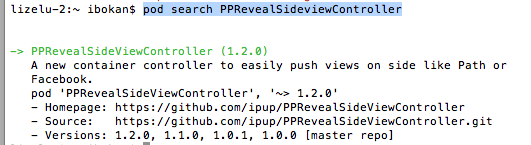
(2).在Podfile中添加相应的版本库

(3).之后保存一下Podfile文件,然后执行pod install即可
二、为我们的工程添加pch文件
因为用的是XCode6, 上面默认是没有pch文件的,如果我们想使用pch文件,需要手动添加,添加步骤如下
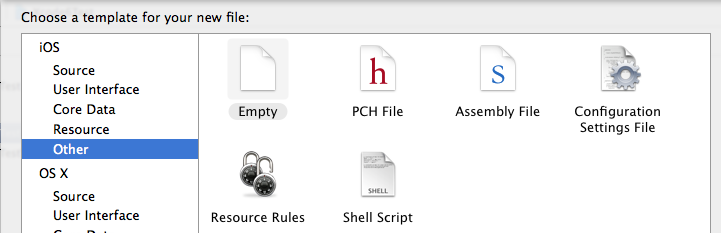
1.在XCode6中是么有pch文件的,如下图

2.创建pch文件

3.配置pch文件
(1)、找工程的Targets->Build Settings->Apple LLVM 6.0 - Language

(2)在Prefix Header下面的Debug和Release下添加$(SRCROOT)/工程名/pch文件,入下图

三、使用PPRevealSideViewController来实现抽屉效果
当然了首先在pch文件中引入我们的第三方类库,然后使用即可
1.在storyboard拖出来我们要用的视图控制器,点击主界面上的按钮会以抽屉的形式展示出导航页,然后在导航页导航到各个界面,之后在从各个页面回到主界面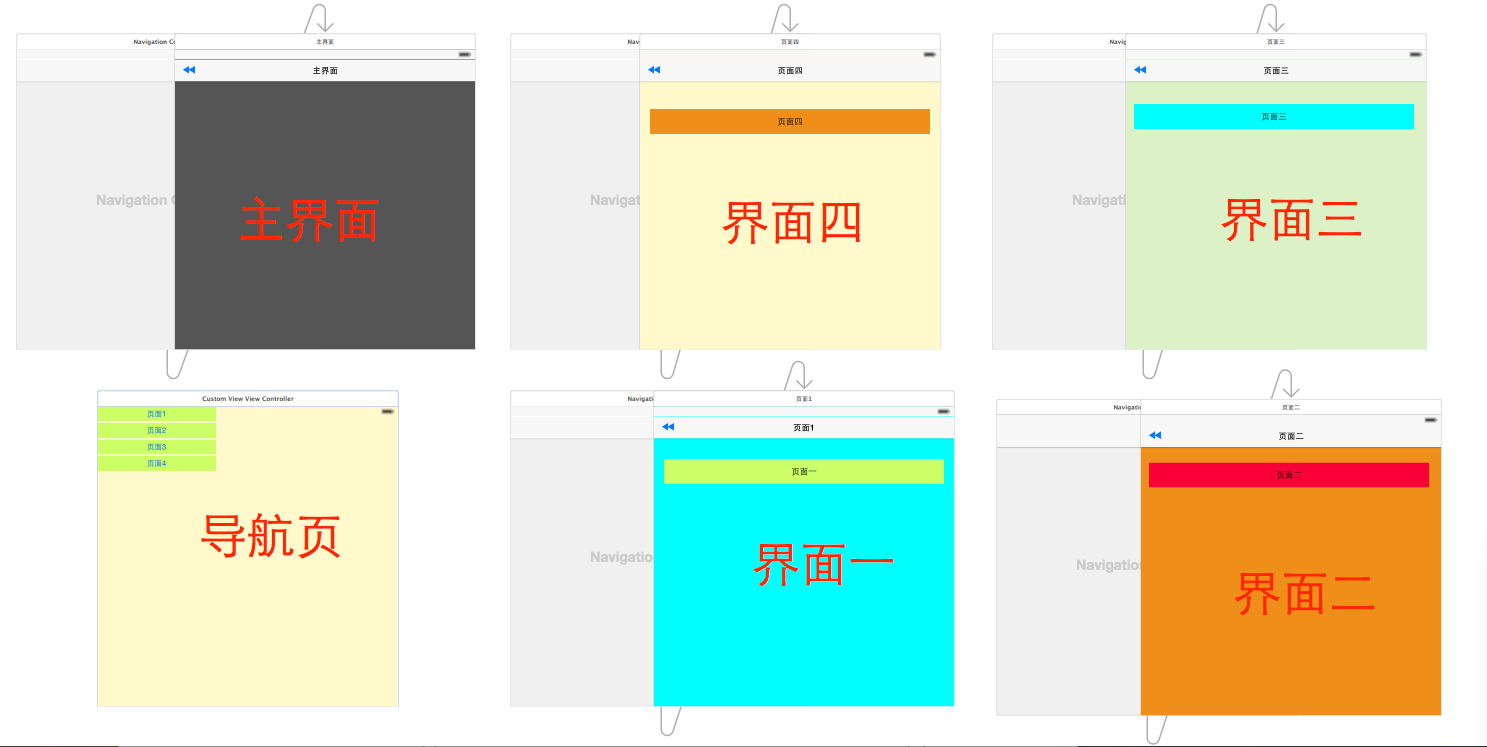
2.在AppDelegate中初始化我们的PPRevealSideViewController并设置为启动页面代码如下:
 - (BOOL)application:(UIApplication *)application didFinishLaunchingWithOptions:(NSDictionary *)launchOptions {

     // Override point for customization after application launch.

     self.window = [[UIWindow alloc] initWithFrame:[[UIScreen mainScreen] bounds]];

     //获取主视图的导航控制器

     UIStoryboard *storyboard = [UIStoryboard storyboardWithName:@"Main" bundle:[NSBundle mainBundle]];

     UIViewController *vc = [storyboard instantiateViewControllerWithIdentifier:@"NavigationController"];

     //新建PPRevealSideViewController,并设置根视图(主页面的导航视图)

     PPRevealSideViewController *sideViewController = [[PPRevealSideViewController alloc] initWithRootViewController:vc];

     sideViewController.fakeiOS7StatusBarColor = [UIColor whiteColor];

     //把sideViewController设置成根视图控制器

     self.window.rootViewController = sideViewController;

     [self.window makeKeyAndVisible];

     return YES;

 }
3.在主界面使用PPRevealSideViewController来推出导航页
 - (IBAction)tapItem:(id)sender {

     UIStoryboard *storybaord = [UIStoryboard storyboardWithName:@"Main" bundle:[NSBundle mainBundle]];

     UITableViewController *table = [storybaord instantiateViewControllerWithIdentifier:@"CustomViewViewController"];

     [self.revealSideViewController pushViewController:table onDirection:PPRevealSideDirectionLeft animated:YES];

 }
4.在导航页点击不同的按钮使用PPRevealSideViewController跳转到不同的controller
 - (IBAction)tap1:(id)sender {

      UIStoryboard *storyboard = [UIStoryboard storyboardWithName:@"Main" bundle:[NSBundle mainBundle]];

     UIViewController *one = [storyboard instantiateViewControllerWithIdentifier:@"one"];

     [self.revealSideViewController popViewControllerWithNewCenterController:one animated:YES];

 }

 - (IBAction)tap2:(id)sender {

     UIStoryboard *storyboard = [UIStoryboard storyboardWithName:@"Main" bundle:[NSBundle mainBundle]];

     UIViewController *one = [storyboard instantiateViewControllerWithIdentifier:@"two"];

     [self.revealSideViewController popViewControllerWithNewCenterController:one animated:YES];

 }

 - (IBAction)tap3:(id)sender {

     UIStoryboard *storyboard = [UIStoryboard storyboardWithName:@"Main" bundle:[NSBundle mainBundle]];

     UIViewController *one = [storyboard instantiateViewControllerWithIdentifier:@"three"];

     [self.revealSideViewController popViewControllerWithNewCenterController:one animated:YES];

 }

 - (IBAction)tap4:(id)sender {

     UIStoryboard *storyboard = [UIStoryboard storyboardWithName:@"Main" bundle:[NSBundle mainBundle]];

     UIViewController *one = [storyboard instantiateViewControllerWithIdentifier:@"four"];

     [self.revealSideViewController popViewControllerWithNewCenterController:one animated:YES];

 }
5.各个页面返回到主界面的代码如下:
 - (IBAction)tapPage:(id)sender {

     UIStoryboard *storyboard = [UIStoryboard storyboardWithName:@"Main" bundle:[NSBundle mainBundle]];

     UIViewController *view = [storyboard instantiateViewControllerWithIdentifier:@"NavigationController"];

     [self.revealSideViewController popViewControllerWithNewCenterController:view animated:YES];

 }
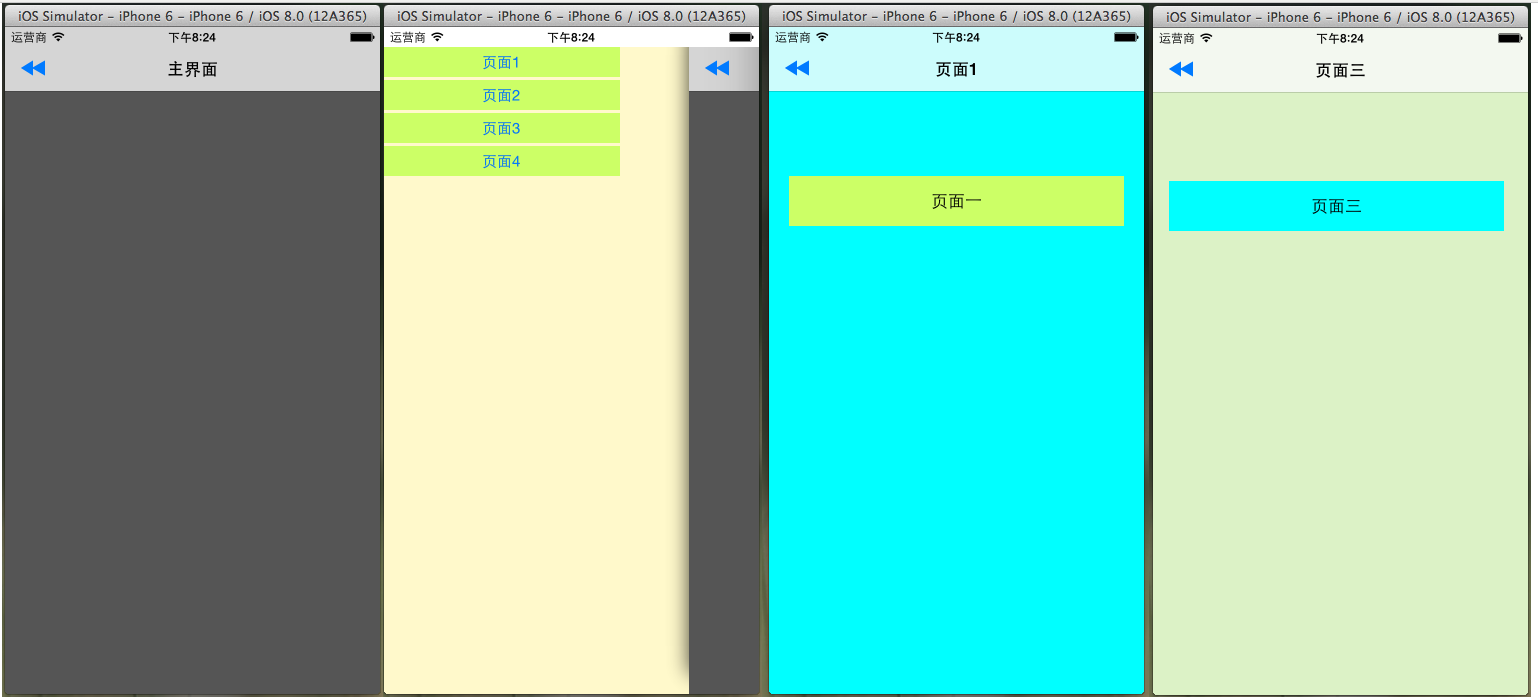
四.到此效果实现完毕,下面是效果图:
iOS开发之抽屉效果实现的更多相关文章
- iOS 开发之粒子效果
本文由糖炒小虾.Benna翻译 ,校对:sai.u0u0.iven.子龙山人 iOS 5中的UIKit粒子系统教程 Ray的话:这是第15篇.也是最后一篇<iOS 5 盛宴>中的iOS 5 ...
- iOS开发-添加圆角效果高效实现
圆角(RounderCorner)是一种很常见的视图效果,相比于直角,它更加柔和优美,易于接受.但很多人并不清楚如何设置圆角的正确方式和原理.设置圆角会带来一定的性能损耗,如何提高性能是另一个需要重点 ...
- 我的iOS开发系列博文
之前目录性的总结了发表过的关于OC方面的文章,今天在目录性的总结一下有关iOS开发的文章.走过路过不要错过哦,今天的博文也全都是干货.写技术博客与大家交流一下思想也是不错的. 下面是我的技术博客中有关 ...
- Wpf 抽屉效果
在android开发中有抽屉效果,就是在页面的边上有一个按钮,可以通过点击或者拖拽这个按钮,让页面显示.Wpf也可以实现相同的效果. 主要是通过一个DoubleAnimation和RectAnimat ...
- ios开发中超简单抽屉效果(MMDrawerController)的实现
ios开发中,展示类应用通常要用到抽屉效果,由于项目需要,本人找到一个demo,缩减掉一些不常用的功能,整理出一个较短的实例. 首先需要给工程添加第三方类库 MMDrawerController: 这 ...
- iOS开发——实用技术OC篇&简单抽屉效果的实现
简单抽屉效果的实现 就目前大部分App来说基本上都有关于抽屉效果的实现,比如QQ/微信等.所以,今天我们就来简单的实现一下.当然如果你想你的效果更好或者是封装成一个到哪里都能用的工具类,那就还需要下一 ...
- 玩转iOS开发 - 简易的实现2种抽屉效果
BeautyDrawer BeautyDrawer 是一款简单易用的抽屉效果实现框架,集成的属性能够对view 滑动缩放进行控制. Main features 三个视图,主视图能够左右滑动.实现抽屉效 ...
- iOS开发——高级篇——iOS抽屉效果实现原理
实现一个简单的抽屉效果: 核心思想:KVO实现监听mainV的frame值的变化 核心代码: #import "ViewController.h" // @"frame& ...
- ios开发抽屉效果的封装使用
#import "DragerViewController.h" #define screenW [UIScreen mainScreen].bounds.size.width @ ...
随机推荐
- c# http get请求与post请求实例
//http请求工具类 using System;using System.Collections.Generic;using System.IO;using System.Linq;using Sy ...
- 基于thinkphp的省略图便捷函数
/** * 生成缩略图 * @param string $image 原图路径 例:thumb_5242d9082fcdc.jpg * @param string $type 图像格式 * @para ...
- [LintCode] Linked List Cycle 单链表中的环
Given a linked list, determine if it has a cycle in it. ExampleGiven -21->10->4->5, tail co ...
- centos下为大硬盘分区(大于2T)
问题:centos/redhat下使用分区工具fdisk创建大于2TB的分区,无法创建 关键字:MBR.GPT.CHS.LBA MBR:主引导记录 GPT:GUID 分区表 CHS:磁柱 磁头 扇区 ...
- HTTP 错误 500.21 - Internal Server Error 处理程序“PageHandlerFactory-Integrated”在其模块列表中有一个错误模块“ManagedPipelineHandler”
HTTP 错误 500.21 - Internal Server Error 处理程序“PageHandlerFactory-Integrated”在其模块列表中有一个错误模块“ManagedPipe ...
- Android课程---简单的音乐播放器
第一个:用Activity实现 activity_music_play1.xml <?xml version="1.0" encoding="utf-8" ...
- ASP.NET Core 1.0中的管道-中间件模式
ASP.NET Core 1.0借鉴了Katana项目的管道设计(Pipeline).日志记录.用户认证.MVC等模块都以中间件(Middleware)的方式注册在管道中.显而易见这样的设计非常松耦合 ...
- [.net 面向对象程序设计进阶] (11) 序列化(Serialization)(三) 通过接口 IXmlSerializable 实现XML序列化 及 通用XML类
[.net 面向对象程序设计进阶] (11) 序列化(Serialization)(三) 通过接口 IXmlSerializable 实现XML序列化 及 通用XML类 本节导读:本节主要介绍通过序列 ...
- Python调用C++的DLL
import os import sys from ctypes import * test = cdll.LoadLibrary('D:\Python27\py.dll') print test.A ...
- APOC 15 Years Celebration
最近很忙,没有及时更新博客,也没有参加各种活动,唯一的活动就是接下来要讲的APOC 15 Years Celebration.不知不觉,自己也加入APOC有一年多了,正如大家所说“岁月是把杀猪刀”,我 ...