
MySQL Crash Course #16# Chapter 24. Using Cursors + mysql 循环
mysql中游标的使用案例详解(学习笔记)这篇讲得相当直白好懂了。
索引:
cursor 基础讲解
cursor 有点类似于 JDBC 中的 ResultSet ,允许我们在执行 SELECT 之后,一行一行地 FETCH 数据。
它只能被用在存储过程中!如果把存储过程比作函数,cursor 只能在这个函数体中(存储过程的内部)定义、打开、关闭,一旦存储过程执行完毕,它将不再存在(可以把 cursor 理解为一个局部变量)。
定义一个 cursor ,这个时候并没有执行 SELECT 语句:
CREATE PROCEDURE processorders()

BEGIN

   DECLARE ordernumbers CURSOR

   FOR

   SELECT ordernum FROM orders;

END;
打开 cursor,SELECT 语句就是在这个时候被执行的,数据被缓存到 cursor 中,在这之后可以 FETCH 数据:
OPEN ordernumbers;
关闭 cursor ,释放 cursor 所占用的所有内存和资源, 当然,即便不手动关闭,在存储过程结束时(执行到 END) cursor 也会自动关闭:
CLOSE ordernumbers;
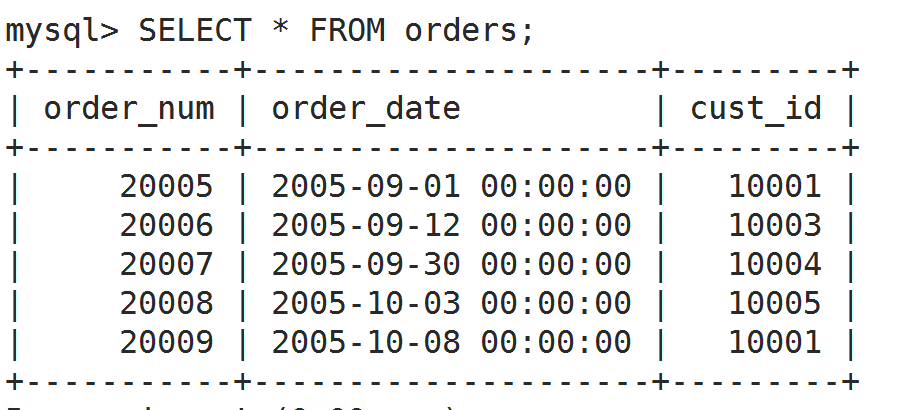
接下来就是 FETCH 数据了,每次 FETCH 一次都是下一行!可以结合上面几个知识点做个小实验,上面是实验用的表:
DROP PROCEDURE IF EXISTS hello;

DELIMITER //

CREATE PROCEDURE hello()

BEGIN

   -- 声明局部变量,用于临时存储 FETCH 结果

   DECLARE o INT;

   -- 声明游标

   DECLARE ordernumbers CURSOR

   FOR

   SELECT order_num FROM orders;

   -- 打开游标(执行SELECT,缓存数据)

   OPEN ordernumbers;

   -- 取出第一个订单号放到 o 里,并打印

   FETCH ordernumbers INTO o;

   SELECT o;

   -- 取出第二个订单号放到 o 里,并打印

   FETCH ordernumbers INTO o;

   SELECT o;

   -- 关闭游标(释放内存、资源)

   CLOSE ordernumbers;

   -- 重新打开游标(重新执行SELECT,缓存数据)

   OPEN ordernumbers;

   -- 取出第 ? 个订单号放到 o 里,并打印

   FETCH ordernumbers INTO o;

   SELECT o; -- 可以猜到,依然是第一个订单号

END //

DELIMITER ;

CALL hello();

mysql 循环
mySQL 本身的循环其实挺简单的,但是书上写的循环有点特殊。
基本循环示例:
while ↓
DROP PROCEDURE IF EXISTS hello;

DELIMITER //

CREATE PROCEDURE hello()

BEGIN

    DECLARE v1 INT DEFAULT 5;

    WHILE v1 > 0 DO

    SET v1 = v1 - 1;

    SELECT v1;

    END WHILE;

END //

DELIMITER ;

CALL hello();
repeat ↓
DROP PROCEDURE IF EXISTS hello;

DELIMITER //

CREATE PROCEDURE hello()

BEGIN

    DECLARE v1 INT DEFAULT 5;

    REPEAT

    SET v1 = v1 - 1;

    SELECT v1;

    UNTIL v1 = 0 END REPEAT;

END //

DELIMITER ;

CALL hello();
loop ↓
DROP PROCEDURE IF EXISTS hello;

DELIMITER //

CREATE PROCEDURE hello()

BEGIN

    DECLARE v1 INT DEFAULT 5;

    label1: LOOP

    SET v1 = v1 - 1;

    SELECT v1;

    IF v1 > 0 THEN

    ITERATE label1; -- 继续循环 相当于continue

    END IF;

    LEAVE label1; -- 相当于 break

    END LOOP;

END //

DELIMITER ;

CALL hello();
PS. 为了确保可以直接 COPY 到命令行执行,上面的代码缩进有点问题。。。
书上的循环示例:
CREATE PROCEDURE processorders()

BEGIN

   -- Declare local variables

   DECLARE done BOOLEAN DEFAULT 0;

   DECLARE o INT;

   -- Declare the cursor

   DECLARE ordernumbers CURSOR

   FOR

   SELECT order_num FROM orders;

   -- Declare continue handler

   DECLARE CONTINUE HANDLER FOR SQLSTATE '' SET done=1;

   -- Open the cursor

   OPEN ordernumbers;

   -- Loop through all rows

   REPEAT

      -- Get order number

      FETCH ordernumbers INTO o;

   -- End of loop

   UNTIL done END REPEAT;

   -- Close the cursor

   CLOSE ordernumbers;

END;
首先要看懂这句话
DECLARE CONTINUE HANDLER FOR SQLSTATE '02000' SET done=1;
意思就是出现 SQLSTATE '02000' 这句话时就执行 SET done=1
而 SQLSTATE '02000' 等价于 not found ,它是在 FETCH 不到数据的时候出现的,因此拿不到数据的时候 done 变为真就结束循环了。。。
书上的整合代码
CREATE PROCEDURE processorders()

BEGIN

   -- Declare local variables

   DECLARE done BOOLEAN DEFAULT 0;

   DECLARE o INT;

   DECLARE t DECIMAL(8,2);

   -- Declare the cursor

   DECLARE ordernumbers CURSOR

   FOR

   SELECT order_num FROM orders;

   -- Declare continue handler

   DECLARE CONTINUE HANDLER FOR SQLSTATE '' SET done=1;

   -- Create a table to store the results

   CREATE TABLE IF NOT EXISTS ordertotals

      (order_num INT, total DECIMAL(8,2));

   -- Open the cursor

   OPEN ordernumbers;

   -- Loop through all rows

   REPEAT

      -- Get order number

      FETCH ordernumbers INTO o;

      -- Get the total for this order

      CALL ordertotal(o, 1, t);

      -- Insert order and total into ordertotals

      INSERT INTO ordertotals(order_num, total)

      VALUES(o, t);

   -- End of loop

   UNTIL done END REPEAT;

   -- Close the cursor

   CLOSE ordernumbers;

END;
这些活到底谁来做好呢 ? 是上层应用程序 还是 数据库 ? 。 。。 待更新。。
MySQL Crash Course #16# Chapter 24. Using Cursors + mysql 循环的更多相关文章
- MySQL Crash Course #15# Chapter 23. Working with Stored Procedures
以前写过类似的东西,用来自动生成数据. 你可以将 Stored Procedure 理解为可以重复使用的批处理文件. Stored Procedure 非常有用,我们应该尽可能地去使用它. 那么,应用 ...
- MySQL Crash Course #06# Chapter 13. 14 GROUP BY. 子查询
索引 理解 GROUP BY 过滤数据 vs. 过滤分组 GROUP BY 与 ORDER BY 之不成文的规定 子查询 vs. 联表查询 相关子查询和不相关子查询. 增量构造复杂查询 Always ...
- MySQL Crash Course #05# Chapter 9. 10. 11. 12 正则.函数. API
索引 正则表达式:MySQL only supports a small subset of what is supported in most regular expression implemen ...
- MySQL Crash Course #02# Chapter 3. 4 通配符. 分页
索引 查看表.文档操作 检索必须知道的两件事 数据演示由谁负责 通配符.非必要不用 检索不同的行 限制结果集.分页查找 运用数据库.表全名 命令后加分号对于很多 DBMS 都不是必要的,但是加了也没有 ...
- MySQL Crash Course #08# Chapter 16. Using Different Join Types
记文档还是相当重要的! 索引 假名的三个用途 自交(Self Joins) 自然交(Natural Joins) Outer Joins Using Table Aliases Using alias ...
- MySQL Crash Course #13# Chapter 21. Creating and Manipulating Tables
之前 manipulate 表里的数据,现在则是 manipulate 表本身. INDEX 创建多列构成的主键 自动增长的规定 查看上一次插入的自增 id 尽量用默认值替代 NULL 外键不可以跨引 ...
- MySQL Crash Course #11# Chapter 20. Updating and Deleting Data
INDEX Updating Data The IGNORE Keyword Deleting Data Faster Deletes Guidelines for Updating and Dele ...
- MySQL Crash Course #10# Chapter 19. Inserting Data
INDEX BAD EXAMPLE Improving Overall Performance Inserting Multiple Rows INSTEAD OF Inserting a Singl ...
- MySQL Crash Course #04# Chapter 7. 8 AND. OR. IN. NOT. LIKE
索引 AND. OR 运算顺序 IN Operator VS. OR NOT 在 MySQL 中的表现 LIKE 之注意事项 运用通配符的技巧 Understanding Order of Evalu ...
随机推荐
- js备忘录_1
js没有重载,只有同名覆盖,参数任意 所有参数封装在arguments数组中 Uncaught ReferenceError: d is not defined js引擎会当做变量处理 functio ...
- Sublime Text3注册激活和部分配置
1. 更改hosts文件(参照:sublime text3 破解方法,亲测有效) windows系统的hosts文件在C:\Windows\System32\drivers\etc在hosts文件中 ...
- kubernetes网络原理
1.1. 基础原则 每个Pod都拥有一个独立的IP地址,而且假定所有Pod都在一个可以直接连通的.扁平的网络空间中,不管是否运行在同一Node上都可以通过Pod的IP来访问. k8s中Pod的IP是最 ...
- 关于JS call apply 对象、对象实例、prototype、Constructor、__proto__
关于call与apply的理解容易让人凌乱,这里有个方法可供参考 tiger.call(fox,arg1,arg2...) tiger.apply(fox,[arg1,arg2...]) 理解为 fo ...
- javaScript高级教程(二)Scope Chain & Closure Example
<!DOCTYPE html> <html> <head> <meta charset=gb2312 /> <title>js</ti ...
- Javascript异步执行时要小心的变量作用域
function asyncFunction(callback){ setTimeout(function(){ callback() },200); } var color = 'blue'; // ...
- 对innodb_flush_log_at_commit参数的写日志和刷盘行为进行图解
对innodb_flush_log_at_commit参数的写日志和刷盘行为进行图解
- Input的类型(type)
HTML5 新的 Input 类型 HTML5 拥有多个新的表单输入类型.这些新特性提供了更好的输入控制和验证. 本章全面介绍这些新的输入类型: color date datetime datetim ...
- hdu1166敌兵布阵&&hdu1754I Hate It(线段树入门)
单点更新是最最基础的线段树,只更新叶子节点,然后把信息用pushup这个函数更新上来. http://acm.hdu.edu.cn/showproblem.php?pid=1166 update单点更 ...
- 1.keras实现-->使用预训练的卷积神经网络(VGG16)
VGG16内置于Keras,可以通过keras.applications模块中导入. --------------------------------------------------------将 ...