
xampp——apache服务启动问题(端口占用)
Apache启动提示
20:39:02 [Apache] Error: Apache shutdown unexpectedly.
20:39:02 [Apache] This may be due to a blocked port, missing dependencies,
20:39:02 [Apache] improper privileges, a crash, or a shutdown by another method.
20:39:02 [Apache] Press the Logs button to view error logs and check
20:39:02 [Apache] the Windows Event Viewer for more clues
20:39:02 [Apache] If you need more help, copy and post this
20:39:02 [Apache] entire log window on the forums
20:46:47 [Apache] Problem detected!
20:46:47 [Apache] Port 443 in use by ""D:\Program Files (x86)\VMware\VMware Workstation\vmware-hostd.exe" -u "C:\ProgramData\VMware\hostd\config.xml"" with PID 9168!
20:46:47 [Apache] Apache WILL NOT start without the configured ports free!
20:46:47 [Apache] You need to uninstall/disable/reconfigure the blocking application
20:46:47 [Apache] or reconfigure Apache and the Control Panel to listen on a different port
上面说明VMware占用了443端口
以下通过修改配置文件来修改默认端口(当没有安装VMware不会占用端口)
2.httpd-ssl.conf(修改无效)
3.修改properties.ini
右键记事本打开或notepad++打开properties.ini
[General]
installdir=D:\xampp
base_stack_name=XAMPP
base_stack_version=1.8.3-1
base_stack_platform=windows
require_root_privileges=1
[Apache]
apache_server_port=80
apache_server_ssl_port=443
apache_root_directory=/xampp/apache
apache_htdocs_directory=D:\xampp/htdocs
apache_domainname=127.0.0.1
apache_configuration_directory=D:\xampp/apache/conf
apache_unique_service_name=
[MySQL]
mysql_port=3306
mysql_host=localhost
mysql_root_directory=D:\xampp\mysql
mysql_binary_directory=D:\xampp\mysql\bin
mysql_data_directory=D:\xampp\mysql\data
mysql_arguments=-u root -P3306
mysql_unique_service_name=
[PHP]
php_binary_directory=D:\xampp\php
php_configuration_directory=D:\xampp\php
修改成(默认除apache,禁止修改其他内容,如悉例外)
apache_server_port=8080
apache_server_ssl_port=4433
ctrl+S保存
star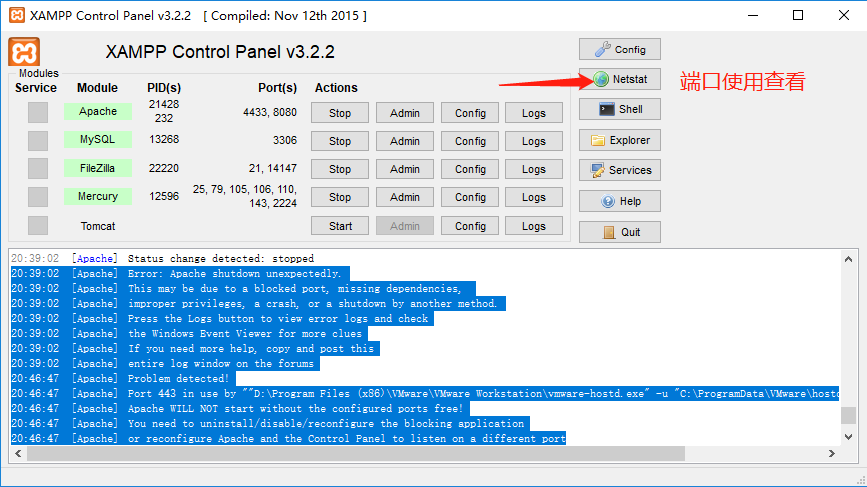
当然也有其他方法,只是有些方法效率不高则不做修改方法
xampp——apache服务启动问题(端口占用)的更多相关文章
- Apache -- XAMPP Apache 无法启动原因及解决方法
XAMPP Apache 无法启动原因1(缺少VC运行库): 这个就是我遇到的问题原因,下载安装的XAMPP版本是xampp-win32-1.7.7-VC9,而现有的Windows XP系统又没有安装 ...
- 关于XAMPP Apache无法启动问题解决方案
安装好XAMPP后,启动Apache服务启动失败,然后从xampp安装目录下执行apache_start.bat文件,如下图 显示443端口被占用. 解决方法: 启动cmd,输入netstat -a ...
- Windows下Apache服务多个端口反向代理配置
修改\Apache24\conf\httpd.conf: 1.修改安装包地址: Define SRVROOT "/Apache24" 修改为: Define SRVROOT &qu ...
- bitnami-redmine Apache服务启动不起来
方法一: 通过 netstat -a -o 查看端口占用情况,关闭调用相关端口的进程. c:\> netstat -a -o Active Connections Proto Local ...
- 关于centOS 7的服务启动,端口查询,防火墙管理
端口的查询与开启 CentOS 7 默认没有使用iptables,所以通过编辑iptables的配置文件来开启80端口是不可以的CentOS 7 采用了 firewalld 防火墙 如要查询是否开启8 ...
- Myeclipse 自带Tomcat启动8080端口占用
在启动Myeclipse自带的Tomcat发现报错,显示8080端口被占用 第一步:window+r 组合键,调出命令窗口. 第二步:输出命令:netstat -ano|findstr 8080 ...
- tomcat启动项目 端口占用
转自:https://blog.csdn.net/u010427935/article/details/77297529 有时候电脑比较卡,项目比较大的情况下,eclipse没有完全停止tomcat的 ...
- tomcat启动时端口占用的问题怎么解决
PS:web项目在启动的时候,一般会报Address already in use: bind,常规的处理思路为:删除任务管理器中的javaw.exe进程即可:当删除仍然解决不了时,一般处理思路如下, ...
- mysql服务启动 但端口未监听
mysql 启动了,用 localhost 可以连接,但是用 127.0.0.1 不能连接.可能的原因是 1. mysql为了增强安全性而跳过了端口监听,查看方法: 用mysql> SHOW V ...
随机推荐
- 个人作业4——alpha阶段个人总结
一.个人总结 类型 具体技能和面试问题 现在的回答(大三) 语言 拿手的计算机语言(偏web前端,PC/Mobile App) java 语言 拿手的计算机语言(偏后端,数据处理,网站后台,机器学习等 ...
- Python函数部分(1)
之前,我们编代码时程序遵循的原则是:根据逻辑从上至下实现功能,其往往用一大段代码来实现指定功能,开发过程中最常见的操作就是粘贴复制,也就是将之前实现的代码块复制到现需功能处.这种方式虽然可以应付一般性 ...
- Java如何获取JSON数据中的值
场景:在接口自动化场景中,下个接口发送的请求参数,依赖上个接口请求结果中的值.需要将获取值作为全局参数引用. import java.io.File; import java.io.FileInput ...
- matlab中CRC的函数使用
先学习一下matlab中CRC函数. 语法如下: h = crc.generator(‘Polynomial', polynomial, ‘param1', val1, etc.) 再看一个例子就比较 ...
- [Freemarker]自定义时间戳函数
使用freemarker的web项目经常需要用在Url后面加上时间戳来保证资源不被缓存,我们可以自定义方法实现时间戳. 先看freemarker配置信息: <bean id="free ...
- java框架之SpringBoot(17)-监控管理
介绍 SpringBoot 提供了监控管理功能的场景启动器,它可以为我们提供准生产环境下的应用监控和管理功能.我们可以通过HTTP.JMX.SSH协议来进行操作,自动得到审计.健康及指标信息等. 使用 ...
- 小程序 滚动wx.pageScrollTo
API:https://developers.weixin.qq.com/miniprogram/dev/api/wx.pageScrollTo.html wx.pageScrollTo 在小程序的开 ...
- 使用paginate分页后数据处理
public function index(){ $sql = ""; $list = ""; $pagenumber = 20;//默认分页条数 //查询数据 ...
- Expression #1 of SELECT list is not in GROUP BY clause and contains nonaggregated column 'userinfo.
安装了mysql5.7,用group by 查询时抛出如下异常: Expression # of SELECT list is not in GROUP BY clause and contains ...
- Java基础 JDBC
一,前言 数据库是开发中必不可少的一个工具,那么java如何操作数据库呢,那就是我们的JDBC了,接下来我们将会好好聊一下这个JDBC. 二,JDBC 2.1 JDBC概述 JDBC(Java Dat ...