
VS2015+Win10 调试DirectX 报错
安装完Win10调试程序突然在这个地方报错:
#if (defined(DEBUG) || defined(_DEBUG))

deviceFlags |= D3D11_CREATE_DEVICE_DEBUG;

#endif /* (defined(DEBUG) || defined(_DEBUG)) */
错误信息如下:
D3D11CreateDevice: Flags (0x2) were specified which require the D3D11 SDK Layers for Windows 10, but they are not present on the system. These flags must be removed, or the Windows 10 SDK must be installed. Flags include: D3D11_CREATE_DEVICE_DEBUG
问题分析:
以前在win7 和Win8 下安装完DirectX 的SDK就不错了,在Win10 下则装了DirectX也报错(Win8 的SDK 和Win10 的SDK都装了)
后来在MSDN的博客中发现:
Windows 10 optional feature: Graphics Tools
There are several scenarios where you need only minimal graphics tools on the target system. For example:
- Install the D3D SDK Layers so that your application can create a D3D Debug device
- Use DXCAP command line tool to capture and playback D3D graphics log file
- Scripting of API traces or doing regression testing on a lab machine
In these cases, all you need to install is the Windows 10 optional feature of “Graphics Tools”.
To install the Graphics Tools optional feature, go to the Settings panel, under System, Apps & features, Manage optional Features, Add a feature, and then look for “Graphics Tools”
解决方案:
方法1
Settings panel -> System -> Apps & features -> Manage optional Features -> Add a feature -> Select "Graphics Tools"
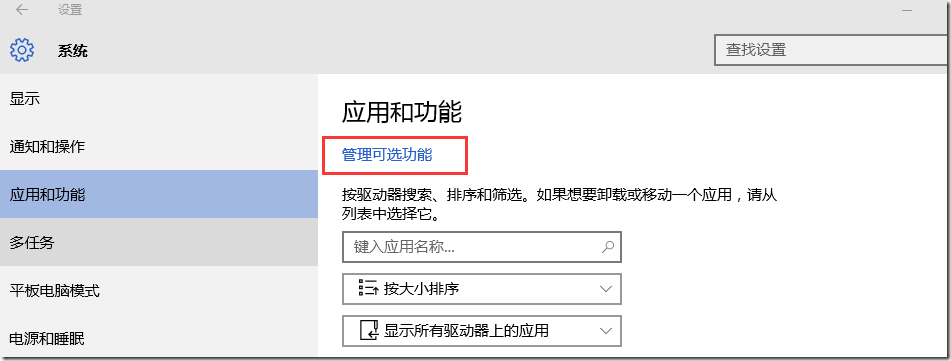
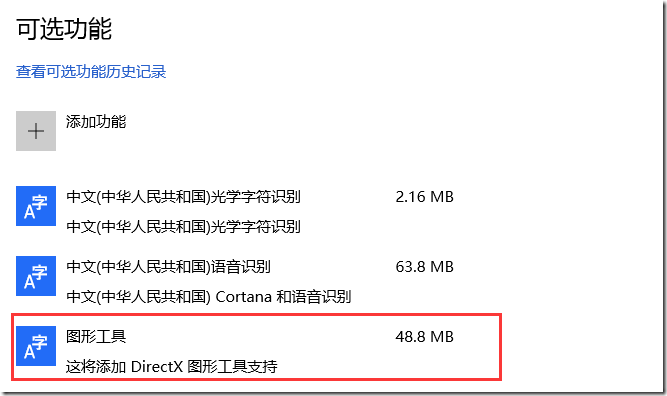
方法2
用管理员身份打开命令行工具(cmd),执行如下命令:
Dism /online /add-capability /capabilityname:Tools.Graphics.DirectX~~~~0.0.1.0
参考
Visual Studio 2015 and Graphics Tools for Windows 10
Use D3D11 debug layer with VS2013 on Windows 10
VS2015+Win10 调试DirectX 报错的更多相关文章
- 【Datastage】Datastage在win10上安装报错:This Application requires one of the following versions of the .NET Framework:v1.1.4322 Do you want to install this .NET Framework version now?
Datastage在win10上安装报错如下: 这个错误的意思是:.netFramWork的版本不符合要求,于是,我在网上下载了一个版本一致的 下载地址为:http://pan.baidu.com/s ...
- 获取win10 Insider Preview报错0x80080300
获取win10 Insider Preview报错0x80080300 1.msconfig2.隐藏Microsoft 服务3.disable 剩下的服务4.win + i, Update&s ...
- Ubuntu-1404 GDB 调试C++报错
问题 Ubuntu1404下,当用GDB调试C++程序时,报错ImportError: No module named 'libstdcxx' 解决办法 vim ~/.gdbinit #~/.gdbi ...
- win10安装wmi报错问题
在win10上,安装wmi,首先下载https://pypi.python.org/pypi/WMI/#downloads,将wmi下载下来 安装过程中,会报错,No Python installat ...
- 本地调试 谷歌浏览器报错:跨域问题处理 Access-Control-Allow-Origin
前端在本地,调试,就经常的就是会遇到 调用接口,提示跨域了. 如你要访问 http://****/api/user chrome 浏览器 报错: XMLHttpRequest cannot load ...
- ionic真机调试Android报错 - could not read ok from ADB Server * failed to start daemon * error: cannot connect to daemon
在使用真机调试Android程序时,报错如下: could not read ok from ADB Server * failed to start daemon error: cannot con ...
- 安卓小程序的一次bug调试,报错:java.lang.NullPointerException,logcat学习
做实验的时候,调试了很久后模拟器执行后,app还是会崩溃并停止运行,错误如下. 因为初学,所以也不知道怎么使用调试工具,也不懂看日志,经过学习后尝试这查看了LogCat日志上面有这样的提示: 其中引起 ...
- Delphi2007 在Win10 下运行报错 Assertion failure
Delphi2007 原来安装在Win7 下 运行正常, 自从升级到Win10 ,新建工程运行然后关闭报错, 报错信息如下: ---------------------------bds.exe - ...
- vscode与MinGW64调试c++报错
这个问题在刚配好环境测试的时候往往不会被发现,因为单纯的c++编译调试是没问题的.但一旦调试使用stl库的代码就会报错,而编译又没问题且可以正常运行,但在vscode的集成终端里运行不会显示任何本该显 ...
随机推荐
- GitHub实战系列~2.把本地项目提交到github中 2015-12-10
GitHub实战系列汇总:http://www.cnblogs.com/dunitian/p/5038719.html ———————————————————————————————————————— ...
- 存储程序(1)——MYSQL
MySQL支持把几种对象存放在服务器端供以后使用.这几种对象有一些可以根据情况通过程序代码调用,有一些会在数据表被修改时自动执行,还有一些可以在预定时刻自动执行.它们包括以下几种: 1.存储函数(st ...
- MVC5 网站开发之三 数据存储层功能实现
数据存储层在项目Ninesky.DataLibrary中实现,整个项目只有一个类Repository. 目录 奔跑吧,代码小哥! MVC5网站开发之一 总体概述 MVC5 网站开发之二 创建项目 ...
- Android自定义控件之自定义组合控件
前言: 前两篇介绍了自定义控件的基础原理Android自定义控件之基本原理(一).自定义属性Android自定义控件之自定义属性(二).今天重点介绍一下如何通过自定义组合控件来提高布局的复用,降低开发 ...
- JavaScript学习总结(三)——this、原型、javascript面向对象
一.this 在JavaScript中this表示:谁调用它,this就是谁. JavaScript是由对象组成的,一切皆为对象,万物皆为对象.this是一个动态的对象,根据调用的对象不同而发生变化, ...
- Phantomjs+Nodejs+Mysql数据抓取(1.数据抓取)
概要: 这篇博文主要讲一下如何使用Phantomjs进行数据抓取,这里面抓的网站是太平洋电脑网估价的内容.主要是对电脑笔记本以及他们的属性进行抓取,然后在使用nodejs进行下载图片和插入数据库操作. ...
- How do servlets work-Instantiation, sessions, shared variables and multithreading[reproduced]
When the servletcontainer (like Apache Tomcat) starts up, it will deploy and load all webapplication ...
- ASP.NET 截获服务器生成的将要发送到客户端的html的方法
有时候我们需要在将服务器端生成的html发送带客户端之前对这些html进行操作,比如生成静态html加之保存.改变生成的html中的某些内容等等,那么久可以通过如下的方案解决. 我总结了两种方式,个人 ...
- WebComponent魔法堂:深究Custom Element 之 从过去看现在
前言 说起Custom Element那必然会想起那个相似而又以失败告终的HTML Component.HTML Component是在IE5开始引入的新技术,用于对原生元素作功能"增强& ...
- JavaScript RegExp 基础详谈
前言: 正则对于一个码农来说是最基础的了,而且在博客园中,发表关于讲解正则表达式的技术文章,更是数不胜数,各有各的优点,但是就是这种很基础的东西,如果我们不去真正仔细研究.学习.掌握,而是抱着需要的时 ...