
利用Spire for .NET实现办公自动化——Spire.Doc
今天研究了一下E-ICEBLUE公司的Spire for .NET系列产品。我们可以通过利用这个系列的dll库文件轻松的实现办公自动化的需求,而且不需要安装相应的办公软件。有关于Spire .NET系列产品的介绍戳这里可以看到。下面我以Spire.Doc这个dll库为例,写一下它的使用过程(我的虚拟机上没有下载与安装Windows Office之类的办公软件):
1、下载Spire.Doc.Dll文件(下载地址):
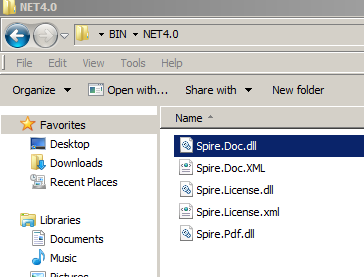
2、将上面五个文件copy到项目的debug路径下:

2、这里我在VS中新建一个控制台类型的project并命名为SpireDocUse,右键项目->Add->Reference->Browse->选择Spire.Doc.dll文件,完成引用:

3、在项目中using这个dll库:
using Spire.Doc;

using Spire.Doc.Documents;

using Spire.Doc.Fields;
4、接下来就可以参考官网上的教程来操作了,这里举个例子。创建一个word文档->写入一些内容->设置一下样式,然后保存:
using System;

using Spire.Doc;

using Spire.Doc.Documents;

using Spire.Doc.Fields;

using System.Drawing;

namespace SpireDocUse

{

    class Program

    {

        static void Main(string[] args)

        {

            //Configure path.

            string desktopPath = Environment.GetFolderPath(Environment.SpecialFolder.Desktop);

            string filePath = desktopPath + @"\test.docx";

            string picPath = desktopPath + @"\wang.jpg";

            //Create a word document.

            Document doc = new Document();

            //Add a section.

            Section section = doc.AddSection();

            //Add a paragraph.

            Paragraph paragraph = section.AddParagraph();

            paragraph.AppendText("Spire is me.");

            //Add a comment.

            string content = "CNblog:http://www.cnblogs.com/LanTianYou/";

            Comment comment = paragraph.AppendComment(content);

            comment.Format.Author = "Tylan";

            //Set font style for the paragraph.

            ParagraphStyle style = new ParagraphStyle(doc);

            style.Name = "TylanFontStyle";

            style.CharacterFormat.FontName = "Batang";

            style.CharacterFormat.FontSize = ;

            style.CharacterFormat.TextColor = Color.Green;

            doc.Styles.Add(style);

            paragraph.ApplyStyle(style.Name);

            //Insert a picture.

            DocPicture pic = paragraph.AppendPicture(Image.FromFile(picPath));

            pic.Width = ;

            pic.Height = ;

            //Add header.

            HeaderFooter header = doc.Sections[].HeadersFooters.Header;

            Paragraph headerParagraph = header.AddParagraph();

            TextRange headerText = headerParagraph.AppendText("Spire header");

            headerText.CharacterFormat.FontSize = ;

            headerText.CharacterFormat.TextColor = Color.Tomato;

            headerParagraph.Format.Borders.Bottom.BorderType = BorderStyle.ThinThinSmallGap;

            headerParagraph.Format.Borders.Bottom.Space = 0.15f;

            headerParagraph.Format.Borders.Color = Color.DarkGray;

            //Add footer.

            HeaderFooter footer = doc.Sections[].HeadersFooters.Footer;

            Paragraph footerParagraph = footer.AddParagraph();

            TextRange footerText = footerParagraph.AppendText("Spire footer");

            footerText.CharacterFormat.FontSize = ;

            footerText.CharacterFormat.TextColor = Color.Tomato;

            footerParagraph.Format.Borders.Top.BorderType = BorderStyle.ThinThinSmallGap;

            footerParagraph.Format.Borders.Top.Space = 0.15f;

            footerParagraph.Format.Borders.Color = Color.DarkGray;

            //Save the file.

            doc.SaveToFile(filePath, FileFormat.Docx);

        }

    }

}
运行结果(在桌面生成一个word文档):

在安有word的办公机打开这个文件:

通过以上的例子,我们实现了在无Office的环境下实现办公的需求。通过Spire.NET可以对word文档实现一系列的操作。除了Spire.Doc库还有很多的.NET组件我们都可以选择使用,可以在官网首页的.NET模块中看到:
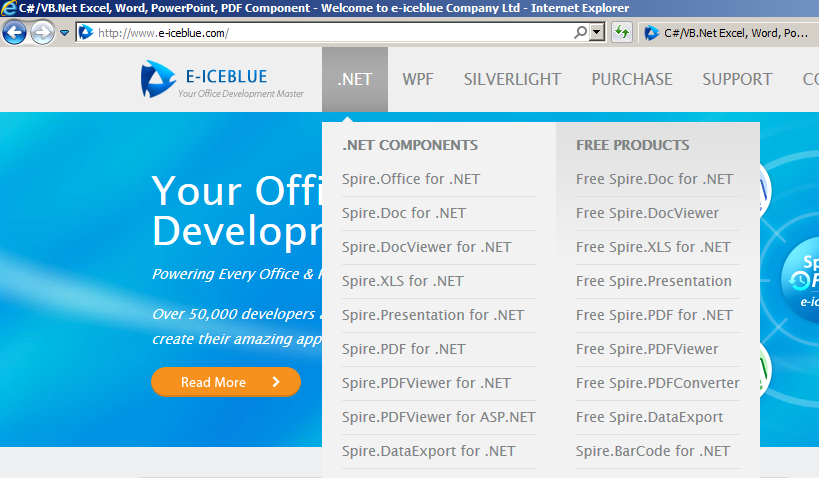
在日常的工作中,我们可以像上述过程一样,对Spire.Doc库中封装好的API进行一次再封装,以满足我们的自动化需求。具体可以根据自己的需求来引用相应的Spire .NET组件进行完成。
利用Spire for .NET实现办公自动化——Spire.Doc的更多相关文章
- 利用pdfbox和poi抽取pdf、doc以及docx格式的内容
使用pdfbox1.5.0抽取pdf格式文档内容,使用poi3.7抽取doc及docx文档内容: /** * Created by yan.shi on 2017/9/25. */ import or ...
- Spire.Doc组件
使用Spire.Doc组件利用模板导出Word文档 以前一直是用Office的组件实现Word文档导出,但是让客户在服务器安装Office,涉及到版权:而且Office安装,包括权限配置也是比较麻烦. ...
- 使用Spire.Doc来转换文本
使用Spire.Doc来转换文本 前段时间,我为不熟悉这个产品的读者们写了一篇关于我对 Spire.Doc的初识印象.Spire.Doc是一个专业的Word .NET库,它是专门为开发人员设计的用来快 ...
- C# 利用itextsharp、Spire配合使用为pdf文档每页添加水印
下载类库: 直接下载 引入类库 功能实现 using iTextSharp.text.pdf; using Spire.Pdf; using Spire.Pdf.Graphics; using Sys ...
- 使用Spire组件抛出异常The type initializer for 'spr857' threw an exception
使用Spire组件抛出异常The type initializer for 'spr857' threw an exception 我使用免费的Spire.Xls组件尝试去转换Excel文档到PDF文 ...
- 【原创】.NET读写Excel工具Spire.Xls使用(1)入门介绍
在.NET平台,操作Excel文件是一个非常常用的需求,目前比较常规的方法有以下几种: 1.Office Com组件的方式:这个方式非常累人,微软的东西总是这么的复杂,使用起来可能非常不便,需要安装E ...
- 【好文翻译】测试必看:使用Spire.XLS来生成自动化报表!
Download C# project - 7.1 KB 介绍 在我的编程博客中,我经常会比较不同算法或原理的性能特征.我常常会把性能日志(如花费时间)输出到控制台或者文本文件,然后复制到电子表格中 ...
- .NET读写Excel工具Spire.Xls使用(1)入门介绍
原文:[原创].NET读写Excel工具Spire.Xls使用(1)入门介绍 在.NET平台,操作Excel文件是一个非常常用的需求,目前比较常规的方法有以下几种: 1.Office Com组件的方式 ...
- 教程:关于如何通过Maven仓库安装Spire系列的 Java产品
Spire系列库中已发布的Java产品目前有三个,即Spire.PDF for Java.Spire.Presentation for Java.Spire.Barcode for Java.使用该J ...
随机推荐
- SWF类标准开头Tag
[SWF(width="800", height="600", backgroundColor="#ffffff", frameRate=& ...
- PHP——生成随机数和日期时间
在PHP里面两个常用的函数 rand(); 生成随机数 当括号内无参数时 系统会以当前时间为种子进行随机数的生成 rand(1,10); 括号里面是生成随机数的范围,在形成的随机数在1~1 ...
- (转)json+flexgrid+jbox组合运用页面刷新<jsp>
插件效果 1.JSP页面 1 <%@ page language="java" contentType="text/html; charset=UTF-8" ...
- 有时候dfs可以简化各种组合的操作
比如有时某些操作是组合起来的,你不用去模拟每一种,把其拆分为几种单个操作,就可以了,因为反正会枚举所有的,所以也反正会组合出那种...而且不易出错.. 当然以上只是一种思维方式,并不一定可行,还要考虑 ...
- 转:Java的各种类型转换汇总
java类型转换 Integer String Long Float Double Date 1如何将字串 String 转换成整数 int? A. 有两个方法: 1). int i = Intege ...
- 转:SELENIUM TIPS: CSS SELECTORS
This page will show you some CSS rules and pseudo-classes that will help you move your XPATH locator ...
- 多屏复杂动画CSS技巧三则(转载)
本文转载自: 经验分享:多屏复杂动画CSS技巧三则
- 夺命雷公狗—express—1—express的配置方法和目录结构分析
- 【rails3教材】博客构建过程
构建rails项目--blog $ rails new blog --skip-bundle $ cd blog $ bundle --local $ bundle install #安装需要的包 $ ...
- VC++2010 中Debug和Release配置
刚刚遇到了Release模式正常运行,而直接切换到Debug报错的问题,后来发现是Debug模式和Release模式配置不同造成的,再此记录一下解决方法: 1.项目属性->切换到Release模 ...