
基于多主机的Web服务
【Centos7.4版本】
!!!测试环境我们首关闭防火墙和selinux
[root@localhost ~]# systemctl stop firewalld

[root@localhost ~]# systemctl disable firewalld

[root@localhost ~]# sed -i 's/SELINUX=enforcing/SELINUX=disabled/g' /etc/selinux/config

[root@localhost ~]# setenforce 0
一、基于多主机的Web服务
1、首先先看一下本地网卡的信息
[root@localhost ~]# cd /etc/sysconfig/network-scripts/

[root@localhost network-scripts]# cat ifcfg-ens32

    TYPE=Ethernet

    PROXY_METHOD=none

    BROWSER_ONLY=no

    BOOTPROTO=none

    IPADDR=10.0.0.129        //我本机主网卡P地址

    NETMASK=255.255.255.0

    GATEWAY=10.0.0.2

    DNS1=8.8.8.8

    DEFROUTE=yes

    IPV4_FAILURE_FATAL=no

    IPV6INIT=yes

    IPV6_AUTOCONF=yes

    IPV6_DEFROUTE=yes

    IPV6_FAILURE_FATAL=no

    IPV6_ADDR_GEN_MODE=stable-privacy

    NAME=ens32

    UUID=e4b11756-1775-4b6a-adbf-95f3f24f941e

    DEVICE=ens32

    ONBOOT=yes
2、安装HTTP服务,并启动服务
[root@localhost ~]# yum install -y httpd

[root@localhost ~]# systemctl start httpd

[root@localhost ~]# systemctl enable httpd

Created symlink from /etc/systemd/system/multi-user.target.wants/httpd.service to /usr/lib/systemd/system/httpd.service.
3、首先看一下配置模板
[root@localhost ~]# vim /usr/share/doc/httpd-2.4.6/httpd-vhosts.conf

..........                //上面的我省略了

<VirtualHost *:@@Port@@>

    ServerAdmin webmaster@dummy-host.example.com

    DocumentRoot "@@ServerRoot@@/docs/dummy-host.example.com"

    ServerName dummy-host.example.com

    ServerAlias www.dummy-host.example.com

    ErrorLog "/var/log/httpd/dummy-host.example.com-error_log"

    CustomLog "/var/log/httpd/dummy-host.example.com-access_log" common

</VirtualHost>

<VirtualHost *:@@Port@@>

    ServerAdmin webmaster@dummy-host2.example.com

    DocumentRoot "@@ServerRoot@@/docs/dummy-host2.example.com"

    ServerName dummy-host2.example.com

    ErrorLog "/var/log/httpd/dummy-host2.example.com-error_log"

    CustomLog "/var/log/httpd/dummy-host2.example.com-access_log" common

</VirtualHost>

//这几行是配置虚拟主机的模板
4、创建目录,写入测试首页
[root@localhost ~]# mkdir /var/www/aaa

[root@localhost ~]# mkdir /var/www/bbb

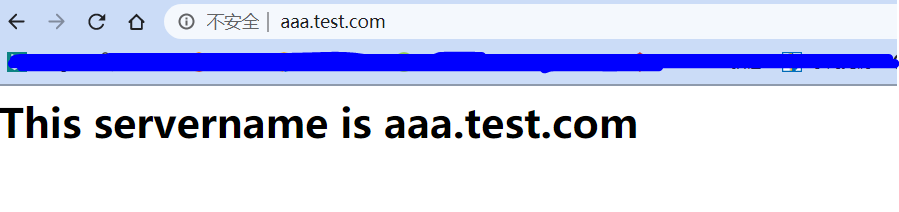
[root@localhost ~]# echo '<h1>This servername is aaa.test.com</h1>' > /var/www/aaa/index.html

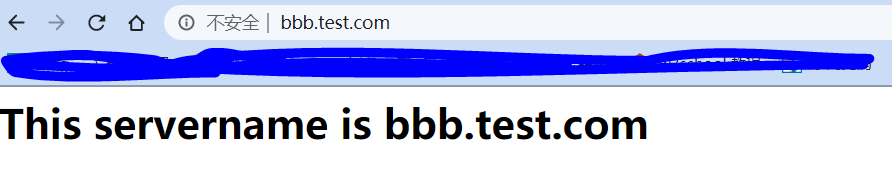
[root@localhost ~]# echo '<h1>This servername is bbb.test.com</h1>' > /var/www/bbb/index.html
5、在本地的/etc/hosts文件下写入两个hostname
[root@localhost ~]# vim /etc/hosts

127.0.0.1   localhost localhost.localdomain localhost4 localhost4.localdomain4

::1         localhost localhost.localdomain localhost6 localhost6.localdomain6

10.0.0.129      aaa.test.com

10.0.0.129      bbb.test.com
//最后两条需要手动添加
6、编辑HTTP的配置文件,添加以下内容
[root@localhost ~]# vim /etc/httpd/conf/httpd.conf

..........                //上面的我就省略

<VirtualHost 10.0.0.129:80>

        documentroot    "/var/www/aaa"

        servername      "aaa.test.com"

        ErrorLog        "/var/log/httpd/aaa.test.com-error_log"

        CustomLog       "/var/log/httpd/aaa.test.com-access_log" common

</VirtualHost>

<VirtualHost 10.0.0.129:80>

        documentroot    "/var/www/bbb"

        servername      "bbb.test.com"

        ErrorLog        "/var/log/httpd/bbb.test.com-error_log"

        CustomLog       "/var/log/httpd/bbb.test.com-access_log" common

</VirtualHost>

//在文件的最后添加上面的内容
7、重启HTTP服务
[root@localhost ~]# systemctl restart httpd
8、在本地C盘的C:\Windows\System32\drivers\etc\hosts这个文件添加两行内容
 1 # Copyright (c) 1993-2009 Microsoft Corp.

 2 #

 3 # This is a sample HOSTS file used by Microsoft TCP/IP for Windows.

 4 #

 5 # This file contains the mappings of IP addresses to host names. Each

 6 # entry should be kept on an individual line. The IP address should

 7 # be placed in the first column followed by the corresponding host name.

 8 # The IP address and the host name should be separated by at least one

 9 # space.

10 #

11 # Additionally, comments (such as these) may be inserted on individual

12 # lines or following the machine name denoted by a '#' symbol.

13 #

14 # For example:

15 #

16 #      102.54.94.97     rhino.acme.com          # source server

17 #       38.25.63.10     x.acme.com              # x client host

18

19 # localhost name resolution is handled within DNS itself.

20 #    127.0.0.1       localhost

21 #    ::1             localhost

22

23 10.0.0.129        aaa.test.com

24 10.0.0.129        bbb.test.com

25 //添加最后两行就行
9、在浏览器的地址栏分别输入两个域名
基于多主机的Web服务的更多相关文章
- 如何快速搭建一个基于ServiceStack框架的web服务
ServiceStack是一个高性能的.NET Web Service 平台,能够简化开发高性能的REST (支持JSON,XML,JSV,HTML,MsgPack,ProtoBuf,CSV等消息格式 ...
- Python flask 基于 Flask 提供 RESTful Web 服务
转载自 http://python.jobbole.com/87118/ 什么是 REST REST 全称是 Representational State Transfer,翻译成中文是『表现层状态转 ...
- 基于多IP地址Web服务
[Centos7.4版本] !!!测试环境我们首关闭防火墙和selinux [root@localhost ~]# systemctl stop firewalld [root@localhost ~ ...
- 基于多端口的Web服务
[Centos7.4版本] !!!测试环境我们首关闭防火墙和selinux [root@localhost ~]# systemctl stop firewalld [root@localhost ~ ...
- 基于IIS构建Pyathon Web服务
本文简单叙述了在Windows下,如何利用IIS构建Python Web服务. 其主要步骤如下: 1.在IIS下构建一个站点,如图: 2.配置Python文件的处理程序,如图: 3.最后,在对应站点根 ...
- Web 服务编程,REST 与 SOAP(转)
原文地址:Web 服务编程,REST 与 SOAP REST 简介 在开始我们的正式讨论之前,让我们简单看一下 REST 的定义. REST(Representational State Transf ...
- Rest风格WEB服务(Rest Style Web Service)的真相
http://blog.csdn.net/jia20003/article/details/8365585 Rest风格WEB服务(Rest Style Web Service)的真相 分类: J2E ...
- Webservices-1.web服务定义简介
一.WEB服务定义(摘自维基百科)详情:http://zh.wikipedia.org/wiki/Web%E6%9C%8D%E5%8A%A1 Web服务是一种服务导向架构的技术,通过标准的Web协议提 ...
- 利用python httplib模块 发送Post请求测试web服务是否正常起来!
最近在学习python,恰好老大最近让我搞个基于post请求测试web服务是否正常启用的小监控,上网查了下资料,发现强大的Python恰好能够用上,所以自己现学现卖,顺便锻炼下自己. 由于本人也刚接触 ...
随机推荐
- gRPC在 ASP.NET Core 中应用学习(二)
前言: 上一篇文章中简单的对gRPC进行了简单了解,并实现了gRPC在ASP.NET Core中服务实现.客户端调用:那么本篇继续对gRPC的4中服务方法定义.其他使用注意点进一步了解学习 一.gRP ...
- java面试-JVM内存结构
一.JVM内存结构 二.类加载(classLoader)机制 java中的ClassLoader详解 java类加载机制面试题 java类加载机制面试题 虚拟机把描述类的数据从Class文件加载到内存 ...
- Dynamics CRM安装教程五:ADFS安装配置
ADFS即联合身份认证是一种更加安全的身份验证方式下面开始进行ADFS打开服务器管理器,到添加角色和功能向导下一步到下面界面勾选Active Directory 联合身份认证服务,下一步 默认,下一步 ...
- 黑马 - poi Excel
3.poi入门操作 3.1 搭建环境 1 <dependency> 2 <groupId>org.apache.poi</groupId> 3 <artifa ...
- (十一)VMware Harbor 配置管理
VMware Harbor 配置管理 这篇主要学习一下,项目下的配置管理. 主要功能就是修改项目的访问权限 当将访问权限改为
- 11. man page,info page
Linux系统中的命令可分为内部命令和外部命令.内部命令,又称为内建命令(builtin).怎么区分内部命令和外部命令了? 输入man bash命令,就可查看所有的内部命令. 如何查看命令使用方法 内 ...
- Day11_52_将Set集合转换为List集合
Set集合转换为List集合 ``` import java.util.*; public class SetReverseLsit { public static void main(String[ ...
- k8s 创建私有docker仓库 登陆授权令牌的Secret
参考https://kubernetes.io/zh/docs/tasks/configure-pod-container/pull-image-private-registry/ Kubernete ...
- 8.switch语句
switch语句语法 switch(expression){ case value : //语句 break; //可选 case value : //语句 break; //可选 //你可以有任意数 ...
- Laravel5.6教程之——安装
1.安装 方式1:全局安装 通过composer安装 laravel 安装器 composer global require "laravel/installer" 1 确保将 c ...