
Genesis2000用c#开发外挂
先上官方的说明
gateway is a command line utility for sending messages and commands to Genesis processes. The gateway command works between all systems that are connected to the same gnd server (in a client-server mode).
This command allows you send messages or run commands or scripts on any genesis process currently running without having to interfere with the GUI on that station.
Running gateway does not require any additional licenses. The program itself is located in $GENESIS_DIR/exx/misc where xx is the version number (eg. e72)
gateway may be called in one of the following modes:
|
gateway <address> <message> |
Sends a message to an address |
|
gateway ’WHO <address>’ |
Returns matching address |
|
gateway ’PID <address>’ |
Returns process IDs of matching adress |
|
gateway <address> |
Opens an interactive session |
- <address> is formed as <user>@<computer>.<display name>, where <user> is the Genesis login name, <computer> is the name of the computer, and <display> is the name of the X Display that is displaying the “get” process.
- As from v7.1, <address> can also be formed as <pid>@computer.display, where <pid> is the process id of the get process, <computer> is the name of the computer, and <display> is the name of the X Display that is displaying the “get” process. This can be important if there are two get’s running on the same computer/display
- A star symbol (“*”) may be used for globbing any part of an address.
- <message> may be any of the following:
WHO <address>
This message returns a space separated list of all addresses matching the <address>
PID <address>
This message returns a space separated list of the Process IDs of all addresses matching the <address>.
COM <genesis line mode command>
This message send a Genesis line mode command to all Genesis processes matching the specified address, unless the operator has specified, “DON’T accept messages” in the clipboard. This message returns zero if the command completed properly. Otherwise it returns a status code.
MSG <message text>
This will cause all Genesis processes matching the specified address to receive a message and display it to the operator, unless the operator has specified “DON’T accept messages” in the clipboard.
ERR <error code>
This returns the display string of the error code.
COMANS
This returns the COMANS of the last COM command
When working in an interactive session, any of the above messages may be sent.
A period “.” on a line by itself causes the gateway to exit. When you wish to close the session, the command must be used, since even if gateway has finished reading its standard input, it continues polling for more
messages.
Examples
# Print a list of all Genesis users
% gateway ’WHO *’
# Print a list of all the instances that “ben” is logged in on Genesis
% gateway ’WHO ben@*’
# Print the process IDs of all the instances of “ben” logged in on jupiter.
% gateway ’PID ben@jupiter.jupiter’
# Open a job on a specific Genesis process.
% gateway ben@jupiter.jupiter ’COM open_job,job=1745’
# An interactive session
% gateway ben@jupiter.jupiter
COM open_job,job=1745
COM script_run,name=/my_scripts/run_analysis,params=pcb
.
Note “get” may be run with the “-x” option and without a script. This puts Genesis into a mode where it will respond to gateway COM messages but will operate without a user interface.
Note This feature first appeared in Genesis Version 6.0c.
In Genesis v7.1, Gateway recognizes addresses of the following form:
% gateway <pid>@computer.display
To open a session with a get process with pid 17777 use:
% gateway %17777@pluto.pluto
(The % notation was chosen since a username could also be numeric.)
Also, in Genesis v7.1, the new command COMANS has been added. This command returns the COMANS of the last COM command. Here is a sample session:
% gateway ben@pluto.pluto
COM open_job,job=0.01745
0
COM open_entity,job=0.01745,type=step,name=pcb
0
COM filter_area_start
0
COM filter_area_xy,x=1,y=1
0
COM filter_area_xy,x=0,y=0
0
COM filter_area_end
0
COMANS
7
好吧这么多英文我看着也头疼,总之外挂需要用到gateway程序,c#程序就是通过process类进行输入和输出,如下代码
using System;

using System.Collections.Generic;

using System.Diagnostics;

using System.IO;

using System.Linq;

using System.Text;

namespace WindowsFormsApplication4

{

   public class Genesis

    {

        //gateway的运行命令色这个样子的 gateway <address> <message>

        //address为genesis上的数据: 用户名@机器名.机器名

        //这里我只取第一个用户名为脚本执行的地方

        /// <summary>

        /// 程序运行的对应用户地址

        /// </summary>

        private string address { get; set; }

        /// <summary>

        ///从系统环境变量获取GENESIS的根目录

        /// </summary>

        string GENESIS_DIR { get { return Environment.GetEnvironmentVariable("GENESIS_DIR");} }

        /// <summary>

        ///从系统环境变量获取GENESIS的程序目录

        /// </summary>

        string GENESIS_EDIR { get { return Environment.GetEnvironmentVariable("GENESIS_EDIR"); } }

       /// <summary>

       /// 发送指令给genesis

       /// </summary>

       /// <param name="cmdText"></param>

       /// <returns></returns>

       public Genesis()

       {

            //返回结果以的用户以\r\n隔开要替换掉为,再分组

           string s = SendCommand("\"WHO\"");

            string[] users = s.Trim().Replace(' ',',').Split(',');

           if (users.Count()>0)

           {

               address = users[users.Count()-1];

           }

       }

       private string SendCommand(string cmdText)

       {

            Process p=new Process();

            p.StartInfo.FileName = GENESIS_EDIR + @"\misc\gateway.exe";

            //返回错误提示

            p.StartInfo.RedirectStandardError = true;

            //可以发送指令

            p.StartInfo.RedirectStandardInput = true;

            //可以用接受指令执行结果

            p.StartInfo.RedirectStandardOutput = true;

            //执行命令不显示窗口

            p.StartInfo.CreateNoWindow = true;

            ///执行指令

            p.StartInfo.Arguments = cmdText;

           p.StartInfo.UseShellExecute = false;

            //

            p.Start();

            //接收指令执行结果

            StreamReader read = p.StandardOutput;

           string s = read.ReadLine();

            //结束进程

            p.Close();

            return s;

       }

       public string COM(string cmdText)

       {

           return SendCommand(string.Format(address+ " \"COM  {0}\"",cmdText));

       }

    }

}
核心的代码就是sendcommand函数,由于genesis有多个特殊指令,这里我只写了COM指令;还有获取用户地址的时候打开系统的任务管理器看一下是否有多个gnd或gateway运行,如果存在多个gnd程序就会崩溃,gateway最好只留一个
接着队代码进行进行测试,新建一个winform程序,添加两个 richTextBox一个用来输入指令,一个接收返回值

发送指令事件代码
 private void button1_Click(object sender, EventArgs e)

        {

            Genesis gen=new Genesis();

            //richTextBox2.AppendText(gen.COM("clipb_open_job,job=test,update_clipboard=view_job"));

            richTextBox2.AppendText(gen.COM(  richTextBox1.Text));

        }
编译好程序打开genesis队程序进行测试,发送指令前如图:
发送指令后
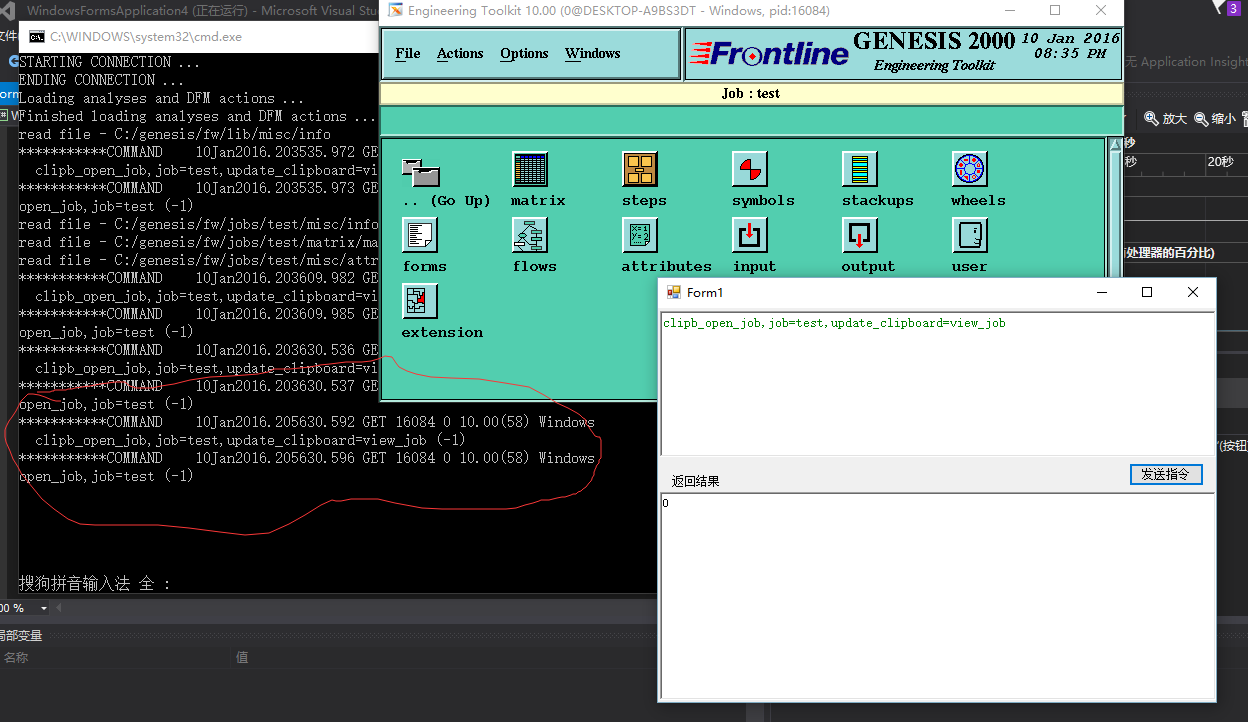
程序测试完成并能接收到结果0;
Genesis2000用c#开发外挂的更多相关文章
- Genesis2000使用c#开发脚本
这是我自学程序以来在博客园的第一篇博客,如有不好的地方请大家指正,谢谢! 这边文章的目的是给予那些在PCB使用Genesis2000程序脚本开发的人员提供.net平台下的开发方法. 目前genesis ...
- Android手游外挂入侵----寓攻于守,方能破敌
欢迎访问网易云社区,了解更多网易技术产品运营经验. 手游外挂入侵 随着各种爆款手游的风靡,目前手机游戏的占比用户已经形成一个巨大的市场,市场上你争我夺,有将PC版本移植到手机中,也有新模式手游的推出. ...
- Java SE学习【二】——面向对象
面向对象的学习也进行了一段时间,这段时间学了,类和对象:属性:方法:封装:继承:多态:接口.也算是有一些自己的理解,不愧是贴近人类思维的思想,老师讲时我常常会想到以前的一些事物和其交相印证,其中最常想 ...
- 手把手教你玩微信小程序跳一跳
最近微信小程序火的半边天都红了,虽然不会写,但是至少也可以仿照网上大神开发外挂吧!下面手把手教妹纸们(汉纸们请自觉的眼观耳听)怎么愉快的在微信小游戏中获得高分. 废话不多说,咱们这就发车了!呸!咱们这 ...
- 【视频教程】使用UIAutomation开发软件外挂
UIAutomation是.Net 3.5之后提供的“界面自动化测试”技术,本来是给测试人员用的,不过UIAutomation由于也是界面自动操作的技术,比直接使用keybd_event.GetWin ...
- 关于炒股软件——金魔方炒股软件的Dll外挂开发
2015-01-19 14:40:04 金魔方平台是由飞狐交易师原创团队集多年研发经验,依靠和讯财经网强大资源,吸取国际专家思路而推出的十年巨作.目前新出的这个2.0版,这一版在数据存储方面作很大的改 ...
- C#外挂QQ找茬辅助源码,早期开发
这是一款几年前开发的工具,当年作为一民IT纯屌,为了当年自己心目中的一位女神熬夜开发完成.女神使用后找茬等级瞬间从眼明手快升级为三只眼...每次看到这个就会想起那段屌丝与女神的回忆.今天特地把代码更新 ...
- Delphi外挂开发网站
http://cheatengine.org/http://wenku.baidu.com/view/2d5de818964bcf84b9d57b15.html [delphi外G]http:// ...
- WMS二开:外挂页面开发培训
springboot:MAVEN结构前后台都是MVC架构基于模板引擎thymeleafapplication.yml文件里面配置了一个DEV\TEST\PROD,用于自动选择配置文件applicati ...
随机推荐
- DotNet Core 介绍
前言 asp.net core rtm 6月底即将发布,自己也想着为社区做点共享,刚好最近不太忙,看到社区的小伙伴们都在为dotnet core的推广而贡献力量,项目中刚好在用rc2版本,就多写些文章 ...
- 初识Opserver,StackExchange的监控解决方案
Opserver是闻名遐迩的网站Stack Overflow的开源监控解决方案,由Stack Exchange发布.它基于.NET框架构建,这在监控工具领域有些与众不同. 旨在为每个受监控系统的健康状 ...
- node(async原理)
node中的async是用来实现同步操作的,提供包括map.Series等方法,本文不做赘述. 由于项目需要在浏览器端用了async.js,因此仔细看了下它的代码.原来,一直以为node是在服务端调用 ...
- Mac OS X上IntelliJ IDEA 13与Tomcat 8的Java Web开发环境搭建
这标题实在有点拗口,不知道怎么写好,但看了标题也就明白文本的内容.最近几天在折腾这些玩意儿,所以写写总结.除了环境搭建,本文还是一篇入门级的上手教程. 去下载一些东西 JDK安装 Tomcat安装 T ...
- Azure SQL Database (19) Stretch Database 概览
<Windows Azure Platform 系列文章目录> Azure SQL Database (19) Stretch Database 概览 Azure SQL Da ...
- EF:oracle的number类型映射为C#的boolean类型
一开始用下面的方法映射, Property(p => p.IsFixed).HasColumnName("IS_FIXED").HasColumnType("num ...
- Java 浅析三大特性之一封装
在说Java 三个特性之前,我们先了解一下什么是面向对象,以及为什么Java是面向对象的语言. 面向对象是区别于面向过程的一种编程的思想.我们可以通过这个例子冰箱装大象的例子来了解一下面向对象与面向过 ...
- .Net批量插入数据到SQLServer数据库,System.Data.SqlClient.SqlBulkCopy类批量插入大数据到数据库
批量的的数据导入数据库中,尽量少的访问数据库,高性能的对数据库进行存储. 采用SqlBulkCopy来处理存储数据.SqlBulkCopy存储大批量的数据非常的高效,将内存中的数据表直接的一次性的存储 ...
- WCF学习之旅——第一个WCF示例(三)
第五步:创建客户端 WCF应用服务被成功寄宿后,WCF服务应用便开始了服务调用请求的监听工作.此外,服务寄宿将服务描述通过元数据的形式发布出来,相应的客户端就可以获取这些元数据.接下来我们来创建客户端 ...
- mysql数据库学习目录
前面的话 对于前端工程师来说,数据库并不是主要技能点,但是基本的增删改查操作还是需要了解的.小火柴将mysql数据库的学习记录整理如下 目录 前端学数据库之基础操作 前端学数据库之数据类型 前端学数 ...