
理解 ASP.NET Core: 处理管道
理解 ASP.NET Core 处理管道
在 ASP.NET Core 的管道处理部分,实现思想已经不是传统的面向对象模式,而是切换到了函数式编程模式。这导致代码的逻辑大大简化,但是,对于熟悉面向对象编程,而不是函数式编程思路的开发者来说,是一个比较大的挑战。
处理请求的函数
在 ASP.NET Core 中,一次请求的完整表示是通过一个 HttpContext 对象来完成的,通过其 Request 属性可以获取当前请求的全部信息,通过 Response 可以获取对响应内容进行设置。
对于一次请求的处理可以看成一个函数,函数的处理参数就是这个 HttpContext 对象,处理的结果并不是输出结果,结果是通过 Response 来完成的,从程序调度的角度来看,函数的输出结果是一个任务 Task。
这样的话,具体处理 Http 请求的函数可以使用如下的 RequestDelegate 委托进行定义。
public delegate Task RequestDelegate(HttpContext context);
在函数参数 HttpContext 中则提供了此次请求的所有信息,context 的 Request 属性中提供了所有关于该次请求的信息,而处理的结果则在 context 的 Response 中表示。通常我们会修改 Response 的响应头,或者响应内容来表达处理的结果。
需要注意的是,该函数的返回结果是一个 Task,表示异步处理,而不是真正处理的结果。
参见:在 Doc 中查看 RequestDelegate 定义
我们从 ASP.NET Core 的源代码中选取一段作为参考,这就是在没有我们自定义的处理时,ASP.NET Core 最终的处理方式,返回 404。这里使用函数式定义。
RequestDelegate app = context =>

{

	  // ......

    context.Response.StatusCode = StatusCodes.Status404NotFound;

    return Task.CompletedTask;

};
来源:在 GitHub 中查看 ApplicationBuilder 源码
把它翻译成熟悉的方法形式,就是下面这个样子:
public Task app(HttpContext context)

{

    // ......

    context.Response.StatusCode = StatusCodes.Status404NotFound;

    return Task.CompletedTask;

};
这段代码只是设置了 Http 的响应状态码为 404,并直接返回了一个已经完成的任务对象。
为了脱离 ASP.NET Core 复杂的环境,可以简单地进行后继的演示,我们自定义一个模拟 HttpContext 的类型 HttpContextSample 和相应的 RequestDelegate 委托类型。
在模拟请求的 HttpContextSample 中,我们内部定义了一个 StringBuilder 来保存处理的结果,以便进行检查。其中的 Output 用来模拟 Response 来处理输出。
而 RequestDelegate 则需要支持现在的 HttpContextSample。
using System.Threading.Tasks;

using System.Text;

public class HttpContextSample

{

    public StringBuilder Output { get; set; }

    public HttpContextSample() {

        Output = new StringBuilder();

    }

}

public delegate Task RequestDelegate(HttpContextSample context);
这样,我们可以定义一个基础的,使用 RequestDelegate 的示例代码。
// 定义一个表示处理请求的委托对象

RequestDelegate app = context =>

{

    context.Output.AppendLine("End of output.");

    return Task.CompletedTask;

};

// 创建模拟当前请求的对象

var context1 = new HttpContextSample();

// 处理请求

app(context1);

// 输出请求的处理结果

Console.WriteLine(context1.Output.ToString());
执行之后,可以得到如下的输出
End of output.
处理管道中间件
所谓的处理管道是使用多个中间件串联起来实现的。每个中间件当然需要提供处理请求的 RequestDelegate 支持。在请求处理管道中,通常会有多个中间件串联起来,构成处理管道。
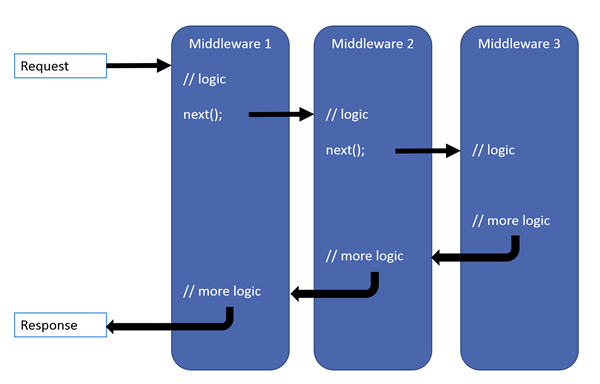
但是,如何将多个中间件串联起来呢?
可以考虑两种实现方式:函数式和方法式。
方法式就是再通过另外的方法将注册的中间件组织起来,构建一个处理管道,以后通过调用该方法来实现管道。而函数式是将整个处理管道看成一个高阶函数,以后通过调用该函数来实现管道。
方法式的问题是在后继中间件处理之前需要一个方法,后继中间件处理之后需要一个方法,这就是为什么 ASP.NET Web Form 有那么多事件的原因。
如果我们只是把后继的中间件中的处理看成一个函数,那么,每个中间件只需要分成 3 步即可:
- 前置处理
- 调用后继的中间件
- 后置处理
在 ASP.NET Core 中是使用函数式来实现请求的处理管道的。
在函数式编程中,函数本身是可以作为一个参数来进行传递的。这样可以实现高阶函数。也就是说函数的组合结果还是一个函数。
对于整个处理管道,我们最终希望得到的形式还是一个 RequestDelegate,也就是一个对当前请求的 HttpContext 进行处理的函数。
本质上来讲,中间件就是一个用来生成 RequestDelegate 对象的生成函数。
为了将多个管道中间件串联起来,每个中间件需要接收下一个中间件的处理请求的函数作为参数,中间件本身返回一个处理请求的 RequestDelegate 委托对象。所以,中间件实际上是一个生成器函数。
使用 C# 的委托表示出来,就是下面的一个类型。所以,在 ASP.NET Core 中,中间件的类型就是这个 Func<T, TResult>。
Func<RequestDelegate, RequestDelegate>
在 Doc 中查看 Func<T, TResult> 的文档
这个概念比较抽象,与我们所熟悉的面向对象编程方式完全不同,下面我们使用一个示例进行说明。
我们通过一个中间件来演示它的模拟实现代码。下面的代码定义了一个中间件,该中间件接收一个表示后继处理的函数,中间件的返回结果是创建的另外一个 RequestDelegate 对象。它的内部通过调用下一个处理函数来完成中间件之间的级联。
// 定义中间件

Func<RequestDelegate, RequestDelegate> middleware1 = next => {

      // 中间件返回一个 RequestDelegate 对象

    return (HttpContextSample context) => {

        // 中间件 1 的处理内容

        context.Output.AppendLine("Middleware 1 Processing.");

        // 调用后继的处理函数

        return next(context);

    };

};
把它和我们前面定义的 app 委托结合起来如下所示,注意调用中间件的结果是返回一个新的委托函数对象,它就是我们的处理管道。
// 最终的处理函数

RequestDelegate app = context =>

{

    context.Output.AppendLine("End of output.");

    return Task.CompletedTask;

};

// 定义中间件 1

Func<RequestDelegate, RequestDelegate> middleware1 = next =>

{

    return (HttpContextSample context) =>

    {

        // 中间件 1 的处理内容

        context.Output.AppendLine("Middleware 1 Processing.");

        // 调用后继的处理函数

        return next(context);

    };

};

// 得到一个有一个处理步骤的管道

var pipeline1 = middleware1(app);

// 准备一个表示当前请求的对象

var context2 = new HttpContextSample();

// 通过管道处理当前请求

pipeline1(context2);

// 输出请求的处理结果

Console.WriteLine(context2.Output.ToString());
可以得到如下的输出
Middleware 1 Processing.
End of output.
继续增加第二个中间件来演示多个中间件的级联处理。
RequestDelegate app = context =>

{

    context.Output.AppendLine("End of output.");

    return Task.CompletedTask;

};

// 定义中间件 1

Func<RequestDelegate, RequestDelegate> middleware1 = next =>

{

    return (HttpContextSample context) =>

    {

        // 中间件 1 的处理内容

        context.Output.AppendLine("Middleware 1 Processing.");

        // 调用后继的处理函数

        return next(context);

    };

};

// 定义中间件 2

Func<RequestDelegate, RequestDelegate> middleware2 = next =>

{

    return (HttpContextSample context) =>

    {

        // 中间件 2 的处理

        context.Output.AppendLine("Middleware 2 Processing.");

        // 调用后继的处理函数

        return next(context);

    };

};

// 构建处理管道

var step1 = middleware1(app);

var pipeline2 = middleware2(step1);

// 准备当前的请求对象

var context3 = new HttpContextSample();

// 处理请求

pipeline2(context3);

// 输出处理结果

Console.WriteLine(context3.Output.ToString());
当前的输出
Middleware 2 Processing.
Middleware 1 Processing.
End of output.
如果我们把这些中间件保存到几个列表中,就可以通过循环来构建处理管道。下面的示例重复使用了前面定义的 app 变量。
List<Func<RequestDelegate, RequestDelegate>> _components

    = new List<Func<RequestDelegate, RequestDelegate>>();

_components.Add(middleware1);

_components.Add(middleware2);

// 构建处理管道

foreach (var component in _components)

{

    app = component(app);

}

// 构建请求上下文对象

var context4 = new HttpContextSample();

// 使用处理管道处理请求

app(context4);

// 输出处理结果

Console.WriteLine(context4.Output.ToString());
输出结果与上一示例完全相同
Middleware 2 Processing.
Middleware 1 Processing.
End of output.
但是,有一个问题,我们后加入到列表中的中间件 2 是先执行的,而先加入到列表中的中间件 1 是后执行的。如果希望实际的执行顺序与加入的顺序一致,只需要将这个列表再反转一下即可。
// 反转此列表

_components.Reverse();

foreach (var component in _components)

{

    app = component(app);

}

var context5 = new HttpContextSample();

app(context5);

Console.WriteLine(context5.Output.ToString());
输出结果如下
Middleware 1 Processing.
Middleware 2 Processing.
End of output.
现在,我们可以回到实际的 ASP.NET Core 代码中,把 ASP.NET Core 中 ApplicationBuilder 的核心代码 Build() 方法抽象之后,可以得到如下的关键代码。
注意 Build() 方法就是构建我们的请求处理管道,它返回了一个 RequestDelegate 对象,该对象实际上是一个委托对象,代表了一个处理当前请求的处理管道函数,它就是我们所谓的处理管道,以后我们将通过该委托来处理请求。
public RequestDelegate Build()

{

    RequestDelegate app = context =>

    {

        // ......

        context.Response.StatusCode = StatusCodes.Status404NotFound;

        return Task.CompletedTask;

    };

    foreach (var component in _components.Reverse())

    {

        app = component(app);

    }

    return app;

}
完整的 ApplicationBuilder 代码如下所示:
// Copyright (c) .NET Foundation. All rights reserved.

// Licensed under the Apache License, Version 2.0. See License.txt in the project root for license information.

using System;

using System.Collections.Generic;

using System.Linq;

using System.Threading.Tasks;

using Microsoft.AspNetCore.Http;

using Microsoft.AspNetCore.Http.Features;

using Microsoft.Extensions.Internal;

namespace Microsoft.AspNetCore.Builder

{

    public class ApplicationBuilder : IApplicationBuilder

    {

        private const string ServerFeaturesKey = "server.Features";

        private const string ApplicationServicesKey = "application.Services";

        private readonly IList<Func<RequestDelegate, RequestDelegate>> _components = new List<Func<RequestDelegate, RequestDelegate>>();

        public ApplicationBuilder(IServiceProvider serviceProvider)

        {

            Properties = new Dictionary<string, object?>(StringComparer.Ordinal);

            ApplicationServices = serviceProvider;

        }

        public ApplicationBuilder(IServiceProvider serviceProvider, object server)

            : this(serviceProvider)

        {

            SetProperty(ServerFeaturesKey, server);

        }

        private ApplicationBuilder(ApplicationBuilder builder)

        {

            Properties = new CopyOnWriteDictionary<string, object?>(builder.Properties, StringComparer.Ordinal);

        }

        public IServiceProvider ApplicationServices

        {

            get

            {

                return GetProperty<IServiceProvider>(ApplicationServicesKey)!;

            }

            set

            {

                SetProperty<IServiceProvider>(ApplicationServicesKey, value);

            }

        }

        public IFeatureCollection ServerFeatures

        {

            get

            {

                return GetProperty<IFeatureCollection>(ServerFeaturesKey)!;

            }

        }

        public IDictionary<string, object?> Properties { get; }

        private T? GetProperty<T>(string key)

        {

            return Properties.TryGetValue(key, out var value) ? (T)value : default(T);

        }

        private void SetProperty<T>(string key, T value)

        {

            Properties[key] = value;

        }

        public IApplicationBuilder Use(Func<RequestDelegate, RequestDelegate> middleware)

        {

            _components.Add(middleware);

            return this;

        }

        public IApplicationBuilder New()

        {

            return new ApplicationBuilder(this);

        }

        public RequestDelegate Build()

        {

            RequestDelegate app = context =>

            {

                // If we reach the end of the pipeline, but we have an endpoint, then something unexpected has happened.

                // This could happen if user code sets an endpoint, but they forgot to add the UseEndpoint middleware.

                var endpoint = context.GetEndpoint();

                var endpointRequestDelegate = endpoint?.RequestDelegate;

                if (endpointRequestDelegate != null)

                {

                    var message =

                        $"The request reached the end of the pipeline without executing the endpoint: '{endpoint!.DisplayName}'. " +

                        $"Please register the EndpointMiddleware using '{nameof(IApplicationBuilder)}.UseEndpoints(...)' if using " +

                        $"routing.";

                    throw new InvalidOperationException(message);

                }

                context.Response.StatusCode = StatusCodes.Status404NotFound;

                return Task.CompletedTask;

            };

            foreach (var component in _components.Reverse())

            {

                app = component(app);

            }

            return app;

        }

    }

}
见:在 GitHub 中查看 ApplicationBuilder 源码
强类型的中间件
函数形式的中间件使用比较方便,可以直接在管道定义中使用。但是,如果我们希望能够定义独立的中间件,使用强类型的类来定义会更加方便一些。
public interface IMiddleware {

  public System.Threading.Tasks.Task InvokeAsync (

    Microsoft.AspNetCore.Http.HttpContext context,

    Microsoft.AspNetCore.Http.RequestDelegate next);

}
我们定义的强类型中间件可以选择实现装个接口。
next 表示请求处理管道中的下一个中间件,处理管道会将它提供给你定义的中间件。这是将各个中间件连接起来的关键。
如果当前中间件需要将请求继续分发给后继的中间件继续处理,只需要调用这个委托对象即可。否则,应用程序针对该请求的处理到此为止。
例如,增加一个可以添加自定义响应头的中间件,如下所示:
using System.Threading.Tasks;

public class CustomResponseHeader: IMiddleware

{

    // 使用构造函数完成服务依赖的定义

    public CustomResponseHeader()

    {

    }

    public Task InvodeAsync(HttpContextSample context, RequestDelegate next)

    {

        context.Output.AppendLine("From Custom Middleware.");

        return next(context);

    }

}
这更好看懂了,可是它怎么变成那个 Func<RequestDelegate, RequestDelegate> 呢?
在演示程序中使用该中间件。
List<Func<RequestDelegate, RequestDelegate>> _components

    = new List<Func<RequestDelegate, RequestDelegate>>();

_components.Add(middleware1);

_components.Add(middleware2);

var middleware3 = new CustomResponseHeader();

Func<RequestDelegate, RequestDelegate> middleware3 = next =>

{

    return (HttpContextSample context) =>

    {

        // 中间件 3 的处理

        var result = middleware3.InvodeAsync(context, next);

        return result;

    };

};

_components.Add(middleware3);
这样开发者可以使用熟悉的对象方式开发中间件,而系统内部自动根据你的定义,生成出来一个 Func<RequestDelegate, RequestDelegate> 形式的中间件。
ASP.NET Core 使用该类型中间件的形式如下所示,这是提供了一个方便的扩展方法来完成这个工作。
.UseMiddleware<CustomResponseHeader>();
按照约定定义中间件
除了实现 IMiddleware 这个接口,还可以使用约定方式来创建中间件。
按照约定定义中间件不需要实现某个预定义的接口或者继承某个基类,而是需要遵循一些约定即可。约定主要体现在如下几个方面:
- 中间件需要一个公共的有效构造函数,该构造函数必须包含一个类型为 RequestDelegate 类型的参数。它代表后继的中间件处理函数。构造函数不仅可以包含任意其它参数,对 RequestDelegate 参数出现的位置也没有任何限制。
- 针对请求的处理实现再返回类型为 Task 的 InvokeAsync() 方法或者同步的 Invoke() 方法中,方法的第一个参数表示当前的请求上下文 HttpContext 对象,对于其他参数,虽然约定并未进行限制,但是由于这些参数最终由依赖注入框架提供,所以,相应的服务注册必须提供。
构造函数和 Invoke/InvokeAsync 的其他参数由依赖关系注入 (DI) 填充。
using System.Threading.Tasks;

public class RequestCultureMiddleware {

    private readonly RequestDelegate _next;

    public RequestCultureMiddleware (RequestDelegate next) {

        _next = next;

    }

    public async Task InvokeAsync (HttpContextSample context) {

        context.Output.AppendLine("Middleware 4 Processing.");

        // Call the next delegate/middleware in the pipeline

        await _next (context);

    }

}
在演示程序中使用按照约定定义的中间件。
Func<RequestDelegate, RequestDelegate> middleware4 = next => {

    return (HttpContextSample context) => {

        var step4 = new RequestCultureMiddleware(next);

        // 中间件 4 的处理

        var result = step4.InvokeAsync (context);

        return result;

    };

};

_components.Add (middleware4);
在 ASP.NET Core 中使用按照约定定义的中间件语法与使用强类型方式相同:
.UseMiddleware<RequestCultureMiddleware >();
中间件的顺序
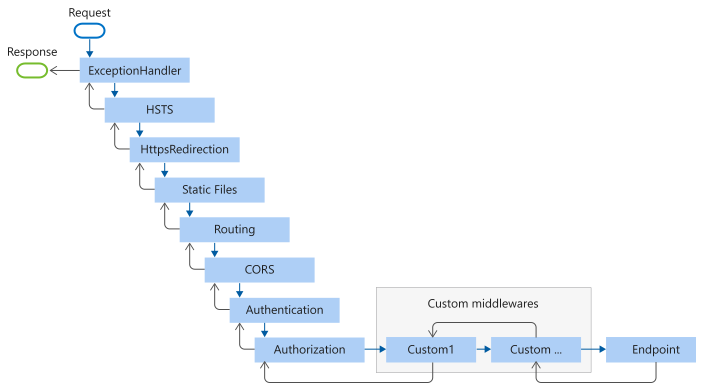
中间件安装一定顺寻构造成为请求处理管道,常见的处理管道如下所示:
实现 BeginRequest 和 EndRequest
理解了请求处理管道的原理,下面看它的一个应用。
在 ASP.NET 中我们可以使用预定义的 Begin_Request 和 EndRequest 处理步骤。
现在整个请求处理管道都是我们自己来进行构建了,那么怎么实现 Begin_Request 和 EndRequest 呢?使用中间件可以很容易实现它。
首先,这两个步骤是请求处理的第一个和最后一个步骤,显然,该中间件必须是第一个注册到管道中的。
所谓的 Begin_Request 就是在调用 next() 之间的处理了,而 End_Request 就是在调用 next() 之后的处理了。在 https://stackoverflow.com/questions/40604609/net-core-endrequest-middleware 中就有一个示例,我们将它修改一下,如下所示:
public class BeginEndRequestMiddleware

{

    private readonly RequestDelegate _next;

    public BeginEndRequestMiddleware(RequestDelegate next)

    {

        _next = next;

    }

    public void Begin_Request(HttpContext context) {

        // do begin request

    }

    public void End_Request(HttpContext context) {

        // do end request

    }

    public async Task Invoke(HttpContext context)

    {

        // Do tasks before other middleware here, aka 'BeginRequest'

        Begin_Request(context);

        // Let the middleware pipeline run

        await _next(context);

        // Do tasks after middleware here, aka 'EndRequest'

        End_Request();

    }

}
Register
public void Configure(IApplicationBuilder app)

{

    // 第一个注册

    app.UseMiddleware<BeginEndRequestMiddleware>();

    // Register other middelware here such as:

    app.UseMvc();

}
理解 ASP.NET Core: 处理管道的更多相关文章
- 如果你想深刻理解ASP.NET Core请求处理管道,可以试着写一个自定义的Server
我们在上面对ASP.NET Core默认提供的具有跨平台能力的KestrelServer进行了详细介绍(<聊聊ASP.NET Core默认提供的这个跨平台的服务器——KestrelServer& ...
- 用.Net Core控制台模拟一个ASP.Net Core的管道模型
在我的上几篇文章中降到了asp.net core的管道模型,为了更清楚地理解asp.net core的管道,再网上学习了.Net Core控制台应用程序对其的模拟,以加深映像,同时,供大家学习参考. ...
- ASP.NET Core HTTP 管道中的那些事儿
前言 马上2016年就要过去了,时间可是真快啊. 上次写完 Identity 系列之后,反响还不错,所以本来打算写一个 ASP.NET Core 中间件系列的,但是中间遇到了很多事情.首先是 NPOI ...
- asp.net core mvc 管道之中间件
asp.net core mvc 管道之中间件 http请求处理管道通过注册中间件来实现各种功能,松耦合并且很灵活 此文简单介绍asp.net core mvc中间件的注册以及运行过程 通过理解中间件 ...
- 理解ASP.NET Core - [01] Startup
注:本文隶属于<理解ASP.NET Core>系列文章,请查看置顶博客或点击此处查看全文目录 准备工作:一份ASP.NET Core Web API应用程序 当我们来到一个陌生的环境,第一 ...
- 理解ASP.NET Core - [02] Middleware
注:本文隶属于<理解ASP.NET Core>系列文章,请查看置顶博客或点击此处查看全文目录 中间件 先借用微软官方文档的一张图: 可以看到,中间件实际上是一种配置在HTTP请求管道中,用 ...
- 理解ASP.NET Core - [04] Host
注:本文隶属于<理解ASP.NET Core>系列文章,请查看置顶博客或点击此处查看全文目录 本文会涉及部分 Host 相关的源码,并会附上 github 源码地址,不过为了降低篇幅,我会 ...
- 理解ASP.NET Core - 路由(Routing)
注:本文隶属于<理解ASP.NET Core>系列文章,请查看置顶博客或点击此处查看全文目录 Routing Routing(路由):更准确的应该叫做Endpoint Routing,负责 ...
- 理解ASP.NET Core - 错误处理(Handle Errors)
注:本文隶属于<理解ASP.NET Core>系列文章,请查看置顶博客或[点击此处查看全文目录](https://www.cnblogs.com/xiaoxiaotank/p/151852 ...
随机推荐
- centos8安装kafka(单机方式)
一,下载kafka 1,官网地址 http://kafka.apache.org/downloads.html 2,下载 [root@localhost source]# wget http://mi ...
- centos8上安装mysql8
一,下载并解压mysql8 1,mysql官网 https://www.mysql.com/ 2,下载到source目录 [root@yjweb source]# wget https://cdn.m ...
- Go语言中Goroutine与线程的区别
1.什么是Goroutine? Goroutine是建立在线程之上的轻量级的抽象.它允许我们以非常低的代价在同一个地址空间中并行地执行多个函数或者方法.相比于线程,它的创建和销毁的代价要小很多,并且它 ...
- Python列表的增删改查
列表的增: li = ['libai','sushi','dufu','sushi',"白居易"] 第一种: append():向列表末尾追加元素 li.append('diaoc ...
- MySQL死锁系列-线上死锁问题排查思路
前言 MySQL 死锁异常是我们经常会遇到的线上异常类别,一旦线上业务日间复杂,各种业务操作之间往往会产生锁冲突,有些会导致死锁异常.这种死锁异常一般要在特定时间特定数据和特定业务操作才会复现,并且分 ...
- 源代码 VS 汇编代码 VS 目标代码 VS 字节码 VS 机器码
1.源代码(source code) 源代码就是平时我们开发的代码:比如C.Java.Python.Shell...等 public class HelloWorld { public static ...
- 趣谈多线程(Python版)
温馨提示:本文篇幅较长,建议读者耐心阅读,本文中的代码经过笔者精心构思,可以复制过去运行一下,观察输出结果,所有代码在python3.5.0中测试通过. 文章目录 What is 多线程? Why w ...
- Jmeter入门(6)- 参数化
一.什么是参数化 为什么要参数化? 在发送大量的请求时,键对值是写死的,每次请求都需要去修改,无法实现快速添加的需求.想要快速实现该需求,就需要用到参数化. 什么是参数化? 根据需求动态获取数据并进行 ...
- 3分钟学完Python,直接从入门到精通
作为帅气小编,我已经把python一些模块的甩在这儿了qwq,只要你拿到这些干货,包你玩转python,直接冲向"大佬"的段位,如果已经学了C或者C++或者说如果你需要你的一段关键 ...
- eclipse 开发常见问题集锦
问题1: eclipse导入外部项目,中文显示乱码(如下图) 方案:项目名-->右键属性-->如下图: 问题2: jsp/html页面eclipse双击打开,代码在工作区不显示(如下图:) ...