
CentOS 7关闭firewalld启用iptables 开放端口
在CentOS7中,有很多CentOS 6中的常用服务发生了变化。
其中iptables是其中比较大的一个。防火墙iptables被firewalld取代。
本文将介绍,如果采用systemctl关闭firewalld,开启iptables。
1.关闭firewalld
[root@hwcentos70-01 system]# systemctl stop firewalld

[root@hwcentos70-01 system]# systemctl disable firewalld

[root@hwcentos70-01 system]# systemctl status firewalld

firewalld.service - firewalld - dynamic firewall daemon

Loaded: loaded (/usr/lib/systemd/system/firewalld.service; disabled)

Active: inactive (dead)

Feb 26 13:48:00 hwcentos70-01 systemd[1]: Stopped firewalld - dynamic firewall daemon.

Feb 26 13:48:14 hwcentos70-01 systemd[1]: Starting firewalld - dynamic firewall daemon...

Feb 26 13:48:15 hwcentos70-01 systemd[1]: Started firewalld - dynamic firewall daemon.

Feb 26 13:49:23 hwcentos70-01 systemd[1]: Started firewalld - dynamic firewall daemon.

Feb 26 13:53:18 hwcentos70-01 systemd[1]: Stopping firewalld - dynamic firewall daemon...

Feb 26 13:53:18 hwcentos70-01 systemd[1]: Stopped firewalld - dynamic firewall daemon.
2.开启iptables
首先安装iptables:
[root@hwcentos70-01 system]#yum install -y iptables-services

[root@hwcentos70-01 system]# systemctl enable iptables

ln -s '/usr/lib/systemd/system/iptables.service' '/etc/systemd/system/basic.target.wants/iptables.service'

[root@hwcentos70-01 system]# systemctl start iptables

[root@hwcentos70-01 system]# systemctl status iptables

iptables.service - IPv4 firewall with iptables

Loaded: loaded (/usr/lib/systemd/system/iptables.service; enabled)

Active: active (exited) since Fri 2016-02-26 13:54:45 UTC; 6s ago

Process: 55539 ExecStart=/usr/libexec/iptables/iptables.init start (code=exited, status=0/SUCCESS)

Main PID: 55539 (code=exited, status=0/SUCCESS)

Feb 26 13:54:45 hwcentos70-01 iptables.init[55539]: iptables: Applying firewall rules: [ OK ]

Feb 26 13:54:45 hwcentos70-01 systemd[1]: Started IPv4 firewall with iptables.
此时iptables的命令都可以使用了:
[root@hwcentos70-01 system]# iptables -L

Chain INPUT (policy ACCEPT)

target prot opt source destination

Chain FORWARD (policy ACCEPT)

target prot opt source destination

Chain OUTPUT (policy ACCEPT)

target prot opt source destination

[root@hwcentos70-01 system]# service iptables save

iptables: Saving firewall rules to /etc/sysconfig/iptables:[ OK ]
3.开放5000端口
输入“vi /etc/sysconfig/iptables”,打开iptables的配置文件,输入之前按一下"i",然后添加一行"-A INPUT -m state --state NEW -m tcp -p tcp --dport 5000 -j ACCEPT",添加以后按一下ESC,输入":x",回车,就保存退出了
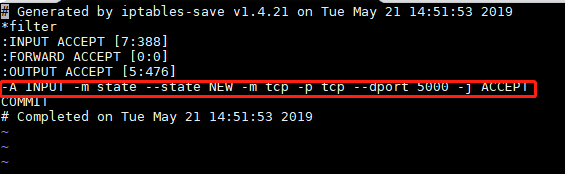
重启iptables,输入"service iptables restart",重启成功以后,,输入"service iptables status",回车,就会显示正在生效的规则
启动监听5000的应用程序
4.测试
cmd(命令提示符)窗口,使用telnet命令进行测试,命令"telnet+空格+服务器IP+空格+5000",可以连接就会直接跳转到一个空白的窗口,连不上就会卡住一段时间,然后提示错误

查看网页

CentOS 7关闭firewalld启用iptables 开放端口的更多相关文章
- CentOS 7关闭firewalld启用iptables
在CentOS7中,有很多CentOS 6中的常用服务发生了变化. 其中iptables是其中比较大的一个.防火墙iptables被firewalld取代. 本文将介绍,如果采用systemctl关闭 ...
- centos 7 关闭firewalld开启iptables
1: 关闭系统高级防火墙firewalld systemctl stop firewalld.service #停止firewall systemctl disable firewalld.servi ...
- [转载]CENTOS 6.0 iptables 开放端口80 3306 22端口
原文地址:6.0 iptables 开放端口80 3306 22端口">CENTOS 6.0 iptables 开放端口80 3306 22端口作者:云淡风轻 #/sbin/iptab ...
- 玩转Linux之- CentOS 7.0,启用iptables防火墙
原文 玩转Linux之- CentOS 7.0,启用iptables防火墙 CentOS 7.0默认使用的是firewall作为防火墙,这里改为iptables防火墙. 1.关闭firewall:sy ...
- Centos7防火墙关闭和启用iptables操作
https://yq.aliyun.com/ziliao/33590前序 还是docker惹得最近做的系统都是上的centos7的系统带来的一系列的新环境的适应 补记下:在使用oracle vmbox ...
- Centos7 防火墙关闭和启用iptables防火墙
操作系统环境:CentOS Linux release 7.0.1406(Core) 64位CentOS 7.0默认使用的是firewall作为防火墙,这里改为iptables防火墙步骤. 1.关闭f ...
- linux命令启动关闭firewalld防火墙,添加端口
firewalld管理防火墙常用命令 1.查看防火墙的状态 [root@localhost HMK]# firewall-cmd --state 查看防火墙的运行状态 not running [r ...
- Linux 防火墙iptables开放端口
Iptabels是与Linux内核集成的包过滤防火墙系统,几乎所有的linux发行版本都会包含Iptables的功能.如果 Linux 系统连接到因特网或 LAN.服务器或连接 LAN 和因特网的代理 ...
- CentOS 8 关闭 Firewalld 及 SELinux
检查 SELinux 是否开启 执行 sestatus 指令可以检视目前 SELinux 的状态, 其中一项是是否有开启, 执行以下指令: # sestatus | grep status 如果看到 ...
随机推荐
- 【poj 1988】Cube Stacking(图论--带权并查集)
题意:有N个方块,M个操作{"C x":查询方块x上的方块数:"M x y":移动方块x所在的整个方块堆到方块y所在的整个方块堆之上}.输出相应的答案. 解法: ...
- 【noi 2.6_2989】糖果(DP)
题意:求取到总和为K的倍数的糖果的最大值. 解法:用模K的余数作为一个维度,f[i][j]表示在前i种糖果中取到总颗数模K余j的最大总颗数. 注意--f[i-1][j]要正常转移,而其他要之前的状态存 ...
- 2020杭电多校 10C / HDU 6879 - Mine Sweeper (构造)
HDU 6879 - Mine Sweeper 题意 定义<扫雷>游戏的地图中每个空白格子的值为其周围八个格子内地雷的数量(即游戏内临近地雷数量的提示) 则一张地图的值\(S\)为所有空白 ...
- Codeforces Round #575 (Div. 3) D2. RGB Substring (hard version)
传送门 题意: 给你一个长为n的仅由'R','G','B'构成的字符串s,你需要在其中找出来一个子串.使得这个子串在"RGBRGBRGBRGB........(以RGB为循环节,我们称这个串 ...
- AtCoder Beginner Contest 182 D - Wandering (前缀和)
题意:在\(x\)轴上,你刚开始在\(0\)的位置,第\(i\)次操作需要走\(A_1,...,A_i\)个单位,如果\(A_i\)为正向右走,否则向左走,求你所能走到的最大坐标. 题解:我们一步一步 ...
- Codeforces Global Round 7 D2. Prefix-Suffix Palindrome (Hard version)(Manacher算法+输出回文字符串)
This is the hard version of the problem. The difference is the constraint on the sum of lengths of s ...
- Educational Codeforces Round 96 (Rated for Div. 2) D. String Deletion (思维)
题意:有一个\(01\)串,每次操作要先删除一个位置上的元素,然后删除相同前缀和,直到字符串被删完,问最多能操作多少次. 题解: 对于一个长度大于\(1\)的相同前缀,我们最多只能对它操作一次,然后就 ...
- 安装jdk并配置环境变量
安装jdk并配置环境变量 安装jdk 点击访问官网 https://www.oracle.com/downloads/或直接下载 https://www.jdkdownload.com/ 推荐使用后面 ...
- python xml转excle
<?xml version="1.0" encoding="UTF-8"?> <RECORDS xmlns:xsi="http:// ...
- Scratch & Flappy Turtle & Flappy Bird & Game
Scratch & Flappy Turtle & Flappy Bird & Game Flappy Turtle Game https://scratch.mit.edu/ ...