
python带颜色打印字符串
python带颜色打印字符串
之前调试pwn题的时候,有时候需要将某些特别的,重要的信息用不一样的颜色打印出来。查阅一些资料,了解了print函数的特性后,自己写了一个脚本,可以用来获取带颜色信息的字符串或者打印一串带颜色、背景色、下划线等的字符串。
脚本内容
#!/usr/bin/env python3

# -*- encoding: utf-8 -*-

'''

@File    : print_with_color.py

@Time    : 2021/03/07 12:41:35

@Author  : Lynne

@Email   : ch22166@163.com

@Desc    : None

'''

from functools import partial

class FontColor:

    BLACK = 30

    RED = 31

    GREEN = 32

    YELLO = 33

    BLUE = 34

    AMARANTH = 35

    CYAN = 36

    WHITE = 37

class BackgroundColor:

    NOCOLOR = -1

    BLACK = 40

    RED = 41

    GREEN = 42

    YELLO = 43

    BLUE = 44

    AMARANTH = 45

    CYAN = 46

    WHITE = 47

class TerminalMode:

    DEFAULT = 0

    HIGHLIGHT = 1

    UNDERLINE = 4

    TWINKLE = 5

    ANTI_WHITE = 7

    INVISIBLE = 8

def __check(font_color:int, background_color:int, terminal_mode:int) -> bool:

    b1 = (font_color >= FontColor.BLACK and font_color <= FontColor.WHITE)

    b2 = (background_color >= BackgroundColor.BLACK and background_color <= BackgroundColor.WHITE) or background_color == BackgroundColor.NOCOLOR

    b3 = (terminal_mode >= TerminalMode.DEFAULT and terminal_mode <= TerminalMode.INVISIBLE and terminal_mode != 2 and terminal_mode != 3 and terminal_mode != 6)

    return (b1 and b2 and b3)

def get_str_with_color(print_str:str, *,

                       font_color:int=FontColor.WHITE,

                       background_color:int=BackgroundColor.NOCOLOR,

                       terminal_mode:int=TerminalMode.DEFAULT)-> str:

    """Decorate a string with color

    Args:

        print_str (str): The str you want to modify.

        font_color (int, optional): Font color. Defaults to FontColor.WHITE.

        background_color (int, optional): Background color. Defaults to BackgroundColor.NOCOLOR.

        terminal_mode (int, optional): terminal mode. Defaults to TerminalMode.DEFAULT.

    Returns:

        str: A string with elaborate decoration.

    """

    check = __check(font_color, background_color, terminal_mode)

    if not check:

        print('\033[1;31;47mWARNING: Failure to set color!\033[0m')

        return print_str

    if background_color == BackgroundColor.NOCOLOR:

        background_color = ''

    else:

        background_color = ';'+str(background_color)

    res_str = '\033[{};{}{}m{}\033[0m'.format(terminal_mode, font_color, background_color, print_str)

    return res_str

def print_color(print_str:str, *,

                font_color:int=FontColor.WHITE,

                background_color:int=BackgroundColor.NOCOLOR,

                terminal_mode:int=TerminalMode.DEFAULT):

    """print a string with color

    Args:

        print_str (str): The str you want to modify.

        font_color (int, optional): Font color. Defaults to FontColor.WHITE.

        background_color (int, optional): Background color. Defaults to BackgroundColor.NOCOLOR.

        terminal_mode (int, optional): terminal mode. Defaults to TerminalMode.DEFAULT.

    """

    print(get_str_with_color(print_str, font_color=font_color, background_color=background_color, terminal_mode=terminal_mode))

# make rgb print func

print_red = partial(print_color,

                    font_color=FontColor.RED,

                    background_color=BackgroundColor.NOCOLOR,

                    terminal_mode=TerminalMode.DEFAULT)

print_green = partial(print_color,

                    font_color=FontColor.GREEN,

                    background_color=BackgroundColor.NOCOLOR,

                    terminal_mode=TerminalMode.DEFAULT)

print_blue = partial(print_color,

                    font_color=FontColor.BLUE,

                    background_color=BackgroundColor.NOCOLOR,

                    terminal_mode=TerminalMode.DEFAULT)

if __name__ == '__main__':

    print('Original print: lynne')

    print_red('Print with red font: lynne')

    print_green('Print with green font: lynne')

    print_blue('Print with blue font:lynne')

    print_color('Print with cyan font, blue background and underline: lynne', font_color=FontColor.CYAN, background_color=BackgroundColor.BLUE, terminal_mode=TerminalMode.UNDERLINE)
在控制台的打印效果如下:
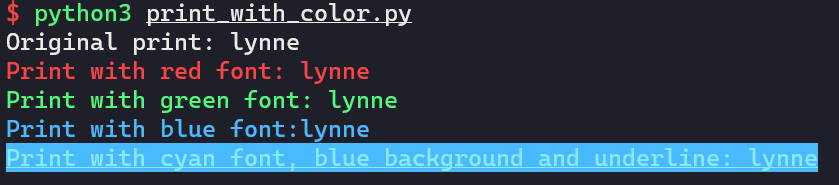
使用
- get_str_with_color:获取带颜色信息的字符串
- print_color:带颜色打印字符串
- print_red/print_green/print_blue:自已定义一些偏函数,方便使用
python带颜色打印字符串的更多相关文章
- linux下printf打印带颜色的字符串
转载:http://blog.chinaunix.net/uid-28917424-id-3889917.html 前不久就在某位同学的博客里看到,但是今天找了好久没找到,就直接google了,现贴出 ...
- python 带颜色样式打印到终端
#!/usr/bin/python # -*- coding: utf-8 -*- """ Created on Tue Aug 8 17:01:54 2017 @aut ...
- python3使用print打印带颜色的字符串
一.实现过程 终端的字符颜色是用转义序列控制的,是文本模式下的系统显示功能,和具体的语言无关 转义序列是以ESC开头,即用\033来完成(ESC的ASCII码用十进制表示是27,用八进制表示就是033 ...
- 在Linux中让打印带颜色的字
echo显示带颜色,需要使用参数-e 格式如下: echo -e "\033[字背景颜色;文字颜色m字符串\033[0m" 例如: echo -e "\033[41;37 ...
- Python_服务器与多客户端通信、UDP协议、pycharm打印带颜色输出、时间同步的机制
1.服务器与多客户端通信 import socket # 创建tcp socket的套接字 sk = socket.socket() # bind sk.bind(('127.0.0.1',8080) ...
- Python 入门 之 print带颜色输出
Python 入门 之 print带颜色输出 1.print带颜色输出书写格式: 开头部分: \033[显示方式; 前景色 ; 背景色 m 结尾部分: \033[0m 详解: 开头部分的三个参数: 显 ...
- DAY4(python)打印字符串以及增删改查
用while循环打印字符串 #if i in s: # print ( i ) s='nanfjkhndaol' index = 0 while 1 : print (s[index]) index+ ...
- 百万年薪python之路 -- 带颜色的print
带颜色的print print输出带颜色的方法详解 书写格式: 开头部分:\033[显示方式;前景色;背景色m + 结尾部分:\033[0m 注意:开头部分的三个参数:显示方式,前景色,背景色是可 ...
- python 输出颜色的与样式的方法
上次遇到这个问题就想写下来,其实当时我也不怎么会,老师说这个东西不需要理解,只需要死记硬背,写的多了就记住了,所以今天搜集了几篇文章,加上自己的理解,写下了这篇python 输出颜色的样式与方法的文章 ...
随机推荐
- Codeforces #637 div2 B. Nastya and Door
题意:给你一个数组a,定义:若a[i]>a[i]&&a[i]>a[i-1],则a[i]为峰值,求长度为k的区间内峰值最多能为多少,并输出这个区间的左端点(区间需要将峰的左边 ...
- c++虚函数、子类中调用父类方法
全部 代码: 1 #include<stdio.h> 2 #include<string.h> 3 #include<iostream> 4 #include< ...
- XHXJ's LIS HDU - 4352 最长递增序列&数位dp
代码+题解: 1 //题意: 2 //输出在区间[li,ri]中有多少个数是满足这个要求的:这个数的最长递增序列长度等于k 3 //注意是最长序列,可不是子串.子序列是不用紧挨着的 4 // 5 // ...
- VMware虚拟化与Kubernetes(K8s)类比阐述-适合VMware用户
概述 容器技术是最近几年非常热门的技术,它似乎就是为云端的应用量身定制的,所以它也被贴上了云原生应用 (Cloud Native Application) 技术的标签.目前最为流行的容器管理调度平台是 ...
- L3-002. 堆栈【主席树 or 线段树 or 分块】
L3-002. 堆栈 时间限制 200 ms 内存限制 65536 kB 代码长度限制 8000 B 判题程序 Standard 作者 陈越 大家都知道"堆栈"是一种"先 ...
- HTML a Tag All In One
HTML a Tag All In One HTML <a> target https://developer.mozilla.org/en-US/docs/Web/HTML/Elemen ...
- React Hooks: useReducer All In One
React Hooks: useReducer All In One useReducer https://reactjs.org/docs/hooks-reference.html#usereduc ...
- Android 开启 WebView 页面 Chrome debug
Android 开启 WebView 页面 Chrome debug WebView debug // 开启 WebView 页面 debug testWebView.setWebContentsDe ...
- App Store Previewer
App Store Previewer App Store 模拟器 https://www.storepreviewer.com/ xgqfrms 2012-2020 www.cnblogs.com ...
- vue农历日历
<template> <div class="calendar-main"> <div class="choose_year"&g ...