
HighCharts中几种tooltip的显示格式
推荐学习地址 => https://www.hcharts.cn/docs/basic-tooltip
https://api.hcharts.cn/#Highcharts.numberFormat
这里给出两个常用的例子
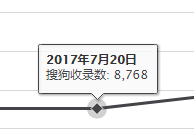
1.折线图横坐标为时间轴时,想显示成

.ts中相关highcharts配置:
             $scope.overviewChart = <HighChartsNGConfig>{

                 options: {

                     title: {

                         text: ``

                     },

                     chart: {

                         type: 'line'

                     },

                     yAxis: {

                         min: 0,

                         title: { text: null },

                         labels: {

                             formatter: function () {

                                 return this.value + "%";

                             }

                         }

                     },

                     xAxis: {

                         type: "datetime",

                         dateTimeLabelFormats: {

                             day: '%b/%e',

                             month: '%y年%b月',

                             week: '%b/%e',

                             year: '%Y年',

                             millisecond: '%b/%e',

                         }

                         // dateTimeLabelFormats: { // don't display the dummy year

                         //     month: '%e. %b',

                         //     year: '%b'

                         // },

                     },

                     tooltip: {

                         formatter: function () {

                             var d = new Date(this.x);

                             var s = '<b>' + d.getFullYear() + '年' + (d.getMonth() + 1) + '月' + d.getDate() + '日' + '</b>';

                             s += '<br/><span style="color:' + this.point.series.color + '">' + this.point.series.name + ': ' +

                                 this.point.y.toFixed(2) + '%' + ' </span>';

                             return s;

                         }

                     },

                     legend: {

                         enabled: true

                     },

                 },

             }
2. tootip想把数字显示成带有千位符号的,如这样:
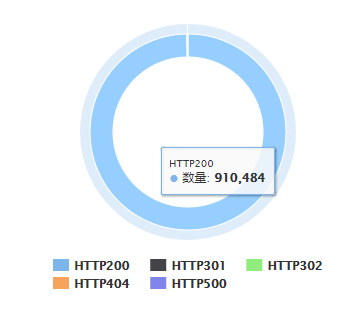
饼图的配置代码
             //图中数字显示成带千位符号的

             Highcharts.setOptions({

                 lang: {

                     thousandsSep: ','

                 }

             });

             //http code概念饼图

             $scope.pieChart = <HighChartsNGConfig>{

                 options: {

                     title: {

                         text: ``

                     },

                     chart: {

                         type: 'pie',

                         height: 300,

                     },

                     tooltip: {

                         // headerFormat: '{point.name}<br>',

                         // pointFormat: '{series.name}: <b>{point.y}%</b>'

                     },

                     plotOptions: {

                         pie: {

                             innerSize: 150,

                             allowPointSelect: true,

                             cursor: 'pointer',

                             dataLabels: {

                                 enabled: false,

                             },

                             showInLegend: true

                         }

                     },

                 },

                 loading: false

             };
HighCharts中几种tooltip的显示格式的更多相关文章
- HighCharts中的无主题的2D折线图
HighCharts中的无主题的2D折线图 1.设计源码 <!DOCTYPE html> <html> <head> <meta charset=" ...
- HighCharts中的Ajax请求的2D折线图
HighCharts中的Ajax请求的2D折线图 设计源码: <!DOCTYPE html> <html> <head> <meta charset=&quo ...
- asp.net mvc 中 一种简单的 URL 重写
asp.net mvc 中 一种简单的 URL 重写 Intro 在项目中想增加一个公告的功能,但是又不想直接用默认带的那种路由,感觉好low逼,想弄成那种伪静态化的路由 (别问我为什么不直接静态化, ...
- jsp中两种include的区别【转】
引用文章:http://www.ibm.com/developerworks/cn/java/j-jsp04293/ http://www.cnblogs.com/lazycoding/archive ...
- Java中四种引用:强、软、弱、虚引用
这篇文章非常棒:http://alinazh.blog.51cto.com/5459270/1276173 Java中四种引用:强.软.弱.虚引用 1.1.强引用当我们使用new 这个关键字创建对象时 ...
- [转]C++中四种类型转换符的总结
C++中四种类型转换符的总结 一.reinterpret_cast用法:reinpreter_cast<type-id> (expression) reinterpret_cast操 ...
- iOS开发UI篇—iOS开发中三种简单的动画设置
iOS开发UI篇—iOS开发中三种简单的动画设置 [在ios开发中,动画是廉价的] 一.首尾式动画 代码示例: // beginAnimations表示此后的代码要“参与到”动画中 [UIView b ...
- 计算DNA中每种核苷酸的数目
问题描述:计算DNA中每种核苷酸的数目 输入文件内容: 代码: 输出结果:
- protobuf-net 与 C#中几种序列化的比较
C#中几种序列化的比较,此次比较只是比较了 序列化的耗时和序列后文件的大小. 几种序列化分别是: 1. XmlSerializer 2. BinaryFormatter 3. DataContract ...
随机推荐
- 利用login-path对MySQL安全加固
Preface Connection security is one of the most important safety strategies which we should ...
- python核心编程2 第十三章 练习
13-3.对类进行定制.写一个类,用来将浮点型值转换为金额. class MoneyFmt(object): def __init__(self, value=0.0, flag='-'): self ...
- 【基于不同设备厂商在处理vlan之间通信配置例子】
H3C: Dot1q子接口实现vlan之间的通信 一:根据项目需求搭建好拓扑图如下: 二:配置 HUAWEI: CISCO
- MySql外键建立在哪里(更新)
一对一的时候:分为主表和附表 外键建立在附件上 附表的外键关联到主表的主键上,Example:学生表和学生信息表,在学生信息表上建立外键 一对多的时候:分为一和多 外键建立在多上 Exampl ...
- 【Js】Jquery遍历-each(function(e){})中的e和$(this)的区别
$("selector").each(function(e){ console.log($(e)); console.log($(this)); console.log(e); c ...
- Hadoop(3)-Hadoop介绍
Hadoop三大发行版本 Hadoop三大发行版本:Apache.Cloudera.Hortonworks. Apache版本最原始(最基础)的版本,对于入门学习最好. Cloudera在大型互联网企 ...
- JAVA判断时间是否在时间区间内
package com.liying.tiger.test; import java.text.ParseException; import java.text.SimpleDateFormat; i ...
- Linux中的目录功能(Red Hat 7)
目录的基本功能: /bin:存放普通用户使用的命令 /sbin:存放管理员可以执行的命令 /home:存放普通的家目录 如张三家目录为/home/zhangsan /root:管理员的家目录 /etc ...
- FIFO队列(First In First Out)和优先队列
queue<类型名> q; q.size() - 返回队列中元素个数 q.empty() - 若队列为空,返回true ,否则返回false q.pop() - 删除队首元素,但不返回其值 ...
- HDU 1495 非常可乐 (只是转了个弯的广搜题)
N - 非常可乐 =========================================================================================== ...