
bug-android之app:mergeDebugResources
bug描述:Error:Execution failed for task ':app:mergeDebugResources'. > Crunching Cruncher seekbar_thumb_normal.png failed, see logs
解决方法:
1.在build.gradle里添加以下两句:
aaptOptions.cruncherEnabled = false
aaptOptions.useNewCruncher = false
例如:
android {
    compileSdkVersion 23
    buildToolsVersion "23.0.3"
    aaptOptions.cruncherEnabled = false
    aaptOptions.useNewCruncher = false

    defaultConfig {
        applicationId "com.phone.app.phone"
        minSdkVersion 19
        targetSdkVersion 23
        versionCode 1
        versionName "1.0"
    }
    buildTypes {
        release {
            minifyEnabled false
            proguardFiles getDefaultProguardFile('proguard-android.txt'), 'proguard-rules.pro'
        }
    }
}
,就直接添加到buildToolsVersion的下方即可,然后你再看再将这两项的属性值添加到配置文件中,如下图:
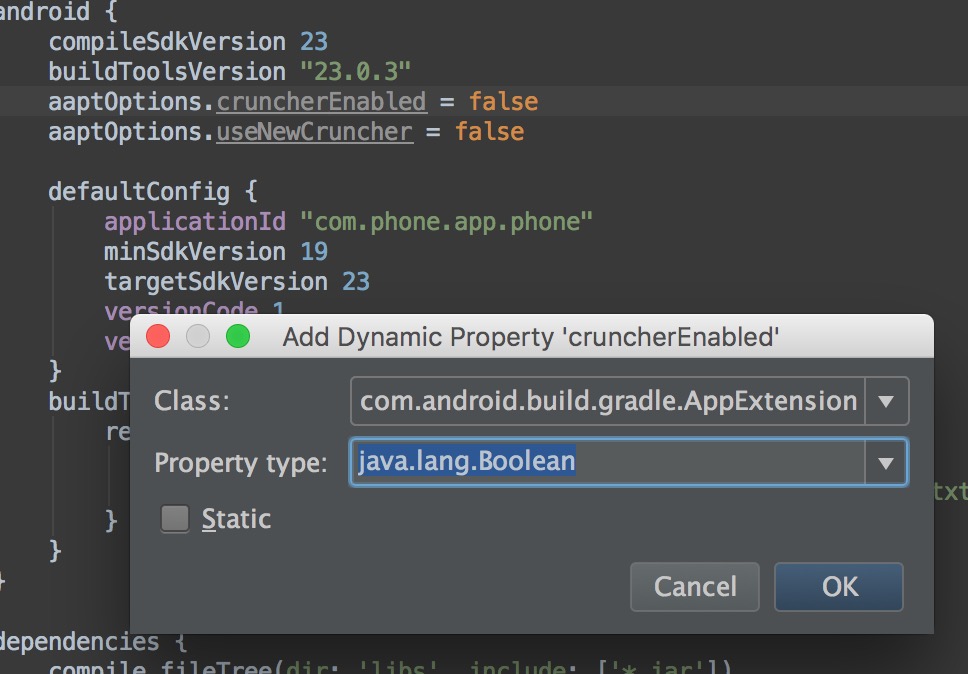
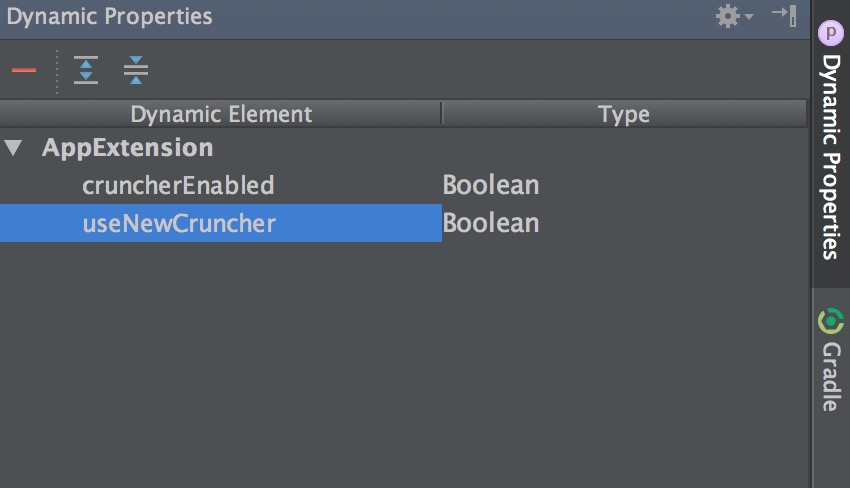
这样再次运行就OK了,这两句的意思是:用来关闭Android Studio的PNG合法性检查的,直接不让它检查!!!
2.就是只有改png图片了 ,国内论坛一个个全叫人改图的真是有点扯淡,如果几百张图片,那还不疯了?
bug-android之app:mergeDebugResources的更多相关文章
- Error:Execution failed for task ':app:mergeDebugResources'. > Some file crunching failed, see logs for details
Android Studio 编译中断.... Error:Execution failed for task ':app:mergeDebugResources'. > Some file c ...
- Error:Execution failed for task ':app:mergeDebugResources'. > Crunching Cruncher ******.9.png
有时候在Android Studio导入Eclipse项目时,会出现Error:Execution failed for task ':app:mergeDebugResources'. > C ...
- react-native 异常处理 Execution failed for task ':app:mergeDebugResources'.
1.react-native run-android 失败 * What went wrong:Execution failed for task ':app:mergeDebugResources' ...
- Error:Execution failed for task ':app:mergeDebugResources'. > Some file crunching failed, see logs f
今天调试安卓程序遇到的问题Error:Execution failed for task ':app:mergeDebugResources'. > Some file crunching fa ...
- Cordova 打包 Android release app 过程详解
Cordova 打包 Android release app 过程详解 时间 -- :: SegmentFault 原文 https://segmentfault.com/a/119000000517 ...
- 【Android端 APP GPU过度绘制】GPU过度绘制及优化
一.Android端的卡顿 Android端APP在具体使用的过程中容易出现卡顿的情况,比如查看页面时出现一顿一顿的感受,切换tab之后响应很慢,或者具体滑动操作的时候也很慢. 二.卡顿的原因 卡顿的 ...
- 分享我开发的网络电话Android手机APP正式版,图文详解及下载
分享我开发的网络电话Android手机APP正式版,图文详解及下载 分享我开发的网络电话Android手机APP正式版 实时语音通讯,可广域网实时通讯,音质清晰流畅! 安装之后的运行效果: 第一次安装 ...
- Android开发App工程结构搭建
本文算是一篇漫谈,谈一谈关于android开发中工程初始化的时候如何在初期我们就能搭建一个好的架构. 关于android架构,因为手机的限制,目前我觉得也确实没什么大谈特谈的,但是从开发的角 ...
- Android_bug之 task ':app:mergeDebugResources'. > Some file crunching failed, see logs f
今天调试安卓程序遇到的问题Error:Execution failed for task ':app:mergeDebugResources'. > Some file crunching fa ...
随机推荐
- Apache 使用localhost(127.0.0.1)可以访问 但是使用本机IP(局域网)不能访问
- BIOS设置教程
BIOS设置图解教程之AMI篇 BIOS设置图解教程之AMI篇(目前主板上常见的BIOS主要为AMI与AWARD两个系列,如何辨别BIOS品牌系列请移步,本文详细讲解AMI系列的BIOS设置图解教程, ...
- CodeForces 716A Crazy Computer
题目链接:http://codeforces.com/problemset/problem/716/A 题目大意: 输入 n c, 第二行 n 个整数,c表示时间间隔 秒. 每个整数代表是第几秒.如果 ...
- setTimeout不断重复执行
setTimeout() 方法用于在指定的毫秒数后调用函数或计算表达式. setTimeout(code,millisec) code 必需.要调用的函数后要执行的 JavaScript 代码串. ...
- border设置不占用宽度
经常我们设置好了DIV或其他标签的宽度,但是一加边框,宽度就又增加了,尤其是用百分比的时候,宽度控制不好真是麻烦! 如下有一解决办法,代码如下,(新属性,兼容性不好,手机端.谷歌.火狐测试可以) -w ...
- yii2嵌入微信公众号支付
原文地址:https://segmentfault.com/a/1190000005114556
- 使用Fluent API 配置/映射属性和类型
Code First约定-Fluent API配置 使用Fluent API 配置/映射属性和类型 简介 通常通过重写派生DbContext 上的OnModelCreating 方法来访问Code F ...
- JS网页顶部进度条demo
<html> <head> <meta http-equiv="Content-Type" content="text/html; char ...
- 再说vim的tab设置
首先, vim的设置允许简写 // 单击一次tab,停靠, 停止在 4个spaces距离处 set tabstop=4 , 可以简写为: set ts=4 // 允许将tab转换为空格 turn ta ...
- Linux服务器管理: RPM包
服务安装类型主要分两种: RPM安装和源码包编译安装: 1.RPM包查看: rpm -qa | grep 包名 用chkconfig --list 查看服务自启动命令 只对RPM包安装的服务生效 ...