
06 使用bbed修复update的数据--01
场景1
表t3
SQL> select * from t3;

    ID NAME

---------- --------------------

     1 aaa

     2 bbbb
SQL> update t3 set name='cccc' where name='bbbb'; ###这里更新值长度相同

1 row updated.

SQL> commit;

Commit complete.

SQL> alter system flush buffer_cache;

System altered.
BBED> set file 5 block 2207

    FILE#              5

    BLOCK#             2207

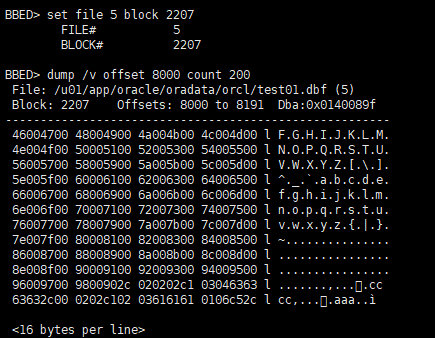
BBED> dump /v offset 8000 count 200

 File: /u01/app/oracle/oradata/orcl/test01.dbf (5)

 Block: 2207    Offsets: 8000 to 8191  Dba:0x0140089f

-------------------------------------------------------

 46004700 48004900 4a004b00 4c004d00 l F.G.H.I.J.K.L.M.

 4e004f00 50005100 52005300 54005500 l N.O.P.Q.R.S.T.U.

 56005700 58005900 5a005b00 5c005d00 l V.W.X.Y.Z.[.\.].

 5e005f00 60006100 62006300 64006500 l ^._.`.a.b.c.d.e.

 66006700 68006900 6a006b00 6c006d00 l f.g.h.i.j.k.l.m.

 6e006f00 70007100 72007300 74007500 l n.o.p.q.r.s.t.u.

 76007700 78007900 7a007b00 7c007d00 l v.w.x.y.z.{.|.}.

 7e007f00 80008100 82008300 84008500 l ~...............

 86008700 88008900 8a008b00 8c008d00 l ................

 8e008f00 90009100 92009300 94009500 l ................

 96009700 9800902c 020202c1 03046363 l .......,..cc

 63632c00 0202c102 03616161 0106c52c l cc,...aaa..ì  ####把bbbb的值更新为cccc

2c1030463636363---cccc

2c10203616161--aaa

BBED> p kdbr

sb2 kdbr[]                                 @118      8078

sb2 kdbr[]                                 @120      8067

BBED> p *kdbr[]

rowdata[]

----------

ub1 rowdata[]                              @8167     0x2c

BBED> x/rncccccc

rowdata[]                                  @8167    =8067+100

----------

flag@8167: 0x2c (KDRHFL, KDRHFF, KDRHFH)

lock@8168: 0x02

cols@8169:    2

col    0[] @8170: 2

col    1[] @8173: cccc  ####把bbbb的值更新为cccc
更新前后值的长度相同,在原位置进行更新
例2 修改值之后的长度大于之前的值长度
SQL> select * from t3;

    ID NAME

---------- --------------------

     1 aaa

     2 cccc

SQL> update t3 set name='dddddd' where name='cccc'; ###更新的值的长度变长

1 row updated.

SQL> commit;

Commit complete.

SQL>  alter system flush buffer_cache;

System altered.
BBED> set file 5 block 2207

    FILE#              5

    BLOCK#             2207

BBED> p kdbr

sb2 kdbr[]                                 @118      8078

sb2 kdbr[]                                 @120      8054

BBED> p *kdbr[]

rowdata[]

----------

ub1 rowdata[]                              @8154     0x2c

BBED> x/rncccccc

rowdata[]                                  @8154

----------

flag@8154: 0x2c (KDRHFL, KDRHFF, KDRHFH)

lock@8155: 0x01

cols@8156:    2

col    0[] @8157: 2 ###id=2

col    1[] @8160: dddddd  ##值更新为dddddd

BBED> dump /v offset 8000 count 200

 File: /u01/app/oracle/oradata/orcl/test01.dbf (5)

 Block: 2207    Offsets: 8000 to 8191  Dba:0x0140089f

-------------------------------------------------------

 46004700 48004900 4a004b00 4c004d00 l F.G.H.I.J.K.L.M.

 4e004f00 50005100 52005300 54005500 l N.O.P.Q.R.S.T.U.

 56005700 58005900 5a005b00 5c005d00 l V.W.X.Y.Z.[.\.].

 5e005f00 60006100 62006300 64006500 l ^._.`.a.b.c.d.e.

 66006700 68006900 6a006b00 6c006d00 l f.g.h.i.j.k.l.m.

 6e006f00 70007100 72007300 74007500 l n.o.p.q.r.s.t.u.

 76007700 78007900 7a007b00 7c007d00 l v.w.x.y.z.{.|.}.

 7e007f00 80008100 82008300 84008500 l ~...............

 86008700 88008900 8a008b00 8c008d00 l ................

 8e008f00 90009100 92002c01 0202c103 l ..........,..

 06646464 6464642c 000202c1 03046363 l .dddddd,...cc   ###这里cccc的值还在,新的值dddddd放在后面的位置

 63632c00 0202c102 03616161 0106462d l cc,...aaa..F-

 <16 bytes per line>

SQL> select dump('d','') from dual;

DUMP('D','')

----------------

Typ=96 Len=1: 64

SQL> select * from t3;

    ID NAME

---------- --------------------

     1 aaa

     2 dddddd

2c10306646464646464---dddddd ###新增加记录

2c1030463636363---cccc ###修改之后,这个值没变

2c10203616161 ---aaa

测试通过bbed把dddddd的值修改回ccccc,而不使用update命令
原来cccc的位置

SQL> select to_char(8067,'xxxxxxxxxxxxxx') from dual;

TO_CHAR(8067,'X

---------------

       1f83

SQL> select to_char(8054,'xxxxxxxxxx') from dual;

TO_CHAR(805

-----------

       1f76

新值dddddd的位置 76,修改为旧值cccc位置83

BBED> modify /x 83 offset 120

Warning: contents of previous BIFILE will be lost. Proceed? (Y/N) y

 File: /u01/app/oracle/oradata/orcl/test01.dbf (5)

 Block: 2207             Offsets:  120 to  319           Dba:0x0140089f

------------------------------------------------------------------------

 831f0000 00000000 00000000 00000000 00000000 00000000 00000000 00000000

 00000000 00000000 00000000 00000000 00000000 00000000 00000000 00000000

 00000000 00000000 00000000 00000000 00000000 00000000 00000000 00000000

 00000000 00000000 00000000 00000000 00000000 00000000 00000000 00000000

 00000000 00000000 00000000 00000000 00000000 00000000 00000000 00000000

 00000000 00000000 00000000 00000000 00000000 00000000 00000000 00000000

 00000000 00000000

 <32 bytes per line>

BBED> sum apply

Check value for File 5, Block 2207:

current = 0x2191, required = 0x2191

修改事务槽
BBED> dump /v offset 8168

 File: /u01/app/oracle/oradata/orcl/test01.dbf (5)

 Block: 2207    Offsets: 8168 to 8191  Dba:0x0140089f

-------------------------------------------------------

 000202c1 03046363 63632c00 0202c102 l ...cccc,..  ####cccc事务槽位00

 03616161 0106462d                   l .aaa..F-

 <16 bytes per line>

BBED> dump /v offset 8155

 File: /u01/app/oracle/oradata/orcl/test01.dbf (5)

 Block: 2207    Offsets: 8155 to 8191  Dba:0x0140089f

-------------------------------------------------------

 010202c1 03066464 64646464 2c000202 l ...dddddd,...  ####dddddd事务槽的值为01

 c1030463 6363632c 000202c1 02036161 l.cccc,...aa

 61010646 2d                         l a..F-

 <16 bytes per line>

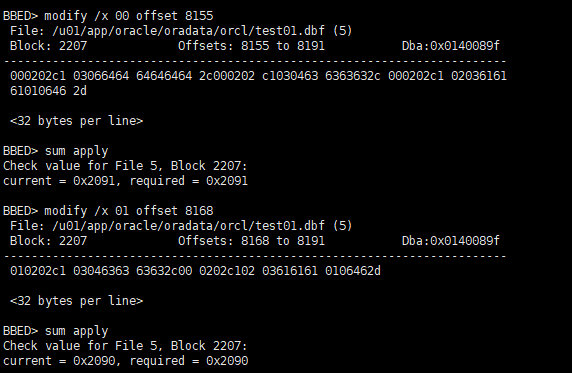
BBED> modify /x 00 offset 8155 ##修改dddddd事务槽为00

 File: /u01/app/oracle/oradata/orcl/test01.dbf (5)

 Block: 2207             Offsets: 8155 to 8191           Dba:0x0140089f

------------------------------------------------------------------------

 000202c1 03066464 64646464 2c000202 c1030463 6363632c 000202c1 02036161

 61010646 2d

 <32 bytes per line>

BBED> sum apply

Check value for File 5, Block 2207:

current = 0x2091, required = 0x2091

BBED> modify /x 01 offset 8168 ##修改cccc事务槽为01

 File: /u01/app/oracle/oradata/orcl/test01.dbf (5)

 Block: 2207             Offsets: 8168 to 8191           Dba:0x0140089f

------------------------------------------------------------------------

 010202c1 03046363 63632c00 0202c102 03616161 0106462d

 <32 bytes per line>

BBED> sum apply

Check value for File 5, Block 2207:

current = 0x2090, required = 0x2090
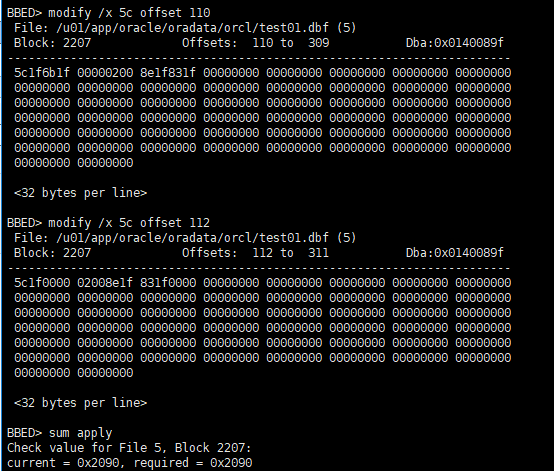
有效空间设置(这一块的值和位置没有搞明白)
BBED> modify /x 5c offset 110

 File: /u01/app/oracle/oradata/orcl/test01.dbf (5)

 Block: 2207             Offsets:  110 to  309           Dba:0x0140089f

------------------------------------------------------------------------

 5c1f6b1f 00000200 8e1f831f 00000000 00000000 00000000 00000000 00000000

 00000000 00000000 00000000 00000000 00000000 00000000 00000000 00000000

 00000000 00000000 00000000 00000000 00000000 00000000 00000000 00000000

 00000000 00000000 00000000 00000000 00000000 00000000 00000000 00000000

 00000000 00000000 00000000 00000000 00000000 00000000 00000000 00000000

 00000000 00000000 00000000 00000000 00000000 00000000 00000000 00000000

 00000000 00000000

 <32 bytes per line>

BBED> modify /x 5c offset 112

 File: /u01/app/oracle/oradata/orcl/test01.dbf (5)

 Block: 2207             Offsets:  112 to  311           Dba:0x0140089f

------------------------------------------------------------------------

 5c1f0000 02008e1f 831f0000 00000000 00000000 00000000 00000000 00000000

 00000000 00000000 00000000 00000000 00000000 00000000 00000000 00000000

 00000000 00000000 00000000 00000000 00000000 00000000 00000000 00000000

 00000000 00000000 00000000 00000000 00000000 00000000 00000000 00000000

 00000000 00000000 00000000 00000000 00000000 00000000 00000000 00000000

 00000000 00000000 00000000 00000000 00000000 00000000 00000000 00000000

 00000000 00000000

 <32 bytes per line>

BBED> sum apply

Check value for File 5, Block 2207:

current = 0x2090, required = 0x2090

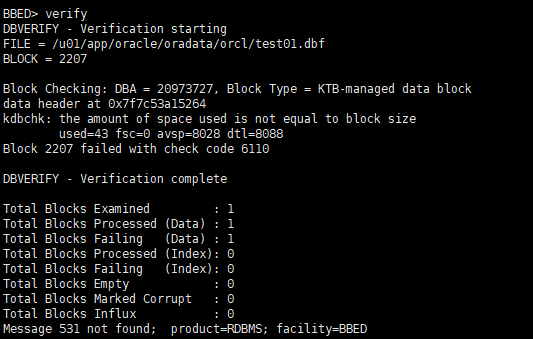
BBED> verify

DBVERIFY - Verification starting

FILE = /u01/app/oracle/oradata/orcl/test01.dbf

BLOCK = 2207

Block Checking: DBA = 20973727, Block Type = KTB-managed data block

data header at 0x7f7c53a15264

kdbchk: the amount of space used is not equal to block size

        used=43 fsc=0 avsp=8028 dtl=8088

Block 2207 failed with check code 6110

DBVERIFY - Verification complete

Total Blocks Examined         : 1

Total Blocks Processed (Data) : 1

Total Blocks Failing   (Data) : 1

Total Blocks Processed (Index): 0

Total Blocks Failing   (Index): 0

Total Blocks Empty            : 0

Total Blocks Marked Corrupt   : 0

Total Blocks Influx           : 0

Message 531 not found;  product=RDBMS; facility=BBED
SQL> alter system flush buffer_cache;

System altered.

SQL> select * from t3; ##没有使用update命令,只用bbed把dddddd的值修改回cccc

    ID NAME

---------- --------------------

     1 aaa

     2 cccc
06 使用bbed修复update的数据--01的更多相关文章
- 06 使用bbed修复delete的数据--01
06 使用bbed修复delete的数据--01 根据rowid查看数据文件和block号 SYS@ orcl ; ROWID ID NAME FILE# BLOCK# --------------- ...
- 06 使用bbed提交delete的数据--01
使用bbed模拟delete提交操作 --session 1 TEST@ orcl )); Table created. TEST@ orcl ,'AAAAA'); row created. TEST ...
- 使用bbed编辑研究oracle数据块结构
bbed是随oracle软件公布的一款数据块查看和编辑工具,作为一款内部工具.bbed的功能很强大,可是假设使用不当可能给数据库造成无法挽回的损失.因此.我们建议在使用bbed改动数据块前备份被改动的 ...
- 04 bbed修复system文件头损坏
04 bbed修复system文件头损坏 1 启动数据库,查看trace,在mount到open, SQL> startup mount; ORACLE instance started. To ...
- 利用BBED恢复UPDATE改动前的值
转载请注明出处:http://blog.csdn.net/guoyjoe/article/details/30615151 实验步骤例如以下: 1.创建表guo_test1 gyj@PROD> ...
- phalcon: update修改数据却变成了insert插入数据
phalcon: 在对表进行操作是,update修改数据却变成了insert插入数据. 发现,update的时,无论怎么加where都会变成了insert插入数据. 检查了一下表,原来是表没有 主键引 ...
- SQL中使用UPDATE更新数据时一定要记得WHERE子句
我们在使用 SQL 中的 UPDATE 更新数据时,一般都不会更新表中的左右数据,所以我们更新的数据的 SQL 语句中会带有 WHERE 子句,如果没有WHERE子句,就回更新表中所有的数据,在 my ...
- SQL中CRUD C——create 添加数据 R——read 读取数据 U——update 修改数据 D——delete 删除数据
在SQL server中对数据库的操作: 删除表:drop table 表名修改表:alter table 表名 添加列add 列名 列类型alter table 表名 drop column 列名 ...
- update改数据详解
update修改数据的要素 : 改哪张表? 改哪几列的值? 分别改成什么值? 在哪些行生效?(这个很重要,否则所有行都会受影响) mysql> update class ; where 表达式 ...
随机推荐
- 【学习总结】快速上手Linux玩转典型应用-第7章-WebServer安装和配置讲解
课程目录链接 快速上手Linux玩转典型应用-目录 目录 1. Apache的安装 2. Apache的虚拟主机配置及伪静态操作 3. Nginx的基本操作 4. Nginx伪静态的实现 5. 实例演 ...
- gulp程序怎么跑起来 及 使用中遇到的常见错误
gulp常见问题 问题一:Error: cannot find module 'gulp-concat' #16 解答:需要先npm install,然后执行gulp gulp安装及使用 一.安装no ...
- windows_vs编译过程
visual studio 2010 编译程序时,首先是cpp经过预处理,处理掉#define,#include等等.#include部分,将头文件部分替换到cpp中.之后进行优化过程,到.s.之后进 ...
- 基于tcp和udp协议的套接字
socket:是在应用层和传输层之间的一个抽象层,它把TCP/IP层的复杂的操作封装抽象,并提供一些接口供应用层调用 套接字:被设计用于同一台主机上多个应用程序之间的通信,被称为进程之间通信或IPC ...
- Tensorflow fintune
https://zhuanlan.zhihu.com/p/42183653 tf2.0中有更简单的做法,和keras一样
- IAR
IAR是什么 支持众多半导体公司产品的c处理器 http://www.rimelink.com/pr.jsp
- GUI学习之十七——QDoubleSpinBox学习总结
在上一章我总结了QSpinBox的使用方法,QSpinBox是用来操作整数或离散集合的,还有另外一种控件是用来操作浮点类数据的,就是QDoubleSpinBox. 一.描述 QDoubleSpinBo ...
- python time、datetime模块
时间的三种格式:1)时间戳 2)格式化的时间字符串 3)元组(struct_time):time.struct_time(tm_year=1970, tm_mon=5, tm_mday=23, tm_ ...
- java tomcat虚拟目录的深入了解
我们知道,Web网站中的内容(包括网页,图片,音频文件等)一般都存放在App的目录下.但随着网站内容的不断丰富,用户需要把不同层次的内容组织成网站的子目录.我们通常的做法是在网站主目录下新建子目录,并 ...
- gremlin语言语法--学习笔记
学习gremlin语言的目的:测试图数据,支持gremlin语句,所以必须系统学习一下!!!! 一.基础查询 g.V() 查询所有的顶点 g.V(3) 查询顶点id为3的点.字符串id的要到引号V(& ...