
brdd 惰性执行 mapreduce 提取指定类型值 WebUi 作业信息 全局临时视图 pyspark scala spark 安装
【rdd 惰性执行】
为了提高计算效率 spark 采用了哪些机制
1-rdd 基于分布式内存数据集进行运算
2-lazy evaluation :惰性执行,即rdd的变换操作并不是在运行该代码时立即执行,而仅记录下转换操作的对象;只有当运行到一个行动代码时,变换操作的计算逻辑才真正执行。
http://spark.apache.org/docs/latest/rdd-programming-guide.html#resilient-distributed-datasets-rdds
【 rdd 是数据结构,spark最小的处理单元,rdd的方法(rdd算子)实现数据的转换和归约。】
RDD Operations
RDDs support two types of operations: transformations, which create a new dataset from an existing one, and actions, which return a value to the driver program after running a computation on the dataset. For example, map is a transformation that passes each dataset element through a function and returns a new RDD representing the results. On the other hand, reduce is an action that aggregates all the elements of the RDD using some function and returns the final result to the driver program (although there is also a parallel reduceByKey that returns a distributed dataset).
All transformations in Spark are lazy, in that they do not compute their results right away. Instead, they just remember the transformations applied to some base dataset (e.g. a file). The transformations are only computed when an action requires a result to be returned to the driver program. This design enables Spark to run more efficiently. For example, we can realize that a dataset created through map will be used in a reduce and return only the result of the reduce to the driver, rather than the larger mapped dataset.
By default, each transformed RDD may be recomputed each time you run an action on it. However, you may also persist an RDD in memory using the persist (or cache) method, in which case Spark will keep the elements around on the cluster for much faster access the next time you query it. There is also support for persisting RDDs on disk, or replicated across multiple nodes.
http://wiki.mbalib.com/wiki/肯德尔等级相关系数
http://baike.baidu.com/item/kendall秩相关系数
斯皮尔曼等级相关(Spearman Rank Correlation)
http://wiki.mbalib.com/wiki/斯皮尔曼等级相关
Spark3重相关系数的计算

【安装】
C:\spark211binhadoop27\bin>echo %HADOOP_HOME%

C:\spark211binhadoop27

C:\spark211binhadoop27\bin>%HADOOP_HOME%\bin\winutils.exe ls \tmp\hive

d--------- 1 PC-20170702HMLH\Administrator PC-20170702HMLH\None 0 Jul  7 2017 \tmp\hive

C:\spark211binhadoop27\bin> %HADOOP_HOME%\bin\winutils.exe chmod 777 \tmp\hive

C:\spark211binhadoop27\bin> %HADOOP_HOME%\bin\winutils.exe ls \tmp\hive

drwxrwxrwx 1 PC-20170702HMLH\Administrator PC-20170702HMLH\None 0 Jul  7 2017 \tmp\hive

C:\spark211binhadoop27\bin>spark-shell

Using Spark's default log4j profile: org/apache/spark/log4j-defaults.properties

Setting default log level to "WARN".

To adjust logging level use sc.setLogLevel(newLevel). For SparkR, use setLogLevel(newLevel).

17/07/07 09:43:13 WARN NativeCodeLoader: Unable to load native-hadoop library for your platform... using builtin-java classes where applicable

17/07/07 09:43:14 WARN Utils: Service 'SparkUI' could not bind on port 4040. Attempting port 4041.

17/07/07 09:43:15 WARN General: Plugin (Bundle) "org.datanucleus" is already registered. Ensure you dont have multiple JAR versions of the same plugin in the classpath. The URL "file:/C:/spark211binha

doop27/bin/../jars/datanucleus-core-3.2.10.jar" is already registered, and you are trying to register an identical plugin located at URL "file:/C:/spark211binhadoop27/jars/datanucleus-core-3.2.10.jar.

"

17/07/07 09:43:15 WARN General: Plugin (Bundle) "org.datanucleus.store.rdbms" is already registered. Ensure you dont have multiple JAR versions of the same plugin in the classpath. The URL "file:/C:/s

park211binhadoop27/bin/../jars/datanucleus-rdbms-3.2.9.jar" is already registered, and you are trying to register an identical plugin located at URL "file:/C:/spark211binhadoop27/jars/datanucleus-rdbm

s-3.2.9.jar."

17/07/07 09:43:15 WARN General: Plugin (Bundle) "org.datanucleus.api.jdo" is already registered. Ensure you dont have multiple JAR versions of the same plugin in the classpath. The URL "file:/C:/spark

211binhadoop27/bin/../jars/datanucleus-api-jdo-3.2.6.jar" is already registered, and you are trying to register an identical plugin located at URL "file:/C:/spark211binhadoop27/jars/datanucleus-api-jd

o-3.2.6.jar."

17/07/07 09:43:18 WARN ObjectStore: Version information not found in metastore. hive.metastore.schema.verification is not enabled so recording the schema version 1.2.0

17/07/07 09:43:18 WARN ObjectStore: Failed to get database default, returning NoSuchObjectException

17/07/07 09:43:20 WARN ObjectStore: Failed to get database global_temp, returning NoSuchObjectException

Spark context Web UI available at http://192.168.0.155:4041

Spark context available as 'sc' (master = local[*], app id = local-1499391794538).

Spark session available as 'spark'.

Welcome to

      ____              __

     / __/__  ___ _____/ /__

    _\ \/ _ \/ _ `/ __/  '_/

   /___/ .__/\_,_/_/ /_/\_\   version 2.1.1

      /_/

Using Scala version 2.11.8 (Java HotSpot(TM) 64-Bit Server VM, Java 1.8.0_131)

Type in expressions to have them evaluated.

Type :help for more information.

scala> var file = sc.textFile("E:\\LearnSpark\\word.txt")

file: org.apache.spark.rdd.RDD[String] = E:\LearnSpark\word.txt MapPartitionsRDD[1] at textFile at <console>:24

scala> var counts = file.flatMap(line=>line.split(" ")).map(word=>(word,1)).reduceByKey(_ + _)

counts: org.apache.spark.rdd.RDD[(String, Int)] = ShuffledRDD[4] at reduceByKey at <console>:26

scala> counts.saveASTextFile("E:\\LearnSpark\\count.txt")

<console>:29: error: value saveASTextFile is not a member of org.apache.spark.rdd.RDD[(String, Int)]

       counts.saveASTextFile("E:\\LearnSpark\\count.txt")

              ^

scala> counts.saveAsTextFile("E:\\LearnSpark\\count.txt")

org.apache.hadoop.mapred.FileAlreadyExistsException: Output directory file:/E:/LearnSpark/count.txt already exists

  at org.apache.hadoop.mapred.FileOutputFormat.checkOutputSpecs(FileOutputFormat.java:131)

  at org.apache.spark.rdd.PairRDDFunctions$$anonfun$saveAsHadoopDataset$1.apply$mcV$sp(PairRDDFunctions.scala:1191)

  at org.apache.spark.rdd.PairRDDFunctions$$anonfun$saveAsHadoopDataset$1.apply(PairRDDFunctions.scala:1168)

  at org.apache.spark.rdd.PairRDDFunctions$$anonfun$saveAsHadoopDataset$1.apply(PairRDDFunctions.scala:1168)

  at org.apache.spark.rdd.RDDOperationScope$.withScope(RDDOperationScope.scala:151)

  at org.apache.spark.rdd.RDDOperationScope$.withScope(RDDOperationScope.scala:112)

  at org.apache.spark.rdd.RDD.withScope(RDD.scala:362)

  at org.apache.spark.rdd.PairRDDFunctions.saveAsHadoopDataset(PairRDDFunctions.scala:1168)

  at org.apache.spark.rdd.PairRDDFunctions$$anonfun$saveAsHadoopFile$4.apply$mcV$sp(PairRDDFunctions.scala:1071)

  at org.apache.spark.rdd.PairRDDFunctions$$anonfun$saveAsHadoopFile$4.apply(PairRDDFunctions.scala:1037)

  at org.apache.spark.rdd.PairRDDFunctions$$anonfun$saveAsHadoopFile$4.apply(PairRDDFunctions.scala:1037)

  at org.apache.spark.rdd.RDDOperationScope$.withScope(RDDOperationScope.scala:151)

  at org.apache.spark.rdd.RDDOperationScope$.withScope(RDDOperationScope.scala:112)

  at org.apache.spark.rdd.RDD.withScope(RDD.scala:362)

  at org.apache.spark.rdd.PairRDDFunctions.saveAsHadoopFile(PairRDDFunctions.scala:1037)

  at org.apache.spark.rdd.PairRDDFunctions$$anonfun$saveAsHadoopFile$1.apply$mcV$sp(PairRDDFunctions.scala:963)

  at org.apache.spark.rdd.PairRDDFunctions$$anonfun$saveAsHadoopFile$1.apply(PairRDDFunctions.scala:963)

  at org.apache.spark.rdd.PairRDDFunctions$$anonfun$saveAsHadoopFile$1.apply(PairRDDFunctions.scala:963)

  at org.apache.spark.rdd.RDDOperationScope$.withScope(RDDOperationScope.scala:151)

  at org.apache.spark.rdd.RDDOperationScope$.withScope(RDDOperationScope.scala:112)

  at org.apache.spark.rdd.RDD.withScope(RDD.scala:362)

  at org.apache.spark.rdd.PairRDDFunctions.saveAsHadoopFile(PairRDDFunctions.scala:962)

  at org.apache.spark.rdd.RDD$$anonfun$saveAsTextFile$1.apply$mcV$sp(RDD.scala:1489)

  at org.apache.spark.rdd.RDD$$anonfun$saveAsTextFile$1.apply(RDD.scala:1468)

  at org.apache.spark.rdd.RDD$$anonfun$saveAsTextFile$1.apply(RDD.scala:1468)

  at org.apache.spark.rdd.RDDOperationScope$.withScope(RDDOperationScope.scala:151)

  at org.apache.spark.rdd.RDDOperationScope$.withScope(RDDOperationScope.scala:112)

  at org.apache.spark.rdd.RDD.withScope(RDD.scala:362)

  at org.apache.spark.rdd.RDD.saveAsTextFile(RDD.scala:1468)

  ... 48 elided

scala> counts.saveAsTextFile("E:\\LearnSpark\\count.txt")

scala>
https://blogs.msdn.microsoft.com/arsen/2016/02/09/resolving-spark-1-6-0-java-lang-nullpointerexception-not-found-value-sqlcontext-error-when-running-spark-shell-on-windows-10-64-bit/
C:\spark211binhadoop27\bin>echo %HADOOP_HOME%

C:\spark211binhadoop27

C:\spark211binhadoop27\bin>%HADOOP_HOME%\bin\winutils.exe ls \tmp\hive

d---------  PC-20170702HMLH\Administrator PC-20170702HMLH\None  Jul    \tmp\hive

C:\spark211binhadoop27\bin> %HADOOP_HOME%\bin\winutils.exe chmod  \tmp\hive

C:\spark211binhadoop27\bin> %HADOOP_HOME%\bin\winutils.exe ls \tmp\hive

drwxrwxrwx  PC-20170702HMLH\Administrator PC-20170702HMLH\None  Jul    \tmp\hive

C:\spark211binhadoop27\bin>spark-shell

Using Spark's default log4j profile: org/apache/spark/log4j-defaults.properties

Setting default log level to "WARN".

To adjust logging level use sc.setLogLevel(newLevel). For SparkR, use setLogLevel(newLevel).

// :: WARN NativeCodeLoader: Unable to load native-hadoop library for your platform... using builtin-java classes where applicable

// :: WARN Utils: Service 'SparkUI' could not bind on port . Attempting port .

// :: WARN General: Plugin (Bundle) "org.datanucleus" is already registered. Ensure you dont have multiple JAR versions of the same plugin in the classpath. The URL "file:/C:/spark211binha

doop27/bin/../jars/datanucleus-core-3.2..jar" is already registered, and you are trying to register an identical plugin located at URL "file:/C:/spark211binhadoop27/jars/datanucleus-core-3.2..jar.

"

// :: WARN General: Plugin (Bundle) "org.datanucleus.store.rdbms" is already registered. Ensure you dont have multiple JAR versions of the same plugin in the classpath. The URL "file:/C:/s

park211binhadoop27/bin/../jars/datanucleus-rdbms-3.2..jar" is already registered, and you are trying to register an identical plugin located at URL "file:/C:/spark211binhadoop27/jars/datanucleus-rdbm

s-3.2..jar."

// :: WARN General: Plugin (Bundle) "org.datanucleus.api.jdo" is already registered. Ensure you dont have multiple JAR versions of the same plugin in the classpath. The URL "file:/C:/spark

211binhadoop27/bin/../jars/datanucleus-api-jdo-3.2..jar" is already registered, and you are trying to register an identical plugin located at URL "file:/C:/spark211binhadoop27/jars/datanucleus-api-jd

o-3.2..jar."

// :: WARN ObjectStore: Version information not found in metastore. hive.metastore.schema.verification is not enabled so recording the schema version 1.2.

// :: WARN ObjectStore: Failed to get database default, returning NoSuchObjectException

// :: WARN ObjectStore: Failed to get database global_temp, returning NoSuchObjectException

Spark context Web UI available at http://192.168.0.155:4041

Spark context available as 'sc' (master = local[*], app id = local-).

Spark session available as 'spark'.

Welcome to

      ____              __

     / __/__  ___ _____/ /__

    _\ \/ _ \/ _ `/ __/  '_/

   /___/ .__/\_,_/_/ /_/\_\   version 2.1.

      /_/

Using Scala version 2.11. (Java HotSpot(TM) -Bit Server VM, Java 1.8.0_131)

Type in expressions to have them evaluated.

Type :help for more information.

scala>
设置Windows系统的环境变量 HADDOP_HOME为
HADDOP_HOME E:\LearnSpark\spark-2.1.1-bin-hadoop2.7
from pyspark.sql import SparkSession

import re

f = 'part-m-00003'

spark = SparkSession.builder.appName("spark_from_log_chk_unique_num").getOrCreate()

unique_mac_num = spark.read.text(f).rdd.map(lambda r: r[0]).map(

    lambda s: sorted(re.findall('[0-9a-z]{2}[0-9a-z]{2}[0-9a-z]{2}[0-9a-z]{2}[0-9a-z]{2}', s)[3:])).map(

    lambda l: ' '.join(l)).flatMap(lambda x: x.split(' ')).distinct().count()
ssh://sci@192.168.16.128:22/usr/bin/python -u /home/sci/.pycharm_helpers/pydev/pydevd.py --multiproc --qt-support --client '0.0.0.0' --port 45131 --file /home/win_pymine_clean/filter_mac/do_action.py

warning: Debugger speedups using cython not found. Run '"/usr/bin/python" "/home/sci/.pycharm_helpers/pydev/setup_cython.py" build_ext --inplace' to build.

pydev debugger: process 10092 is connecting

Connected to pydev debugger (build 171.3780.115)

pydev debugger: warning: trying to add breakpoint to file that does not exist: /home/win_pymine_clean/filter_mac/4.py (will have no effect)

pydev debugger: warning: trying to add breakpoint to file that does not exist: /home/win_pymine_clean/feature_wifi/mechanical_proving.py (will have no effect)

pydev debugger: warning: trying to add breakpoint to file that does not exist: /home/win_pymine_clean/filter_mac/chk_single_mac.py (will have no effect)

pydev debugger: warning: trying to add breakpoint to file that does not exist: /home/win_pymine_clean/spider_businessarea/spider_58.py (will have no effect)

pydev debugger: warning: trying to add breakpoint to file that does not exist: /home/win_pymine_clean/filter_mac/4.py (will have no effect)

pydev debugger: warning: trying to add breakpoint to file that does not exist: /home/win_pymine_clean/filter_mac/4.py (will have no effect)

pydev debugger: warning: trying to add breakpoint to file that does not exist: /home/win_pymine_clean/spider_map/one_row_unique_num.py (will have no effect)

pydev debugger: warning: trying to add breakpoint to file that does not exist: /home/win_pymine_clean/spider_businessarea/spider_58.py (will have no effect)

pydev debugger: warning: trying to add breakpoint to file that does not exist: /home/win_pymine_clean/feature_wifi/matrix_singular_value_decomposition.py (will have no effect)

Using Spark's default log4j profile: org/apache/spark/log4j-defaults.properties

Setting default log level to "WARN".

To adjust logging level use sc.setLogLevel(newLevel). For SparkR, use setLogLevel(newLevel).

17/10/24 00:45:54 WARN NativeCodeLoader: Unable to load native-hadoop library for your platform... using builtin-java classes where applicable

17/10/24 00:45:54 WARN Utils: Your hostname, ubuntu resolves to a loopback address: 127.0.1.1; using 192.168.16.128 instead (on interface ens33)

17/10/24 00:45:54 WARN Utils: Set SPARK_LOCAL_IP if you need to bind to another address

17/10/24 00:45:55 WARN Utils: Service 'SparkUI' could not bind on port 4040. Attempting port 4041.

17/10/24 00:45:55 WARN Utils: Service 'SparkUI' could not bind on port 4041. Attempting port 4042.
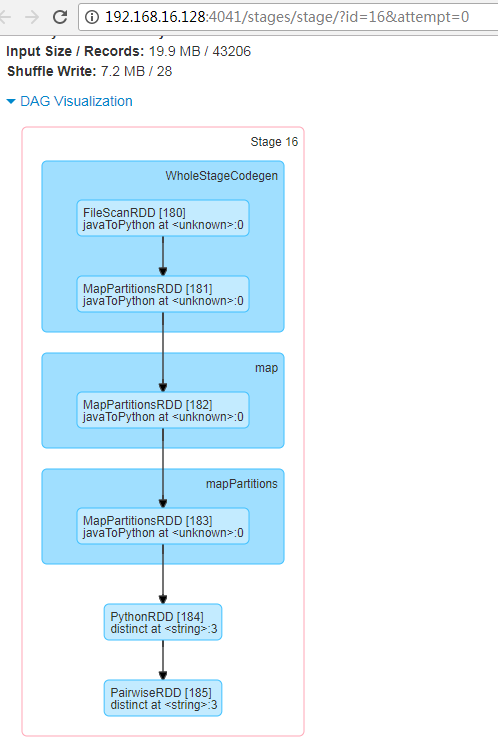
【 WebUi 作业信息 】
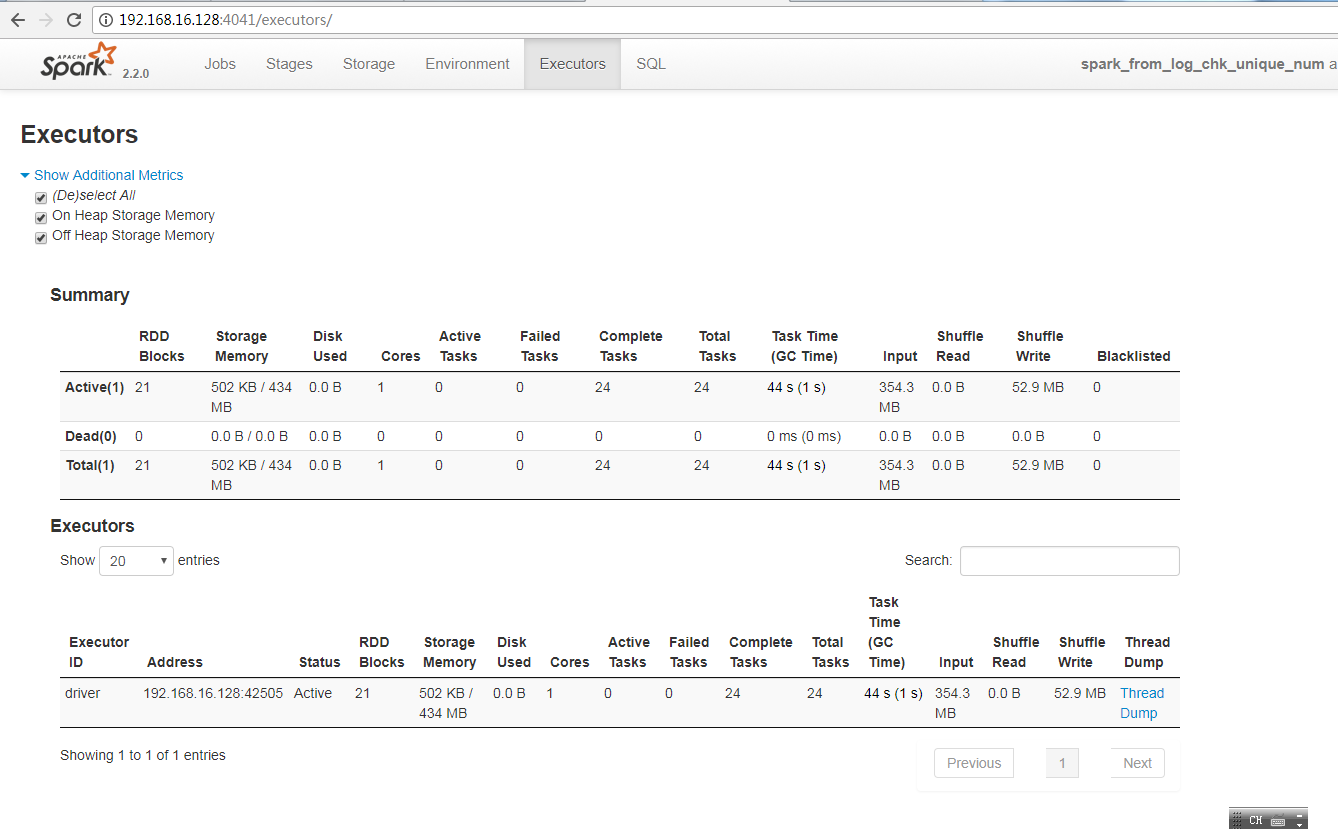
【DAG】
sci 192.168.16.128
sudo apt install net-tools
h0 192.168.16.129
h1 192.168.16.130
h2 192.168.16.131
h3 192.168.16.132
h4 192.168.16.133
h5 192.168.16.134
test 192.168.16.135
sudo apt install ssh
【
Run programs up to 100x faster than Hadoop MapReduce in memory, or 10x faster on disk.
Apache Spark has an advanced DAG execution engine that supports acyclic data flow and in-memory computing.
Two types of links
There are two types of links
symbolic links: Refer to a symbolic path indicating the abstract location of another file
hard links : Refer to the specific location of physical data.
How do I create soft link / symbolic link?
Soft links are created with the ln command. For example, the following would create a soft link named link1 to a file named file1, both in the current directory
$ ln -s file1 link1
To verify new soft link run:
$ ls -l file1 link1
】
【
Hard link vs. Soft link in Linux or UNIX
Hard links cannot link directories.
Cannot cross file system boundaries.
Soft or symbolic links are just like hard links. It allows to associate multiple filenames with a single file. However, symbolic links allows:
To create links between directories.
Can cross file system boundaries.
These links behave differently when the source of the link is moved or removed.
Symbolic links are not updated.
Hard links always refer to the source, even if moved or removed.
】
{
【
lrwxrwxrwx 1 root root 9 Jan 24 2017 python -> python2.7*
lrwxrwxrwx 1 root root 9 Jan 24 2017 python2 -> python2.7*
-rwxr-xr-x 1 root root 3785256 Jan 19 2017 python2.7*
lrwxrwxrwx 1 root root 33 Jan 19 2017 python2.7-config -> x86_64-linux-gnu-python2.7-config*
lrwxrwxrwx 1 root root 16 Jan 24 2017 python2-config -> python2.7-config*
lrwxrwxrwx 1 root root 9 Sep 17 20:24 python3 -> python3.5*
}
sudo rm py*2
sudo rm python
sudo ln -s ./python3.5 python
【
Main entry point for Spark functionality. A SparkContext represents the connection to a Spark cluster, and can be used to create RDD and broadcast variables on that cluster.
】
【pyspark mapreduce 计算文件中指定类型值的个数】
from pyspark.sql import SparkSession

import re

f = 'part-m-00003'

spark = SparkSession.builder.appName("spark_from_log_chk_unique_num").getOrCreate()

unique_mac_num = spark.read.text(f).rdd.map(lambda r: r[0]).map(

    lambda s: sorted(re.findall('[0-9a-z]{2}[0-9a-z]{2}[0-9a-z]{2}[0-9a-z]{2}[0-9a-z]{2}', s)[3:])).map(

    lambda l: ' '.join(l)).flatMap(lambda x: x.split(' ')).distinct().count()

dd =9
【全局临时视图】
Global Temporary View
http://spark.apache.org/docs/latest/sql-programming-guide.html#global-temporary-view
【 session-scoped】
Temporary views in Spark SQL are session-scoped and will disappear if the session that creates it terminates. If you want to have a temporary view that is shared among all sessions and keep alive until the Spark application terminates, you can create a global temporary view. Global temporary view is tied to a system preserved database global_temp, and we must use the qualified name to refer it, e.g. SELECT * FROM global_temp.view1.
// Register the DataFrame as a global temporary view

df.createGlobalTempView("people");

// Global temporary view is tied to a system preserved database `global_temp`

spark.sql("SELECT * FROM global_temp.people").show();

// +----+-------+

// | age|   name|

// +----+-------+

// |null|Michael|

// |  30|   Andy|

// |  19| Justin|

// +----+-------+

// Global temporary view is cross-session

spark.newSession().sql("SELECT * FROM global_temp.people").show();

// +----+-------+

// | age|   name|

// +----+-------+

// |null|Michael|

// |  30|   Andy|

// |  19| Justin|

// +----+-------+
scala spark wordcount windows
1-安装
- jdk jdk-8u171-windows-x64.exe 并添加到系统Path spark-shell运行需要 D:\scalajre\jre\bin\java.exe ; 路径问题,在代码中有明确的答案
- IDE http://scala-ide.org/download/sdk.html Download Scala IDE for Eclipse
- scala https://scala-lang.org/download/ https://downloads.lightbend.com/scala/2.12.6/scala-2.12.6.msi 添加到系统Path,便于在cmd开启

注意安装到无空格目录
cmd scala 环境变量 SCALA_HOME D:\scalainstall\bin
- 下载spark
http://220.112.193.199/files/9037000006180326/mirrors.shu.edu.cn/apache/spark/spark-2.3.0/spark-2.3.0-bin-hadoop2.7.tgz
解压至 D:\LearnSpark\win
下载 http://public-repo-1.hortonworks.com/hdp-win-alpha/winutils.exe (win7 可用) ,拷贝到D:\LearnSpark\win\spark-2.3.0-bin-hadoop2.7\bin
版本参考 Running Spark Applications on Windows · Mastering Apache Spark https://jaceklaskowski.gitbooks.io/mastering-apache-spark/content/spark-tips-and-tricks-running-spark-windows.html
设置HADOOP_HOME 为 D:\LearnSpark\win\spark-2.3.0-bin-hadoop2.7
为了在cmd.exe 中直接使用spark-shell,将D:\LearnSpark\win\spark-2.3.0-bin-hadoop2.7\bin添加到Path
C:\Users\Administrator>spark-shell

2018-05-20 20:10:42 WARN  NativeCodeLoader:62 - Unable to load native-hadoop library for your platfo

rm... using builtin-java classes where applicable

Setting default log level to "WARN".

To adjust logging level use sc.setLogLevel(newLevel). For SparkR, use setLogLevel(newLevel).

Spark context Web UI available at http://192.168.1.102:4040

Spark context available as 'sc' (master = local[*], app id = local-1526818258887).

Spark session available as 'spark'.

Welcome to

      ____              __

     / __/__  ___ _____/ /__

    _\ \/ _ \/ _ `/ __/  '_/

   /___/ .__/\_,_/_/ /_/\_\   version 2.3.0

      /_/

Using Scala version 2.11.8 (Java HotSpot(TM) 64-Bit Server VM, Java 1.8.0_171)

Type in expressions to have them evaluated.

Type :help for more information.

scala>

移除winutils.exe

Microsoft Windows [版本 6.1.7601]

版权所有 (c) 2009 Microsoft Corporation。保留所有权利。

C:\Users\Administrator>spark-shell

2018-05-20 20:15:37 ERROR Shell:397 - Failed to locate the winutils binary in the hadoop binary path

java.io.IOException: Could not locate executable D:\LearnSpark\win\spark-2.3.0-bin-hadoop2.7\bin\win

utils.exe in the Hadoop binaries.

        at org.apache.hadoop.util.Shell.getQualifiedBinPath(Shell.java:379)

        at org.apache.hadoop.util.Shell.getWinUtilsPath(Shell.java:394)

        at org.apache.hadoop.util.Shell.<clinit>(Shell.java:387)

        at org.apache.hadoop.util.StringUtils.<clinit>(StringUtils.java:80)

        at org.apache.hadoop.security.SecurityUtil.getAuthenticationMethod(SecurityUtil.java:611)

        at org.apache.hadoop.security.UserGroupInformation.initialize(UserGroupInformation.java:273)

        at org.apache.hadoop.security.UserGroupInformation.ensureInitialized(UserGroupInformation.ja

va:261)

        at org.apache.hadoop.security.UserGroupInformation.loginUserFromSubject(UserGroupInformation

.java:791)

        at org.apache.hadoop.security.UserGroupInformation.getLoginUser(UserGroupInformation.java:76

1)

        at org.apache.hadoop.security.UserGroupInformation.getCurrentUser(UserGroupInformation.java:

634)

        at org.apache.spark.util.Utils$$anonfun$getCurrentUserName$1.apply(Utils.scala:2464)

        at org.apache.spark.util.Utils$$anonfun$getCurrentUserName$1.apply(Utils.scala:2464)

        at scala.Option.getOrElse(Option.scala:121)

        at org.apache.spark.util.Utils$.getCurrentUserName(Utils.scala:2464)

        at org.apache.spark.SecurityManager.<init>(SecurityManager.scala:222)

        at org.apache.spark.deploy.SparkSubmit$.secMgr$lzycompute$1(SparkSubmit.scala:393)

        at org.apache.spark.deploy.SparkSubmit$.org$apache$spark$deploy$SparkSubmit$$secMgr$1(SparkS

ubmit.scala:393)

        at org.apache.spark.deploy.SparkSubmit$$anonfun$prepareSubmitEnvironment$7.apply(SparkSubmit

.scala:401)

        at org.apache.spark.deploy.SparkSubmit$$anonfun$prepareSubmitEnvironment$7.apply(SparkSubmit

.scala:401)

        at scala.Option.map(Option.scala:146)

        at org.apache.spark.deploy.SparkSubmit$.prepareSubmitEnvironment(SparkSubmit.scala:400)

        at org.apache.spark.deploy.SparkSubmit$.submit(SparkSubmit.scala:170)

        at org.apache.spark.deploy.SparkSubmit$.main(SparkSubmit.scala:136)

        at org.apache.spark.deploy.SparkSubmit.main(SparkSubmit.scala)

2018-05-20 20:15:37 WARN  NativeCodeLoader:62 - Unable to load native-hadoop library for your platfo

rm... using builtin-java classes where applicable

Setting default log level to "WARN".

To adjust logging level use sc.setLogLevel(newLevel). For SparkR, use setLogLevel(newLevel).

Spark context Web UI available at http://192.168.1.102:4040

Spark context available as 'sc' (master = local[*], app id = local-1526818554657).

Spark session available as 'spark'.

Welcome to

      ____              __

     / __/__  ___ _____/ /__

    _\ \/ _ \/ _ `/ __/  '_/

   /___/ .__/\_,_/_/ /_/\_\   version 2.3.0

      /_/

Using Scala version 2.11.8 (Java HotSpot(TM) 64-Bit Server VM, Java 1.8.0_171)

Type in expressions to have them evaluated.

Type :help for more information.

scala>
主要windows下winutils.exe的位置,结果文件名不要在目标文件夹存在
Microsoft Windows [版本 6.1.7601]

版权所有 (c) 2009 Microsoft Corporation。保留所有权利。

C:\Users\Administrator>spark-shell

2018-05-20 20:29:41 WARN  NativeCodeLoader:62 - Unable to load native-hadoop library for your platfo

rm... using builtin-java classes where applicable

Setting default log level to "WARN".

To adjust logging level use sc.setLogLevel(newLevel). For SparkR, use setLogLevel(newLevel).

Spark context Web UI available at http://192.168.1.102:4040

Spark context available as 'sc' (master = local[*], app id = local-1526819397675).

Spark session available as 'spark'.

Welcome to

      ____              __

     / __/__  ___ _____/ /__

    _\ \/ _ \/ _ `/ __/  '_/

   /___/ .__/\_,_/_/ /_/\_\   version 2.3.0

      /_/

Using Scala version 2.11.8 (Java HotSpot(TM) 64-Bit Server VM, Java 1.8.0_171)

Type in expressions to have them evaluated.

Type :help for more information.

scala> var file=sc.textFile("D:\\LearnSpark\\win\\mytest.txt")

file: org.apache.spark.rdd.RDD[String] = D:\LearnSpark\win\mytest.txt MapPartitionsRDD[1] at textFil

e at <console>:24

scala> var counts100=file.flatMap(line=>line.split(" ")).map(word=>(word,100)).reduceByKey(_+_)

counts100: org.apache.spark.rdd.RDD[(String, Int)] = ShuffledRDD[4] at reduceByKey at <console>:25

scala> counts100.saveAsTextFile("D:\\LearnSpark\\win\\my_unique_name.txt")

scala>
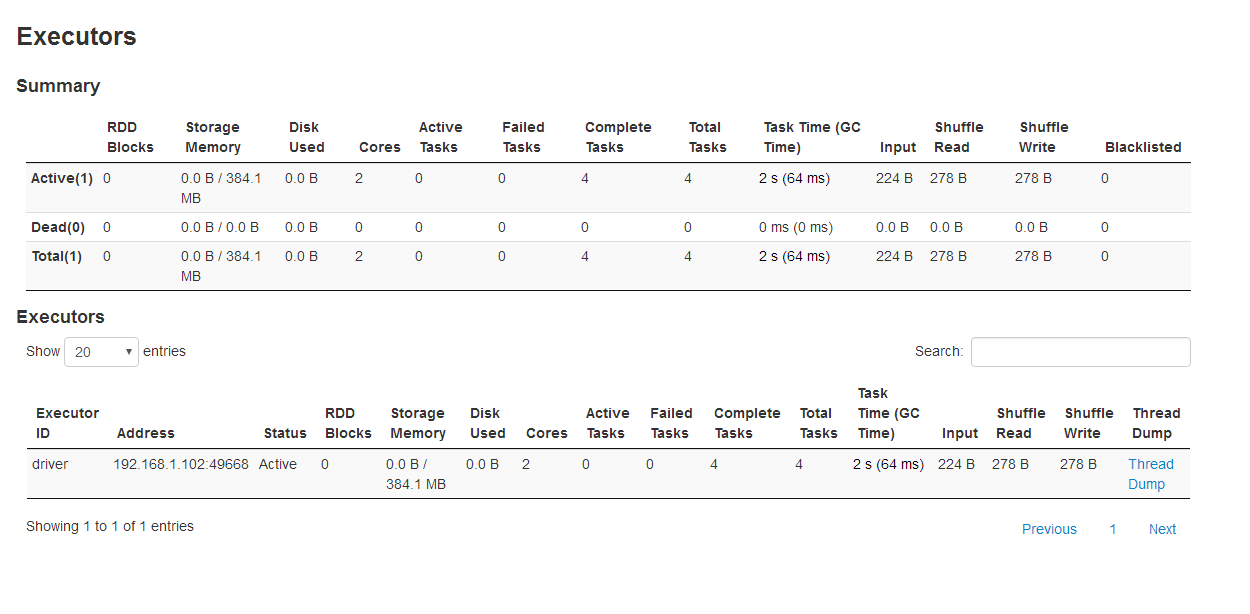
win10 运行demo
var textFile=spark.read.textFile("D://SparkProducing//userdata//testenv.txt")
The root scratch dir: /tmp/hive on HDFS should be writable
The root scratch dir: /tmp/hive on HDFS should be writable. Current permissions are: rw-rw-rw- (on Windows) - Stack Overflow https://stackoverflow.com/questions/34196302/the-root-scratch-dir-tmp-hive-on-hdfs-should-be-writable-current-permissions
查C盘 存在 c://tmp//hive 修改权限
textFile.count() // Number of items in this Dataset
textFile.first() // First item in this Dataset
var lineWithSpark=textFile.filter(line=>line.contains("Spark"))
lineWithSpark.collect()
brdd 惰性执行 mapreduce 提取指定类型值 WebUi 作业信息 全局临时视图 pyspark scala spark 安装的更多相关文章
- SAP S4HANA如何取到采购订单ITEM里的'条件'选项卡里的条件类型值?
SAP S4HANA如何取到采购订单ITEM里的'条件'选项卡里的条件类型值? 最近在准备一个采购订单行项目的增强的function spec.其中有一段逻辑是取到采购订单行项目条件里某个指定的条件类 ...
- JavaScript基本类型值与引用类型值
前言 JS变量可以用来保存两种类型的值:基本类型值和引用类型值.基本类型的值源自一下5种基本数据类型:Underfined.Null.Boolean.Number和String. 基本类型值和引用类型 ...
- ECMA Script 6_Symbol() 唯一类型值声明函数_Symbol 数据类型
Symbol 数据类型 let s = Symbol(); typeof s; // "symbol" 是 ES6 继 Number,String,Boolean,Undefine ...
- 背水一战 Windows 10 (122) - 其它: 通过 Windows.System.Profile 命名空间下的类获取信息, 查找指定类或接口的所在程序集的所有子类和子接口
[源码下载] 背水一战 Windows 10 (122) - 其它: 通过 Windows.System.Profile 命名空间下的类获取信息, 查找指定类或接口的所在程序集的所有子类和子接口 作者 ...
- response的contentType的类型值Response.ContentType
MIME类型的含义 MIME类型就是设定某种扩展名的文件用一种应用程序来打开的方式类型,当该扩展名文件被访问的时候,浏览器会自动使用指定应用程序来打开.多用于指定一些客户端自定义的文件名,以及一些媒体 ...
- Java -- 获取指定接口的所有实现类或获取指定类的所有继承类
Class : ClassUtil package pri.lime.main; import java.io.File; import java.io.IOException; import jav ...
- javascript变量的引用类型值
JavaScript变量可以用来保存俩种类型的值:基本类型和引用类型值 前言 JS变量可以用来保存两种类型的值:基本类型值和引用类型值.基本类型的值源自一下5种基本数据类型:Underfined.Nu ...
- 010-Spring aop 001-核心说明-拦截指定类与方法、基于自定义注解的切面
一.概述 面向切面编程(AOP)是针对面向对象编程(OOP)的补充,可以非侵入式的为多个不具有继承关系的对象引入相同的公共行为例如日志.安全.事务.性能监控等等.SpringAOP允许将公共行为从业务 ...
- 执行jar包或执行其中的某个类
执行jar包,默认执行javafile中指定的main程序java -jar jar包例如 java -jar test.jar执行依赖其他jar包的class: java -cp .;E:\tool ...
随机推荐
- 002/区块链核心概念与原理详解(Mooc)
1.课程介绍 (一).区块链前世今生 密码朋克--神秘组织(邮件组) 2.区块链核心概念与原理 (一)比特币是数字货币 为什么叫区块链? 因为比特币系统里面的数据是一个个的区块来存储,并且通过hash ...
- 简述Vue中的计算属性
1.什么是计算属性 如果模板中的表达式存在过多的逻辑,那么模板会变得臃肿不堪,维护起来也异常困难,因此为了简化逻辑出现了计算属性: <template> <div id=" ...
- Vue --》 如何在vue中调用百度地图
1.项目根目录下下载百度地图插件 npm install vue-baidu-map –save 2.在首页index.html中引入百度地图: <script type="text/ ...
- 如何实现动态水球图 --》 echars结合echarts-liquidfill实现
1)项目中作为项目依赖,安装到项目当中(注意必须要结合echars) npm install echarts vue-echarts --save npm install echarts-liquid ...
- 自己挖的坑自己填--JVM报内存溢出
在写定时任务时,对表数据进行批量操作,测试数据有10万条左右,在测试时发现跑着跑着出现内存溢出现象,最后发现创建的对象paramList 和tmBeanList没有被回收,经过资料查找,发现是循环内不 ...
- 探究Javascript模板引擎mustache.js使用方法
这篇文章主要为大家介绍了Javascript模板引擎mustache.js使用方法,mustache.js是一个简单强大的Javascript模板引擎,使用它可以简化在js代码中的html编写,压缩后 ...
- Redis 21问,你接得住不?
作者:菜鸟小于 cnblogs.com/Young111/p/11518346.html 1.什么是redis? Redis 是一个基于内存的高性能key-value数据库. 2.Reids的特点 R ...
- [Bzoj2004][Hnoi2010]Bus 公交线路(状压dp&&矩阵加速)
题目链接:https://www.lydsy.com/JudgeOnline/problem.php?id=2004 看了很多大佬的博客才理解了这道题,菜到安详QAQ 在不考虑优化的情况下,先推$dp ...
- adb logcat查看手机端日志
前言 做app测试,遇到异常情况,查看日志是必不可少的,日志如何输出到手机sdcard和电脑的目录呢?这就需要用logcat输出日志了以下操作是基于windows平台的操作:adb logcat | ...
- 重磅 | Elasticsearch7.X学习路线图
原文:重磅 | Elasticsearch7.X学习路线图 版权声明:本文为博主原创文章,遵循CC 4.0 BY-SA版权协议,转载请附上原文出处链接和本声明. 本文链接:https://blog.c ...