
在openshift上自定义node.js的版本
https://github.com/ramr/nodejs-custom-version-openshift
由于是线上服务器,一步一步来:
先把上面的工程拉下来,覆盖到初始化的工程里,提交,让服务器端装起来。
#  Uncomment one of the version lines to select the node version to use.

#  The last "non-blank" version line is the one picked up by the code in

#  .openshift/lib/utils

#  Default: 0.10.

#

#  0.8.

#  0.9.

#  0.10.

#  0.11.

#  0.12.

#  0.12.

4.2.
配置好.openshift/markers/NODEJS_VERSION (默认写的4.2.3, 我改的6.9.2)
如果失败了,找到最初commit id 用reset --hard HEAD~1 一版一版往前退,
然后pull 返回去初始状态,否则错上推错很有可能会出现被服务器永久拒绝的状态(哭),那就只能重新建应用了
还没commit的直接 checkout --force 就放弃修改了
一堆无关痛痒的依赖错误之后是:

那么会不会是503呢,它没有明显的deploy failure,说是node启动失败
看看dashboard 状态
只要不是一直被stopped就还有希望 
页面并没有受到影响,仍然显示默认的index.html
在dashboard点restart,重启之后页面仍然正常显示,猜想服务器终于把node给升级好啦?
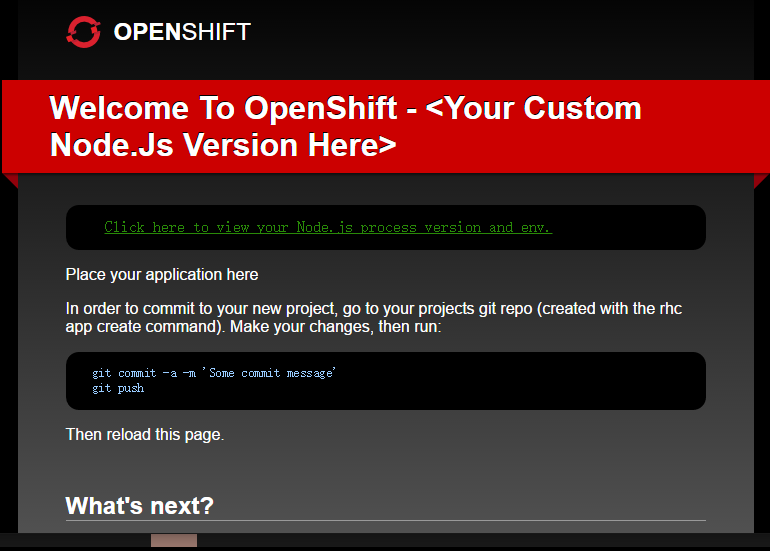
(尝试了一次不点restrt, 跑去网上冲浪不知等了多久也自动能stated) 页面改头换面了:
把package.json里面scripts、dependencies、devDependencies加进去
再次push应该会看到这样

明显的node已经升级成功,但是dashboard上仍然显示0.10
然后我有一个用了webpack的工程需要移植上去,
根据stackoverflow这篇文章,需要设置.openshift中的action_hook下build文件:
create the following file: .openshift/action_hook/build which contains the following:
#!/bin/bash

webpack --config $OPENSHIFT_DATA_DIR/webpack.config.js
题主出现了报错,但我是一次成功的。。。
另外,如果出现这种问题像我之前查到的解决方式一样需要配置静态地址:
self.initializeServer = function() {

        self.createRoutes();

        self.app = express();

        self.app.use('/', express.static(__dirname + '/dist'));

        //  Add handlers for the app (from the routes).

        for (var r in self.routes) {

            self.app.get(r, self.routes[r]);

        }

    };
还有上面一段populate the cache也需要设置
     /**

     *  Populate the cache.

     */

    self.populateCache = function() {

        if (typeof self.zcache === "undefined") {

            self.zcache = { 'index.html': '' };

        }

     //  Local cache for static content.

   //原来openshift给的index.html

    //self.zcache['index.html'] = fs.readFileSync('./index.html');

        self.zcache['index.html'] = fs.readFileSync('./dist/index.html');

    };
这样就和本地启动一样了,本地npm start还是可以指定其他的入口文件进行本地启动,并不会冲突。
$ git push

Counting objects: , done.

Delta compression using up to  threads.

Compressing objects: % (/), done.

Writing objects: % (/), 43.95 KiB |  bytes/s, done.

Total  (delta ), reused  (delta )

remote:

remote:   - pre_stop_nodejs: Adding Node.js version 6.9. binaries to path

remote:   - PATH set to include custom node version (6.9.) from

remote:        /var/lib/openshift/585cd49089f5cf3e75000095/app-root/data//node-v6.9.2-linux-x64/bin

remote:     PATH = /var/lib/openshift/585cd49089f5cf3e75000095/app-root/data//node-v6.9.2-linux-x64/bin:/var/lib/openshift/585cd49089f5cf3e75000095/app-root/runtime/repo/node_modules/.bin:/var/lib/openshift/585cd49089f5cf3e75000095//.node_modules/.bin:/opt/rh/nodejs010/root/usr/bin:/bin:/usr/bin:/usr/sbin

remote: Stopping NodeJS cartridge

remote: Tue Dec   :: GMT- (EST): Stopping application 'angular' ...

remote: Tue Dec   :: GMT- (EST): Stopped Node application 'angular'

remote: Repairing links for  deployments

remote: Saving away previously installed Node modules

remote: Building git ref 'master', commit d3e7fb0

remote: NOTE: The .openshift/action_hooks/pre_build hook is not executable, to make it executable:

remote:       On Windows run:   git update-index --chmod=+x .openshift/action_hooks/pre_build

remote:       On Linux/OSX run: chmod +x .openshift/action_hooks/pre_build

remote: Building NodeJS cartridge

remote: npm info it worked if it ends with ok

remote: npm info using npm@2.14.

remote: npm info using node@v0.10.35

remote: npm info preinstall nodejs-Custom-Version-Sample@1.0.

remote: npm info package.json core-js@2.4. No README data

remote: npm info package.json ts-loader@0.8. No README data

remote: npm info package.json @angular/compiler@2.0.-rc. No README data

remote: npm info package.json @angular/common@2.0.-rc. No description

remote: npm info package.json @angular/common@2.0.-rc. No README data

remote: npm info package.json @angular/compiler-cli@0.6. No README data

remote: npm info package.json @angular/core@2.0.-rc. No README data

remote: npm info package.json @angular/forms@2.0.-rc. No README data

remote: npm info package.json @angular/http@2.0.-rc. No README data

remote: npm info package.json @angular/platform-browser@2.0.-rc. No README data

remote: npm info package.json @angular/platform-browser-dynamic@2.0.-rc. No README data

remote: npm info package.json @angular/router@3.0.-rc. No README data

remote: npm info package.json @angular/upgrade@2.0.-rc. No description

remote: npm info package.json @angular/upgrade@2.0.-rc. No README data

remote: npm info package.json echarts@3.3. No license field.

remote: npm info package.json raw-loader@0.5. No license field.

remote: npm info build /var/lib/openshift/585cd49089f5cf3e75000095/app-root/runtime/repo

remote: npm info linkStuff nodejs-Custom-Version-Sample@1.0.

remote: npm info install nodejs-Custom-Version-Sample@1.0.

remote: npm info postinstall nodejs-Custom-Version-Sample@1.0.

remote:

remote: > nodejs-Custom-Version-Sample@1.0. postinstall /var/lib/openshift/585cd49089f5cf3e75000095/app-root/runtime/repo

remote: > typings install

remote:

remote:

remote: Error: EACCES, permission denied '/var/lib/openshift/585cd49089f5cf3e75000095/.config'

remote:     at Object.fs.mkdirSync (fs.js::)

remote:     at sync (/var/lib/openshift/585cd49089f5cf3e75000095/app-root/runtime/repo/node_modules/typings/node_modules/typings-core/node_modules/mkdirp/index.js::)

remote:     at Function.sync (/var/lib/openshift/585cd49089f5cf3e75000095/app-root/runtime/repo/node_modules/typings/node_modules/typings-core/node_modules/mkdirp/index.js::)

remote:     at Object.create.all.get (/var/lib/openshift/585cd49089f5cf3e75000095/app-root/runtime/repo/node_modules/typings/node_modules/typings-core/node_modules/configstore/index.js::)

remote:     at Object.Configstore (/var/lib/openshift/585cd49089f5cf3e75000095/app-root/runtime/repo/node_modules/typings/node_modules/typings-core/node_modules/configstore/index.js::)

remote:     at Object.<anonymous> (/var/lib/openshift/585cd49089f5cf3e75000095/app-root/runtime/repo/node_modules/typings/node_modules/typings-core/dist/utils/store.js::)

remote:     at Module._compile (module.js::)

remote:     at Object.Module._extensions..js (module.js::)

remote:     at Module.load (module.js::)

remote:     at Function.Module._load (module.js::)

remote:     at Module.require (module.js::)

remote:     at require (module.js::)

remote:     at Object.<anonymous> (/var/lib/openshift/585cd49089f5cf3e75000095/app-root/runtime/repo/node_modules/typings/node_modules/typings-core/dist/utils/fs.js::)

remote:     at Module._compile (module.js::)

remote:     at Object.Module._extensions..js (module.js::)

remote:     at Module.load (module.js::)

remote:

remote: npm info nodejs-Custom-Version-Sample@1.0. Failed to exec postinstall script

remote: npm ERR! Linux 2.6.-642.6..el6.x86_64

remote: npm ERR! argv "node" "/opt/rh/nodejs010/root/usr/bin/npm" "install" "-d

remote: npm ERR! node v0.10.35

remote: npm ERR! npm  v2.14.13

remote: npm ERR! code ELIFECYCLE

remote: npm ERR! nodejs-Custom-Version-Sample@1.0. postinstall: `typings install`

remote: npm ERR! Exit status

remote: npm ERR!

remote: npm ERR! Failed at the nodejs-Custom-Version-Sample@1.0. postinstall script 'typings install'.

remote: npm ERR! This is most likely a problem with the nodejs-Custom-Version-Sample package,

remote: npm ERR! not with npm itself.

remote: npm ERR! Tell the author that this fails on your system:

remote: npm ERR!     typings install

remote: npm ERR! You can get their info via:

remote: npm ERR!     npm owner ls nodejs-Custom-Version-Sample

remote: npm ERR! There is likely additional logging output above.

remote:

remote: npm ERR! Please include the following file with any support request:

remote: npm ERR!     /var/lib/openshift/585cd49089f5cf3e75000095/app-root/runtime/repo/npm-debug.log

remote: An error occurred executing 'gear postreceive' (exit code: )

remote: Error message: CLIENT_ERROR: Failed to execute: 'control build' for /var/lib/openshift/585cd49089f5cf3e75000095/nodejs

remote:

remote: For more details about the problem, try running the command again with the '--trace' option.

To ssh://xxx.rhcloud.com/~/git/angular.git/

   bf853eb..d3e7fb0  master -> master
每次push完也没法直接看到页面,总是会进入building,等它打包完自动started就好了。
在openshift上自定义node.js的版本的更多相关文章
- 在Visual Studio上开发Node.js程序
[题外话] 最近准备用Node.js做些东西,于是找找看能否有Visual Studio上的插件以方便开发.结果还真找到了一个,来自微软的Node.js Tools for Visual Studio ...
- [译]How to Install Node.js on Ubuntu 14.04 如何在ubuntu14.04上安装node.js
原文链接为 http://www.hostingadvice.com/how-to/install-nodejs-ubuntu-14-04/ 由作者Jacob Nicholson 发表于October ...
- CentOS上安装Node.js
CentOS上安装Node.js [日期:2014-07-21] 来源:Linux社区 作者:maskdfe [字体:大 中 小] CentOS上安装Node.js(想在Linux上学习No ...
- 在 Ubuntu 14.04/15.04 上配置 Node JS v4.0.0
大家好,Node.JS 4.0 发布了,这个流行的服务器端 JS 平台合并了 Node.js 和 io.js 的代码,4.0 版就是这两个项目结合的产物——现在合并为一个代码库.这次最主要的变化是 N ...
- 如何发布一个自定义Node.js模块到NPM(详细步骤)
咱们闲话不多说,直接开始! 由于我从没有使用过MAC,所以我不保证本文中介绍的操作与MAC一致. 文章开始我先假定各位已经在window全局安装了Node.js,下面开始进行详细步骤介绍: 本文本着, ...
- Deepin 15.5上安装 Node.js
Node.js 源码安装 以下部分我们将介绍在Ubuntu Linux下安装 Node.js . 其他的Linux系统,如Centos等类似如下安装步骤. 在 Github 上获取 Node.js 源 ...
- Window 上安装Node.js
Window 上安装Node.js 1.Windows安装包下载地址 https://nodejs.org/en/ 2.下载好后,按照默认设置即可,安装路径可以更改 3.安装好后,检测PATH环境变量 ...
- 在CentOS 7上安装Node.js的4种方法(yum安装和源码安装)
CentOS 7上的安装方法,其中涵盖了源码安装,已编译版本安装,EPEL(Extra Packages for Enterprise Linux)安装和通过NVM(Node version mana ...
- 如何发布一个自定义Node.js模块到NPM(详细步骤,附Git使用方法)
咱们闲话不多说,直接开始! 由于我从没有使用过MAC,所以我不保证本文中介绍的操作与MAC一致. 文章开始我先假定各位已经在window全局安装了Node.js,下面开始进行详细步骤介绍: 本文本着, ...
随机推荐
- vi快捷键必知必会
文本编辑器是所有计算机系统中最常用的一种工具.UNIX下的编辑器有ex,sed和vi等,其中,使用最为广泛的是vi,而vi命令繁多,论坛里好像这方面的总结不多,以下稍做总结,以资共享!渴望更正和补充! ...
- openoffice转换过程中遇到繁体字文档转换失败的问题
今天发现上线的文档转换功能中存在一个文档转换不成功,查看后台日志标志文档无法加载成功,提示日志如下: INFO: connected Jul 08, 2015 2:50:33 PM com.artof ...
- Linux 普通用户su命令切换控制
1.编辑配置文件/etc/pam.d/su .将下面配置文件"#“去掉: # auth required pam_wheel.so use_uid 改成 a ...
- 练习PopupWindow弹出框之实现界面加载的时候显示弹出框到指定的view下面--两种延迟方法
今天在练习PopupWindow弹出框的时候,打算在界面加载的时候将弹出框展现出来并显示在指定的view下面. 初步方法是直接在OnResume方法里面直接执行showPopupWindows方法. ...
- java反射知识
java反射机制是在运行状态中,对于任意一个类(class文件),都能够知道这个类的所有属性和方法:对于任意一个对象,都能够调用它的任意一个方法和属性:这种动态获取的信息以及动态调用对象的方法的功能称 ...
- Retrofit研究1
以下为来自Github的retrofit的介绍.话说,翻译还真蛋疼,就这个花了快3个小时. Retrofit 一个在Android和Java上类型安全的HTTP客户端 介绍 Retrofit可以把你的 ...
- C#数据类型转换的几种形式
1.隐式转换:一般是低类型向高类型转化,能够保证值不发生变化. 隐式数值C#数据类型转换: 从 sbyte 到 short.int.long.float.double 或 decimal. 从 byt ...
- Xcode中实现ARC和MRC混编
1.在Xcode中打开项目文件 2.选中项目名称 3.在右侧选择build phass 选项卡 4.选择 complite source 选项 5.选择要支持MRC编译的.m文件,双击 6.在弹出的框 ...
- 《程序员的思维修炼》摘抄start:2014年9月27日19:27:07
程序员的思维修炼:摘抄:考虑到社会中各个相关团体的复杂交互影响和社会的持续变化,在我看来当前最重要的两项技能就是: ▪沟通能力: ▪学习和思考能力.软件行业正在逐步提高沟通能力.特别是敏捷方法(见注解 ...
- Windows下Eclipse+PyDev配置Python开发环境
1.简介 Eclipse是一款基于Java的可扩展开发平台.其官方下载中包括J2EE.Java.C/C++.Android等诸多版本.除此之外,Eclipse还可以通过安装插件的方式进行包括Pytho ...