
NPOI的使用Excel模板导出 可插入到指定行
Excel模版建议把需要添加数据行的样式设置好
模版样式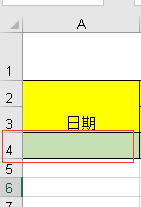 ,导出后效果
【2017-11-22 对获取需插入数据的首行样式有时为空报错修改】
        /// <summary>

        /// 根据模版导出Excel

        /// </summary>

        /// <param name="templateFile">模版路径(包含后缀)  例:"~/Template/Exceltest.xls"</param>

        /// <param name="strFileName">文件名称(不包含后缀)  例:"Excel测试"</param>

        /// <param name="source">源DataTable</param>

        /// <param name="cellKes">需要导出的对应的列字段  例:string[] cellKes = { "Date","Remarks" };</param>

        /// <param name="rowIndex">从第几行开始创建数据行,第一行为0</param>

        /// <returns>是否导出成功</returns>

        public static string ExportScMeeting(string templateFile, string strFileName, DataTable source, string[] cellKes, int rowIndex)

        {

            templateFile = HttpContext.Current.Server.MapPath(templateFile);

            int cellCount = cellKes.Length;//总列数,第一列为0

            IWorkbook workbook = null;

            try

            {

                using (FileStream file = new FileStream(templateFile, FileMode.Open, FileAccess.Read))

                {

                    if (Path.GetExtension(templateFile) == ".xls")

                        workbook = new HSSFWorkbook(file);

                    else if (Path.GetExtension(templateFile) == ".xlsx")

                        workbook = new XSSFWorkbook(file);

                }

                ISheet sheet = workbook.GetSheetAt();

                if (sheet != null && source != null && source.Rows.Count > )

                {

                    IRow row; ICell cell;

                    //获取需插入数据的首行样式

                    IRow styleRow = sheet.GetRow(rowIndex);

                    if (styleRow == null)

                    {

                        for (int i = , len = source.Rows.Count; i < len; i++)

                        {

                            row = sheet.CreateRow(rowIndex);

                            //创建列并插入数据

                            for (int index = ; index < cellCount; index++)

                            {

                                row.CreateCell(index)

                                    .SetCellValue(!(source.Rows[i][cellKes[index]] is DBNull) ? source.Rows[i][cellKes[index]].ToString() : string.Empty);

                            }

                            rowIndex++;

                        }

                    }

                    else

                    {

                        for (int i = , len = source.Rows.Count; i < len; i++)

                        {

                            row = sheet.CreateRow(rowIndex);

                            row.HeightInPoints = styleRow.HeightInPoints;

                            row.Height = styleRow.Height;

                            //创建列并插入数据

                            for (int index = ; index < cellCount; index++)

                            {

                                cell = row.CreateCell(index, styleRow.GetCell(index).CellType);

                                cell.CellStyle = styleRow.GetCell(index).CellStyle;

                                cell.SetCellValue(!(source.Rows[i][cellKes[index]] is DBNull) ? source.Rows[i][cellKes[index]].ToString() : string.Empty);

                            }

                            rowIndex++;

                        }

                    }

                }

                return NPOIExport(strFileName + "." + templateFile.Split('.')[templateFile.Split('.').Length - ], workbook);

            }

            catch (Exception ex)

            {

                return ex.Message;

            }

        }
附属方法
        public static string NPOIExport(string fileName, IWorkbook workbook)

        {

            try

            {

                System.IO.MemoryStream ms = new System.IO.MemoryStream();

                workbook.Write(ms);

                HttpContext.Current.Response.Clear();

                HttpContext.Current.Response.ClearHeaders();

                HttpContext.Current.Response.Cache.SetCacheability(System.Web.HttpCacheability.Private);

                HttpContext.Current.Response.Buffer = true;

                HttpContext.Current.Response.ContentEncoding = System.Text.Encoding.UTF8;

                HttpContext.Current.Response.AddHeader("Content-Disposition", string.Format("attachment; filename={0}", fileName));

                HttpContext.Current.Response.ContentType = "application/ms-excel";

                HttpContext.Current.Response.BinaryWrite(ms.ToArray());

                HttpContext.Current.Response.Flush();

                HttpContext.Current.Response.End();

                ms.Close();

                ms.Dispose();

                return "导出成功";

            }

            catch (Exception ex)

            {

                return "导出失败";

            }

        }
调用方法
    /// <summary>

    /// 后台调用方法

    /// </summary>

    /// <returns></returns>

    public string Exc()

    {

        return ExcelUtil.ExportScMeeting("~/Template/MonthlyRepair.xls", "ExcelName", new DataTable(), new string[] { "name1", "name2" }, );

    }

    //前台js调用 window.open('@Url.Action("Exc")');
注:需要在指定行插入数据的话请使用NPOI自带的方法对Excel进行操作
sheet.ShiftRows(0/*开始行*/, sheet.LastRowNum/*结束行*/, 10/*插入总行数,移动大小(行数)--往下移动*/, true/*是否复制行高*/, false/*是否重置行高*/);
示例方法代码
    /// <summary>

    /// 根据模版导出Excel

    /// </summary>

    /// <param name="templateFile">模版路径(包含后缀)  例:"~/Template/Exceltest.xls"</param>

    /// <param name="strFileName">文件名称(不包含后缀)  例:"Excel测试"</param>

    /// <param name="isCover">是否向下覆盖,不覆盖则在rowIndex行插入数据</param>

    /// <param name="source">源DataTable</param>

    /// <param name="cellKes">需要导出的对应的列字段  例:string[] cellKes = { "Date","Remarks" };</param>

    /// <param name="rowIndex">从第几行开始创建数据行,第一行为0</param>

    /// <returns>是否导出成功</returns>

    public static string ExportScMeeting(string templateFile, string strFileName, bool isCover, DataTable source, string[] cellKes, int rowIndex)

    {

        templateFile = HttpContext.Current.Server.MapPath(templateFile);

        int cellCount = cellKes.Length;//总列数,第一列为0

        IWorkbook workbook = null;

        try

        {

            using (FileStream file = new FileStream(templateFile, FileMode.Open, FileAccess.Read))

            {

                workbook = new HSSFWorkbook(file);

            }

            ISheet sheet = workbook.GetSheetAt();

            if (sheet != null && source != null && source.Rows.Count > )

            {

                IRow row;

                //是否向下覆盖

                if (!isCover) sheet.ShiftRows(rowIndex, sheet.LastRowNum, source.Rows.Count, true, false);

                //获取需插入数据的首行样式

                IRow styleRow = sheet.GetRow(isCover ? rowIndex : (rowIndex + source.Rows.Count));

                for (int i = , len = source.Rows.Count; i < len; i++)

                {

                    row = sheet.CreateRow(rowIndex);

                    //创建列并插入数据

                    for (int index = ; index < cellCount; index++)

                    {

                        row.CreateCell(index)

                            .SetCellValue(!(source.Rows[i][cellKes[index]] is DBNull) ? source.Rows[i][cellKes[index]].ToString() : string.Empty);

                    }

                    rowIndex++;

                }

            }

            return NPOIExport(strFileName + ".xls", workbook);

        }

        catch (Exception ex)

        {

            return ex.Message;

        }

    }
NPOI的使用Excel模板导出 可插入到指定行的更多相关文章
- NPOI的使用Excel模板导出
private string ExportScMeeting(DataTable source) { string templateFile = Server.MapPath(@"Excel ...
- .Net NPOI 根据excel模板导出excel、直接生成excel
一.根据Excel模板导出excel 1.导入NPOI.dll 2.DAL中添加类ExportExcel.cs using NPOI.SS.UserModel; using System; usin ...
- ASP.NET Core 2.2 : 十六.扒一扒新的Endpoint路由方案 try.dot.net 的正确使用姿势 .Net NPOI 根据excel模板导出excel、直接生成excel .Net NPOI 上传excel文件、提交后台获取excel里的数据
ASP.NET Core 2.2 : 十六.扒一扒新的Endpoint路由方案 ASP.NET Core 从2.2版本开始,采用了一个新的名为Endpoint的路由方案,与原来的方案在使用上差别不 ...
- 基于EPPlus和NPOI实现的Excel导入导出
基于EPPlus和NPOI实现的Excel导入导出 CollapseNav.Net.Tool.Excel(NuGet地址) 太长不看 导入 excel 文件流将会转为 ExcelTestDto 类型的 ...
- java实现excel模板导出
一. 准备工作 1. 点击此下载相关开发工具 2. 将poi-3.8.jxls-core-1.0两个jar包放到工程中,并引用 3. 将excel模板runRecord.xls放到RunRecordB ...
- kettle 使用excel模板导出数据
通过excel进行高速开发报表: 建设思路: 1.首先制订相关的execl模板. 2.通过etl工具(kettle)能够高速的 将数据库中的数据按excel模板导出成新的excel就可以. 当中ket ...
- Magicodes.IE之Excel模板导出教材订购表
说明 本教程主要说明如果使用Magicodes.IE.Excel完成教材订购表的Excel模板导出. 要点 本教程使用Magicodes.IE.Excel来完成Excel模板导出 需要通过创建Dto来 ...
- Excel模板导出之动态导出
说明 目前Magicodes.IE已支持Excel模板导出时使用JObject.Dictionary和ExpandoObject来进行动态导出,具体使用请看本篇教程. 本功能的想法.部分实现初步源于a ...
- C#实现Excel模板导出和从Excel导入数据
午休时间写了一个Demo关于Excel导入导出的简单练习 1.窗体 2.引用office命名空间 添加引用-程序集-扩展-Microsoft.Office.Interop.Excel 3.封装的Exc ...
随机推荐
- CWindowWnd类源码分析
CWindowWnd代码在UIBase.h和UIBase.cpp文件里.主要实现的是一个基本窗口的创建与消息处理. 相关代码: 头文件: class UILIB_API CWindowWnd { pu ...
- OpenCV入门:(七:OpenCV取随机数以及显示文字)
1.随机颜色 OpenCV中自带了取随机数的方法,使用步骤: RNG rng( 0xFFFFFFFF ); 随机数 = rng.uniform( 下限,上限 ); 2.显示文字 , , bool bo ...
- 1030 Travel Plan (30 分)(最短路径 and dfs)
#include<bits/stdc++.h> using namespace std; ; const int inf=0x3f3f3f3f; int mp[N][N]; bool vi ...
- 基于规则的中文分词 - NLP中文篇
之前在其他博客文章有提到如何对英文进行分词,也说后续会增加解释我们中文是如何分词的,我们都知道英文或者其他国家或者地区一些语言文字是词与词之间有空格(分隔符),这样子分词处理起来其实是要相对容易很多, ...
- 相关系数之杰卡德相似系数(Jaccardsimilarity coefficient)
杰卡德相似系数(Jaccardsimilarity coefficient) (1)杰卡德相似系数 两个集合A和B交集元素的个数在A.B并集中所占的比例,称为这两个集合的杰卡德系数,用符号 J(A,B ...
- HDU 1693 Eat the Trees(插头DP,入门题)
Problem Description Most of us know that in the game called DotA(Defense of the Ancient), Pudge is a ...
- 什么是http?
http请求流程: http课程链接:http://www.imooc.com/video/6712/0
- Python 随笔01---列表
列表 1.取出列表中的元素方法?? 2.删除列表中的元素del.remove对比?? 3.linux 常用操作命令
- SSH面试集锦——不看后悔哦!
1. 谈谈你mvc的理解 MVC是Model-View-Controler的简称.即模型-视图-控制器.MVC是一种设计模式,它强制性的把应用程序的输入.处理和输出分开. MVC中的模型 ...
- php函数引用参数解惑《细说php》