
Android弹出输入提示框--PopupWindow实现
前言 之前直接用Dialog实现了弹出对话框。现在尝试用更好地解决方案--PopupWindow类--来实现
1.首先搞一个弹出框布局,和之前类似。

这样的东西,它的布局是这样:
 1 <?xml version="1.0" encoding="utf-8"?>

 2 <LinearLayout xmlns:android="http://schemas.android.com/apk/res/android"

 3     android:id="@+id/create_user_dialog_view"

 4     android:layout_width="fill_parent"

 5     android:layout_height="300dp"

 6     android:background="@drawable/自己搞背景样式"

 7     android:minWidth="200dp"

 8     android:orientation="vertical"

 9     android:padding="10dp"

10     android:paddingBottom="30dp"

11     android:paddingTop="30dp"

12     android:layout_marginTop="250dp"

13     >

14

15     <EditText

16

17         android:id="@+id/text_name"

18         android:layout_width="fill_parent"

19         android:layout_height="wrap_content"

20         android:background="@drawable/自己搞背景样式"

21         android:hint="编辑框1"

22         android:minHeight="45dp"

23         android:textSize="18sp" />

24

25     <EditText

26         android:id="@+id/text_mobile"

27         android:layout_width="fill_parent"

28         android:layout_height="wrap_content"

29         android:layout_marginTop="5dp"

30         android:background="@drawable/自己搞背景样式"

31         android:hint="编辑框2"

32         android:minHeight="45dp"

33         android:textSize="18sp" />

34

35     <EditText

36         android:id="@+id/text_info"

37         android:layout_width="fill_parent"

38         android:layout_height="wrap_content"

39         android:layout_marginTop="5dp"

40         android:background="@drawable/自己搞背景样式"

41         android:gravity="top|left"

42         android:hint="编辑框3"

43         android:minHeight="145dp"

44         android:textSize="18sp" />

45

46     <Button

47         android:id="@+id/btn_save"

48         android:layout_width="fill_parent"

49         android:layout_height="wrap_content"

50         android:layout_marginTop="5dp"

51         android:background="@自己搞背景样式"

52         android:text="按钮" />

53

54 </LinearLayout>
2.然后搞一个对话框弹出类,就是重头戏了,这个东西设置了上面布局中的细节操作,如按钮监听啊,弹出窗口的特征什么的。用Kotlin实现。
 package com.example.jason_jan.自己的包名

 import com.example.jason_jan.自己的项目名.R

 import android.app.Activity

 import android.content.Context

 import android.view.Display

 import android.view.LayoutInflater

 import android.view.View

 import android.view.Window

 import android.view.WindowManager

 import android.widget.Button

 import android.widget.EditText

 import android.widget.PopupWindow

 import android.widget.RelativeLayout

 /**

  * Created by Jason_Jan on 2017/7/3.

  */

 class CreateUserPopWin(mContext: Activity, itemsOnClick: View.OnClickListener?) : PopupWindow() {

     private val mContext: Context

     private val view: View

     private val btn_save_pop: Button

     var text_name: EditText

     var text_mobile: EditText

     var text_info: EditText

     init {

         this.mContext = mContext

         this.view = LayoutInflater.from(mContext).inflate(R.layout.create_user_dialog, null)//这里的layout是之前设置的弹出框布局

         text_name = view.findViewById(R.id.text_name) as EditText

         text_mobile = view.findViewById(R.id.text_mobile) as EditText

         text_info = view.findViewById(R.id.text_info) as EditText

         btn_save_pop = view.findViewById(R.id.btn_save) as Button

         // 设置按钮监听

         btn_save_pop.setOnClickListener(itemsOnClick)

         // 设置外部可点击

         this.isOutsideTouchable = true

         /* 设置弹出窗口特征 */

         // 设置视图

         this.contentView = this.view

         // 设置弹出窗体的宽和高

         /*

          * 获取窗口对象及参数对象以修改对话框的布局设置, 可以直接调用getWindow(),表示获得这个Activity的Window

          * 对象,这样这可以以同样的方式改变这个Activity的属性.

          */

         val dialogWindow = mContext.window

         val m = mContext.windowManager

         val d = m.defaultDisplay // 获取屏幕宽、高用

         val p = dialogWindow.attributes // 获取对话框当前的参数值

         this.height = RelativeLayout.LayoutParams.WRAP_CONTENT

         this.width = (d.width * 0.8).toInt()

         // 设置弹出窗体可点击

         this.isFocusable = true

     }

 }
3.然后就是测试这个弹出框类能不能正确执行了。新建一个Activity--我就直接叫做MyDialogTest2
package 自己的项目名

import android.app.Activity

import android.support.v7.app.AppCompatActivity

import android.os.Bundle

import android.util.Log

import 自己的项目名.R

import android.view.Gravity

import android.view.View

import 要引用的自己创建的CreateUserPop路径

class MyDialogTest2 : Activity() {

    var createUserPopWin: CreateUserPopWin?=null

    override fun onCreate(savedInstanceState: Bundle?) {

        super.onCreate(savedInstanceState)

        setContentView(R.layout.activity_my_dialog_test2)

    }

   /* showEditPopWin*/

    fun showEditPopWin(view: View?) {

        /*Log.d("TAG","******0")*/

        createUserPopWin = CreateUserPopWin(this, onClickListener)

        createUserPopWin?.showAtLocation(findViewById(R.id.activity_my_dialog_test2), Gravity.CENTER, 0, 0)
                                           //这里的id时这个类对应的布局中的id,不然就像我一样入坑了,下面有具体的布局信息

       /* Log.d("TAG","******4")*/

    }

    private val onClickListener

            = object : View.OnClickListener {

        override fun onClick(v: View?) {

          /*  Log.d("TAG","******2")*/

            when (v?.getId()) {

                R.id.btn_save -> {

                    val name1 = createUserPopWin?.text_name?.getText().toString().trim()

                    val mobile1 = createUserPopWin?.text_mobile?.getText().toString().trim()

                    val info1 = createUserPopWin?.text_info?.getText().toString().trim()

                    println(name1 + "——" + mobile1 + "——" + info1)

                    createUserPopWin?.dismiss()

                }

            }

            /*Log.d("TAG","******3")*/

        }

    }

}
4.这里是对应的布局信息,就是两个按钮,点击按钮,弹出对话框
<?xml version="1.0" encoding="utf-8"?>

<RelativeLayout xmlns:android="http://schemas.android.com/apk/res/android"

    xmlns:app="http://schemas.android.com/apk/res-auto"

    xmlns:tools="http://schemas.android.com/tools"

    android:layout_width="match_parent"

    android:layout_height="match_parent"

    android:id="@+id/activity_my_dialog_test2"

    tools:context="对应的类路径--可以不写--">

    <Button

        android:layout_width="300dp"

        android:layout_height="wrap_content"

        android:layout_marginTop="100dp"

        android:layout_centerHorizontal="true"

        android:text="测试弹出框"

        android:onClick="showEditPopWin"

        android:background="@drawable/自己搞一个背景样式"

        />

    <Button

        android:layout_width="300dp"

        android:layout_height="wrap_content"

        android:layout_centerVertical="true"

        android:layout_centerHorizontal="true"

        android:text="测试弹出框"

        android:onClick="showEditPopWin"

        android:background="@drawable/自己搞一个背景样式"

        />

</RelativeLayout>
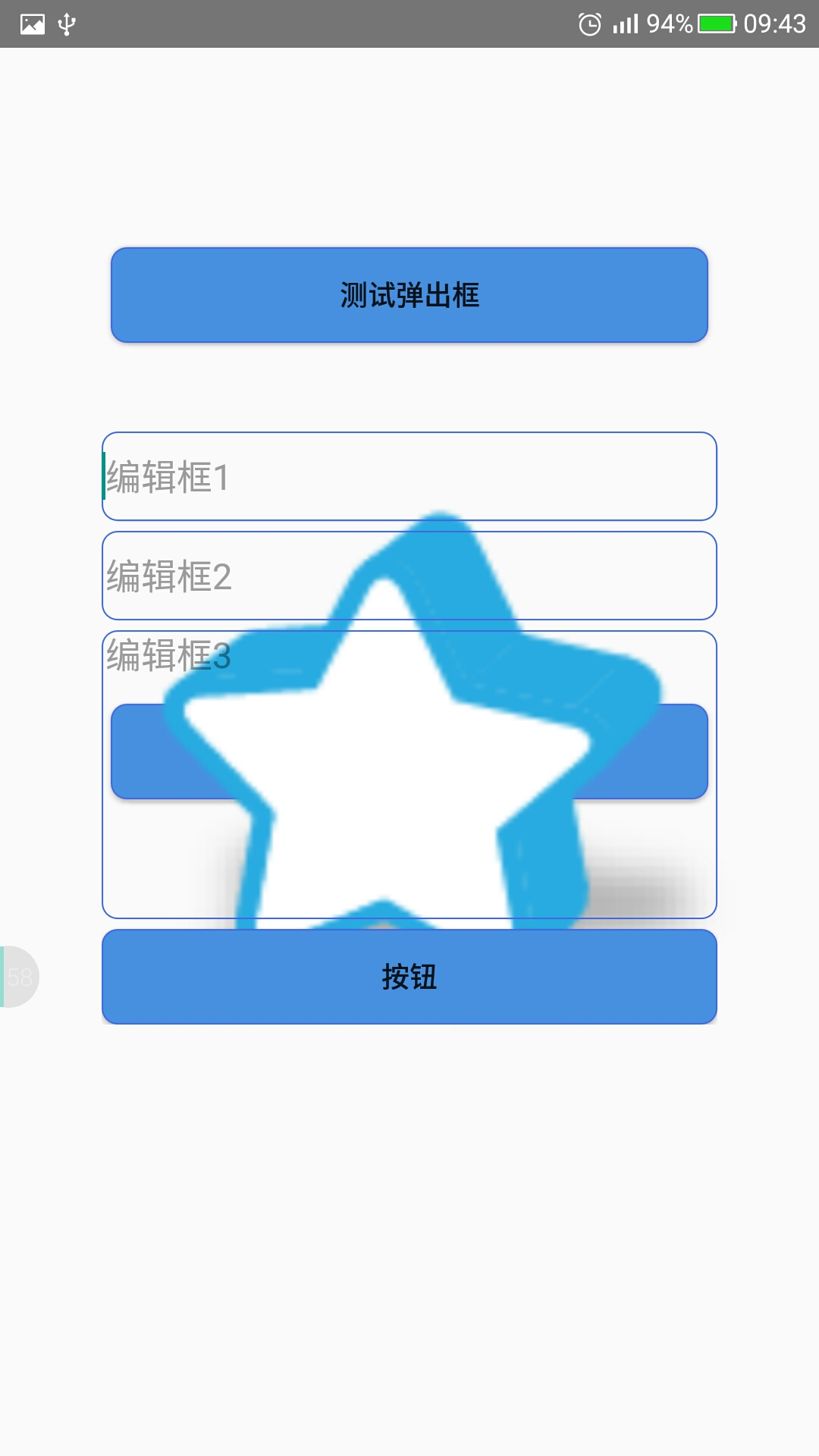
5.最后的测试结果如下

6.就是这么简单,背景当然是很难看了。习惯就好。
Android弹出输入提示框--PopupWindow实现的更多相关文章
- 解决PL/SQL Dev连接Oracle弹出空白提示框
第一次安装Oracle,装在虚拟机中,用PL/SQL Dev连接远程数据库的时候老是弹出空白提示框,网上找了很久,解决方法也很多,可是就是没法解决我这种情况的. 没办法,只能自己研究,经过大概一天时间 ...
- PL/SQL Dev连接Oracle弹出空白提示框的解决方法分享
第一次安装Oracle,装在虚拟机中,用PL/SQL Dev连接远程数据库的时候老是弹出空白提示框,网上找了很久,解决方法也很多,可是就是没法解决我这种情况的. 出现这种问题,解决方法大概有这几种: ...
- 弹出JS提示框
弹出JS提示框Page.ClientScript.RegisterStartupScript(typeof(string), "msg", "<script> ...
- Asp.Net下载页面,并弹出下载提示框
Asp.Net下载页面,并弹出下载提示框.在删除按钮里调用以下方法.
- IE中使用ajaxSubmit上传文件弹出下载提示框
使用jQuery的ajaxSubmit 上传文件时,在IE中会弹出下载提示框: 解决方法:让action返回String类型,而不是ActionView,
- asp.net导出excel并弹出保存提示框
asp.net导出excel并弹出保存提示框 2013-07-12 | 阅:1 转:78 | 分享 腾讯空间 人人网 开心网 新浪微博 腾讯微博 搜狐空间 推荐给朋友 举报 ...
- [UWP]在应用退出时弹出确认提示框
1. 需求 在应用退出时(点击右上角的关闭按钮)弹出一个确认按钮可以说是一个最常见的操作了,例如记事本的"你是否保存": 但这个功能在UWP上居然有点小复杂.这篇文章将解释如何实现 ...
- Android基础TOP4_1:点击物理按钮弹出退出提示框
JAVA: public class MainActivity extends Activity { @Override protected void onCreate(Bundle savedIns ...
- android 弹出日期选择框
DatePickerDialog 在很多时候需要用户去设定时间,不可能让用户去在一个文本框中去输入时间,所以就需要有个日期弹出选择框,而这个框就是DatePickerDialog. 1.在API中的D ...
随机推荐
- iDempiere 使用指南 生产插件(Manufacturing)安装过程
Created by 蓝色布鲁斯,QQ32876341,blog http://www.cnblogs.com/zzyan/ iDempiere官方中文wiki主页 http://wiki.idemp ...
- DXperience Winforms新版本13.2功能预览
据界面控件厂商 DevExpress 官方最新消息,大家期盼已久的DXperience 13.2终于要面世了.今天在这里提前跟大家提前披露一下DXperience Winforms 13.2的一些精彩 ...
- Mono For Android如何在VS2012 中打开设计界面
刚接触 Mono For Android 没几天,不知不觉把设计界面弄丢了.辛辛苦苦才把设计界面弄出来,如果你在 Layout 下打开 *.xaml 的文件打开的却是 xml 文档,那么你可以按照 ...
- http缓存基本介绍
https://www.helloweba.com/view-blog-414.html
- 关于HTML5,最牛逼的10本书!
关于HTML5,最牛逼的10本书! 关于HTML5,最牛逼的10本书.rar HTML5+CSS3从入门到精通 李东博 著 推荐指数:★★★☆ 简介:本书通过基础知识+中小实例+综合案例的方式,讲述了 ...
- 打开excl链接时总是出现问题
主要现象:1.提示"发生了意外错误":2.报错"由于本机限制无法打开链接" 原因: 这个是由于默认浏览器异常造成的,就是比如你下载了新的浏览器,然后为默认浏览器 ...
- 探讨下在Delphi里面进程之间的数据共享
进程是一个具有一定独立功能的程序关于某个数据集合的一次运行活动.它是操作系统动态执行的基本单元,在传统的操作系统中,进程既是基本的分配单元,也是基本的执行单元.现在小编就和大家来探讨一下在Delphi ...
- 显示C++ vector中的数据
C++ 中的vector是一个容器数据类型,不能使用cout直接显示容器中的值. 以下程序中,myvector 是一个vector数据类型.将myvector替换为需要输出的vector. for(i ...
- cutil.h问题
CUDA5.0没有cutil.h头文件,貌似用helper_cuda.h文件代替,暂时没出问题.
- C#如何使用异步编程【BeginInvoke/EndInvoke】
怎么使用异步,就是用委托进行处理,如果委托对象在调用列表中只有一个方法,它就可以异步执行这个方法.委托类有两个方法,叫做BeginInvoke和EndInvoke,它们是用来异步执行使用. 异步有三种 ...