
[我的CVE][CVE-2017-15709]Apache ActiveMQ Information Leak
问题原因:
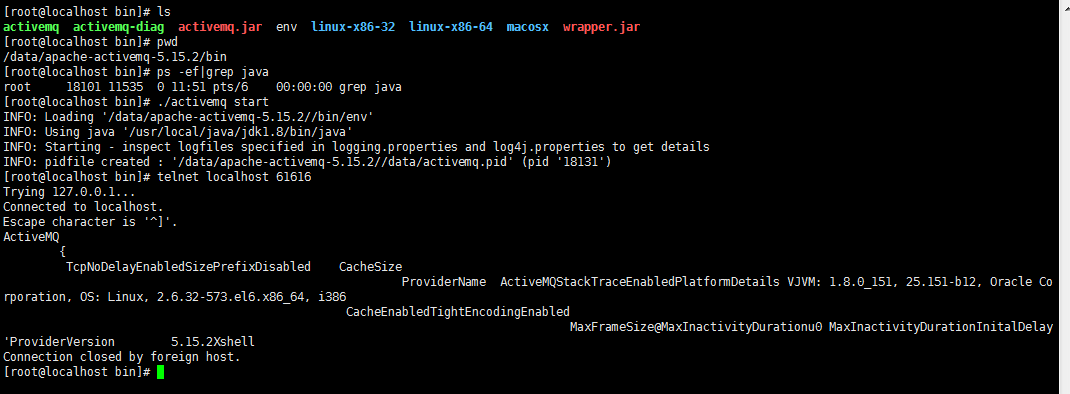
Apache ActiveMQ默认消息队列61616端口对外,61616端口使用了OpenWire协议,这个端口会暴露服务器相关信息,这些相关信息实际上是debug信息。
会返回应用名称,JVM,操作系统以及内核版本等信息。
影响版本:
测试用例:
修复前:
 @Test

-    public void testClientProperties() throws Exception{

-        BrokerService service = createBrokerService();

-        try {

-            ActiveMQConnectionFactory factory = new ActiveMQConnectionFactory(new URI(brokerUri));

-            ActiveMQConnection conn = (ActiveMQConnection)factory.createConnection();

-            final AtomicReference<WireFormatInfo> clientWf = new AtomicReference<WireFormatInfo>();

-            conn.addTransportListener(new DefaultTransportListener() {

-                @Override

-                public void onCommand(Object command) {

-                    if (command instanceof WireFormatInfo) {

-                        clientWf.set((WireFormatInfo)command);

-                    }

-                }

-            });

-            conn.start();

-            if (clientWf.get() == null) {

-                fail("Wire format info is null");

-            }

-            assertTrue(clientWf.get().getProperties().containsKey("ProviderName"));

-            assertTrue(clientWf.get().getProperties().containsKey("ProviderVersion"));

-            assertTrue(clientWf.get().getProperties().containsKey("PlatformDetails"));

-            assertTrue(clientWf.get().getProviderName().equals(ActiveMQConnectionMetaData.PROVIDER_NAME));

-            assertTrue(clientWf.get().getPlatformDetails().equals(ActiveMQConnectionMetaData.PLATFORM_DETAILS));

-        } finally {

-            stopBroker(service);
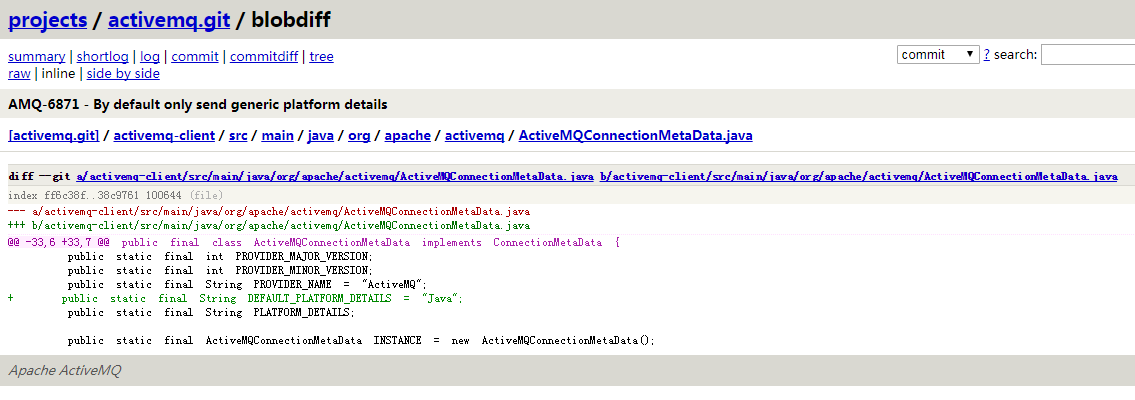
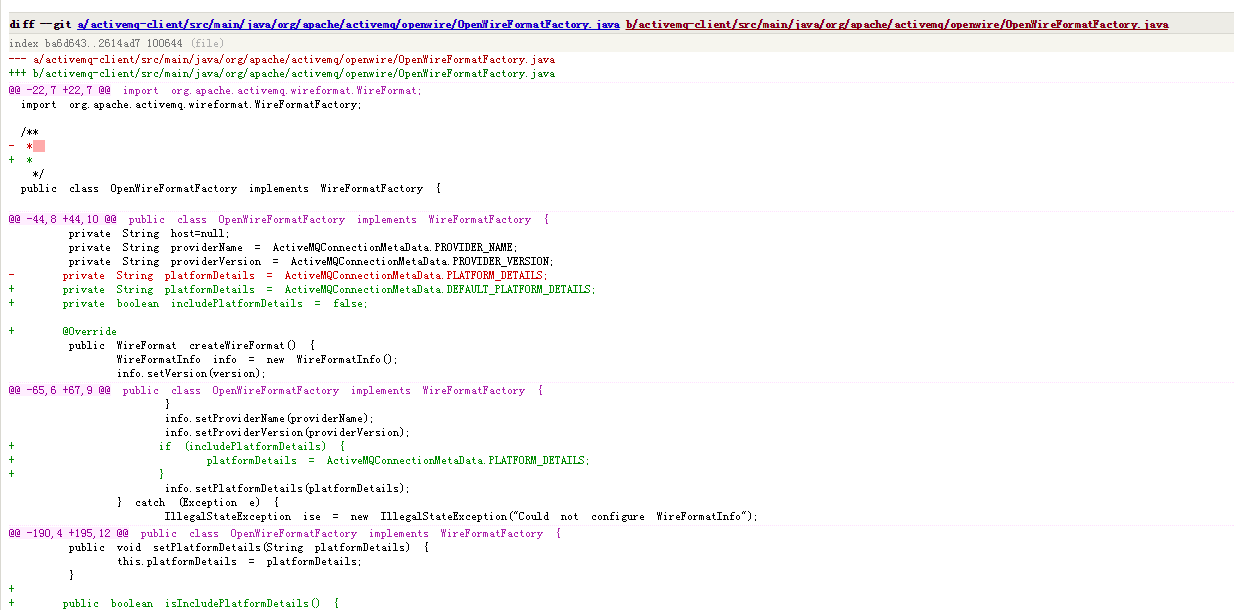
修复后:
+    public void testClientPropertiesWithDefaultPlatformDetails() throws Exception{

+        WireFormatInfo clientWf = testClientProperties(brokerUri);

+        assertTrue(clientWf.getPlatformDetails().equals(ActiveMQConnectionMetaData.DEFAULT_PLATFORM_DETAILS));

+    }

+

+    @Test

+    public void testClientPropertiesWithPlatformDetails() throws Exception{

+        WireFormatInfo clientWf = testClientProperties(brokerUri + "?wireFormat.includePlatformDetails=true");

+        assertTrue(clientWf.getPlatformDetails().equals(ActiveMQConnectionMetaData.PLATFORM_DETAILS));

+    }

+

+    private WireFormatInfo testClientProperties(String brokerUri) throws Exception {

+        ActiveMQConnectionFactory factory = new ActiveMQConnectionFactory(new URI(brokerUri));

+        ActiveMQConnection conn = (ActiveMQConnection)factory.createConnection();

+        conn.start();

+

+        assertTrue(connector.getConnections().size() == 1);

+        final WireFormatInfo clientWf = connector.getConnections().get(0).getRemoteWireFormatInfo();

+        if (clientWf == null) {

+            fail("Wire format info is null");

         }

+

+        //verify properties that the client sends to the broker

+        assertTrue(clientWf.getProperties().containsKey("ProviderName"));

+        assertTrue(clientWf.getProperties().containsKey("ProviderVersion"));

+        assertTrue(clientWf.getProperties().containsKey("PlatformDetails"));

+        assertTrue(clientWf.getProviderName().equals(ActiveMQConnectionMetaData.PROVIDER_NAME));

+

+        return clientWf;

     }
修复版本:
Apache Active MQ 5.14.6
Apache Active MQ 5.15.3
Apache Active MQ 5.16.0
官方公布的草案:
CVE-- - Information Leak

Severity: Low

Vendor:

The Apache Software Foundation

Versions Affected:

Apache ActiveMQ 5.14. - 5.15.

Description:

When using the OpenWire protocol it was found that certain system details (such as the OS and kernel version) are exposed as plain text.

Mitigation:

Use a TLS enabled transport or upgrade to Apache ActiveMQ 5.14. or 5.15..

Credit:

This issue was discovered by QingTeng cloud Security of Minded Security Researcher jianan.huang
参考信息:
https://cve.mitre.org/cgi-bin/cvename.cgi?name=CVE-2017-15709
https://issues.apache.org/jira/browse/AMQ-6871
http://activemq.apache.org/security-advisories.html
http://activemq.apache.org/security-advisories.data/CVE-2017-15709-announcement.txt
[我的CVE][CVE-2017-15709]Apache ActiveMQ Information Leak的更多相关文章
- 消息队列MQ - Apache ActiveMQ
Apache ActiveMQ是Apache软件基金会所研发的开放源码消息中间件:由于ActiveMQ是一个纯Jave程式,因此只需要操作系统支持Java虚拟机,ActiveMQ便可执行. 1.que ...
- Apache ActiveMQの版本更迭和Apache ActiveMQの故障转移
本文描述apache activemq 版本更迭的原因以及Apache ActiveMQのThe Failover Transport new features in 5.2.0 1.对信息的传输/ ...
- apache activemq的重连
1.activemq的重连机制 maxReconnectAttempts -1 | 0 From version 5.6 onwards: -1 is default and means retry ...
- apache activemq 学习笔记
0.activemq的概念 activemq实现了jms(java Message server),用于接收,发送,处理消息的开源消息总线. 1.activemq和jms的区别 jms说白了就是jav ...
- How to Setup Replicated LevelDB Persistence in Apache ActiveMQ 5.9--转载
原文地址:https://simplesassim.wordpress.com/2013/11/03/how-to-setup-replicated-leveldb-persistence-in-ap ...
- Apache ActiveMQ消息中间件的基本使用
Apache ActiveMQ是Apache软件基金会所研发的开放源码消息中间件:由于ActiveMQ是一个纯Java程式,因此只需要操作系统支援Java虚拟机,ActiveMQ便可执行. 支持Jav ...
- Apache ActiveMQ实战(2)-集群
ActiveMQ的集群 内嵌代理所引发的问题: 消息过载 管理混乱 如何解决这些问题--集群的两种方式: Master slave Broker clusters ActiveMQ的集群有两种方式: ...
- Apache ActiveMQ实战(1)-基本安装配置与消息类型
ActiveMQ简介 ActiveMQ是一种开源的,实现了JMS1.1规范的,面向消息(MOM)的中间件,为应用程序提供高效的.可扩展的.稳定的和安全的企业级消息通信.ActiveMQ使用Apache ...
- Linux下apache activemq的安装与配置
ActiveMQ 是Apache出品,最流行的,能力强劲的开源消息总线.ActiveMQ 是一个完全支持JMS1.1和J2EE 1.4规范 的 JMS Provider实现,尽管JMS规范出台已经是很 ...
随机推荐
- PBKDF2加密
password - the password that needs to be hashed. This should be convertedinto a char array before pa ...
- Kafka详解四:Kafka的设计思想、理念
问题导读 1.Kafka的设计基本思想是什么?2.Kafka消息转运过程中是如何确保消息的可靠性的? 本节主要从整体角度介绍Kafka的设计思想,其中的每个理念都可以深入研究,以后我可能会发专题文章做 ...
- How to use QToolBar and QToolButton in Qt
http://developer.nokia.com/Community/Wiki/How_to_use_QToolBar_and_QToolButton_in_Qt How to use QTool ...
- CSDN_博客__WapPc
CSDN 博客 手机上的网址 和 PC上的网址,对应关系: 1. 举个例子: 手机上的网址: http://m.blog.csdn.net/article/details?id=7910239 PC ...
- 第一个Python程序hello.py提示出现File "<stdin>",line 1错误
写第一个Python程序hello.py,内容仅有一句,print 'hello world', 运行 Python hello.py 出错,提示: File "<stdin>& ...
- FilterDispatcher处理流程
org.apache.struts2.dispatcher.ng.filter.StrutsPrepareAndExecuteFilter 前身是:org.apache.struts2.dispatc ...
- DOM初体验(绑定事件,监听事件)
JavaScript的组成: ECMAScript(js的基本语法).DOM(文档对象模型).BOM(浏览器对象模型) DOM的作用: 1. 找到页面上的元素 2. 增添.删除.修改页面上的元素 3. ...
- jQuery实现表格冻结行和列
前几天,遇到一个需求是要将表格的前几行和前几列冻结即固定,就是在有滚动条的情况下,保持那几行和那几列固定,这个需求其实是一个非常常见的需求,因为在涉及好多行和列时,在拖动滚动条时,我们需要知道每行每列 ...
- node中的加密模块 crypto
crypto 加密模块(不是很安全):是使用md5来加密,这是node自带的模块,不需要安装. 引入模块: const crypto = require('crypto'); 当用户注册时,我们将从前 ...
- VMware设置NAT网络及 CentOS 7IP配置
1.打开VMware,选择 编辑, 虚拟网络编辑器 2.默认情况下,VMware8为我们NAT所使用的网卡,选中VMnet8 3.此处设置我们的IP地址,这个随便指定,我这里设置成192.168.2 ...